Overview
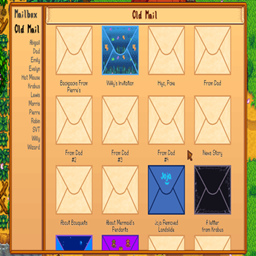
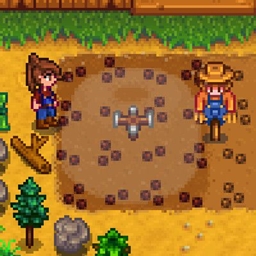
This mod is meant to provide modders a centralized place for standardized tutorials. It could also be a place to show tutorials for vanilla gameplay. Mostly it came about as the last piece I needed before publishing my area-of-effect spell wands mod, in order to demonstrate how to cast each spell.
Tutorials are categorized and can have multiple pages, each with a graphic (static or animated) and a text panel.
052ff0e3-cd00-4e8c-9ff0-bc7177f8fc32
Usage
The default tutorial hotkey is LeftControl + F1.
Pressing the hotkey combination without context will open the interface with all available tutorials.
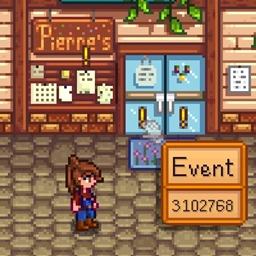
Mods can designate showing only specific categories of tutorials by creating tutorial triggers for inventory items or map tiles.
Pressing the tutorial key combination while hovering over a triggered inventory item or tile will open the tutorial for that item, showing only the categories assigned to that trigger.
This mod also adds a button to Launcher Drawer to open the global tutorial interface.
Creating Tutorials
Content Patcher
Tutorials can be added using Content Patcher, e.g.:
This creates a tutorial category "Area of Effect', a single tutorial with four "frames" or pages in that category, and tutorial triggers for a Tool with the qualified item id "aedenthorn.MagicWandsCP_copperWand" and a tile with the Action property of "aedenthorn.AreaOfEffectAction".
Textures should be 16x9, size doesn't matter. Animated textures should be laid out as 16x9 frames in the same graphic, left to right.
StartRect refers to the bounds of the first frame of the animation.
FrameRate is the number of ticks per frame.
For triggers, you can either specify a tutorial id or a tutorial category. The "Categories" entry can be omitted to show all categories, or you can use it to specify other categories that should be included in the menu for this trigger.
You can add pages to existing tutorials as well, e.g.:
C#
The SMAPI API for this mod is:
Technical
Requires SMAPI.
Implements a Generic Mod Config Menu interface to change config settings in-game.
Translations should use config variable names as the keys, adding .Desc to the end of the key for hover descriptions.
Code is at https://github.com/aedenthorn/StardewValleyMods.
A list of all my mods for Stardew Valley is available at https://www.nexusmods.com/stardewvalley/articles/895.
This mod is meant to provide modders a centralized place for standardized tutorials. It could also be a place to show tutorials for vanilla gameplay. Mostly it came about as the last piece I needed before publishing my area-of-effect spell wands mod, in order to demonstrate how to cast each spell.
Tutorials are categorized and can have multiple pages, each with a graphic (static or animated) and a text panel.
052ff0e3-cd00-4e8c-9ff0-bc7177f8fc32
Usage
The default tutorial hotkey is LeftControl + F1.
Pressing the hotkey combination without context will open the interface with all available tutorials.
Mods can designate showing only specific categories of tutorials by creating tutorial triggers for inventory items or map tiles.
Pressing the tutorial key combination while hovering over a triggered inventory item or tile will open the tutorial for that item, showing only the categories assigned to that trigger.
This mod also adds a button to Launcher Drawer to open the global tutorial interface.
Creating Tutorials
Content Patcher
Tutorials can be added using Content Patcher, e.g.:
{

  "Format": "2.9.1",

  "Changes": [

    {

  "Action": "EditData",

      "Target": "aedenthorn.Tutorials/cats",

      "Entries": {

        "aedenthorn.AreaOfEffect/aoe-cat": "Area Of Effect"

      }

    },

    {

      "Action": "EditData",

      "Target": "aedenthorn.Tutorials/dict",

      "Entries": {

        "aedenthorn.AreaOfEffect/basics": {

          "Title": "Casting Spells",

          "Category": "aedenthorn.AreaOfEffect/aoe-cat",

          "Frames": [

            {

              "Texture": "aedenthorn.AreaOfEffect/internal/1",

              "Frames": 1,

              "FrameRate": 0,

              "StartRect": null,

              "Text": "To cast a spell, hold a wand and press the use tool button."

            },

            {

              "Texture": "aedenthorn.AreaOfEffect/internal/2",

              "Frames": 1,

              "FrameRate": 0,

              "StartRect": null,

              "Text": "This will darken the screen and let you draw a pattern in the darkness."

            },

            {

              "Texture": "aedenthorn.AreaOfEffect/internal/fireball",

              "Frames": 4,

              "FrameRate": 60,

              "StartRect": {

                "X": 0,

                "Y": 0,

                "Width": 1970,

                "Height": 1109

              },

              "Text": "Hold down the use tool button and draw the pattern. When a pattern is recognized, the name of the spell will appear."

            },

            {

              "Texture": "aedenthorn.AreaOfEffect/internal/3",

              "Frames": 2,

              "FrameRate": 60,

              "StartRect": {

                "X": 0,

                "Y": 0,

                "Width": 1499,

                "Height": 843

              },

              "Text": "Let go of the button to set the spell, then you can use the wand to cast it."

            }

          ]

        }

      }

    },

    {

  "Action": "EditData",

      "Target": "aedenthorn.Tutorials/triggers",

      "Entries": {

        "(T)aedenthorn.MagicWandsCP_copperWand": {

          "Tutorial": "aedenthorn.AreaOfEffect/basics",

          "Category": null,

          "Categories": []

        },

        "aedenthorn.AreaOfEffectAction": {

          "Tutorial": "aedenthorn.AreaOfEffect/basics",

          "Category": null,

          "Categories": []

        }

      }

    }

  ]

}
This creates a tutorial category "Area of Effect', a single tutorial with four "frames" or pages in that category, and tutorial triggers for a Tool with the qualified item id "aedenthorn.MagicWandsCP_copperWand" and a tile with the Action property of "aedenthorn.AreaOfEffectAction".
Textures should be 16x9, size doesn't matter. Animated textures should be laid out as 16x9 frames in the same graphic, left to right.
StartRect refers to the bounds of the first frame of the animation.
FrameRate is the number of ticks per frame.
For triggers, you can either specify a tutorial id or a tutorial category. The "Categories" entry can be omitted to show all categories, or you can use it to specify other categories that should be included in the menu for this trigger.
You can add pages to existing tutorials as well, e.g.:
    {

  "Action": "EditData",

      "Target": "aedenthorn.Tutorials/added",

      "Entries": {

        aedenthorn.AdditionToExistingTutorial: {

          "Tutorial": "aedenthorn.AreaOfEffect/basics",

          "Position": 0,

          "Frames": [

            {


              "Texture": "aedenthorn.AreaOfEffect/internal/0",

              "Frames": 1,

              "FrameRate": 0,

              "StartRect": null,

              "Text": "Welcome to the AOE Spell Casting tutorial!"

            }

          ]

        }

      }

    }
C#
The SMAPI API for this mod is:
    public interface ITutorialAPI

    {

        public void AddCategory(string key, string value);

        public void AddTutorial(string key, object indata);

        public void AddTutorialFrame(string key, string texture, int frames, int frameRate, Rectangle? startRect, string text);

        public void AddTutorialTrigger(string key, string tutorial, string category, List<string> categories);

    }
Technical
Requires SMAPI.
Implements a Generic Mod Config Menu interface to change config settings in-game.
Translations should use config variable names as the keys, adding .Desc to the end of the key for hover descriptions.
Code is at https://github.com/aedenthorn/StardewValleyMods.
A list of all my mods for Stardew Valley is available at https://www.nexusmods.com/stardewvalley/articles/895.
The Tutorials Team


Owner