Tool Master Animation Speed and Cost Management
- By
Dynamic scaling for tool animation speed and cost based on time of day, or constant throughout.
bb2211.png
22bb11.png
Description
Tool Master
Dynamic Tool Stamina & Speed Management
Dynamic Tool Stamina & Speed Management
Safe to uninstall anytime. Removing it just disables the features.</figure>
Overview
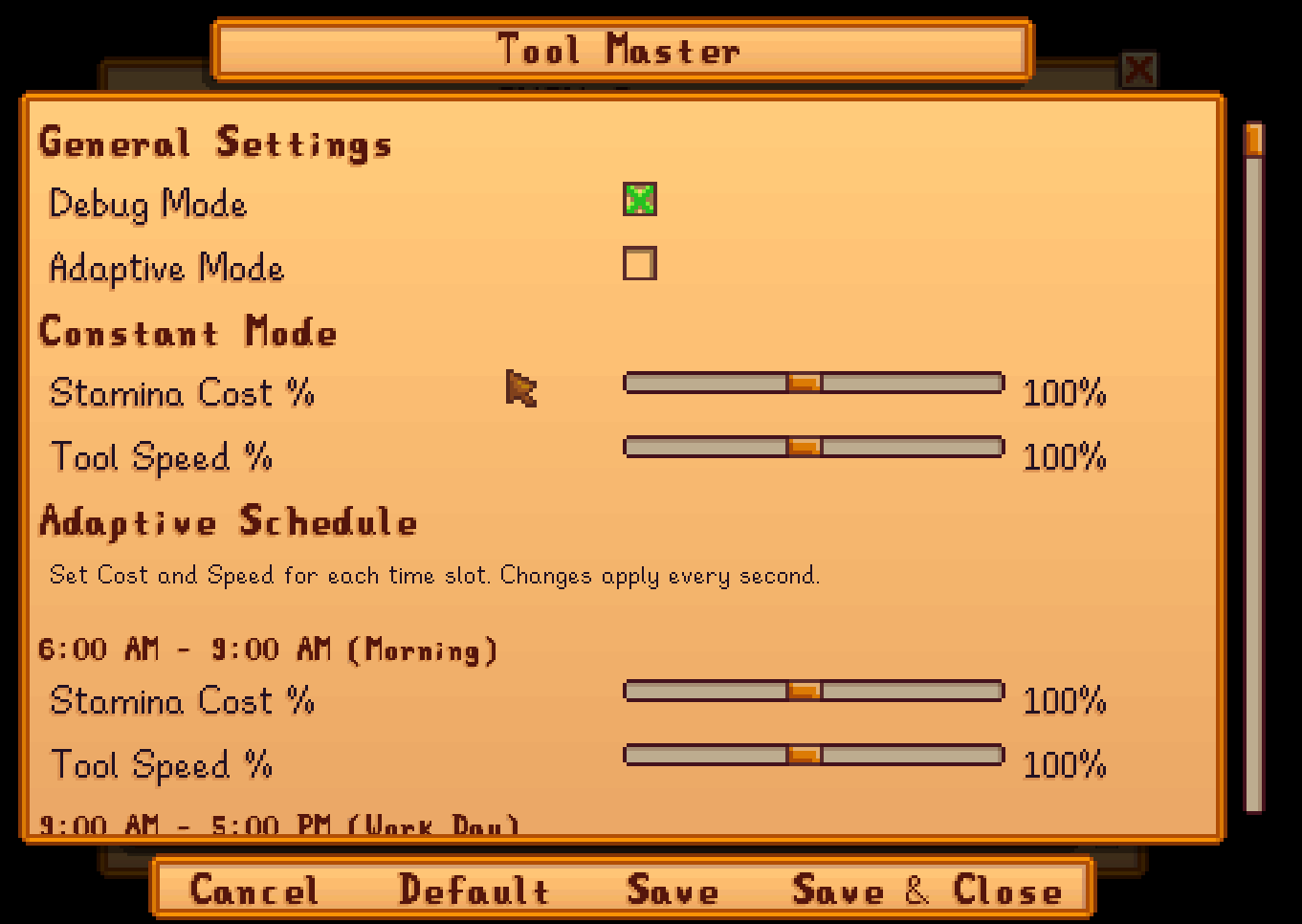
Tool Master gives you complete control over your tool stamina costs and animation speeds. Choose between a constant modifier that affects all day, or set up a dynamic schedule that changes throughout the day - perfect for creating unique gameplay challenges or just making your farm life easier!
Features
Two Operating Modes:
* Constant Mode - Set fixed stamina cost and tool speed percentages that apply all day
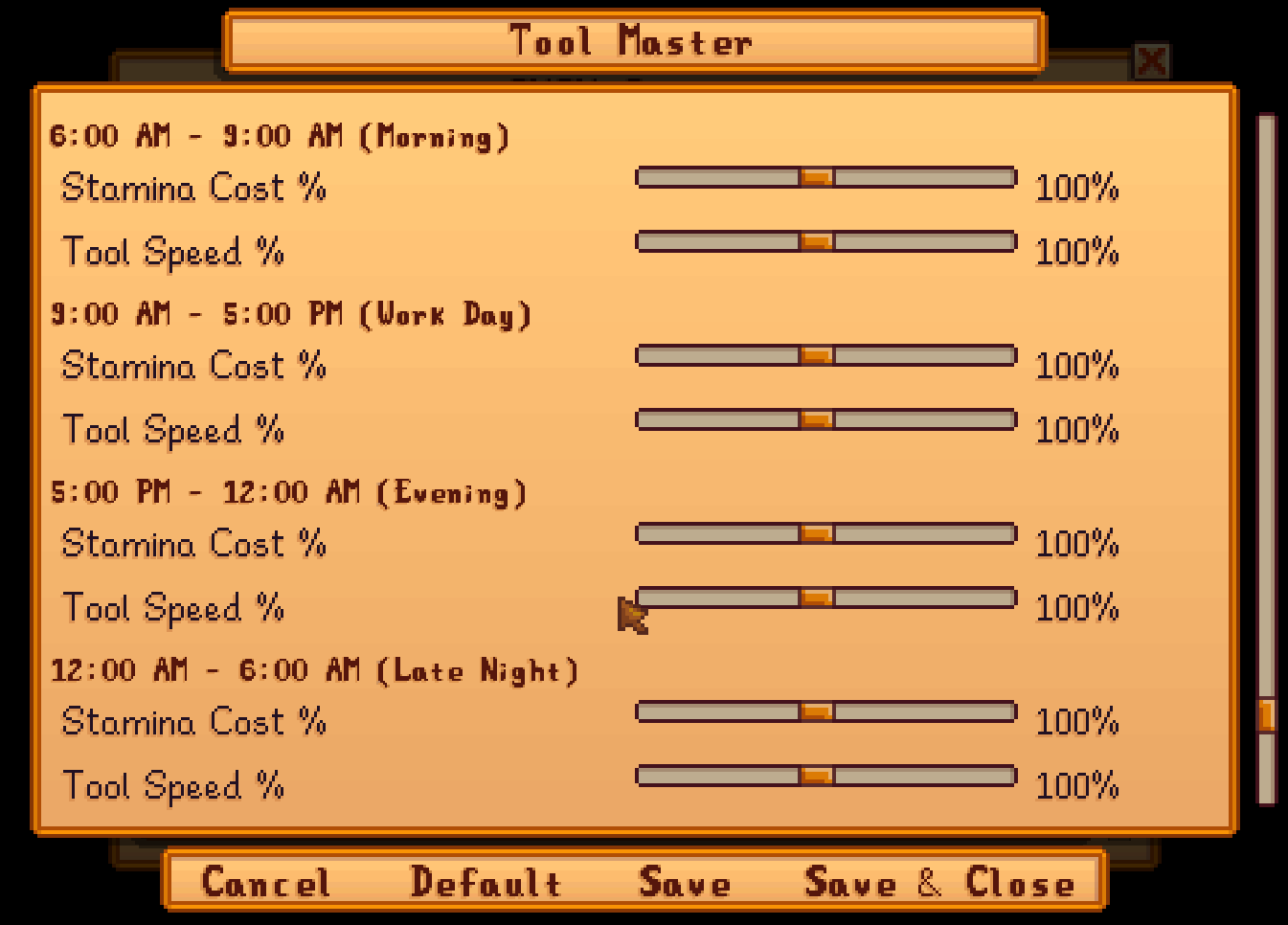
* Adaptive Mode - Configure different settings for four time periods throughout the day
Stamina Cost Control:
* Adjust tool stamina usage from 10% to 200%
* 50% = Half the stamina cost (easier gameplay)
* 100% = Normal vanilla stamina usage
* 200% = Double stamina cost (hardcore mode)
* Changes apply instantly when using any tool
Tool Speed Control:
* Modify tool animation and charge speed from 10% to 200%
* 150% = 50% faster tool animations
* 100% = Normal vanilla speed
* 50% = Half speed (for those who like to take it slow)
* Affects all tools including hoe, watering can, pickaxe, axe, and more
Adaptive Time Slots:
* 6:00 AM - 9:00 AM - Morning settings
* 9:00 AM - 5:00 PM - Work day settings
* 5:00 PM - 12:00 AM - Evening settings
* 12:00 AM - 6:00 AM - Late night settings
Quality of Life:
* Debug mode displays current stats above your character
* Full Generic Mod Config Menu (GMCM) integration
* Real-time updates - changes apply immediately
* No performance impact


Installation
1. Install SMAPI
2. Install Generic Mod Config Menu (optional but recommended)
3. Download this mod and unzip it into your Stardew Valley/Mods folder
4. Run the game using SMAPI
Configuration
Via Generic Mod Config Menu (Recommended):
* Open the game menu
* Click the cogwheel icon at the bottom
* Find "Tool Master" in the mod list
* Adjust settings to your preference
Via config.json:
All settings can also be edited directly in the config file located at:Stardew Valley/Mods/ToolMaster/config.json
Example Configurations:
Easy Mode - Constant:
* Stamina Cost: 50%
* Tool Speed: 150%
Result: Tools use half stamina and work 50% faster
Hardcore Mode - Constant:
* Stamina Cost: 200%
* Tool Speed: 75%
Result: Tools use double stamina and work 25% slower
Realistic Day Cycle - Adaptive:
* Morning (6-9 AM): 80% cost, 120% speed (fresh and energized)
* Work Day (9-5 PM): 100% cost, 100% speed (normal)
* Evening (5-12 AM): 120% cost, 90% speed (getting tired)
* Late Night (12-6 AM): 150% cost, 75% speed (exhausted)
Debug Mode
Enable debug mode in the config to see real-time information displayed above your character:
* Current stamina cost percentage
* Current tool speed percentage
* Current in-game time
* Tool usage status
* Current stamina level
This is helpful for testing your settings and understanding how the mod works.
Compatibility
* Stardew Valley 1.6+ required
* SMAPI 3.14.0+ required
* Should be compatible with most other mods
* Works with all vanilla tools
* Multiplayer: Only affects the player who has the mod installed
FAQ
Q: Does this work in multiplayer?
A: Yes! Each player can have their own settings. The mod only affects the player who has it installed.
Q: Will this affect my save file?
A: No, this mod only modifies gameplay mechanics temporarily. Your save file is completely safe.
Q: Can I change settings mid-game?
A: Yes! All changes apply immediately without needing to restart.
Q: Why isn't the speed changing when I adjust the settings?
A: Make sure you're using a tool when testing speed changes. The animation speed only applies while actively using tools.
Q: Does this work with modded tools?
A: It should work with most modded tools, but some heavily modified tools may not be affected.
Enjoy your customized farming experience!
The Tool Master Animation Speed and Cost Management Team


Owner