The Pretty Valley Project
- By
The PRETTIEST valley you've ever laid eyes on! For all my girly pops who need some pastel loving magic in their Stardew!
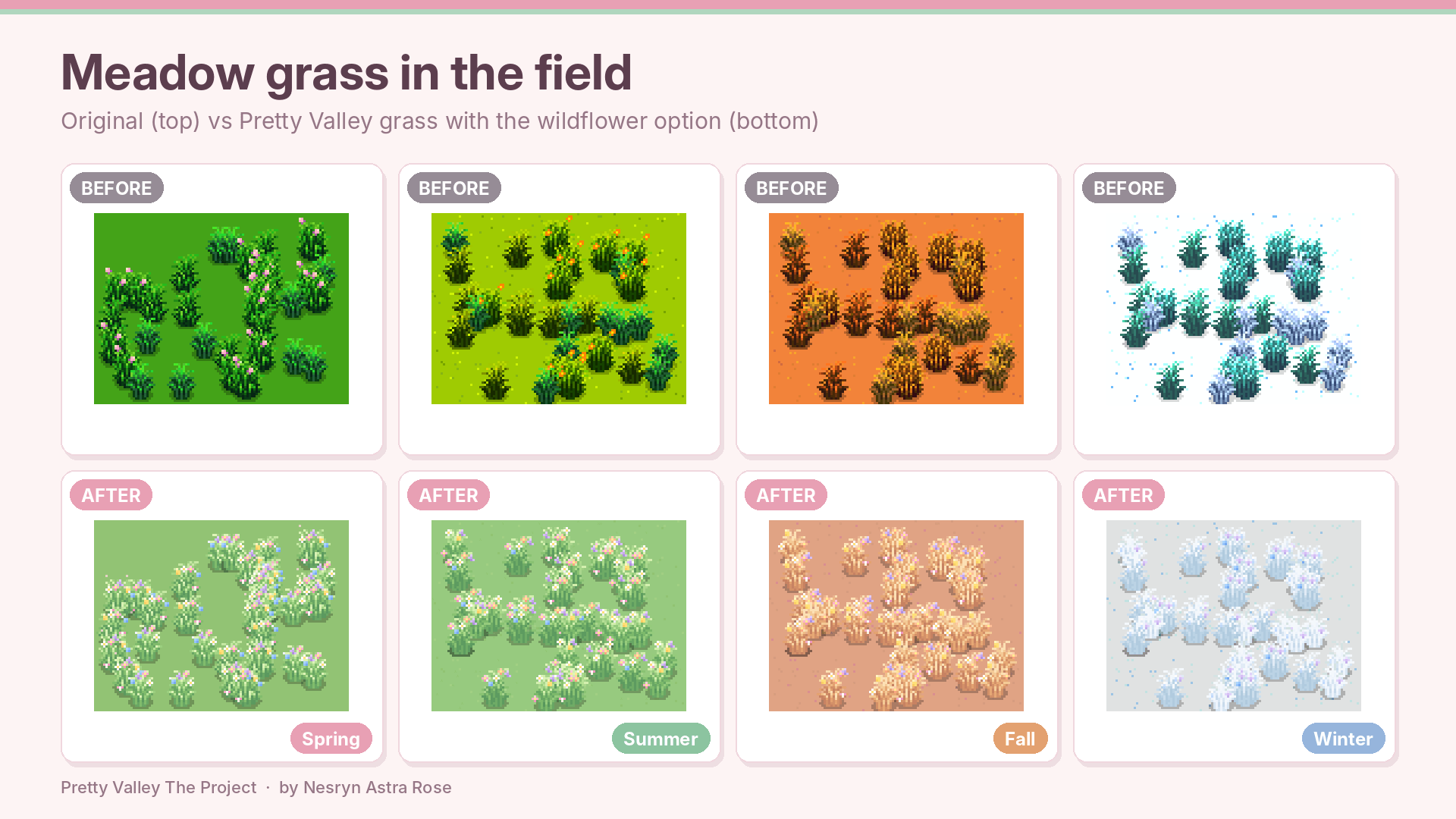
89_custom_grass_meadow_before_after.png
Pretty-Valley-Main-Preview-1920x1080.png
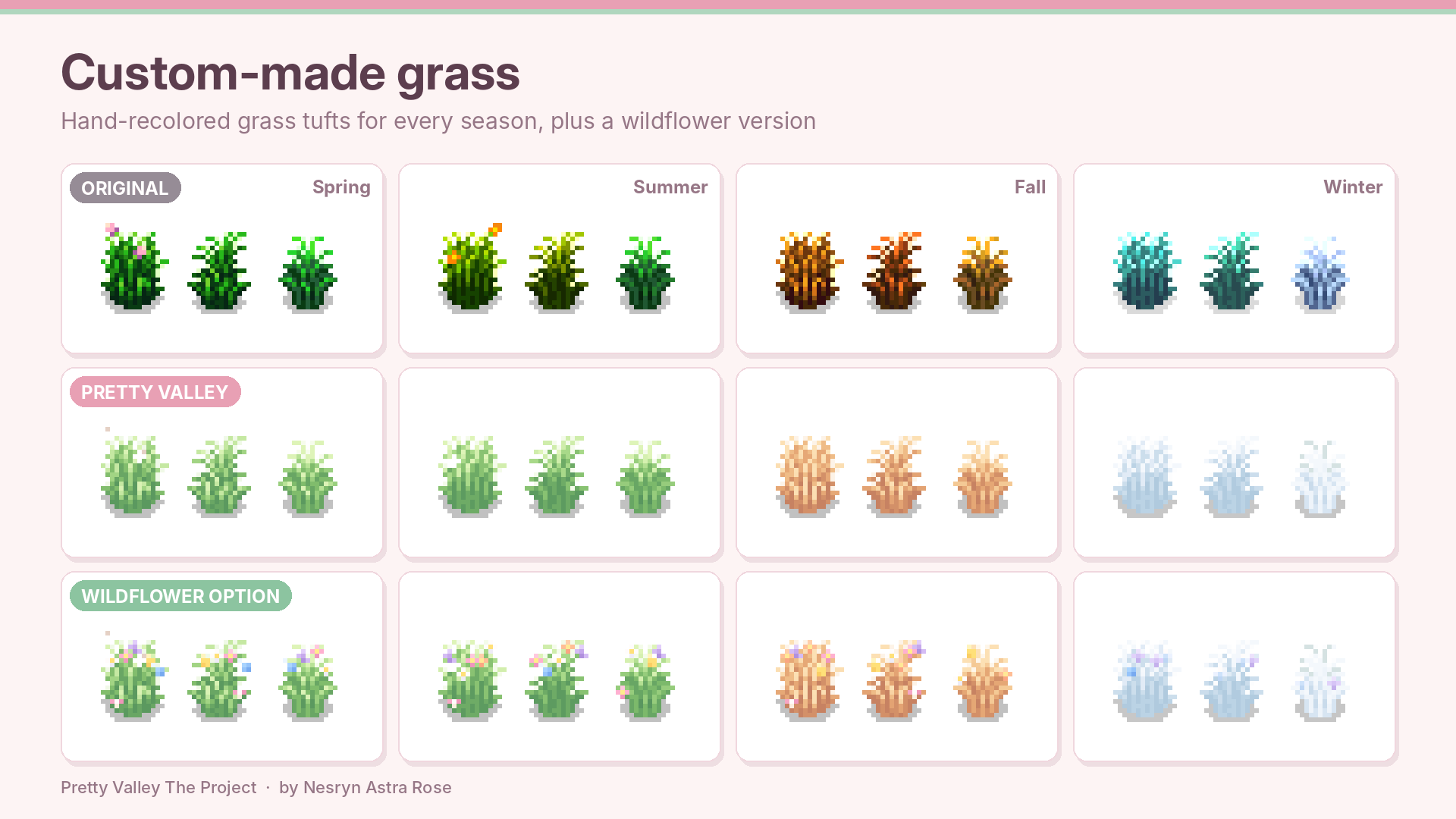
88_custom_grass_variants.png
85_tools_upgrade_tiers_before_after.png
93_foliage_scene_winter_before_after.png
Description
🌸 Pretty Valley The Project 🌸
One cozy pastel makeover for the whole valley! 🍃🌷
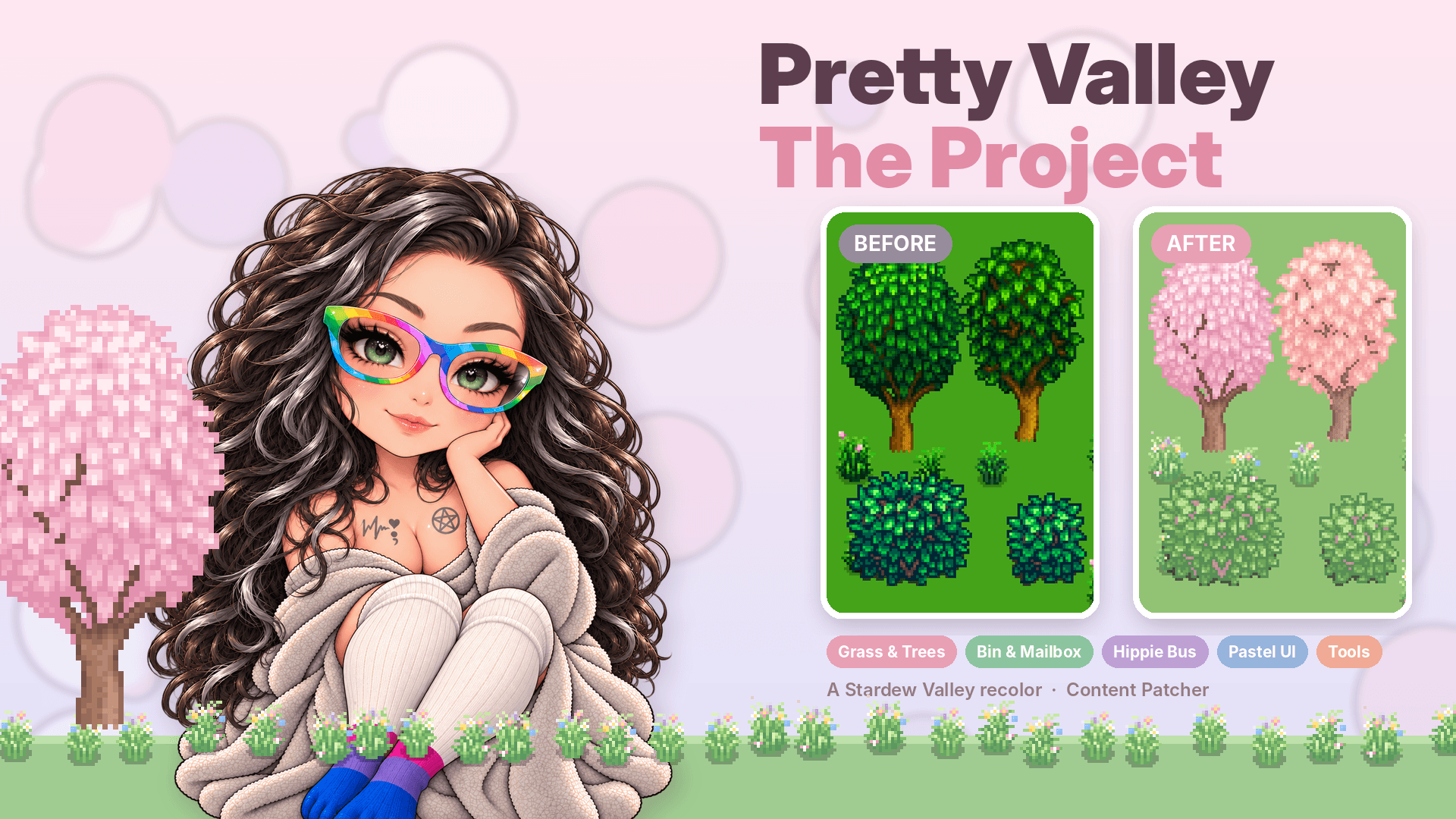
Welcome to Pretty Valley! ✨ This is a complete pastel recolor of Stardew Valley in a single Content Patcher mod. Sage-mint grass, blush-rose dirt, pink beach sand, cherry-blossom trees, a fluffy cloud shipping bin, a flower-covered hippie bus, and a soft pink interface to match. 💕
Everything is image-only, so it never touches your items, NPCs, maps, events or saves. Don't like a part? Switch it off! 🎀
🌿 What's Inside
- 🌱 Nature recolor – grass, dirt, beach sand and the seasonal outdoor, beach, island and Pelican Town tilesheets, in all four seasons
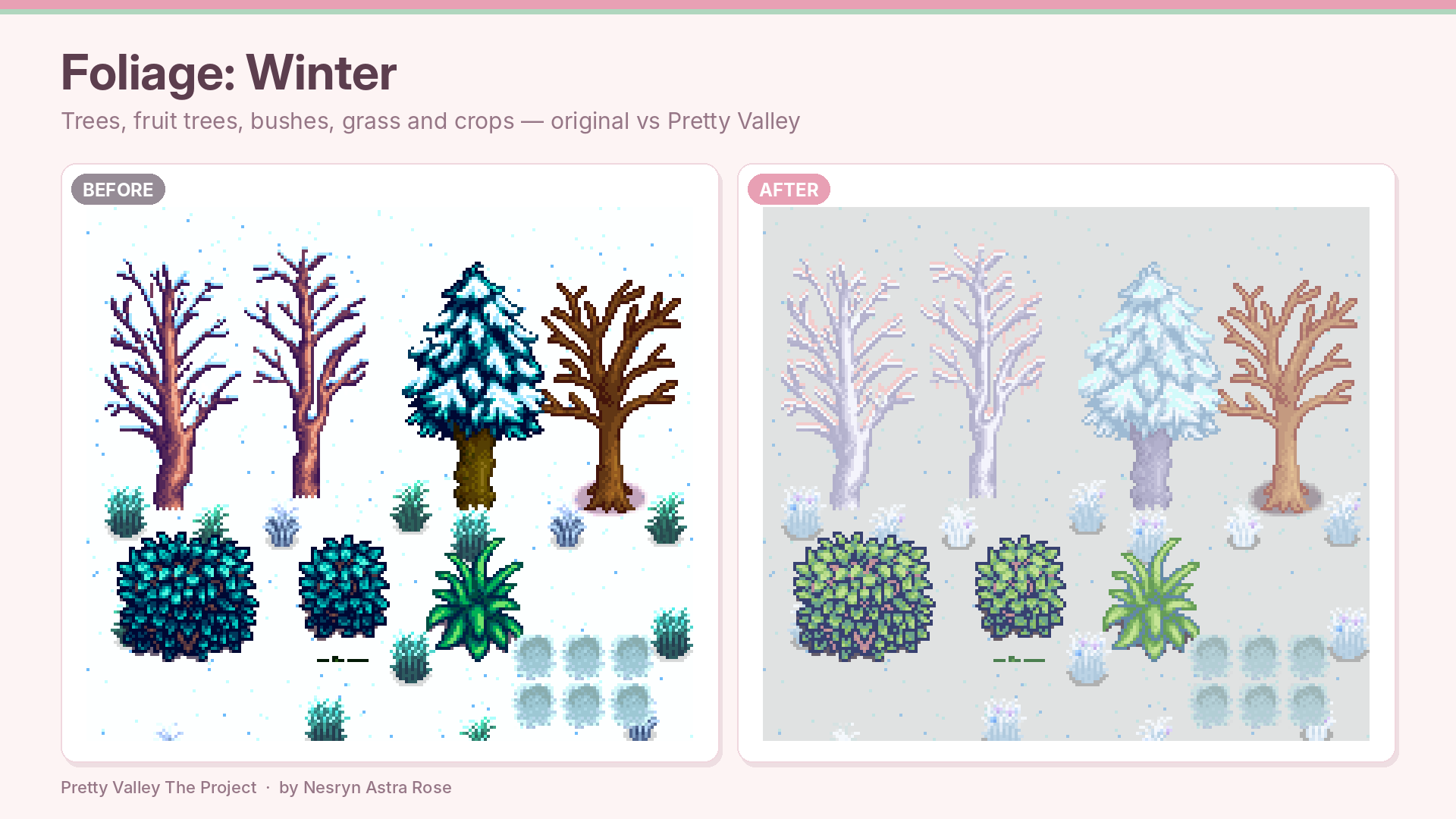
- 🌳 Trees – oak, maple, pine, mystic, palm, mushroom and fruit trees
- 🌼 Custom-made grass – hand-recolored grass tufts for every season
- 🌸 Wildflower grass – an optional version dotted with pastel flowers
- 🍓 Bushes, crops & flowers – berry, tea and decorative bushes, plus every crop and flower growth stage
- 🪴 Tilled soil – dry, watered and snowy soil
- ☁️ Cloud shipping bin – a fluffy bunny cloud bin with a matching lid animation (closed and open!), in four seasons
- 💌 Magic mailbox – a sparkly vine-wrapped mailbox, in four seasons
- 🚌 Seasonal hippie bus – a flowering, rainbow-striped bus with a door animation, in four seasons
- 🎀 Meadow Cottage UI – blush-pink menus, buttons, tabs, inventory, toolbar, dialogue boxes, clock and HUD
- 🌅 Title screen – a flowered logo, matching buttons and a sunset backdrop
- 📜 Letters & boards – letters, billboard, bundle page, special orders board and the forge
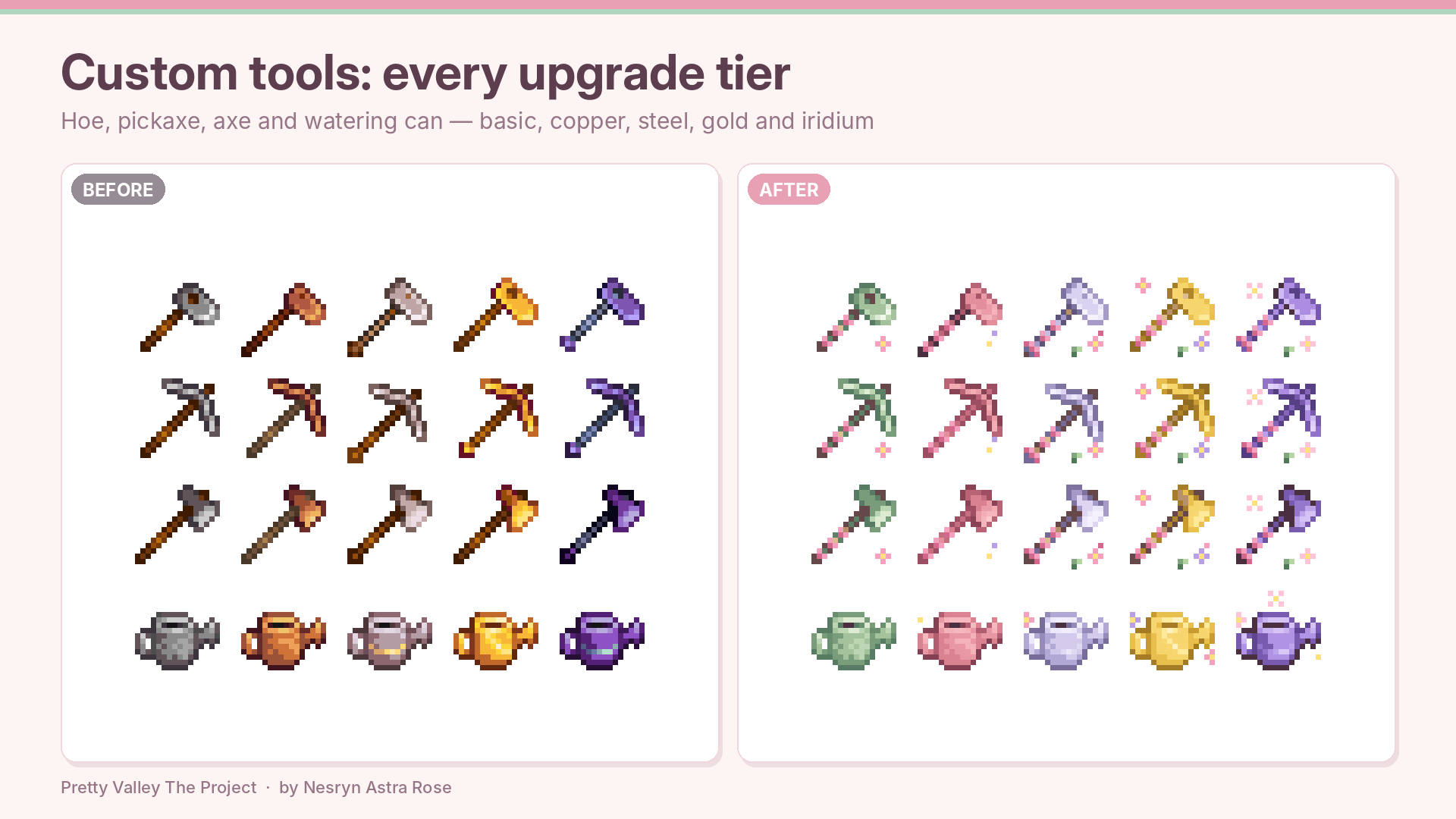
- 🔨 Custom tools – flower-trimmed hoe, pickaxe, axe, watering can, fishing rods, pans, trash cans and scythes in every upgrade tier
- 🧁 Add-on for other mods – pastel recolors for Stardew Valley Expanded trees and DaisyNiko's Tilesheets (only active if you have them)
🎨 Three Palette Strengths
- 🤍 Soft – the gentlest, most muted pastel look
- 💗 Medium – a balanced middle
- 💖 Strong – the full Pretty Valley palette (default)
One setting covers the nature recolor and the SVE / DaisyNiko add-on together, so they always match. 💗
⚙️ Options (everything is ON by default)
Set any of these to
falsein
config.jsonto switch that part off. If you use Generic Mod Config Menu they also appear in its menu. 🎛️
| Option | What it controls |
|---|---|
|
Soft, Medium or Strong |
|
Grass, dirt, beach sand and the seasonal tilesheets |
|
Oak, maple, pine, palm, mushroom, mystic and fruit trees |
|
Berry, tea and decorative bushes |
|
Crop and flower growth stages |
|
Pastel flowers in the grass (needs |
|
The cloud bin and its lid animation |
|
The magic mailbox |
|
The hippie bus and its door animation |
|
Menu frames, buttons, tabs, tooltips, dialogue boxes, inventory and toolbar |
|
Clock, day panel, energy and health bars, weather icons |
|
Title screen logo, buttons and backdrop |
|
Letters, billboard, bundle page, special orders board and forge |
|
Flower-trimmed tools, rods, pans, trash cans and scythes |
|
Flower and vine trim on frames, letters and the logo (off = clean, plain pink) |
📦 Requirements
- Stardew Valley 1.6 or newer
- SMAPI 4.0 or newer
- Content Patcher 2.5.0 or newer
Optional:
- Stardew Valley Expanded and DaisyNiko's Tilesheets – for the add-on part (each part only runs if that mod is installed)
- Generic Mod Config Menu – to change settings in game
🛠️ Installation
- Install the latest SMAPI and Content Patcher.
- Extract the download. You should get a folder called [CP] Pretty Valley The Project.
- Put that folder inside
Stardew Valley/Mods - Start the game through SMAPI and enjoy! 🌷
Updating: delete the old folder, then copy in the new one. Please don't merge new files over old ones. Uninstalling: delete the folder. Nothing is written to your save files. 🧺
🤝 Compatibility
This mod only edits images. It never changes game data, items, NPCs, maps or events. 💞
- Load order: the nature recolor and the UI run at Early priority, so another mod that edits the same pixels will win. The add-on, bin, mailbox and bus run at Late priority, so they win over other mods.
- Inside the pack: none of the parts edit the same pixels, so they never fight each other.
- Stardew Valley Expanded: in SVE's Galdoran regions, SVE swaps in its own menu frames, HUD and portrait panel, and those take priority over this UI. To see this mod's UI there too, set
toDisableGaldoranTheme
in SVE's config.true - Other recolor, UI, tool or portrait mods: they usually win for the same pixels. Turn off the matching option (for example
) to avoid mixing looks.EnableTools - Title screen: this mod supplies a sunset backdrop. Remove other title-screen background mods so they don't fight over it.
- Languages: art that contains text (menus with words, title buttons) is applied only for English. Everything else applies in all languages.
🩹 Troubleshooting
- "FromFile file doesn't exist" in the SMAPI log: the install is incomplete. Delete the mod folder and copy it in again in full.
- Nothing changed in game: make sure Content Patcher is installed and that Pretty Valley The Project loaded in the SMAPI log with no errors. In the SMAPI console, type
to see every patch and why any were skipped.patch summary
📝 Changelog
v1.0.0 – Initial release 🌸 Combines five mods into one, adds a single Strength setting, per-part on/off options, and includes fixes from a full audit.
💖 Credits
Made with love by Nesryn Astra Rose. 🌸
The Pretty Valley Project Team