Nozzle and Enricher and Scarecrow on Sprinklers
- By
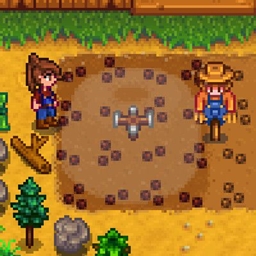
Lets you place both a pressure nozzle and an enricher (and a scarecrow if you like!) on the same sprinkler. Adds the ability to create custom nozzles.
Overview
This mod adds the basic ability to add both a range-increasing pressure nozzle and a fertilizer-placing enricher together on any sprinkler.
You can also set the range bonus for the pressure nozzle in the config and create custom nozzles with custom range bonuses.
You can also now place scarecrows on sprinklers with this mod.
Custom Nozzles
To designate an object as a custom nozzle, use Content Patcher, e.g.:
This designates a custom object with the ItemId "aedenthorn.IridiumNozzle" as having a range bonus of 3 tiles.
Note that your nozzle object must have two sprites side-by-side in its spritesheet, just like the vanilla pressure nozzle; the first one is for the item icon, the second is for the placed visual indicator. You can find the pressure nozzle sprites in Maps/springobjects.
Notes
When you use a tool on a sprinkler, it will remove the enricher first, then the nozzle. To remove the nozzle first, hold down the mod key when using the tool (default Left Alt).
This mod works by moving nozzle objects into the sprinkler's mod data, which means if you remove this mod, your placed nozzles will disappear if they have been moved into mod data. To avoid this, you'll have to remove the nozzles from the sprinklers with tools first.
fd85de86-cea7-4c5f-894c-a0f9d3c84f27
Technical
Requires SMAPI.
Implements a Generic Mod Config Menu interface to change config settings in-game.
Translations for GMCM should use config variable names as the keys, adding .Desc to the end of the key for hover descriptions.
Code is at https://github.com/aedenthorn/StardewValleyMods.
A list of all my mods for Stardew Valley is available at https://www.nexusmods.com/stardewvalley/articles/895.
This mod adds the basic ability to add both a range-increasing pressure nozzle and a fertilizer-placing enricher together on any sprinkler.
You can also set the range bonus for the pressure nozzle in the config and create custom nozzles with custom range bonuses.
You can also now place scarecrows on sprinklers with this mod.
Custom Nozzles
To designate an object as a custom nozzle, use Content Patcher, e.g.:
{

"Format": "2.9.1",

"Changes": [

{

"Action": "EditData",

"Target": "aedenthorn.NozzleAndEnricher/dict",

"Entries": {

"(O)aedenthorn.IridiumNozzle": 3

}

}

]

}
This designates a custom object with the ItemId "aedenthorn.IridiumNozzle" as having a range bonus of 3 tiles.
Note that your nozzle object must have two sprites side-by-side in its spritesheet, just like the vanilla pressure nozzle; the first one is for the item icon, the second is for the placed visual indicator. You can find the pressure nozzle sprites in Maps/springobjects.
Notes
When you use a tool on a sprinkler, it will remove the enricher first, then the nozzle. To remove the nozzle first, hold down the mod key when using the tool (default Left Alt).
This mod works by moving nozzle objects into the sprinkler's mod data, which means if you remove this mod, your placed nozzles will disappear if they have been moved into mod data. To avoid this, you'll have to remove the nozzles from the sprinklers with tools first.
fd85de86-cea7-4c5f-894c-a0f9d3c84f27
Technical
Requires SMAPI.
Implements a Generic Mod Config Menu interface to change config settings in-game.
Translations for GMCM should use config variable names as the keys, adding .Desc to the end of the key for hover descriptions.
Code is at https://github.com/aedenthorn/StardewValleyMods.
A list of all my mods for Stardew Valley is available at https://www.nexusmods.com/stardewvalley/articles/895.
The Nozzle and Enricher and Scarecrow on Sprinklers Team


Owner