


Hide My Spells
- By

Hide-My-Spells-Promo-Thumbnail.jpg
Hide-My-Spells-MCM-Active-Effects.jpg
Hide-My-Spells-MCM-Lesser-Powers.jpg
Hide-My-Spells-Revealed-Powers-Hidden-Icons-Nexus.jpg
Hide-My-Spells-Powers-Hiding-Applied-Nexus.jpg
Description
If you enjoy the mod, please like, endorese and conisder donating to keep more mods coming <3
Tired of all the spells you never use bloating your menus?
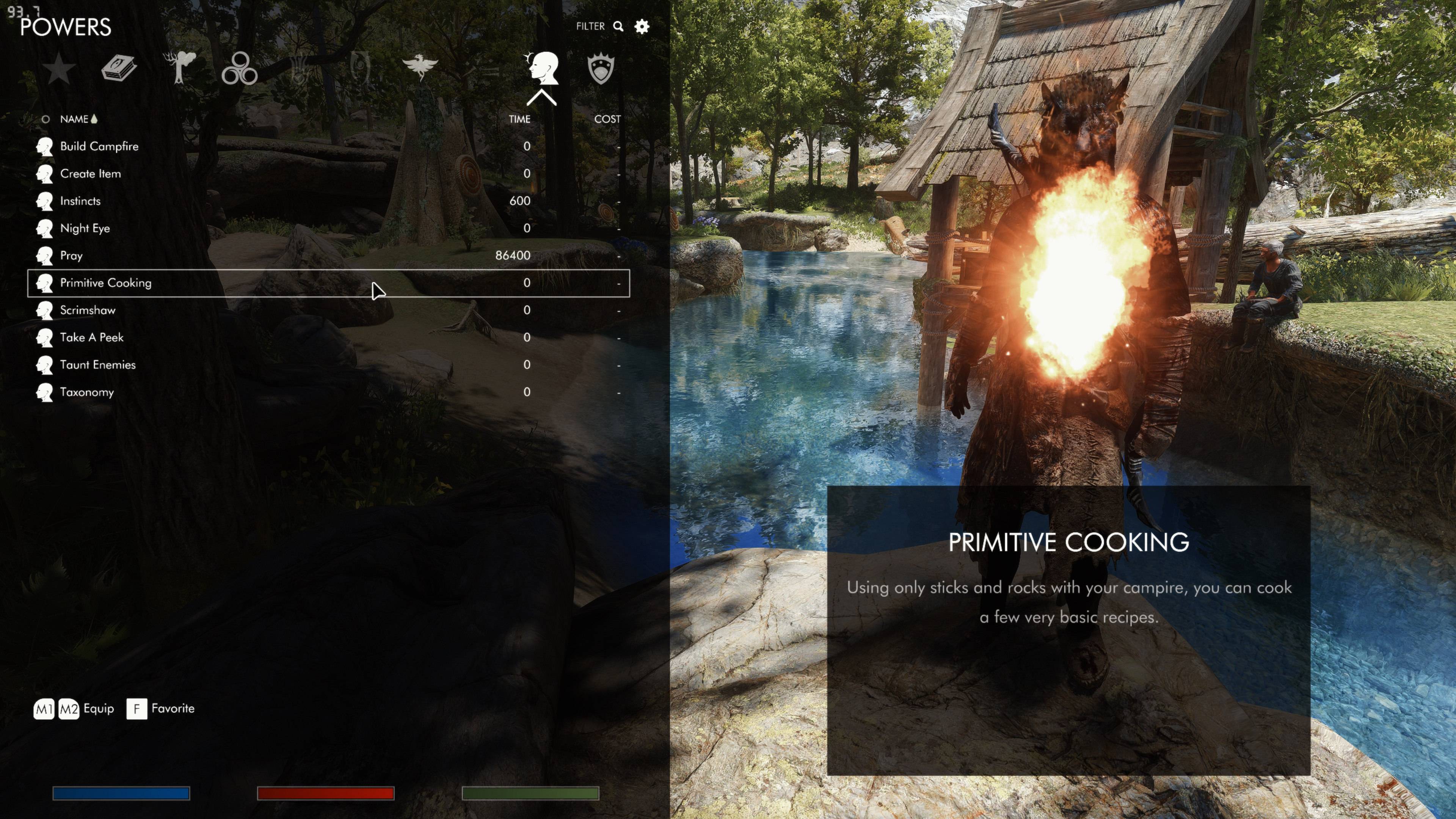
Hide My Spells lets you clean up your Magic menu by choosing which spells, powers, shouts and Active Effects you want to see. Hide unused abilities, tuck away setup powers after configuring your mods, and clear unwanted Active Effects entries from view. This mod does NOT delete your spells or remove their effects; it only hides them from view in the Magic menu. Your abilities remain learned and your effects keep working. Use configurable hotkeys to manage entries directly from the Magic menu and reveal hidden entries when you need them. In 0.5.3-alpha, toggle the highlighted entry between hidden and shown without ending temporary reveal. A red crossed-out eye marks entries whose saved setting is hidden. The hotkey and MCM checkboxes stay in sync.
ESL-flagged ESP - Does not use a standard ESP slot ●
MAIN FEATURES
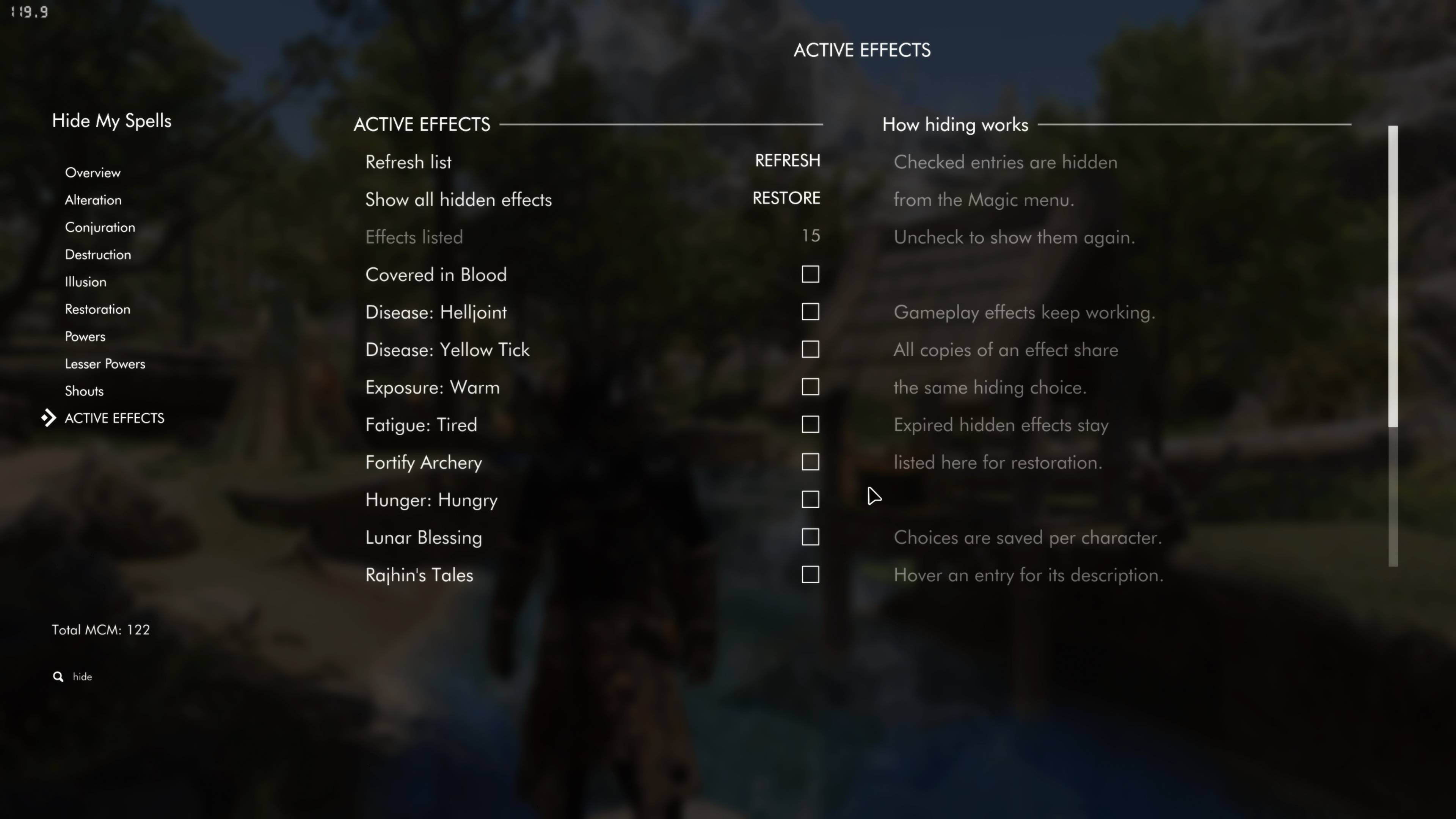
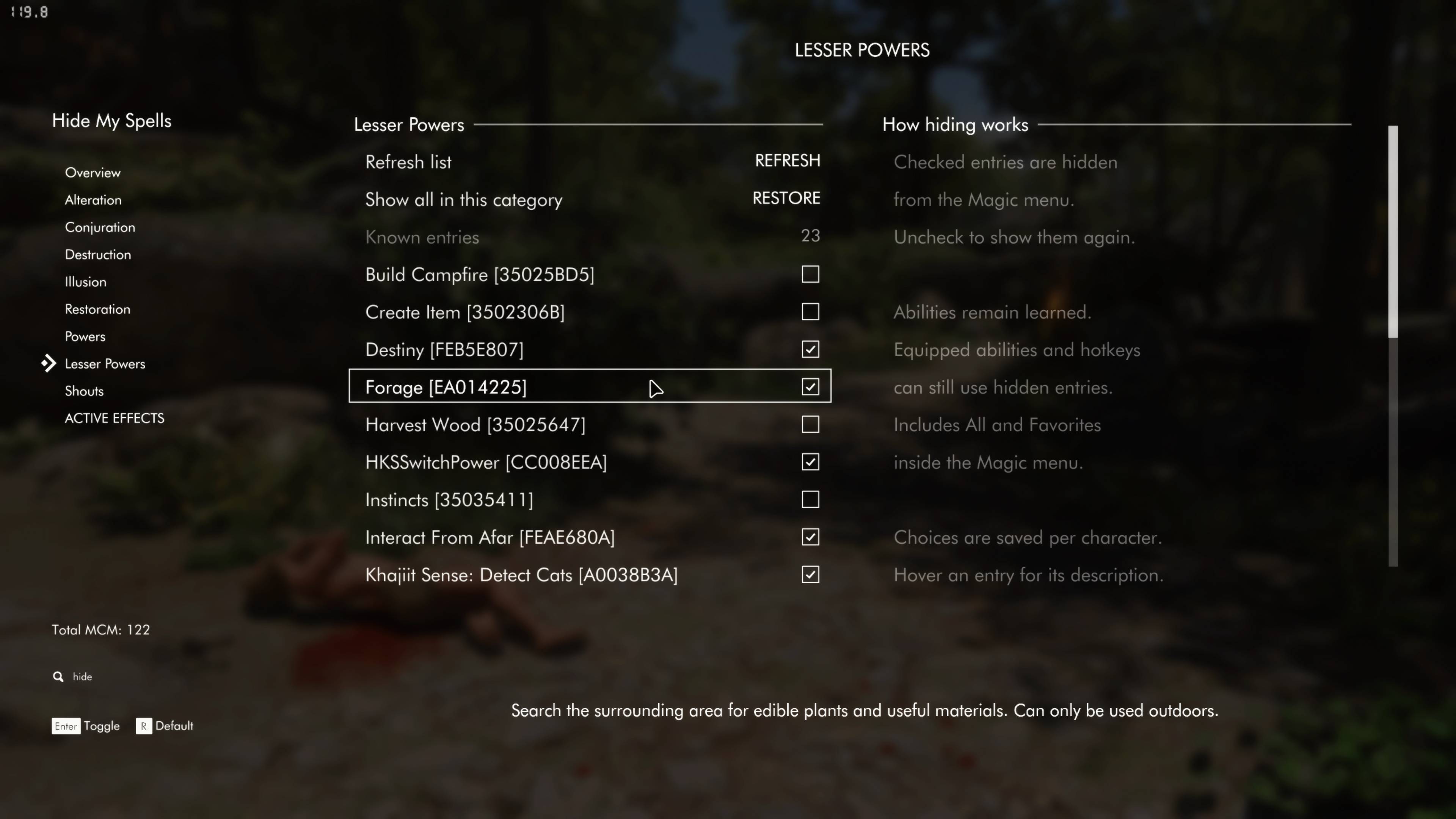
- Configurable through the MCM: Choose exactly which entries to hide with individual checkboxes. Checked means hidden; unchecked means shown.
- Configurable visibility toggle (0.5.3): Hover over or select a spell, power, shout or Active Effect and press your assigned key to toggle its saved hiding choice. Reveal hidden entries first to select and restore them. The matching MCM checkbox updates automatically, and temporary reveal stays active while you manage multiple entries.
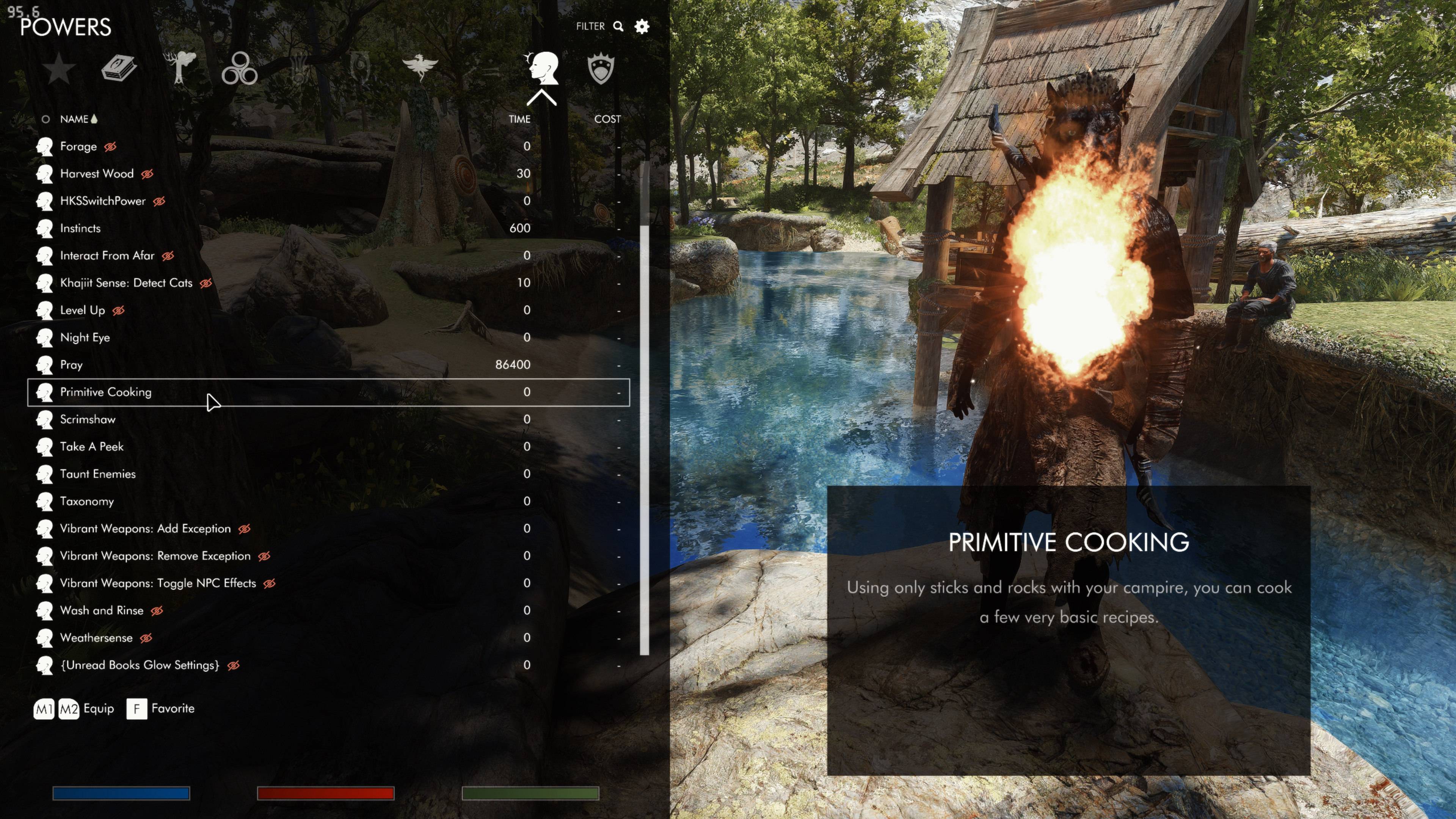
- Hidden-state icons (0.5.3): A red crossed-out eye appears after the name and existing status icons of revealed hidden entries. Restore an entry and its eye disappears; hide it again and the eye returns. Badges scale with menu rows. "Show hidden-state icons" is enabled by default and can be turned off in MCM Overview.
- Configurable reveal hotkey: Assign a keyboard key to instantly show hidden entries while the Magic menu is open. Click a revealed spell to equip it, then cast it normally after leaving the menu. You do not need to unhide it permanently. Press the reveal key again to hide entries; closing the menu also resets reveal unless "Keep hidden entries revealed" is enabled (0.5.3-alpha). Your choices and equipped spell remain unchanged.
- Keep entries revealed between menu visits (0.5.3): Enable "Keep hidden entries revealed" to keep reveal active after closing and reopening the Magic menu. Press the reveal key again to hide entries. This option is off by default, so closing the menu normally resets reveal. When this option is enabled, saving and loading also preserves whether reveal was active. Older saves without this information start with hiding applied.
- Support for all five spell schools: Manage Alteration, Conjuration, Destruction, Illusion and Restoration spells in their own categories.
- Powers, lesser powers and shouts: Hide unused abilities and configuration powers alongside your spells.
- Hide unwanted Active Effects entries: Clean up the Active Effects list while the effects themselves continue working normally.
- Reversible hiding: Hidden entries remain in the MCM. Uncheck an entry or use a category's restore control to show it again. In 0.5.3-alpha, you can also restore revealed entries using the visibility toggle key.
- Settings saved with your character: Hide/show choices, hotkey settings and display preferences are stored with each save. The keep-revealed preference is saved too, and active reveal is restored on load when that preference is enabled. Save after making changes you want to keep.
- Optional Form IDs: Keep MCM lists clean by default, or enable "Show spell Form IDs" in Overview to distinguish spells and effects with identical names.
- Descriptions on hover: Read an entry's description in the MCM, with general instructions kept in the right column.
- Refresh and pagination: Browse large lists and refresh them after learning abilities or gaining effects.
REQUIREMENTS
Version 0.5.3-alpha provides separate builds for Steam Skyrim runtimes 1.5.97, 1.6.640, 1.6.1170 and 1.7.104. Choose the file that matches your SkyrimSE.exe version. Install only one Hide My Spells build.
SE download - runtime 1.5.97
- SKSE64 2.0.20
- Address Library for SKSE Plugins: must include the database for Skyrim SE 1.5.97. The older All in one (1.5.X) package provides this.
AE download - Steam runtime 1.6.1170
- SKSE64 2.2.8 for Steam runtime 1.6.1170 (the version used in our test setup).
- Address Library for SKSE Plugins: must include versionlib-1-6-1170-0.bin. Use the AE/1.6.x package or an All in One package containing that database.
AE download - Steam runtime 1.6.640
- SKSE64 2.2.3 for Steam runtime 1.6.640.
- Address Library for SKSE Plugins: must include versionlib-1-6-640-0.bin. Use the AE/1.6.x package or an All in One package containing that database.
AE download - Steam runtime 1.7.104
- SKSE64 2.3.1
- Address Library for SKSE Plugins v13: must include versionlib-1-7-104-0.bin for Skyrim 1.7.104.
All four builds require SkyUI 5.2 SE and a compatible SkyUI-based Magic menu. SkyUI's SE file is used with all four listed runtimes.
Each DLL accepts only its listed runtime. Other runtime versions, GOG, Skyrim VR and Legendary Edition are not supported by these releases. The 1.6.x builds target 1.6.640 and 1.6.1170 specifically; other 1.6.x versions are not covered. Owning the Anniversary Upgrade does not determine compatibility; check your executable version.
Hide My Spells is a standalone mod. No mod collection or MCM Helper is required.
INSTALLATION INSTRUCTIONS
1. Install the requirements for your runtime.
2. Download the build for your exact Steam runtime: SE 1.5.97, AE 1.6.640, AE 1.6.1170 or AE 1.7.104. Install it through your mod manager. Do not enable multiple builds together.
3. Enable the mod and HideMySpells.esp, which is ESL-flagged.
4. Launch Skyrim through SKSE. If using MO2, launch SKSE through MO2.
5. Load your save and allow the MCM to register.
6. Open Mod Configuration > Hide My Spells.
7. Select a category and check the entries you want to hide. Uncheck them to show them again.
8. Save your game to preserve your choices.
To use the reveal hotkey, open Overview in the MCM, enable the reveal hotkey, and assign an unused keyboard key. Press it while the Magic menu is open to show hidden entries; press again to hide them. You can click a revealed spell to equip it and cast it normally after leaving the menu, even though its saved setting remains hidden. By default, closing the menu resets reveal but does not unequip the spell. In 0.5.3-alpha, enable "Keep hidden entries revealed" in Overview to keep reveal active between menu visits until you press the key again. This option defaults to off; the preference is saved with your character, and loading restores the reveal state recorded in that save when the option is enabled. Category and search filters still apply.
0.5.3 - toggle directly from the Magic menu: In MCM Overview, turn on "Enable visibility toggle hotkey" and bind "Toggle selected entry" to an unused keyboard key different from reveal. Hover over or select an entry and press the key to switch its saved hiding choice. Use reveal to see hidden entries, then toggle any of them back to shown. Reveal stays active, and the red eye updates to reflect your choice. Existing hide-key bindings carry over when updating.
"Show hidden-state icons" is enabled by default in Overview. Turn it off if you prefer no badges. Badges scale with the menu rows; long names may be shortened to leave room. Unrecognized menu layouts may omit the badge, so the MCM checkbox remains the definitive hiding setting.
Both shortcuts work inside the Magic menu and use keyboard keys. New bindings start disabled and unassigned. Save your game after changing your hiding choices or hotkey settings.
A detailed player guide is included in the archive's docs folder.
LOAD ORDER
Hide My Spells does not require a special ESP load-order position relative to your spell mods. It reads eligible spells and effects from your loaded game, so you do not need to place each spell mod above or below it.
Install and enable SkyUI, SKSE and Address Library first. Let your mod manager handle the normal plugin ordering.
Hide My Spells does not replace SkyUI's menu files. If you use a UI skin or Magic-menu replacer, follow that mod's own ordering instructions. A replacer that changes SkyUI's underlying menu structure may need compatibility work; changing load order alone may not fix it.
When updating Hide My Spells, close the game and ensure the new version's files replace the old version completely.
GOOD TO KNOW
Hiding affects the Magic menu, including its All and Favorites categories. It does not hide entries from the separate Favorites menu, equipment wheels or other mods' menus.
The mod does not include a replacement magicmenu.swf. Menu overhauls that change SkyUI's list structure may need compatibility work. Reveal cannot display unknown abilities or entries excluded by the game or another mod.
Spell description numbers use base values and may differ from perk-adjusted values. Active Effects use current values where available. Records without usable descriptions display a fallback message.
SUPPORT
For a bug report, include your game runtime, SKSE version, mod version, Magic-menu replacement, affected entry and steps to reproduce the problem.
HideMySpells.log is written to SKSE's log directory and overwritten each game launch. Copy it after reproducing an issue and before restarting. It contains local diagnostics; the mod does not upload telemetry.
CREDITS
Built using CommonLibSSE-NG, spdlog, fmt and rapidcsv. The AE build also uses DirectXMath and DirectXTK headers. Copyright and license notices are included in each archive's docs folder. AE corresponding source, dependency snapshots and build instructions are provided as a separate source download on this page. Players only need the matching player download.
SHOUT OUTS
Shout out to all my fellow mod users and creators! Thank you for being part of the community and making Skyrim a world we keep coming back to.
And remember: Love above all else.
The Hide My Spells Team
