Dine Out Reloaded-CH│外出用餐大修-CH
Mod author: Carl's Guides/Chinese translation: MeowCats
⩥[Mod Author/模組作者] : Carl's Guides
(If you would like to support the development of this mod and its creator, please click the link below.)
⩥[Module download URL - Patreon ]: LINK
【模組主體下載網址】⇈
Note: The Chinese file does not include the mod itself. Please download the main mod from the link above.
(The Chinese translation shown in the images is not necessarily the final version. Text may be adjusted and refined further to better match the actual in-game content.)

⩥[Required DLC & Custom Mods] ↴
【所需DLC & 自定義模組】
📁遊戲資料片 : 外出用餐
📁自定義模組 : 無
- 如Mods資料夾裡已有以上模組,就無須重複安裝,並請確認使用版本已為最新。
⩥[Other Module Conflicts & Compatibility] ↴
【其他模組衝突&兼容性】
- ❌Weerbesu - 到達時沒有空場地 ;不兼容。
- ❌Paulson - NPC控制模組(NPCC) ;不兼容。
- ❌Zero - 分配NPC工作 ;不兼容。(感謝Black-Hole Mountain反饋)
- 可能會與所有限制NPC生成有關的模組不兼容。

🔖【模組介紹&玩法 / Module Introduction & Gameplay Notes】↴
This is a highly useful restaurant overhaul mod. It not only fixes various bugs in the game's original restaurant management system, but also adds a wealth of new gameplay features. In fact, this mod is considered a classic — the creator has been consistently updating it, and it has always enjoyed a great reputation.
Although I’ve known about this mod for a while, I never really explored it in depth since I rarely play the restaurant aspect of the game. XD
Coincidentally, someone recently recommended it and asked for a Chinese translation, so I took this opportunity to learn more about its gameplay.
Below, I’ve roughly summarized the key changes and new features introduced by this mod. For more detailed information and instructions, please refer to the author’s main post.
🔸『修復遊戲BUG問題』/Fixed Game BUGs』🔸
- Fixed the issue where chefs would stand outside the restaurant constantly.
- Fixed the problem of waiters frequently knocking over dishes. Meals are now served based on the order time for each customer. If you are playing as a customer, your order will be prioritized once completed.
- Fixed the behavior where Sims would run to follow celebrities when they appeared in the restaurant.
- Fixed the persistent one-star rating bug that has been frustrating players.
- Fixed the bug where a group of diners might not leave after finishing their meal and would complain about long wait times.
- Guests are now more likely to remain seated while eating.
- Guests cannot sit in different seats while eating.
- Guests are prevented from stealing food or drinks from each other.
- Sims who are chatting but not eating will leave the group conversation after about 30 minutes.
- Waiters must wait at least 30 simulated minutes before they can enjoy any newly prepared food or drinks.
- Implemented multiple fixes to rescue orders that go wrong (e.g., servers failing to deliver orders or guests not being in a proper dining state).
- Various stability improvements have been made to order processing and customer flow.
- It is now possible to queue multiple "Take Order" commands.
- The "Apologize for Waiting" interaction now immediately updates the guest’s star rating if it can still be improved.
- When playing as a chef, all available interactions are now visible on your character.
🔸『新增內容』/『New Content』🔸
When playing as a customer, you can bribe the restaurant staff with 100 simoleons by clicking on a staff member or a table, which will make the chef prioritize cooking your order.
Restaurant Owner Features & Gameplay Enhancements
- Guest Management: As a restaurant owner, you can click on a guest to manually "Seat Guests", and click on a seated guest to "Take Orders". The "Take Orders" option will no longer appear once the guest has finished their meal.
- Playing as the Chef: You can also take on the role of chef. Click on a meal ticket at the Chef Station to start cooking. Make sure to use the "Set as Chef Station" interaction on the station you plan to use—NPC chefs won’t be able to use it. If you want multiple chefs, hire them and ensure their stations are not marked as Chef Stations. To stop playing as the chef, click "Play Chef (X)" in the top left. This won’t close the restaurant.
- Meal Delivery: As the owner, you can deliver meals yourself by clicking on a food tray. The system will automatically assign the dish to the correct guest.
- Skill-Dependent Interactions: All restaurant owner interactions rely on your Sim’s skills, similar to Hosts, Servers, and Chefs. Charisma benefits Hosts and Servers, while Chefs gain advantages from Gourmet Cooking and Mixology. Cooking only grants a small amount of experience, so it's best to practice during off-hours to unlock high-quality dishes.
- Farm-to-Table System: Grow your own produce and catch fish. Transfer ingredients to your restaurant’s fridge and mark it as your Produce Inventory. Your Sim will automatically use those ingredients when preparing meals, improving quality and profit.
- Cow-to-Meat Feature: You can now turn cows into meat at your restaurant—perfect for players who live on the restaurant lot and want to embrace a true farm-to-table system using dairy cows.
- "Apologize for Waiting" Interaction: This option appears after a guest has been waiting for 40 minutes and can be used before they receive their meal. It helps retain guests who might otherwise leave early.
- Three-Course Dining: Sims can now order a full meal—appetizer, main course, and dessert. In vanilla gameplay, only one dish is ordered unless you gift dessert. With this mod, you can customize guest orders via the restaurant options menu. NPC-run restaurants benefit from this too.
New Guest Types & Venue Features
- Bar and Entertainment Venue Patrons: A major feature of this update is the addition of new patrons who visit for fun rather than food. These Sims evaluate your venue based on drink quality, entertainment value, and overall experience. Décor still matters—but less so than with typical diners.
- Playing as a Bartender: Once you hire a bartender, Sims will begin ordering drinks, generating profits. You can also take on the bartender role yourself. As you level up, you unlock more expensive drink recipes. If no bartender is hired, but the venue is marked as Entertainment/Bar, patrons will still spawn but will focus more on entertainment.
- Flexible Venue Types: This feature allows you to turn any entertainment venue into a functional business. Sims will enjoy available activities without requiring full restaurant service. Build a beach cabana, a bowling bar, or anything else—just disable the default dining features.
- Entrance Fee Option: For entertainment venues, you can set an entrance fee via the restaurant options menu. Guests will pay upon arrival. Higher fees require more entertainment to achieve high ratings—so balance wisely!
Performance, Customization & Convenience Features
- Patron Multiplier: Adjust the number of patrons using the Patrons Multiplier, ranging from 50% to 250%. Lower it for weaker PCs or increase it to test your restaurant's capacity.
- Hire More Staff by Default: Now you can hire +2 waiters and +1 chef without spending any reward points. Restaurants can handle up to 25 guests, and extra staff will help, especially if you offer multi-course meals.
- Smart Order-Taking: A new "Accept Orders" interaction appears in your task list. It scans for all ready tables and simplifies order-taking—ideal for busy restaurants where it’s easy to lose track.
- Meal Base Value Options: Want to specialize in burgers or sandwiches? You can now add a small markup to low-cost menu items to increase profitability.
- Per-Restaurant Settings: Each restaurant can now have its own settings. A fast food joint, burger place, or fine dining restaurant can all feel different. Guests may seat themselves or wait to be seated depending on your settings—allowing for much more personalized restaurant experiences.
- Seated Interaction: If a diner is still standing after being assigned a seat, use the "Seated Interaction" to direct them to sit down.
Take-Out Orders System
- Take-Out Option: Enable this in the settings (Shift-click the ground with testing cheats enabled). You’ll need at least one Delivery Station marked, which determines which chef handles take-out. The number of orders is influenced by your star rating and advertising level. It’s recommended to have 2–3 chefs to avoid overload.
Note: Take-out does not support the sous chef system. Assign a separate NPC chef for take-out to ensure smooth operations.
🔸『模組設置選單』/『Module Settings Menu』🔸
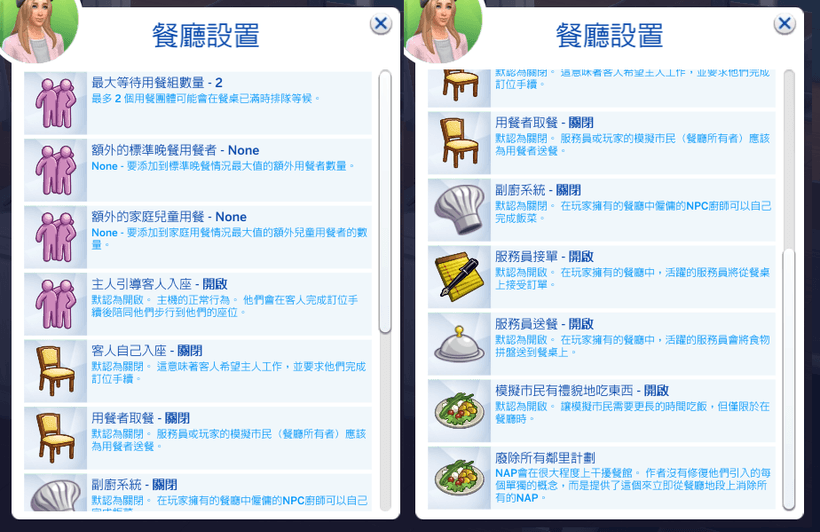
- Hold down the Shift key and click on the ground while on a restaurant lot to access the mod’s restaurant settings menu, where you can customize the restaurant’s operating mode.
- Pick Up – Allows customers to pick up their food themselves when it’s ready.
- More Dining Groups – You can add up to 5 extra children for family meals, or up to 6 additional Sims for regular diners, allowing groups of up to 8 people.
- Maximum Waiting Groups – Lets you set how many groups can wait to be seated when your restaurant is busy and there aren’t enough tables.
- Seat Yourself – When enabled, players dining at NPC-run restaurants can choose their own table directly without waiting for a staff member to seat them.
- Sous Chef System – If you’re playing as the chef alongside an NPC chef, you can enable the Sous Chef System in the menu. The NPC chef will speed up cooking but won’t finish the meal—you must complete it yourself. The quality of the meal depends on your chef skill.
- Remove All Neighborhood Action Project Options – Use this to remove effects like Sharing is Caring, Free Love, and Excessive Violin Playing by clearing all NAPs on the restaurant lot.
- Self-ordering and walk-up diners can be enabled in the restaurant settings. When turned on, Sims will spawn and walk directly to the restaurant’s order station. If no order station is placed, guests will walk behind the chef station to place their order. After ordering, they will be seated immediately and wait for their food to be prepared.
- Sims now spawn closer to the player’s arrival point on the lot. Groups will also spawn together, making the process much faster than the game’s default spawning behavior.
- You can disable standard diners (the game’s default restaurant customers), and both direct delivery and take-out diners are optional. For example, you can choose to have only walk-in customers, only take-out, or a combination of both. If you want to simulate a food truck style, turning off standard diners is a great way to focus on walk-up and take-out service.
🔸『模組物件』/『Module Object』🔸
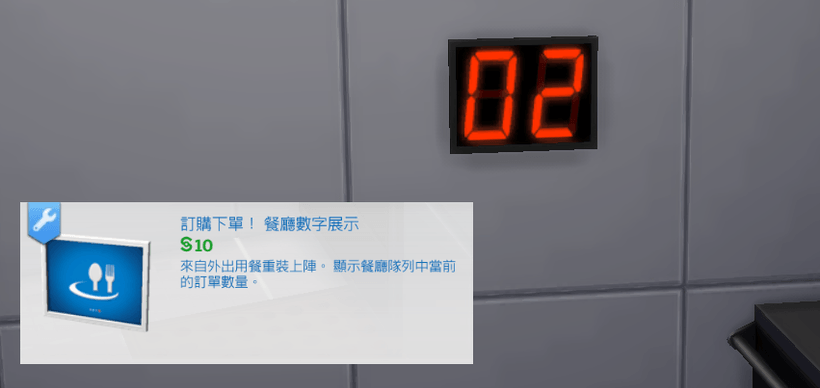
Place Your Order! Restaurant Digital Display: This new object automatically tracks the number of orders the chef still needs to prepare. Simply mount it on the wall to see how much work is left to do.
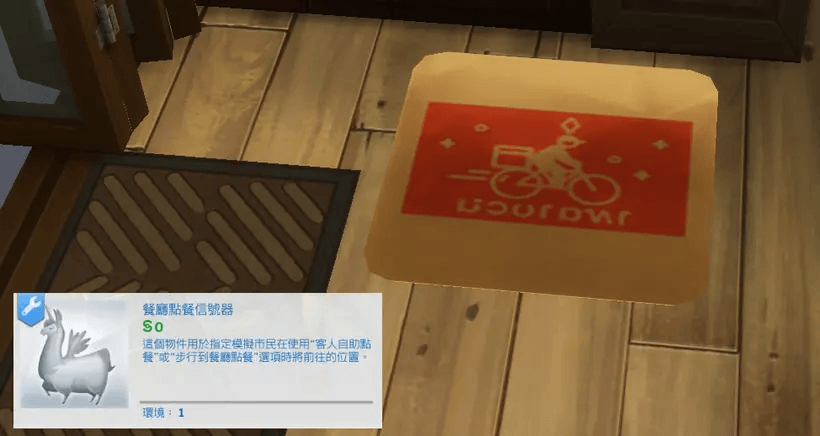
Restaurant Order Annunciator: You can find this object in Build Mode under the Restaurants category, or by searching the keyword "Carl." While you can already mark a Main Chef Station to designate where the player’s chef will cook (to prevent NPCs from taking over), there is now also a marker for a Delivery Station. Your restaurant must have at least one Delivery Station set up to qualify for takeout orders. Since takeout diners need a designated spot to pick up their food, you’ll also need to place a Restaurant Order Annunciator at the pickup location.
⩥【How to Resolve Chinese Display Issues】 ↴
【漢化顯示問題的處理方式】❞如遇到漢化空白問題或無顯示漢化,請確認安裝路徑是否正確或放太深(Mods>自訂文件夾>漢化檔案),或將漢化檔案名稱前面的"!"刪除(只刪除「!」)。使用MAC系統的玩家可以將漢化檔案名稱前面的"!"改成"1"或"A"。
❞簡體中文無須另外再安裝簡體補丁,但只能在設定為簡體語言的遊戲中使用。如果你的遊戲語言為繁體,可能會無法顯示。已將遊戲語言設定為簡體的玩家,如果顯示為空白,請留言告知我。
﹏﹏﹏﹏﹏🍧☪🧊☪🍨☪🧊☪🍦﹏﹏﹏﹏﹏
🎀More Chinese translations are available on my Patreon.
更多中文翻譯可以在我的Patreon上找到。
https://www.patreon.com/c/meowcats

The Dine Out Reloaded-CH│外出用餐大修-CH Team