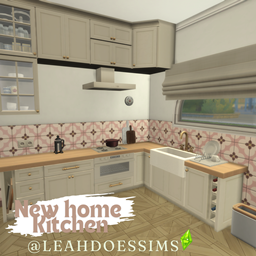
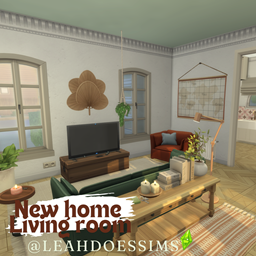
My 6th upload for the house reno/'Sad Beige' collection
A neutral toned Kitchen dining.
I have spent far too much time doing the skylights for this build only to realise that they wont actually load as part of the room unless I upload this as a full lot and not a room, so if anyone is interested I can re-upload this entire collection as a lot build or I can just upload the kitchen attached to a shell so the roof will be there, let me know. Fyi - the coffee maker in the kitchen is currently only for aesthetic purposes, it is functional but I was just having trouble during play testing so may or may not have thrown a fit and gave up, everything else works normally, im sure someone a little more savvy could make some changes so the sims could actually access it :), the pot filler is also functional but only with the harrie coastal double stove so in this build is for decorative purposed. Finally the washing machine, im pretty sure in the CC from syboulette there is a decorative one incase you hate doing laundry or dont have that pack
Including CC from:
Pierism
Felixandre
HARRIE
littledica
SIXAMcc
myshunosun
awingedllama
syboulette
Quirky introvert
New to Downloading Rooms or Lots?
If you are using the Curseforge app you can just click 'Download' and Curseforge will do the rest for you. **
If you're not using the app, download and extract the 4 files in the zip folder into your tray folder, its located in the same place as your mods folder just labelled 'Tray' (Documents\Electronic Arts\The Sims 4\Tray) this will allow you to find all the rooms and lots you download in the gallery in-game. Any CC used for the build will be in the relations tab (unless creator is not on curse forge then it will be linked in the description) and can be downloaded from there and should be placed in the 'Mods' folder like normal (Documents\Electronic Arts\The Sims 4\Mods)
To find all your downloaded rooms in-game, open up the gallery and click on your library tab at the top and make sure you have the Custom Content check box ticked on the left hand side. Also make sure you have the bb.moveobjects cheat enabled before placing to make sure everything is placed correctly.
**If there is CC from creators not on curseforge i will list them on the desctiption and you will have to download those extrernally and add those into the Mods folder (Documents\Electronic Arts\The Sims 4\Mods) otherwise things will be missing, sorry!
Enjoy :)
Leah x