


Vampire Bat Form Replacer
- By
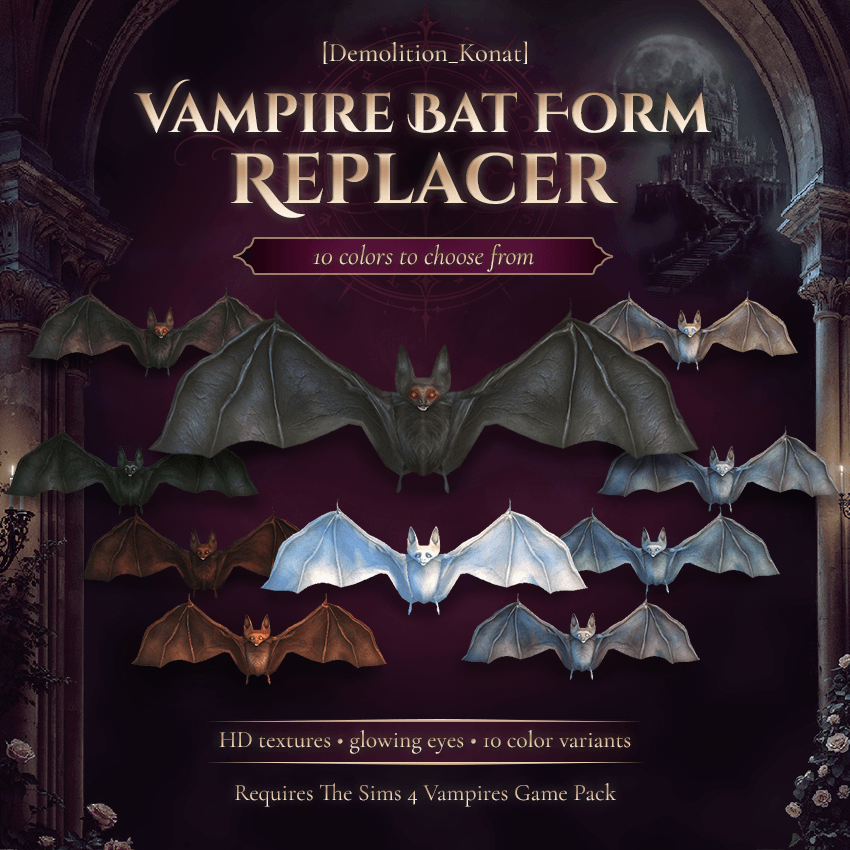
Replace the default vampire bat appearance with detailed HD textures, glowing eyes, and 10 selectable colors that work during travel and bat-form WooHoo.
🦇
Vampire Bat Form Replacer
Ever wanted your vampire to have a unique bat form? Now you can.
This mod replaces the original vampire bat with a more realistic model featuring detailed fur textures, wing membranes, and glowing eyes.
The Obsidian bat is used by default, so all vampires automatically receive the new appearance without any additional setup. You can also choose a different color for each vampire individually.
Features
-
10 available colors: Dark Brown, Frosty, Snow White, Obsidian, Ash Gray, Ginger, Scarlet, Lilac, Smoky Turquoise, and Deep Turquoise.
-
Obsidian as the default: The original bat appearance is automatically replaced with the Obsidian variant.
-
Individual color selection: Assign a different bat color to each vampire.
-
Persistent selection: Selected colors are saved separately for each character.
-
Bat-form compatibility: Custom colors are displayed during manual and automatic bat travel, as well as bat-form WooHoo.
-
Detailed textures: Redesigned fur, wing membranes, and glowing eyes.
How to Change the Color
Your vampire must have the Bat Form ability unlocked.
Click on your vampire and select:
Vampire → Choose Bat Form Color
Choose one of the 10 available colors. You don't need to select anything if you want to use the default Obsidian appearance.
Requirements
The Sims 4: Vampires Game Pack.
Installation
-
Download and extract the ZIP archive.
-
Place both the
.packageand.ts4scriptfiles in yourModsfolder. -
Enable Custom Content and Script Mods in the game settings.
-
Restart the game.
The selection menu is available in Russian for Russian-language games and English for all other languages.
Created by Demolition_Konat
Vampire Bat Form Replacer Team

Owner


