log_overlay.png
Description
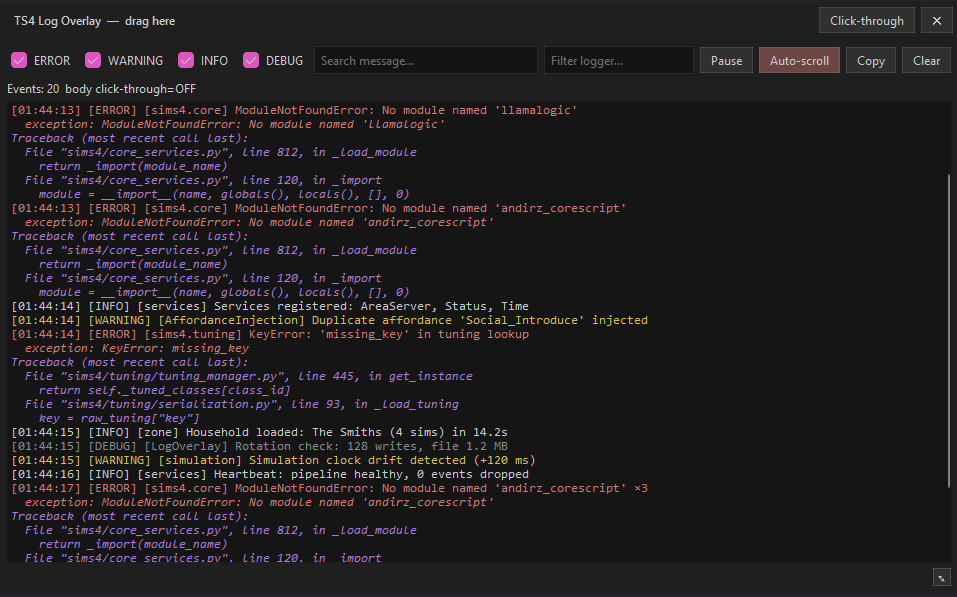
TS4 Log Overlay
A real-time log viewer for The Sims 4. It captures the game's own log output
(sims4.log — INFO / WARNING / ERROR / DEBUG) plus Python exceptions, and shows
them live in a small, always-on-top overlay window above your game — color-coded
by severity, searchable and filterable. Nothing is modified in your save; the mod
only reads log events.
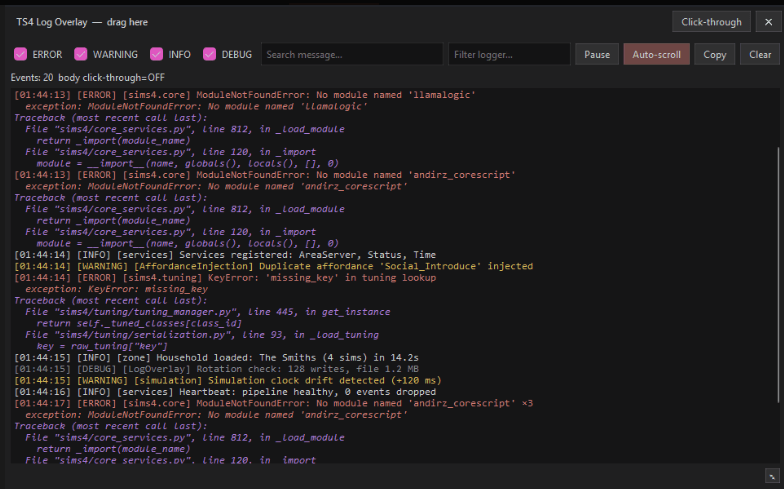
This download is the game-side mod. A separate Windows app (the overlay window itself) is available from the GitHub release page — see "How it works" below. The mod works perfectly fine without it: it keeps writing logs to a file either way.
What it gives you
- Live events from
sims4.logandsys.excepthook, color-coded by severity. - Search (text + logger) and severity checkboxes to narrow what you see.
- Collapses repeated errors with an occurrence count (
×N) so spam doesn't flood the view. - Expandable exception/stack-trace details and a copy-event button.
- Auto-scroll toggle, pause, clear, and click-through mode.
- Independent file logging — readable logs are written to disk even when the overlay is closed.
- Zero impact on your game: non-blocking transport, rate-limited, drops datagrams rather than stalling the game.
How it works
| Piece | What it is | Where you get it |
|---|---|---|
LogOverlay.ts4script |
the game-side script mod that captures and writes the logs | this download |
Overlay.exe |
the on-screen overlay window (Windows app) | GitHub release |
The mod hooks the game's log facility and sends normalized events over localhost UDP to the overlay. If the overlay is not running, nothing breaks — the mod simply keeps writing to its log files.
Requirements
- The Sims 4 with Game Options → Other → Script Mods Allowed = ON.
- Windows if you want the overlay window (the mod itself is cross-platform).
- Windowed or borderless game mode for the overlay to be visible.
Important: game display mode
The overlay only appears correctly when the game runs in windowed or
borderless (windowed-fullscreen) mode. Add this to
Documents\Electronic Arts\The Sims 4\Options.ini:
fullscreen = 0
windowedfullscreen = 1
(or just run the game in normal windowed mode). Exclusive fullscreen is not supported — an overlay cannot stay on top of it.
Installation
- Download this file (
LogOverlay_CurseForge.zip). You can install it with the CurseForge app, or manually: extractLogOverlay.ts4scriptintoDocuments\Electronic Arts\The Sims 4\Mods. - Enable Game Options → Other → Script Mods Allowed = ON and restart the game.
- (Optional, for the overlay window) grab
LogOverlay.zipfrom the GitHub release, unzip it, and runOverlay\Overlay.exe. It auto-creates its config on first run. - Play in windowed / borderless mode.
Where are the logs?
While the game runs, readable logs are written to
Documents\Electronic Arts\The Sims 4\mod_logs\:
ts4-log-<date>-<session>.log            all events, one file
ts4-log-<date>-<session>.ERROR.log      errors only
ts4-log-<date>-<session>.WARNING.log    warnings only
ts4-log-<date>-<session>.INFO.log       info only
ts4-log-<date>-<session>.DEBUG.log      debug only
Lines look like 2026-08-14 12:11:52 | ERROR | logger | message, with exceptions
and stack traces indented below. Files older than 7 days are removed
automatically at startup.
Found an error in the log? It usually comes from another mod, not from this one —
the game reports other mods' missing libraries and errors through sims4.log, and
this tool simply shows them.
Configuration
The mod reads its config from Documents\Electronic Arts\The Sims 4\LogOverlay\config.json
(created automatically). Key options:
logging.debug / info / warning / error— which levels to capture (debug: falseby default).file_logging.human_readable / split_by_level— the readable file layout above.file_logging.write_json— settruefor a raw JSONL dump (diagnostics only, removed on game close).
The overlay's own settings (opacity, size, position, click-through) live in
Overlay\config\config.json next to the exe.
Troubleshooting
- No events in the overlay but the game runs? Check the display mode (windowed/borderless).
- Overlay.exe flagged by antivirus? It is built with Nuitka (a Python-to-C compiler). See the code-signing policy on the GitHub page and the VirusTotal link in the release notes.
- Logs show lots of errors? Check which logger/
<logger>each line names — a missing-library error from another mod is not caused by this mod.
Compatibility & policy
- Tested on game version 1.124 (embedded Python 3.7).
- Do not run Sims Log Enabler at the same time until coexistence is tested —
both hook
sims4.log.Logger. - This is an unofficial fan-made tool. Not affiliated with EA. It modifies nothing in your save file and does not communicate over the internet.
License & source
MIT-licensed open source. The full source, build scripts, and Windows binaries are on GitHub.
TS4 Log Overlay Team