SimWalk
- By
Screenshot 2026-07-28 132305.png
Screenshot 2026-07-28 132257.png
Screenshot 2026-07-28 132251.png
Description
SimWalk gives you direct, real-time keyboard control of your active Sim — walk them around your lot with WASD, like steering a character in an action game, instead of click-to-route. Movement is smooth and collision-aware, the camera stays your point of reference, and doors and stairs are handled automatically as you walk into them. This update also brings a real, noticeable reduction in stutter/hitching, a fix for the camera losing track of your Sim mid-walk, and corrected animation scaling for Teens — see below for details.
How is this different from Victor Andrade's Direct Controls? SimWalk was inspired by Victor's pioneering work and tackles the same dream — but it's an independent build with its own focus, especially on feel and control in tight spaces:
- Smooth, threaded movement in real furniture. SimWalk uses a reduced-radius collision approach so your Sim can slip through the gaps you'd expect to fit through — between a couch and coffee table, along a pool edge, down a narrow kitchen aisle — instead of snagging on invisible footprints.
- Smart, directional doorways. Doors, arches, and stairs only "grab" you when you're actually heading through them — walk past a doorway and it leaves you alone.
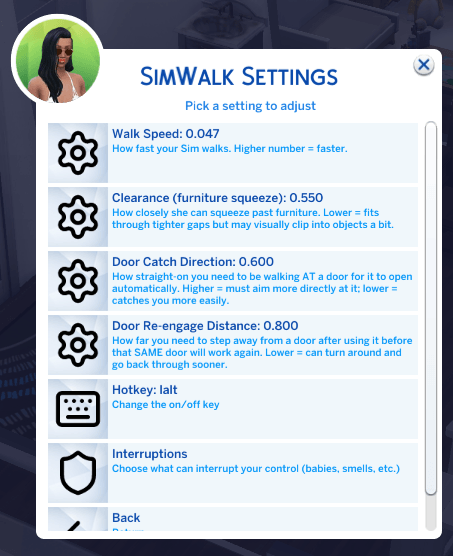
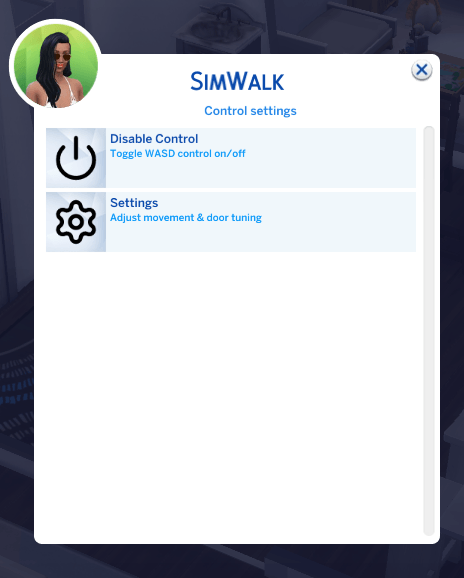
- An in-game pop-up settings menu (F9). Enable/disable and live-tune everything — speed, collision squeeze, door behavior, hotkey — without touching the console.
Installation instructions
- In-game, go to Game Options → Other and make sure Enable Custom Content and Mods and Script Mods Allowed are both checked. Restart the game if you just enabled them.
- Download and unzip the mod.
- Place both files —
SimWalk.packageandSimWalk.ts4script— directly into your Mods folder:Documents\Electronic Arts\The Sims 4\Mods. Keep them no more than one sub-folder deep. - Start the game and load a household.
Localization
SimWalk's F9 settings menu is available in English, Simplified Chinese and Brazilian Portugeuse (separate download). If you'd like SimWalk translated into another language, please post/comment on the mod page.
Main features
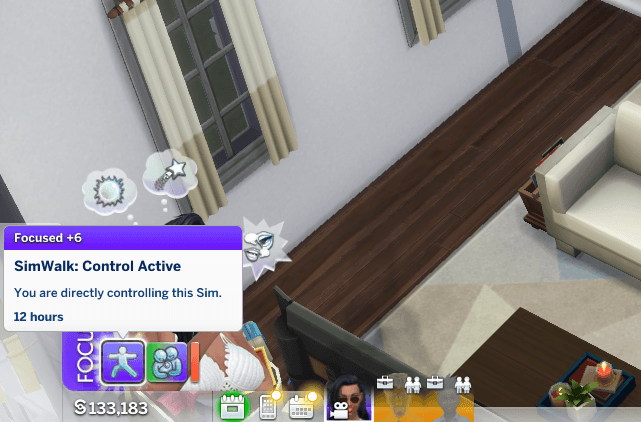
- Direct WASD control of your active Sim, relative to the camera.
- Toggle control on/off with Left Alt (rebindable).
- Smooth, collision-aware movement that threads tight furniture gaps naturally.
- Automatic doors, stairs & arches — walk through them normally; they won't catch you when you're just passing by.
- Camera stays locked on your Sim while walking, so it won't drift away or lose track mid-move — makes it easy to click a pie-menu option without losing your place. (The camera is free to pan normally whenever you're standing still with control on.)
- F9 pop-up settings menu — enable/disable, and adjust walk speed, collision clearance, door catch sensitivity, door re-engage distance, camera lock, and the toggle key all live in-game.
Performance & Animation Update (this version)
This update focuses on reducing the stutter/hitching that could happen during movement, especially in busy or heavily-decorated areas, plus a couple of real bug fixes. After a deep dive into what was actually costing time under the hood, several real, confirmed sources of hitching were found and fixed:
- Smoother movement in crowded areas. Found and fixed an inefficiency in how the game assigns Sims to nearby social situations — it was scanning every Sim in the zone far more often than necessary. Busier lots should now feel noticeably smoother.
- Reduced background housekeeping overhead. Several behind-the-scenes systems (social clustering, background events, weather/seasons processing) were giving themselves overly generous time budgets on every single game tick, whether they needed it or not. These are now trimmed down while SimWalk is active.
- Cleaned up memory housekeeping. Found a build-up of stale, already-finished scheduling entries that weren't being cleared out as often as they should have been, adding unnecessary overhead to the game's core simulation loop.
- Faster, snappier turning. Turn speed and turn responsiveness have been increased based on live testing — direction changes now feel quicker and less sluggish.
- Fixed: camera losing track of your Sim while walking. Moving your mouse (e.g. to click a pie-menu option) used to disconnect the camera from following your Sim. It now stays locked on while you're actively moving.
- Fixed: stretched legs on Teen Sims. Teens were missing a piece of animation data the game needs to correctly scale movement to their body — corrected, and Teen movement should now look normal.
Combined, these changes produce a real, noticeable reduction in stutter frequency and severity, particularly in populated areas. Some residual hitching in very large or densely-populated zones is expected — that portion comes from the base game's own simulation engine handling everything happening in a zone at once, which is outside what any script mod can fully control.
Known Limitations
- Child/Toddlers/Infants Sims will show stretched/distorted leg animations while under SimWalk control. This is a deeper animation-engine issue (These use a fundamentally different walk-animation system than Teens/Adults/Elders) and is not currently fixable without building all-new animation content from scratch.
- Windows only (see Requirements below) — Mac support is shelved until I can find a Mac tester.
Requirements
- The Sims 4 base game.
- Script Mods must be enabled (see Installation, step 1).
- Windows — SimWalk uses a Windows keyboard hook for real-time input, so it is Windows-only.
- No other mods required.
Shout outs
Victor Andrade — SimWalk exists because Victor first showed the community that direct, keyboard-driven control of a Sim was possible. His work was the inspiration for this project, and this mod is offered with gratitude and respect for his memory.
Victor's Direct Controls mod: https://victorandrade.itch.io/direct-controls-for-the-sims-4
In memory of Victor — any donations/gratitude, please donate to Victor's family: https://www.gofundme.com/f/cj2z4w-in-memory-of-victor-helping-hand-family
The SimWalk Team