Enchanted Grove Main Menu
- By
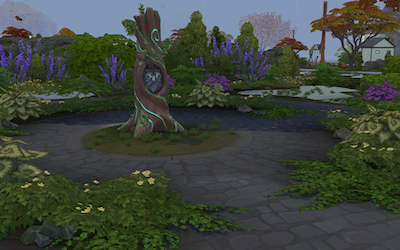
A serene, mystical main menu override featuring a glowing runestone tree surrounded by lush greenery and magical light. Step into an enchanted grove where nature and magic intertwine, creating a peaceful, otherworldly welcome to your Sims 4 world
Step into the Enchanted Grove, a tranquil main menu override inspired by mystical beauty. Featuring a glowing runestone tree wrapped in vines and surrounded by lush foliage, this background brings a serene, magical atmosphere to your Sims 4 startup. Perfect for players who love nature, fantasy, and calm, immersive worlds.
- ✨ Compatible with the latest Sims 4 update.
🌿 Simply install, relax, and let the magic welcome you home.
🌿 Installation Guide – Enchanted Grove Main Menu Override
-
Download the .package file from the “Files” tab.
-
Locate your Mods folder:
- Documents → Electronic Arts → The Sims 4 → Mods
- Move the downloaded file into the Mods folder.
(Example:Documents\Electronic Arts\The Sims 4\Mods\EnchantedGrove_MainMenu.package) - Enable Mods and Custom Content in-game:
- Go to Game Options → Other → Enable Custom Content and Mods
- Restart your game after enabling.
- Launch The Sims 4 and enjoy your new Enchanted Grove main menu background! 🌲✨
ONLY INSTALL 1 MAIN MENU OVERRIDE - if you already have one you will need to remove it from your mods folder.
Enchanted Grove Main Menu Team