RoyaltiesTracker
- By
Adds a Royalties tab to the Owned Businesses panel that tracks every book, song, app, game and video your Sims earn royalties from, with totals and an earnings chart.
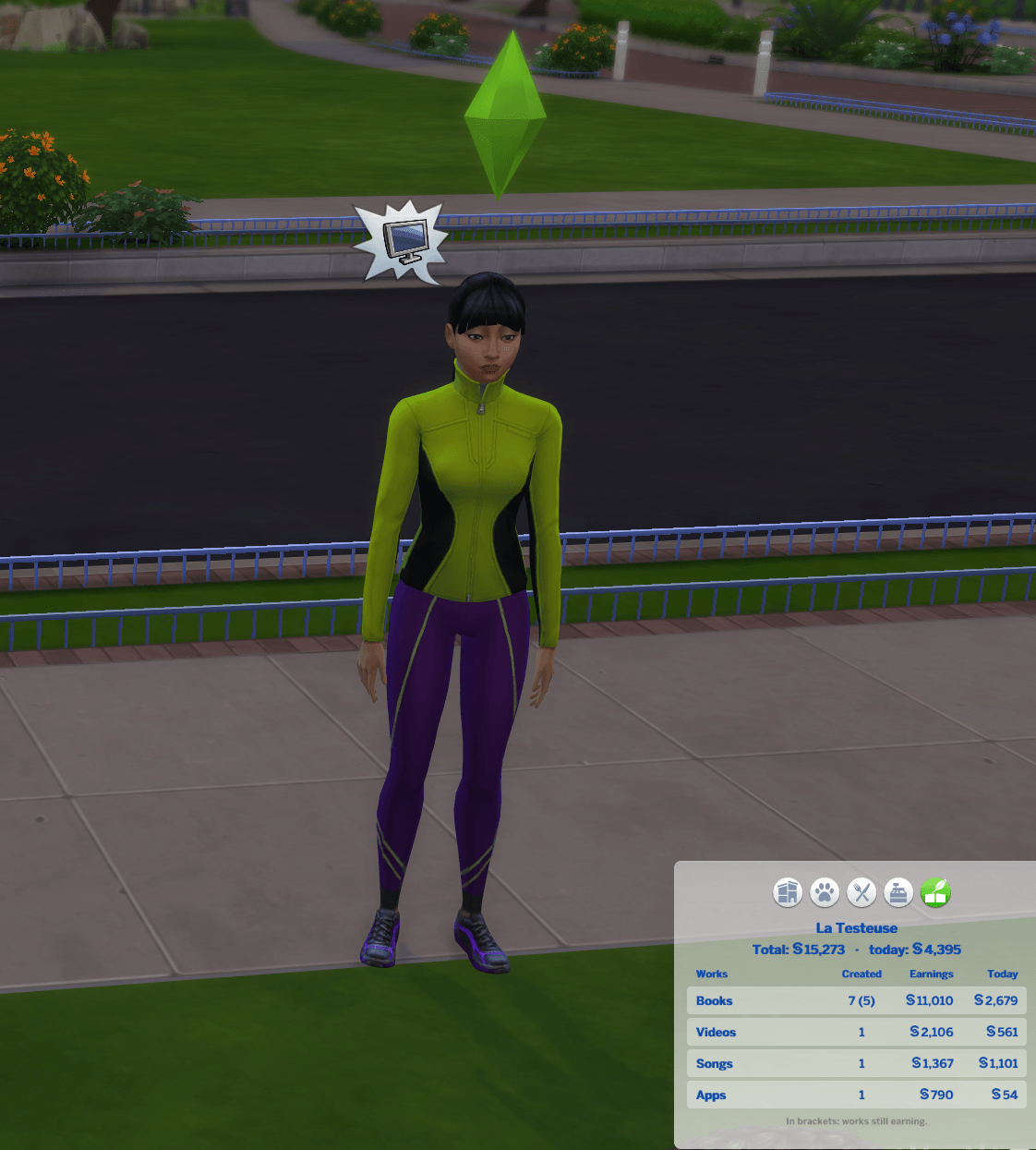
The new Royalties tab in the Owned Businesses panel, for the selected Sim.
Description
RoyaltiesTracker adds a Royalties tab (book & quill icon) to the Owned Businesses panel, so you no longer have to scroll through endless royalty notifications.
What it shows
- Overview by type of work — books, songs, lyrics, apps, video games, videos, released music tracks, snowboarding videos and mystic blessings: number of works created (and how many are still earning), total earnings, and earnings today.
- Click a type to see every work: title, author, publisher or self-published, genre, quality (1–3 stars or bestseller), and progress (e.g. 16/20 payments, "forever", "finished"). Long lists scroll with the mouse wheel.
- Click a work for its details and a real earnings chart of its latest payments.
The tab follows the selected Sim: it shows that Sim's name and only their works, and updates when you switch Sims. Texts follow the game language, in all 18 languages of the game (English, French, German, Spanish, Italian, Dutch, Brazilian Portuguese, Polish, Russian, Czech, Danish, Finnish, Norwegian, Swedish, Japanese, Korean, Simplified and Traditional Chinese). Translations other than English and French were made for the mod: corrections are welcome in the comments.
How it works
The game only keeps royalties that are still paying, and it never keeps a history of payments. RoyaltiesTracker records every payment as it happens (every day at 10 AM), and also remembers works that have stopped paying.
- History is saved when you save your game, one history per save slot. Quitting without saving or loading an older save never mixes things up.
- For works that were already earning when you installed the mod, past payments are estimated from the game's own payment curve and shown as grey dots on the chart. Works that finished before installation are unknown.
Installation
- Download the zip and extract RoyaltiesTracker.ts4script and RoyaltiesTracker.package into your
Modsfolder (directly, or in one subfolder — script mods cannot be deeper than one folder). - Enable Script Mods in Game Options > Other.
- No pack required. Works with any expansion that gives royalties.
The mod creates a RoyaltiesTracker_data folder next to its files (history and an error log). Uninstalling is safe: delete the two files (and that folder if you want); your saves are not modified by the mod.
Compatibility
- Built for game version 1.129.39.1030. This mod replaces the Owned Businesses panel interface file, so it must be updated when a game patch changes that panel.
- Not compatible with other mods that replace the Owned Businesses panel (UI resource
0x93F5A6B7F8C8B809). - Mouse and keyboard only (controller mode not supported).
Known limitations
- Royalty history starts when the mod is installed (see above).
RoyaltiesTracker is a fan-made mod. It is not made, endorsed or supported by Electronic Arts or Maxis.
Français
RoyaltiesTracker ajoute un onglet Droits d'auteur (icône livre et plume) au panneau Établissements possédés.
- Vue d'ensemble par type d'œuvre (livres, chansons, paroles, applications, jeux vidéo, vidéos, morceaux produits, vidéos de snowboard, bénédictions mystiques) : nombre d'œuvres créées, gain total, gain du jour.
- Clic sur un type : la liste des œuvres (titre, auteur, éditeur ou autopublication, genre, qualité, avancement), avec défilement à la molette.
- Clic sur une œuvre : sa fiche et la courbe de ses gains.
L'onglet suit le Sim sélectionné : son nom en tête et uniquement ses œuvres, mis à jour quand vous changez de Sim. Textes dans la langue du jeu (les 18 langues du jeu sont prises en charge). L'historique est enregistré au moment où vous sauvegardez, à partir de l'installation du mod ; les versements passés des œuvres déjà en cours sont estimés (points gris).
Installation : placez RoyaltiesTracker.ts4script et RoyaltiesTracker.package dans Mods (ou un seul sous-dossier) et activez les mods de script. Construit pour la version 1.129.39.1030 ; incompatible avec tout autre mod qui remplace le panneau Établissements possédés.
Mod de fan, non affilié à Electronic Arts ni à Maxis.
RoyaltiesTracker Team