Published Books Library
- By
Every book your Sims publish lands in a shared catalogue: buy a copy at any bookcase and earn royalties when other households buy yours.
Capture dâeÌcran 2026-09-30 aÌ 22.21.35.png
Capture dâeÌcran 2026-09-30 aÌ 21.51.31.png
Capture dâeÌcran 2026-09-30 aÌ 22.26.06.png
Description
📚 PUBLISHED BOOKS LIBRARY 📚
Your Sims' books, on every bookcase in town.
Ever wished you could get back a book your Sim published? In the base game, publishing a book (self-publishing or selling it to a publisher) destroys it forever: all you keep are the royalties. Published Books Library changes that: every book published in your save is added to a shared catalogue, and ANY Sim can buy a copy of it at ANY bookcase. And every copy sold pays royalties to its author: will your Sim write the next bestseller?
✨ Features
- Every book published by any Sim of your save is recorded automatically: self-published books AND books sold to a publisher, from a regular mailbox or a City Living wall mailbox.
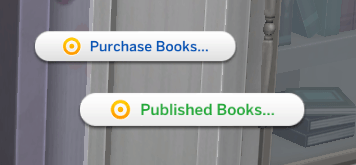
- A new "Published Books…" interaction on every bookcase: at home, in public libraries, on community lots, from every pack.
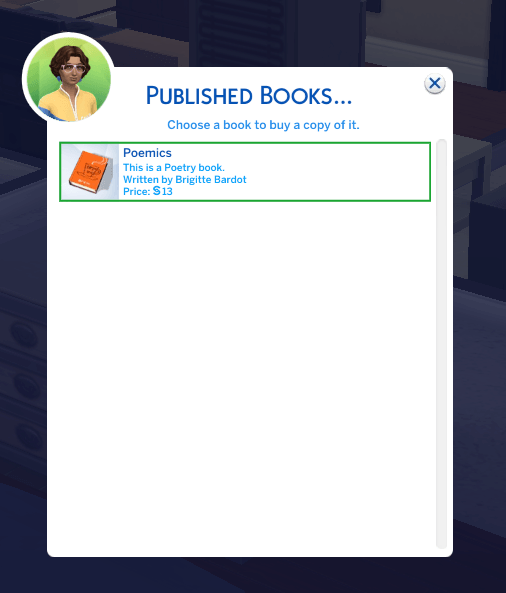
- The catalogue shows each book's cover, title, the description your Sim wrote, "Written by <First Name> <Last Name>" and its price.
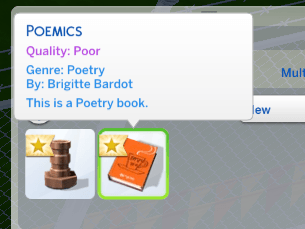
- The copy you buy is identical to the original: same title, description, author, genre and quality.
- Fair price: half of the book's value when it was published (minimum §10), so better books cost more.
- If the household can't afford a book, it is greyed out with a "Not enough simoleons." note and can't be bought.
- Royalties: every time another household buys a copy, the author's household earns half of the price, with a notification if the author is in your household.
- Sales counter: each book shows how many copies it sold, and the catalogue lists the best sellers first.
- Bestsellers: after 5 copies sold, a book gets a "Bestseller!" badge and its author a notification.
- Each save has its own catalogue, saved alongside your game (Save As and travelling are supported).
- Translated into English, French, Spanish, German and Italian. Other game languages display English.
- No dependency: you do NOT need Sims 4 Community Library (S4CL) or any other mod.
📋 Requirements
- Base game only (no pack required).
- Script mods must be enabled: Game Options > Other > "Script Mods Allowed", then restart the game.
- Tested on game version 1.128.90.1230.
💾 Installation
Download and unzip the file.
Move the "PublishedBooksLibrary" folder (with its 2 files) into your Mods folder:
Documents > Electronic Arts > The Sims 4 > ModsMake sure both files are there:
PublishedBooksLibrary.ts4scriptPublishedBooksLibrary.package
⚠️ The .ts4script file must not be more than ONE folder deep inside Mods.
Start the game and make sure script mods are enabled.
🎮 How to use
- Have a Sim write a book on a computer.
- Publish it at a mailbox (self-publish or sell to a publisher).
- Click any bookcase > "Published Books…".
- Pick a book: the price is taken from your household funds and the copy goes straight to your Sim's inventory.
❓ FAQ & known limitations
- Books published BEFORE installing the mod can't be recovered: the game had already deleted them. Only books published after installation appear.
- The option is greyed out until at least one book has been published in your save.
- Where is the catalogue saved? In
Documents > Electronic Arts > The Sims 4 > saves > PublishedBooks. Keep this folder with your saves if you back them up or move them to another computer. - Buying your own books (same household) doesn't pay royalties and doesn't count as a sale.
- If you publish a book and quit WITHOUT saving, then reload the same save without restarting the game, that book may still show up in the catalogue.
- Want to see the whole catalogue? Open the cheat console (Ctrl + Shift + C) and type:
publishedbooks.list - Compatibility with other mods that change book publishing hasn't been tested. Please tell me if you run into a conflict!
🐞 Found a bug?
Please leave a comment with:
- what you were doing when it happened,
- the file
Documents > Electronic Arts > The Sims 4 > Mods > PublishedBooks.log, - your last exception file (lastException.txt, or mc_lastexception.html if you use MC Command Center).
🗑️ Uninstall
Delete the "PublishedBooksLibrary" folder from your Mods folder. Your saves stay safe. You can also delete the "saves > PublishedBooks" folder if you don't plan to reinstall the mod.
🌍 Translations
English, French, Spanish, German, Italian. Spotted a mistake or want to translate the mod into your language? Leave a comment, there are only a few short sentences to translate!
💜 Credits & terms
Made by Little Unicorn. Free for everyone. Please don't re-upload this mod anywhere else or claim it as your own: share the link to this page instead. Happy writing, and happy reading! 📖
Published Books Library Team