
Pose Manager
An advanced utility tool to easily organize, group, rename, and manage your favorite poses.
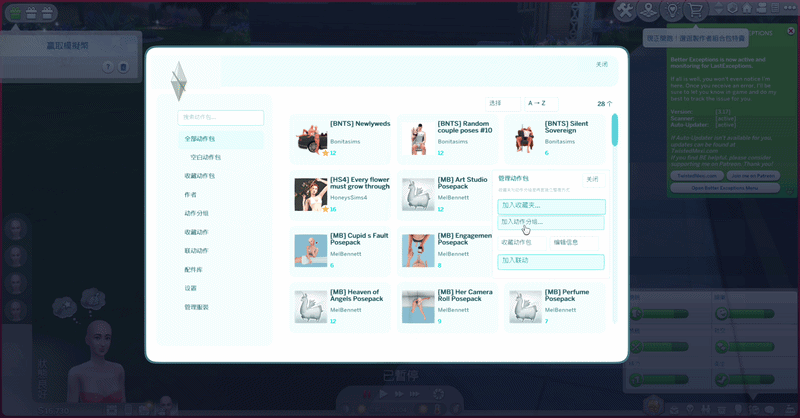
This mod is a utility add-on designed to help you efficiently organize, group, and manage your massive collection of poses in The Sims 4. It significantly improves the menu navigation experience.
REQUIREMENT : You MUST have Andrew's Pose Player installed for this mod to work.
October 13 Update
⚠️ Compatibility: This version currently supports The Sims 4 version 1.128 ONLY.
If you're unable to play the game properly after installing my mod, please feel free to contact me! It may be caused by a conflict with another mod
📌 Required Mod
Andrew's Pose Player by Andrew
https://sims4studio.com/thread/2617/andrews-studio
⚠️ IMPORTANT — Please Choose the Correct Version!
There are TWO download options depending on whether you use TwistedMexi's T.O.O.L. Mod.
📦PoseManager_NO_TOOL.zip
✅ Download this version if you DO NOT have T.O.O.L. installed.
📦PoseManager_WITH_TOOL.zip
✅ Download this version if you HAVE T.O.O.L. installed.
This version already includes the required compatibility patch (!FgEHCompat.package).
🚨 WARNING: Download and install ONLY ONE version!
If you use T.O.O.L., you MUST choose the WITH_TOOL version.
If you do NOT use T.O.O.L., you MUST choose the NO_TOOL version.
Installing the wrong version may prevent your game from launching.
📁 Installation for WITH_TOOL Users:
Place the included !FgEHCompat.package directly in the root of your Mods folder, NOT inside any subfolders.
Documents\Electronic Arts\The Sims 4\Mods\!FgEHCompat.package
Do NOT install this patch without T.O.O.L.!
✨ What's New?
The Pose Manager has received a redesigned interface, along with improvements to pose browsing, selection, and organization!
This update focuses on making it easier to find, select, and manage your poses, especially if you have a large pose collection.
🌸 Redesigned Pose Browser
A new three-column card layout displays more pose packs at once.
View pose pack thumbnails, names, and pose counts directly.
Navigate through your collection with fewer unnecessary steps.
Your browsing position is remembered, so you won't have to start from the beginning every time you reopen the browser.
🔍 Search & Organization
You can now access different sections directly from the left sidebar:
All Pose Packs — Browse your installed pose packs.Empty Pose Packs — View packs with no recognized pose content.
Favorite Packs — Quickly access your favorite pose packs.
Creators — Browse packs by creator information.
Pose Groups — Organize pose packs into custom groups.
Favorite Poses — Access your saved individual poses.
Settings — Manage Pose Manager settings.
Search and sorting options are also available to help you find poses more easily.
💗 Improved Pose Selection
Selecting multiple poses is now much more flexible!
Drag Selection — Click and drag to select multiple poses in a rectangular area, just like selecting files on your computer.
Drag to Deselect — Drag over selected poses again to remove them from your selection.
Flexible Multi-Selection — Select different poses without having to choose everything in between.
Smart Selection — Choose a starting pose and define a selection interval to quickly select poses arranged in a repeating pattern.
🎀 Custom Organization
Create custom groups for entire pose packs or individual poses within a pack.
Organize poses by character, role, or any category you prefer.
Use custom names and notes to keep your collection organized.
📍 Where to Find Everything
After opening Pose Manager, use the left sidebar to access pose packs, favorites, creators, and groups.
Search, sorting, and selection controls are located near the top of the interface. Open a pose pack to browse and select its poses.
Thank you so much for your support! 💗
I hope this update makes browsing and using poses easier and more enjoyable, especially for players who love taking screenshots!
Please note: This release is currently compatible with The Sims 4 version 1.128 only. Other game versions are not supported at this time.
May 8 Update
This update fixes an issue that could cause ModGuard to incorrectly flag the mod. There is no malicious code in this mod. The problem was caused by the way a temporary data file was handled, and it has now been fixed.
This update also adds a new “Return to Last View” feature, allowing the menu to reopen to the last screen you used.
Sorry for the trouble and confusion this caused.
Favorite Poses & Creators Save individual poses, entire pose packs, or your favorite creators into quick-access folders. No more scrolling through hundreds of packs to find what you need.  with a single click.
Custom Renaming & Sorting Rename your favorite creators or packs directly in-game. Add prefixes (e.g., "1_CreatorName") to force them to the top of your list for custom sorting.
Multi-Sim Target Selection Switch the target Sim directly from the pose menu without closing the UI interface.
Pose Manager Team

