Magic ALT Cast Shortcut
- By
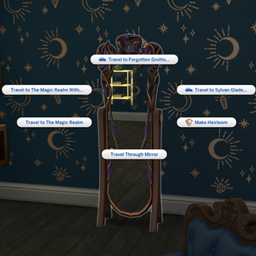
Hold ALT when selecting SIMS and OBJECTS to jump straight to the MAGIC menu.
Magic Shortcut puts your Sim’s available Magic interactions just an Alt + left-click away—no more digging through “More Choices.”
How it works
Hold Alt and click a Sim, object, or the ground in Live Mode to access the Magic interactions available for that target. You can also use it on your active Sim.
- Supports eligible Realm of Magic interactions and custom interactions organized under the Magic menu.
- Keeps existing spell-learning and casting requirements intact.
- Does not change spell effects, talent-point costs, XP, or magical charge.
- Leaves regular clicking available.
- Includes no custom diagnostic logging in the public release.
Meeting someone new? Spells may appear before an introduction, but eligible duels and other social Magic interactions appear after your Sims introduce themselves.
Requirements and installation
Requires The Sims 4: Realm of Magic for its native spellcaster interactions.
Extract the download and place both the .package and .ts4script files together in your Mods folder, no more than one subfolder deep. Do not extract the .ts4script file. Enable Custom Content and Mods and Script Mods Allowed, then restart the game.
Remove older Magic Shortcut versions before installing. Caliban’s Grimoire is not required.
Compatibility notes
The shortcut only displays interactions your Sim is normally eligible to access. Some custom submenus may require an additional click. Other mods that change clicking or pie-menu behavior may conflict.
Built and checked against game version 1.128.90.1030. Windows Alt-click is supported; Mac controls have not been verified.
Feedback
Found an issue? Contact itsORcinneo@gmail.com with your game version, mod version, and a description or screenshot of what happened.
Thank you for trying an orSIMneo mod. Enjoy having your magic a little closer at hand!
Magic ALT Cast Shortcut Team