LUNA Tech: Monochrome Phone Backgrounds
- By
Personalize your Sim's phone with 11 custom monochrome backgrounds from Luna Technologies.
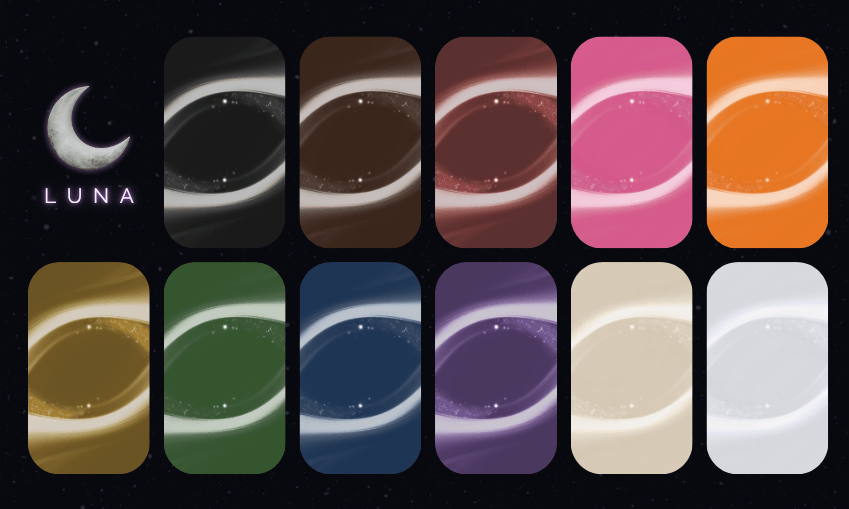
📱 LUNA Tech: Phone Backgrounds for the Sims 4
Give your Sim's phone a little more personality with these 11 custom phone backgrounds, the first Luna OS collection from Luna Technologies: Monochrome.Background order
The backgrounds appear in a fixed order in the phone picker, after the default swatch: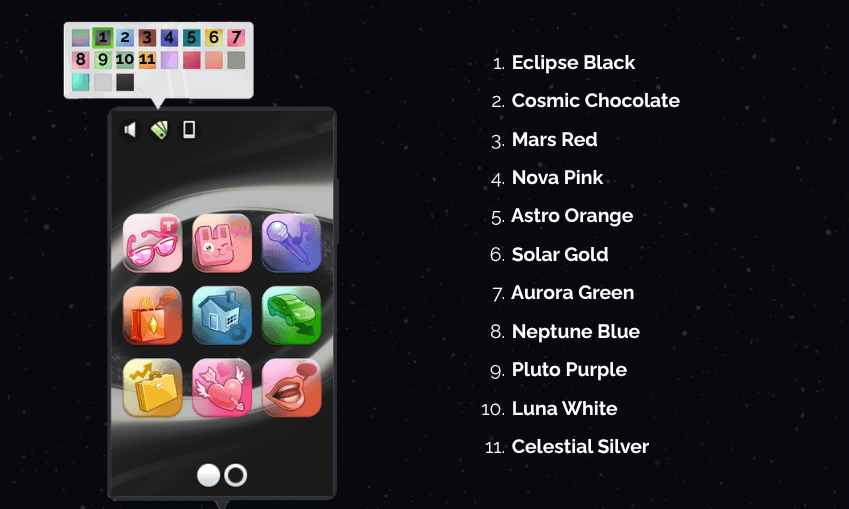 Note: Because of how the game's picker works, the preview thumbnails may retain the game's default imagery, but the selected background displays correctly on the phone.
Installation
- Download the mod from the Files tab on CurseForge.
- If the download is a ZIP file, extract it to access the .package file(s).
- Place the .package file(s) in your Mods folder: Documents > Electronic Arts > The Sims 4 > Mods
- Make sure Custom Content & Mods are enabled in your game settings.
- Restart your game and enjoy!
About Luna Technologies
Luna Technologies is a growing collection of custom technology content for The Sims 4, designed to bring more personality, customization, and style to your Sims' digital lives. Follow Anaik Core on Patreon for more custom content, new releases, and updates on upcoming projects! ♡ Terms of UseLUNA Tech: Monochrome Phone Backgrounds Team