Sul sul! 💜
New K-Pop Dream Room Main Menu Background for The Sims 4! 🎶✨
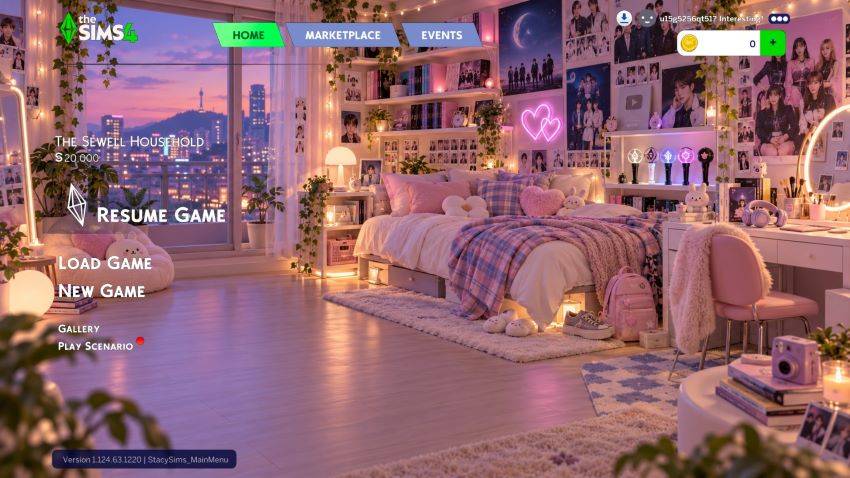
Bring a little K-pop magic to your Sims 4 main menu!
Step into a dreamy K-pop-inspired bedroom filled with pastel pink and purple tones, cozy blankets, fairy lights, cute decorations and plenty of K-pop posters and photocards!
With a beautiful Seoul sunset glowing through the window, this cozy little room is perfect for K-pop lovers who dream of having their own fangirl paradise! 💕🌙
✨ Features:
✨ Base Game Compatible
✨ Tested in-game
✨ 1 .package file
- - - - - - - - - - - - - - - - - - - - - - - - - -
⚠️ Important:
You can only use ONE custom main menu background at a time!
Make sure to remove any other custom main menu backgrounds from your Mods folder before installing this one to avoid conflicts.
- - - - - - - - - - - - - - - - - - - - - - - - - -
Installation instructions:
• Download and unzip the file (with WinRAR or 7-Zip) if necessary.
• Move the .package file into your Sims 4 Mods folder (Documents > Electronic Arts > The Sims 4 > Mods).
• Make sure Custom Content is enabled in your game settings.
• Restart your game and enjoy your new K-pop main menu!
- - - - - - - - - - - - - - - - - - - - - - - - - -
Many thanks for your support! 😊
Have a good game everyone! 💜
- - - - - - - - - - - - - - - - - - - - - - - - - -
kpop gaming Main menu Team

Owner