Headline & Hover Effects Toggle
- By
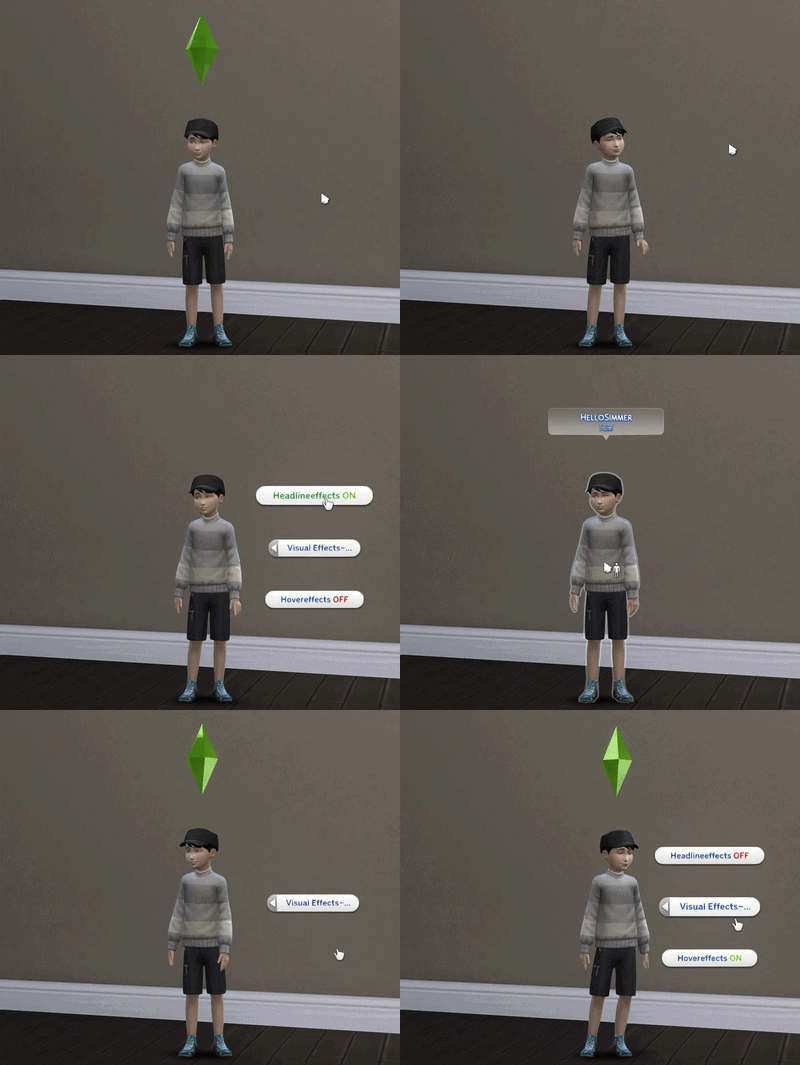
Easily switch Headline and Hover Effects ON/OFF without opening the cheat console. Just click the ground or a wall — no typing required.
Effects display.gif
Description
Compatible with Patch 1.128.90 (September 22, 2026)
📅 [2026-07-03] Update: This update only introduces string translations.
🌐 This mod has just 5 strings, so I translated them into all game-supported languages to keep the experience immersive compared to the original cheat commands.
✍️ I handled Chinese and English myself, and relied on Gemini and Google searches for the rest. If anything looks off, please feel free to let me know!💬
🔄 Renamed & Expanded
This mod was previously focused on Headline Effects only. It has now been expanded to include Hover Effects as well.
To better reflect its functionality, it has been renamed to:
Headline & Hover Effects Toggle
If you used the previous version, this is the same mod — just improved and more clearly named.
⚠ Requirements (IMPORTANT!)
This mod REQUIRES the Lot 51 Core Library to function properly. Please ensure you have downloaded and installed the latest version of it in your Mods folder.
⚠ Important:
Please delete the old files before installing this updated version to avoid conflicts.
🎥 Why I Made This
I enjoy taking screenshots and filming scenes in The Sims 4.
But every time I wanted to hide the Plumbob, speech bubbles, or hover outlines, I had to:
* Open the cheat console
* Type headlineeffects off
* Later type headlineeffects on
* Sometimes also use hovereffects off/on
* Try not to miss one of the many "e"s in the middle
After doing that a few too many times, I figured there has to be a better way.
So I made this mod.
🛠 What This Mod Does
This small quality-of-life mod lets you toggle:
* Headline Effects
* Hover Effects
directly from in-game interactions.
📌 How to Use
* Click the ground
* Or click a wall
* Choose ON or OFF
No cheat console. No typing. No immersion break.
📸 Perfect For
* Screenshot players
* Storytellers
* Machinima creators
* Immersive gameplay lovers
* Anyone who frequently switches UI effects on and off
📦 Installation
1.Delete any previous versions of this mod from your Mods folder.
2.Place both the .package and .ts4script files into your Mods folder.
3.Important: Ensure the .ts4script file is placed no more than ONE folder deep inside your Mods folder.
4.Enable Script Mods Allowed and Enable Custom Content and Mods in your game options.
5.Restart the game.
🛡 Compatibility & Performance
* No constant background scripts
* No autonomy edits
* No gameplay changes
* Lightweight and safe
* Can be added or removed anytime
* For the hover effect toggle, please note that MCCC also has the same feature. Do not use both at the same time, or the options may not display properly.
This mod does not modify how Headline or Hover Effects function.
It simply replaces typing with clicking.
📜 Changelog
v2.0
* Added Hover Effects ON/OFF toggle
* Renamed mod to better reflect functionality
* Optimized Python script logic for better stability and safer core interaction.
------------------------------------------------
🔄 重新命名與功能擴充
這個模組之前只針對「頭頂特效」。現在功能已經擴充,加入了「懸停特效」的控制。
為了更符合實際功能,模組已重新命名為:
Headline & Hover Effects Toggle
如果你用過之前的版本,這就是同一個模組——只是變得更好用,名字也更清晰了。
⚠ 必備前置模組(非常重要!)
本模組需要安裝 Lot 51 Core Library 才能正常運作。請務必確認你的 Mods 資料夾中已安裝最新版本的 Lot 51 核心庫。
⚠ 注意事項:
請在安裝此更新版本前,刪除舊版的所有檔案,以免發生衝突。
🎥 為什麼我要做這個模組
我很喜歡在《模擬市民 4》裡截圖和錄製影片。
但每次我想要隱藏水晶(Plumbob)、對話框或是滑鼠懸停時的輪廓線,我都必須:
* 打開密技列
* 輸入 headlineeffects off
* 拍完後再輸入 headlineeffects on
* 有時候還要再輸入 hovereffects off/on
* 還要小心不要漏打中間那一堆的 "e"
在重複做這件事太多次之後,我想一定有更好的方法。
所以我做了這個模組。
🛠 這個模組的功能
這是一個小巧的便利型模組,讓你可以直接透過遊戲內的選項來切換:
* 頭頂特效(Headline Effects)
* 懸停特效(Hover Effects)
直接從遊戲內的互動選單操作。
📌 使用方法
* 點擊地面
* 或是點擊牆壁
* 選擇開啟(ON)或關閉(OFF)
不用密技列。
不用打字。
不會打斷你的遊戲沉浸感。
📸 非常適合
* 愛截圖的玩家
* 說故事的創作者
* 模擬市民微電影(Machinima)創作者
* 追求沉浸式體驗的玩家
* 任何經常需要開關UI介面特效的人
📦 安裝說明
1.請先從你的 Mods 資料夾中刪除任何舊版的此模組檔案。
2.將本模組的 .package 與 .ts4script 檔案 同時 放入你的 Mods 資料夾中。
3.重要: 腳本模組 (.ts4script) 放在 Mods 資料夾內的層級,最多只能放在「第一層」子資料夾內。
4.在遊戲選項中,勾選 「啟用自訂內容與模組」 以及 「允許腳本模組」。
5.重新啟動遊戲。
🛡 相容性與效能
* 沒有常駐的背景腳本
* 不修改自主行為(Autonomy)
* 不改變任何遊戲機制
* 極度輕量且安全
* 隨時可以加入或從存檔中移除
這個模組並沒有改變頭頂特效或懸停特效本身的運作方式。
它只是把「打字輸入」替換成了「點擊滑鼠」。
*關於hover effect的開關,注意MCCC也有相同功能,請不要一起使用,否則會導致選項無法正常顯示
📜 更新日誌
v2.0
*新增:懸停特效 (Hover Effects) 開關選項
*變更:重新命名模組以更符合功能
*優化:底層Python腳本邏輯更新,提升穩定性與互動安全性。
🍵 Enjoyed AveryPing's Sims 4 mods?
👉 Click here to treat me to a cup of nice tea! 🍵

Headline & Hover Effects Toggle Team