Better Simology Panel
- By
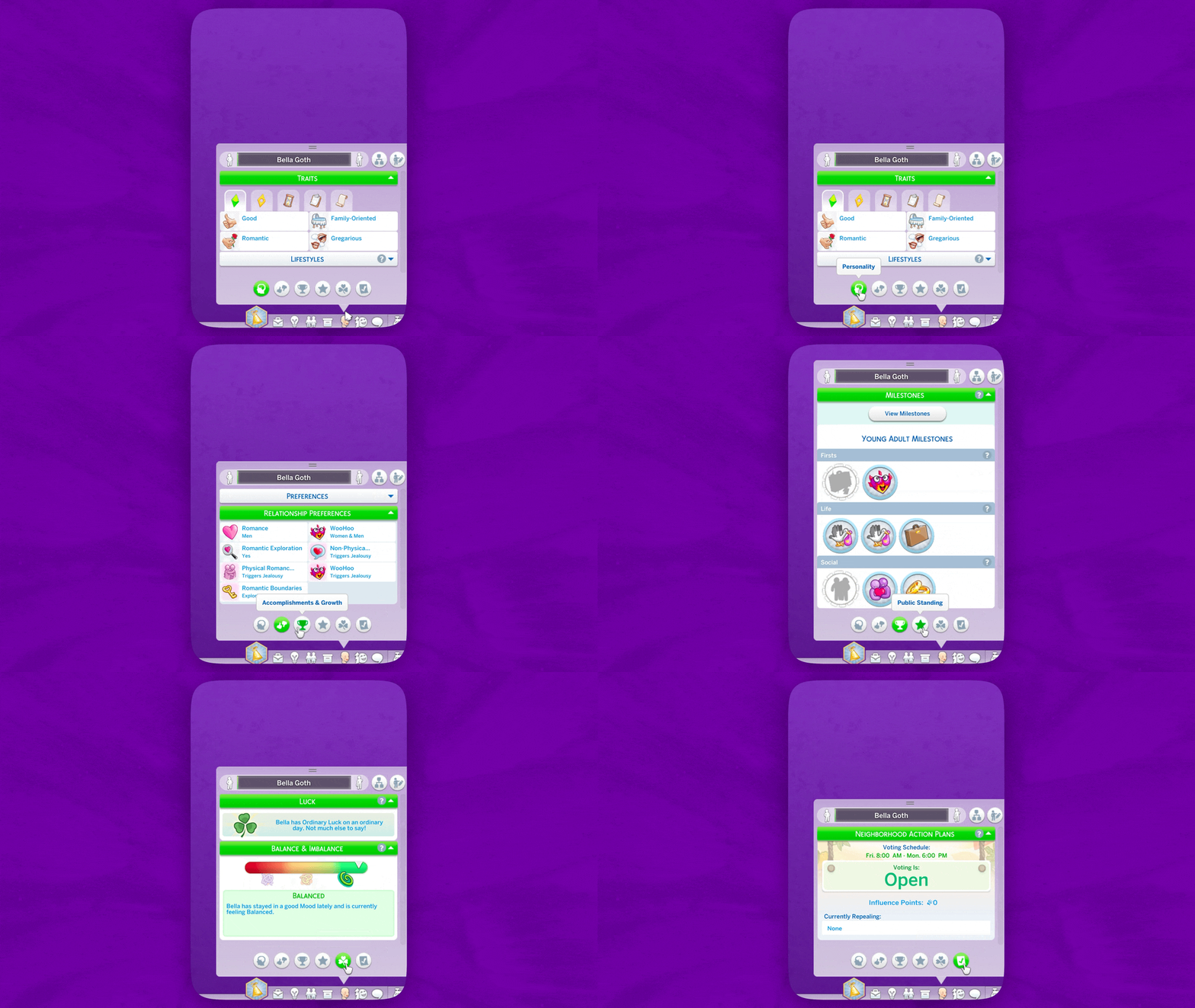
Right at the bottom of the Simology panel, you'll now find filter buttons.
BetterSimologyPanel_preview.gif
TraitsUpdate_Preview.gif
Description
Filter Your Sims' Info with New Categories
👤 Personality: Sim's Traits, Lifestyles, Character Values, Ghost Powers, and Robot Modules.
👍🏻 Preferences: Likes and Dislikes and Relationship Preferences.
🏆 Accomplishments & Growth: Milestones, earned Degrees, and Resolutions.
🌟 Public Standing: Public Image and Faction Reputations.
🍀 Inner Harmony: Luck and Balance.
☑️ Neighborhood Action Plans.
Better Simology Panel is available in all 18 languages, thanks to the help of the community!
Smart Buttons: A Cleaner Look
The mod only shows buttons based on the packs you own:
- Neighborhood Action Plans: Eco Lifestyle
- Public Standing: Get Famous, Journey to Batuu
- Accomplishments & Growth: Seasons, Growing Together, or Discover University
- Inner Harmony: Enchanted by Nature
NOTE: Some buttons may show empty lists if you own the pack but have no current data to display. That’s just how modding works, sorry!
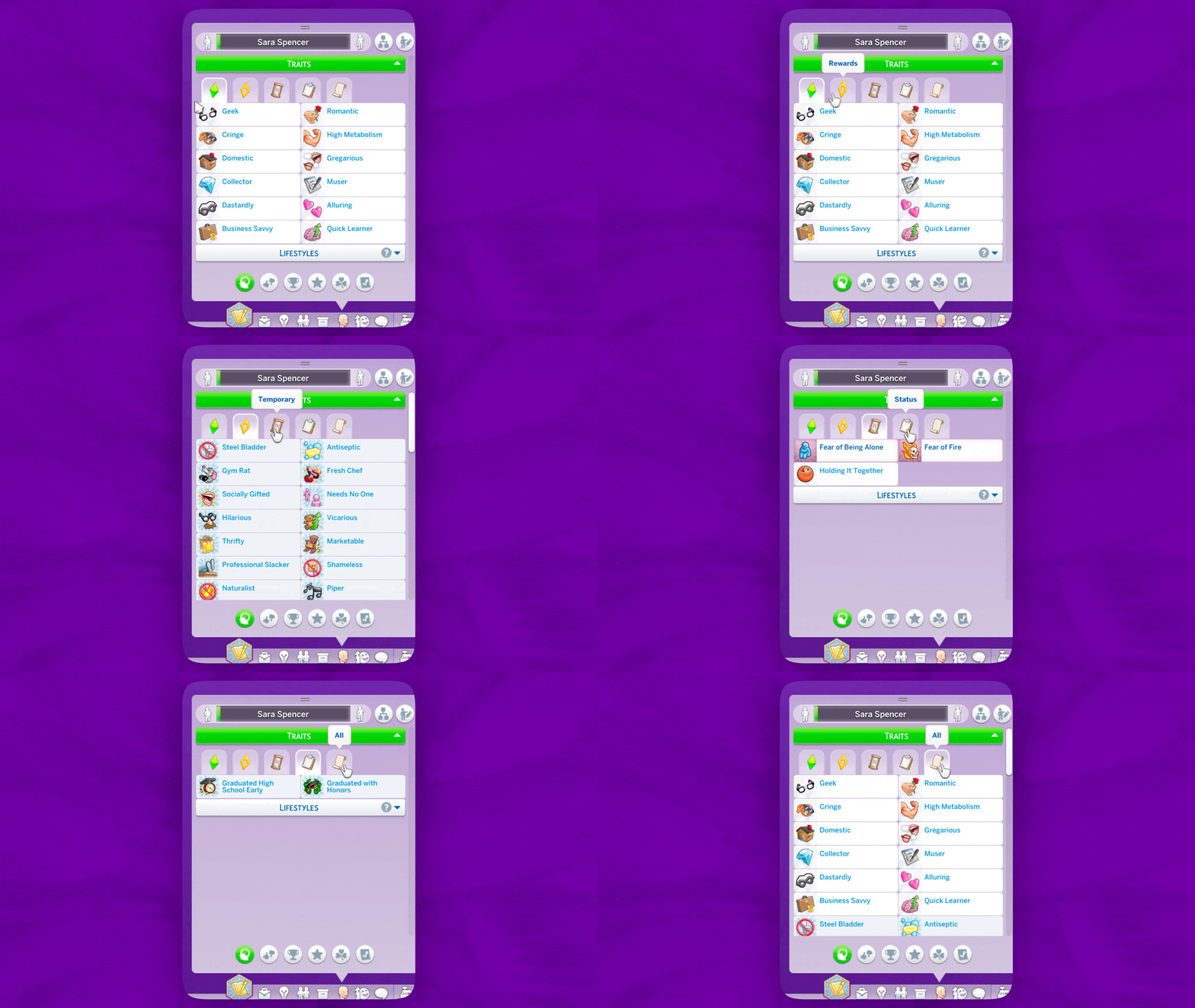
Traits Update (v1.2) introduces new filtering options, grouping traits into Identity, Rewards, Temporary, Status, and All categories.
Sims with over 8 traits of any kind will see new filter buttons above the traits list.
ADDITIONAL CHANGES:
- New "Enter Create a Sim" button replaced the previous "Sim Stats" button in the upper right corner; Enter CAS buttons in Preferences and Relationship Preferences panels were removed to save space and improve appearance. Let me know your thoughts!
- Lifestyles and Preferences panels will collapse by default if Sim has no data.
How to Use: Tips & Tricks
- The Simology Panel auto-expands if no custom height is set.
- You can still resize the panel manually – height is saved per Sim and stays consistent across categories.
- To reset back to auto mode, shrink the panel as much as possible, then click any of the new buttons.
- The selected category is saved per Sim, so switching between Sims remembers your last view.
- You can collapse sections for an even more condensed layout.
How to Install
Pick ONLY ONE file from the zip — either the basic version or the one made for UI Cheats Extension.
“Hey! Your mod isn’t working!”
This is a UI mod, so it conflicts with other mods that also modify the Simology panel.
UI Cheats is one of them, that’s why there’s a special version just for it!
If you use UI Cheats, install
SimMattically_BetterSimologyPanel_withUICheatsExtension.package
🚨 IMPORTANT: Mods load in a specific order – whichever loads first takes priority.
🚨 Make sure my mod loads above UI Cheats in the game’s mod list.
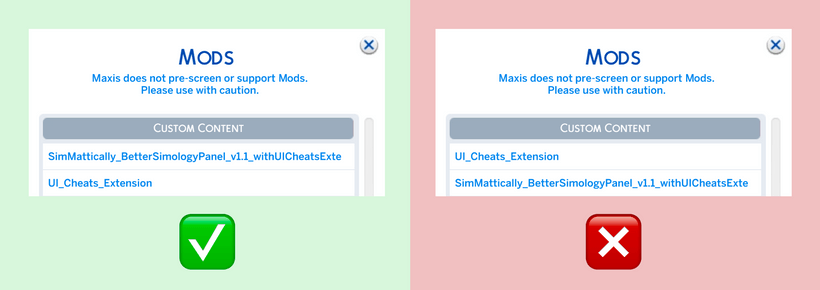
Can’t figure out mod load order?
Put my mod in a folder named “Better Simology Panel” and UI Cheats in “UI Cheats Extension”. This usually fixes the loading priority.
What about UI recolors?
Depends on the creator, but usually you can use both if my mod loads first.
Visual inconsistencies might happen depending on how intense the recolor is, but functionality should be fine. Just expect some possible visual quirks!
Better Simology Panel Team

Owner