


Robotic Caretaker
- By
Description
Robotic Caretaker
Built and tested on 3.3.0 only. It may not load on older versions (for example 3.2 stable), because it hooks into the game's drone code.
Your junk drone stops just following you around and starts looking after your base: it flies to damaged blocks and repairs them, carries ammo to your turrets and reloads them, and takes what it needs from dedicated supply crates. A small HUD next to the toolbelt shows what the drone is doing and what it is missing, and a control window lets you pause it, call it back or change how it works.
Features
Drone Repair Mod
- Repairs damaged blocks inside your or your allies' land claims only.
- Worst blocks first (below 50% health, below 90%, the rest), then the nearest.
- Uses the vanilla repair cost (same materials as the repair tool).
- Terrain (dirt, roads) is ignored.
- Takes materials from its own storage or a Drone Repair Crate. It only fetches what it can actually use, and brings back what is left.
Drone Ammo Mod
- Reloads your and your allies' electric turrets: auto turret, shotgun turret, M60, dart trap.
- Emptiest turret first, then it goes on to the next turret without flying back first.
- Never mixes ammo types in one stack.
- Switches a turret off while loading and back on afterwards (also one that ran dry).
- Takes ammo from its own storage or a Drone Ammo Crate and returns the leftovers.
- Optional split evenly mode for big ammo stacks: every turret gets an equal share.
Supply crates
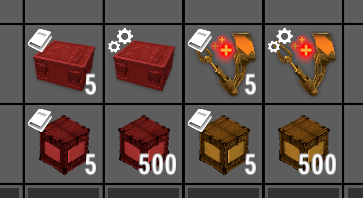
- Drone Repair Crate and Drone Ammo Crate are steel crates the drones fetch from.
- Slots you lock are never touched, and a crate someone has open is skipped.
HUD and control window
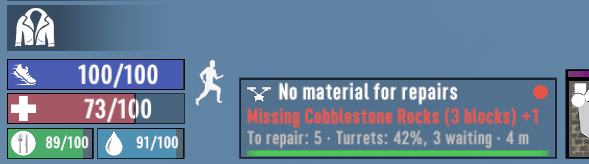
- HUD panel left of the toolbelt: current job, the most important problem (for example Missing Concrete Mix (10 blocks)), repair queue, turret ammo level, drone health.
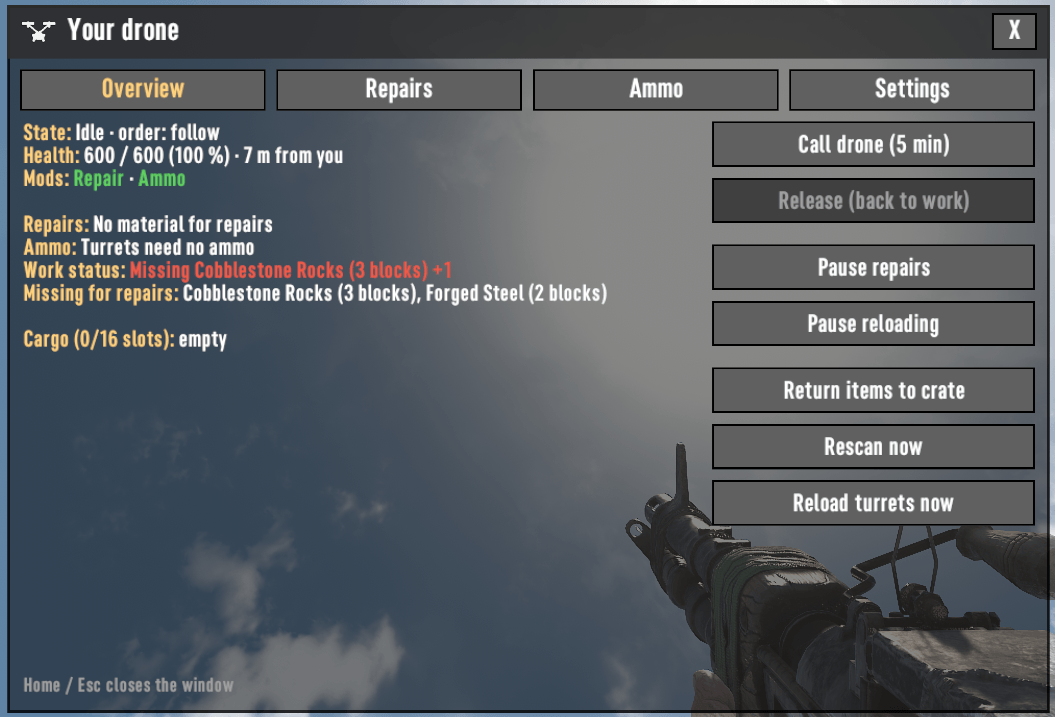
- Control window (default key Home):
- Overview: state, health, cargo, borrowed items, call the drone to you, release it, return items, rescan, reload turrets now.
- Repairs: damaged blocks by severity, the next blocks in line (scrollable), missing material, crate contents, statistics.
- Ammo: every turret in range with its fill level and ammo types (scrollable), turrets nobody has ammo for, crate contents.
- Settings (saved per player on the server):
- ammo before repairs;
- critical blocks only;
- don't repair spikes and barbed wire;
- don't use crates;
- blood moon mode (critical only, ammo first, keep working with zombies around);
- come back when damaged;
- split ammo evenly.
- On-screen notifications for missing material, turrets out of ammo, low drone health and empty ammo crates.
- Compass marker where the drone is working (wrench for repairs, bullet for ammo).
Several drones
Drones share the work: a block or turret one drone is working on is skipped by the others.
Getting it
- Schematics for both mods and both crates drop in loot (robotics and mod schematics loot) and are sold by traders.
- Crafted at a workbench:
| Item | Recipe |
|---|---|
| Drone Repair Mod | 5 Forged Steel, 4 Electrical Parts, 4 Mechanical Parts, 1 Claw Hammer |
| Drone Ammo Mod | 5 Forged Steel, 4 Electrical Parts, 4 Mechanical Parts, 20 Gun Powder |
| Drone Repair Crate | 1 Steel Storage Crate, 4 Electrical Parts, 4 Mechanical Parts |
| Drone Ammo Crate | 1 Steel Storage Crate, 4 Electrical Parts, 4 Mechanical Parts |
Install the mods into your junk drone like any other drone mod. A drone can carry both.
Installation
- Extract the zip into the game's
Modsfolder, so you getMods/RoboticCaretaker/ModInfo.xml. - Install it on the server and on every player's game. Single player and hosted games just need it once.
- The mod contains a DLL, so EasyAntiCheat must be off (start the game without EAC; on servers set
EACEnabledto false).
Players without the mod can still join a server that has it. Their drones work with the mods (the drone logic runs on the server), but they don't get the HUD, the control window or the notifications. Item names and descriptions then show as raw keys such as modRoboticDroneRepairMod, because each game reads texts from its own Mods folder.
Using it
- Put the Repair and/or Ammo mod into the drone and fill a Drone Repair / Ammo Crate inside your land claim.
- Following you, the drone works within 40 blocks of you. Told to stay, it covers the area around its post: half the land claim size, at least 30 blocks.
- The drone does not work while it fights or heals, while an enemy is near (except in blood moon mode), while its inventory is open, or while you are in a vehicle.
Console commands (F1)
| Command | Where | What |
|---|---|---|
droneui |
client | droneui hud on\|off, droneui toasts on\|off, droneui marker on\|off, droneui key <KeyCode> (e.g. droneui key F6), droneui open |
dronerepair |
server | repair status of every drone; dronerepair debug toggles logging |
droneammo |
server | ammo status of every drone; droneammo debug toggles logging |
dronectl |
server | UI subscribers and saved settings; dronectl time [reset] shows how long each drone spent on what |
Server settings
Mods/RoboticCaretaker/RoboticCaretaker.xml (read at server start):
- work ranges (
StayRange=autoor blocks,FollowRange, vertical ranges,OwnerLeash); - scan speed;
- the repair turn while turrets keep the drone busy;
- the fill level for the split-evenly mode;
- how long Call drone lasts;
- the low health threshold;
- how often a warning repeats.
Player settings are stored in <save>/RoboticCaretaker/settings.txt.
Compatibility
- Game version: 3.3.0 (see the note at the top).
- Changes no vanilla items, only adds two drone mods, two crates and their schematics.
- Item and block names:
modRoboticDroneRepairMod,modRoboticDroneAmmoMod,cntDroneRepairCrate,cntDroneAmmoCrate. - Harmony patches on
EntityDrone(updateState, OnUpdateEntity, OnEntityUnload, TeleportOutOfRange); other mods that replace the drone's AI may conflict. - Works with mods that change ammo stack sizes (use the split-evenly setting).
Translations
All texts are in Config/Localization.csv (keys starting with rc). Add a column for your language (german, french, polish, ...) and it is used automatically.
Known limitations
- Drones only work in loaded chunks (near a player), like everything else in the game.
- The sparks shown while repairing use vanilla particle effects and may be hard to see.
Robotic Caretaker Team
