RomMeter
RomMeter.
meter 2.png
Description
📊 RomMeter
A modern combat meter and damage analysis tool for Runes of Magic
RomMeter is a real-time combat statistics addon for Runes of Magic, designed to make damage analysis fast, visual and easy to understand.
It combines the familiar ranked damage-meter view with a dedicated Damage Graph, allowing you to see not only how much damage was dealt, but also when that damage happened during the fight.
⚔️ Real-time combat tracking
📊 Damage rankings
⚡ DPS analysis
📈 Dynamic Damage Graph
👥 Party comparison
👹 Boss encounter analysis
🎯 Quick-access toolbar controls
🧪 Build and rotation testing
⚠️ IMPORTANT — PLEASE READ
Do NOT use /reload while RomMeter is enabled.
RomMeter's Damage Graph is built from dynamic graphical elements.
Because of limitations in the Runes of Magic Lua/UI environment, these dynamically created graph elements are not handled safely when the interface is reloaded.
Using:
/reload
while RomMeter is active may cause the game client to crash.
🚫 Character Switching Warning
You should also not switch characters and immediately enter the game again during the same client session while RomMeter is active.
Doing so can cause the same dynamic graphical elements to be loaded incorrectly and may result in a client crash.
✅ Recommended
If you need to:
-
🔄 Reload the interface
-
👤 Change characters
-
🔁 Relog to another character
Exit the Runes of Magic client completely and start the game again instead.
❌ Avoid
-
/reload -
Logging out to character selection and immediately entering another character
-
Re-entering the game through character selection in the same running client session
This limitation is related specifically to the dynamic Damage Graph implementation and the way the Runes of Magic Lua/UI engine handles those graphical elements.
⚔️ Real-Time Damage Meter
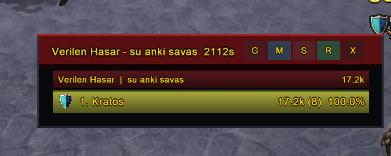
RomMeter tracks combat activity while you play and displays players in a clear ranked list.
Each row makes it easy to compare performance at a glance.
You can quickly see:
-
🥇 Player ranking
-
💥 Total damage
-
⚡ DPS
-
📊 Contribution to total group damage
-
📈 Relative performance
-
👤 Individual player results
This makes RomMeter useful during:
-
👹 Boss fights
-
🏰 Dungeons
-
👥 Party content
-
⚔️ Raids
-
🧪 Build testing
-
🎯 Rotation testing
📈 Dynamic Damage Graph
See how your damage changes throughout the fight
RomMeter includes a dedicated dynamic Damage Graph instead of limiting combat analysis to numbers and horizontal bars.
The graph is generated dynamically from combat data and visualizes damage performance over the course of an encounter.
This makes it possible to see when your damage rises, falls or spikes.
📊 The graph helps you identify:
-
⚡ Burst-damage windows
-
📈 DPS spikes
-
📉 Damage drops
-
🎯 Rotation changes
-
⏱️ Low-activity periods
-
👹 Boss-phase transitions
-
⚔️ Cooldown windows
-
👥 Differences between player performance
A normal damage meter tells you:
How much damage did I do?
The RomMeter graph helps answer:
When did I do that damage?
⚡ Burst & Sustained Damage Analysis
The Damage Graph is particularly useful for separating burst damage from sustained performance.
For example, two players may finish an encounter with similar total damage while reaching that result in completely different ways.
One player may produce:
📈 Very high burst → 📉 large downtime
while another maintains:
📈 Steady damage throughout the encounter.
RomMeter makes these patterns much easier to recognize visually.
🎯 Top Toolbar Controls
RomMeter uses compact buttons at the top of the meter to provide fast access to important functions without filling the interface with large menus.
📈 G — Graph
The G button opens the dedicated Damage Graph view.
Use it when you want to move beyond the normal ranking display and analyze how damage developed throughout the encounter.
With G you can quickly switch from:
📊 Damage Ranking
to
📈 Damage Timeline / Graph
without leaving RomMeter.
This makes the graph part of the normal combat-analysis workflow instead of a separate tool.
💥 Damage Tracking
RomMeter records player damage and presents it in a way that makes group performance easy to compare.
Useful information includes:
-
💥 Total damage
-
⚡ DPS
-
📊 Damage contribution
-
🥇 Ranking
-
📈 Relative performance
The visual bars allow you to understand the group's damage distribution without having to compare large numbers manually.
👥 Party Performance
RomMeter is designed with group combat in mind.
Players are ranked according to their contribution, allowing you to see immediately who is producing the most damage during an encounter.
Example:
🥇 Player A ████████████████ 32%
🥈 Player B ████████████ 25%
🥉 Player C █████████ 18%
This provides both numerical and visual comparison.
👹 Boss Encounter Analysis
RomMeter becomes especially useful during boss fights.
Instead of simply looking at your final DPS number, you can combine the meter with the Damage Graph to understand what happened during different parts of the encounter.
You can use it to identify:
-
🔥 Strong burst phases
-
📉 Unexpected DPS drops
-
⏱️ Downtime
-
🎯 Rotation problems
-
👹 Boss-mechanic interruptions
-
⚔️ Cooldown effectiveness
-
👥 Differences between players
🧪 Build Testing
Changed your equipment?
Changed your rotation?
Added a new rune?
Changed a weapon?
RomMeter gives you a measurable way to compare the result.
Compare different setups using:
📊 Total Damage
⚡ DPS
📈 Damage Graph
🎯 Encounter performance
Instead of relying entirely on how a build feels, you can compare actual combat results.
🎯 Rotation Analysis
The Damage Graph is particularly useful when testing rotations.
You can identify:
-
📈 Where damage peaks
-
📉 Where damage collapses
-
⏳ Where downtime occurs
-
⚡ Whether cooldowns create meaningful burst
-
🔁 Whether a new rotation produces more stable damage
This turns RomMeter into more than a scoreboard.
It becomes a practical combat-analysis tool.
📊 More Than a Damage Ranking
Traditional meters mainly answer:
Who did the most damage?
RomMeter aims to answer more useful questions:
📊 How much damage was dealt?
⚡ How quickly was it dealt?
📈 When did damage increase or decrease?
🎯 Where did the rotation lose momentum?
👹 What happened during different parts of the encounter?
The combination of the normal meter and the Damage Graph gives you both the result and the story behind the result.
🖥️ Clean Combat Interface
RomMeter is designed to remain useful without taking over your entire screen.
🎨 Clean
Combat data is prioritized over unnecessary decoration.
👁️ Readable
Rankings and values are designed to be recognizable quickly.
📐 Compact
The interface keeps important combat information accessible while you continue playing.
⚔️ Combat Focused
RomMeter is designed to be used during actual encounters, not only after them.
🎮 Built for Runes of Magic
RomMeter is developed specifically for the Runes of Magic addon environment.
Its combat tracking and interface are designed around the information available through the Runes of Magic client and addon API.
The dynamic graph system also pushes against limitations of the older RoM UI engine, which is why the /reload and character-switching restrictions described above are important.
🌟 Main Features
⚔️ Real-Time Damage Meter
⚡ DPS Tracking
📊 Player Rankings
📈 Dynamic Damage Graph
🔥 Burst Damage Visualization
📉 DPS Drop Detection
👥 Party Performance Comparison
👹 Boss Encounter Analysis
🎯 Rotation Analysis
🧪 Build Testing
🔘 Quick-Access Top Toolbar
📈 G Button — Instant Graph Access
⚠️ Final Reminder
While using RomMeter:
❌ Do not use /reload
❌ Do not switch characters and immediately re-enter the game
✅ Fully restart the Runes of Magic client when you need to change characters or reload the interface
This prevents crashes caused by the dynamic graph elements and the limitations of the game's Lua/UI engine.
📊 RomMeter
Don't just see the final number. See how you got there.
RomMeter combines a traditional combat meter with visual damage analysis, helping Runes of Magic players understand their performance throughout an entire encounter.
Measure the damage. Watch the timeline. Improve the fight.
The RomMeter Team