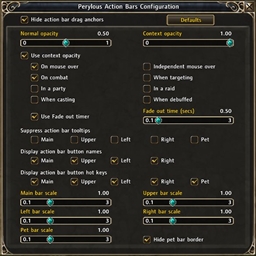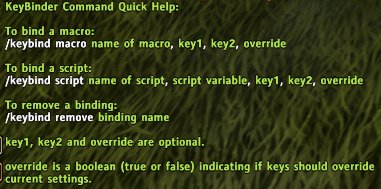
Shows KeyBinder's quick help for the slash commands.
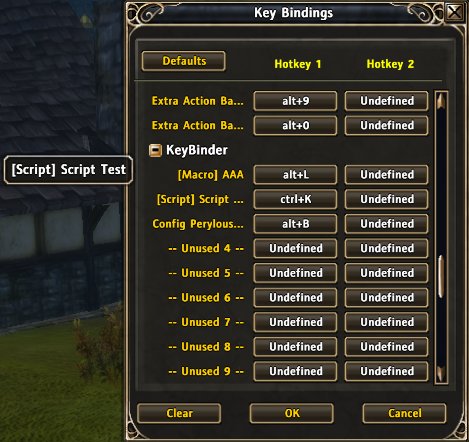
This shows RoM's standard key binding interface with KeyBinder integrated into it.
Description
KeyBinder
By Peryl
KeyBinder allows users and addon developers to bind keys to pretty much anything in the game be it an addon, a macro, or just some generic Lua script. Further, the binding keys will show up in the standard interface and are persistent across game restarts and are saved per character.
Game Version
Verified to work with Runes of Magic client version 3.0.9.2371
Known Issues
The code to execute macros is still bugged. Working on a fix for this, but will take time. The rest of the add-on should work fine however. Update: I've got a workaround for the macro problem, but still need to do some extensive testing on it. I'm also adding a whole configuration GUI which is delaying things as well.
Special Installation Notes
KeyBinder requires some special installation steps in order to function properly. Please read the full instructions in KeyBinder's addon folder (see the file KeyBinder Install Notes.txt). In brief however, the steps merely involves copying the worldxml folder inside KeyBinder's addon folder to your /Interface folder. Care should be taken when doing this however, so again, read the full install notes before doing this step.
Updating from Older Versions
Version 0.1 to Version 0.2
- There is no need to modify the worldxml folder when updating as the bindings.xml file has not changed.
Features
- Up to 100 key bindings supported
- Addons can register/unregister for key bindings
- Users can register macros for use via key bindings
- Can execute code scripts via key bindings
- Can execute on key up as well as key down
- Key bindings persistent across restarts
- Key bindings can be changed via standard key binding interface
- Key bindings are saved per character.
Using KeyBinder
KeyBinder provides both an API for addon use, as well as slash commands for direct use by users. See the file KeyBinder User Manual.txt in KeyBinder's addon folder for a full description of the commands and API functions.
Quick FAQ
What's with the weird folder name?
- The folder name !-KeyBinder allows the Runes of Magic client to find and load KeyBinder early in the addon loading process. This is done in order for KeyBinder to be present when other addons wish to register bindings with KeyBinder.
Deleted macros still appear in list.
- This is due to how KeyBinder saves its custom keys.
- Workaround: Must manually unregister binding.
Key bindings are only sorted at game start.
- This is intentional.
The message "Unused binding key" appears when hitting some binding key.
- This is caused by the default callback associated with unused keys. To "fix", open the normal key binding panel and search for an unused KeyBinder entry that has one of more keys defined on it. Clear these keys to remove the message.
Reporting Bugs
Please report all bugs via CurseForge's ticket system for this addon. You can find it here.
The KeyBinder Team