Tinker Tools: Reloaded
Tinker Tools: Reloaded is a maintained and expanded fork of the original Tinker Tools addon for RIFT—created to keep the tool alive, stable, and evolving for today's dimensioneers. This version preserves the spirit and workflow of the original addon while introducing essential bug fixes, stability improvements, and powerful quality-of-life features that make building large or complex dimensions smoother than ever.
Whether you're constructing a sprawling city, a precision-aligned architectural marvel, or just experimenting with item placement, Tinker Tools: Reloaded is designed to stay reliable under heavy use.
⚠️ IMPORTANT: If you use the original Tinker Tools, keep the old addon installed (but disabled) for your first login with Tinker Tools: Reloaded. Your sets will import automatically.
What’s New in 2.6.0 – Workflow Expansion & Core Enhancements
New: Manage Sets
- New Manage Sets interface in Load / Save
- Scrollable list of saved sets
- Select and delete multiple sets safely
- Supports both account-level and global sets
Global Sets
- Sets can now be saved globally, shared across accounts
- Account-level and global sets are stored and managed separately
- Existing sets remain intact and compatible
Mirror Tool – Fully Reworked
- Mirror items in any direction
- New Symmetry dropdown with selectable mirror planes
- More flexible, predictable mirroring behavior
Configuration Improvements
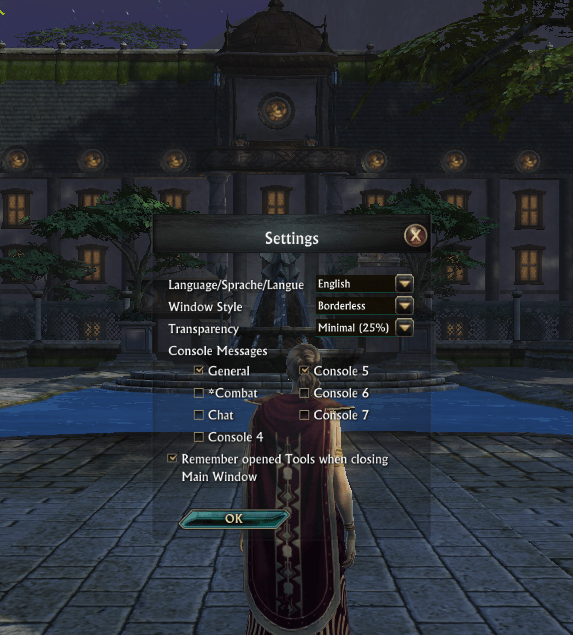
- New configuration button on the main window
- Configuration changes apply immediately—no
/reloadui required
- Configuration window remains open until the user chooses to close it
What's New in 2.5.0 - Multilingual Support
Parlez-vous français? Sprechen Sie Deutsch?
Tinker Tools: Reloaded now speaks your language! Version 2.5.0 introduces complete French and German translations, making dimension building accessible to builders across Europe.
Complete Localization
- Full interface translation - every button, label, and tooltip
- Translated help documentation - all guides available in French and German
- Proper UTF-8 support - accented characters display correctly
- Adjusted layouts - UI adapts to accommodate longer translated text
What's New in 2.4.0 - Major UI/UX Overhaul
Context-Sensitive Help System
- Help buttons on every tool window that open directly to the relevant help section
- Completely rewritten help documentation - clear, jargon-free, step-by-step instructions
- No more guessing how tools work - practical examples and real-world use cases throughout
Reskin Tool - Complete Redesign
- New streamlined workflow: Copy Selected → Remove Old → Paste New
- No longer dependent on Copy/Paste clipboard
- Clear, intuitive interface with helpful instructions built into the window
- "Deselect All" button for quick shape management
Tape Measure (formerly Offset Calculator)
- Renamed for clarity - the new name actually describes what it does
- Completely rewritten help section with easy-to-follow instructions
Import/Export Improvements
- Separated into two clear sections: "Share via Text" and "Between Accounts"
- No more confusion about which button does what
- Added explanatory text to guide users through each workflow
UI Polish & Quality of Life
- Refresh buttons in Move and Rotate now visibly disabled in Relative mode
- Mirror feature now aligns new items end-to-end with originals automatically
- Fixed bugs with help section navigation and image persistence
Main Features
✔ Core Building Tools
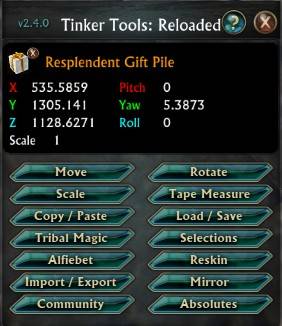
- Move, Rotate, Scale - Precise control over hundreds of items at once
- Copy/Paste - Clone items or groups with customizable offsets for rows, grids, spirals, and more
- Load/Save Sets - Store and reuse complete structures across dimensions
- Mirror - Create perfect reflections across X, Y, or Z axes with automatic alignment
- Reskin - Replace building block appearances while preserving position and rotation
- Absolutes - Copy exact position, rotation, and scale between unrelated items
✔ Advanced Selection Tools
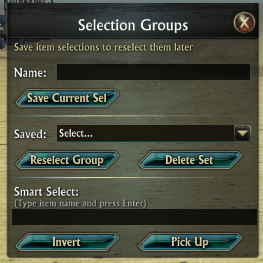
- Smart Select - Select multiple items by name using intelligent matching
- Saved Selections - Store and reload complex item groups instantly
- Invert Selection - Select everything except your current selection
✔ Helper Tools
- Tape Measure - Calculate exact spacing and offsets for perfect alignment
- Alfiebet - Build words and signs using standard building blocks
- Tribal Magic - Fly freely through your dimension for easy high-altitude building
✔ Safe Mass Item Pickup
- New draggable "Pick Up" button with live item-count display
- Safely remove 200+ selected items at once without disconnecting
- Tested successfully with picks of 800 items in a single action
✔ Sharing & Organization
- Import/Export - Share sets via text or transfer between accounts using files
- Community Links - Quick access to dimension building resources and RIFT communities
- Alphabetized set lists with search functionality
Stability & Performance
✔ Critical Fixes
- Fixed disconnect when picking up large selections
- Fixed game crash when zoning out with Tinker Tools open
- Fixed "Bag Move Failure/Unknown Error" for single-item stacks in bank
- Fixed Alfiebet text-building functionality
✔ Improved Item Logic
- Addon now checks bags first, then bank, preventing load/paste failures
- Gracefully handles missing items instead of failing entire operations
- All existing Saved Variables auto-import from earlier versions
✔ Ongoing Development
This project is actively maintained with regular updates, UI refinements, and bug fixes based on community feedback. The goal is long-term stability, improved performance, and compatibility with modern RIFT.
Notes for Users of the Original Tinker Tools
This is a continuation, not a replacement. All original workflows still function the same way, and all saved sets, item data, and UI settings are preserved. The intent is to keep the addon alive and stable while steadily improving reliability and adding optional features that enhance—but never interfere with—existing builds.