API Browser
- By
Provides a Wiki-like browser for the API documentation of Rift and other third party libraries.
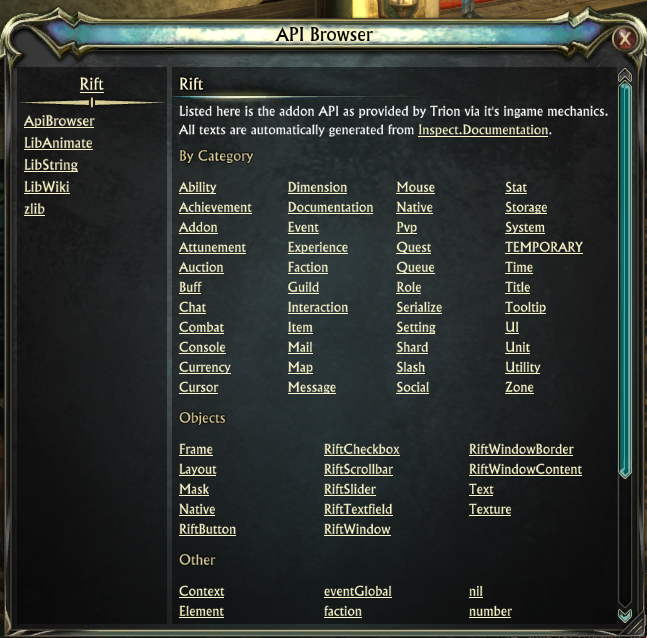
Shows the main window of API Browser with the Rift index page and other libraries in the sidebar.
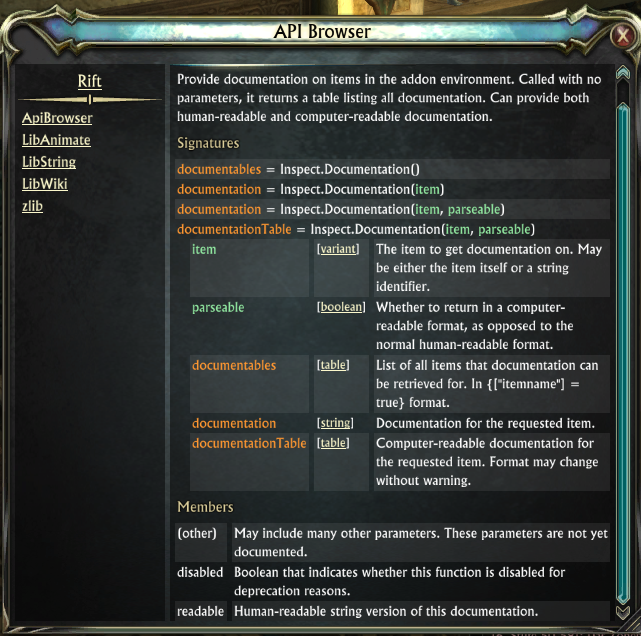
Shows an example page with a function signature.
Description
General Information
ApiBrowser acts as a central area for gathering Rift related API documentation. It is however not limited to the in-game Rift API and supports extension by other third party libraries or tools for which documentation can be provided by their authors.
LibWiki is the actual powerhorse behind building, linking and displaying the individual pages. ApiBrowser provides the content and a UI for it.
By default it comes shipped with the documentation for Rift (using Inspect.Documentation), zlib and LibAnimate, LibString, LibWiki since it depends on those.
Slash Commands
/api
Open the ApiBrowser window showing the current page (by default the Rift documentation index)/api path
Open the ApiBrowser window and navigate to the documentation for the given Rift page/api library path
Open the ApiBrowser window and navigate to the documentation for the given page inside the given library.
Both path and library are case sensitive and must match exactly.
Extensibility
ApiBrowser is self-documenting as it provides the documentation for its own API inside itself.
In order for your library to support this system make ApiBrowser an optional dependency of your library and then invoke the necessary functions to add your library documentation to ApiBrowser. The easiest way is to structure your documentation the same way Rift does and use ApiBrowser.AddLibraryWithRiftLikeCatalogIndex.
Tipp: Use (one or more) separate files containing your documentation and check for the existence of the global "ApiBrowser" object at the beginning of the file. If it doesn't exist "return" from the file so normal end users are spared the unnecesary loading time and memory consumpation. You can check ApiBrowser/doc/Example.lua for an idea of how such a typical documentation source file might look like.
The API Browser Team


Owner