Arbiter Loot Council
- By
Loot council for WoW Forever: the loot master starts a session, raiders answer, the council votes, one click awards the item and queues the trade. Multi-item sessions, custom buttons, guild ranks.
alc-council.png
alc-history.png
alc-loot.png
alc-response (2).png
Skärmbild 2026-10-24 110941.png
Skärmbild 2026-10-24 110948.png
Skärmbild 2026-10-24 110954.png
Skärmbild 2026-10-24 111007.png
Skärmbild 2026-10-24 111021.png
Skärmbild 2026-10-24 111041.png
Description
Arbiter Loot Council
Run a loot council in WoW Forever without the spreadsheet. ALC takes an item from the boss's corpse to the raider who deserves it: the loot master starts a session, every raider answers in a small window, the council votes, one click awards the item, and the trade is queued and logged.
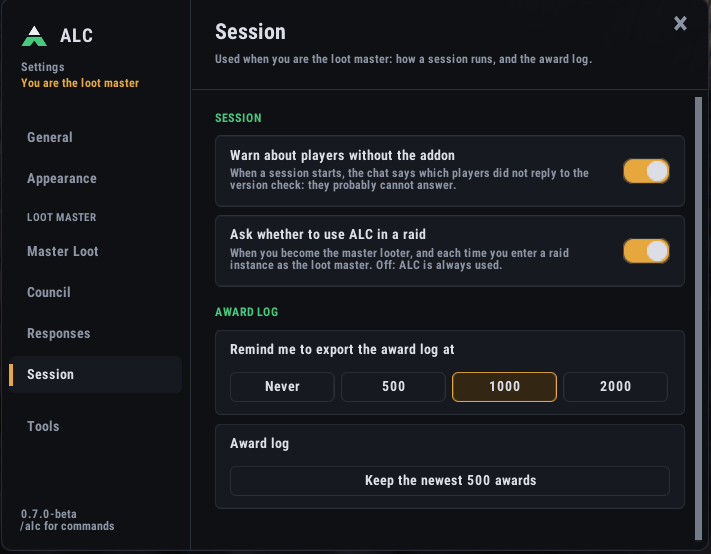
Beta (0.7.0-beta). ALC is being tested in real raids. Everybody in the raid who should answer or vote should have the same version. When a session starts, ALC tells the loot master in chat who did not reply to the version check, and
/alc versionsshows who has which version.
How a loot decision works in ALC
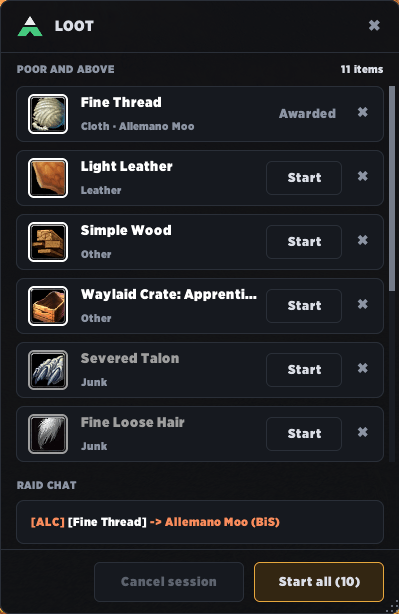
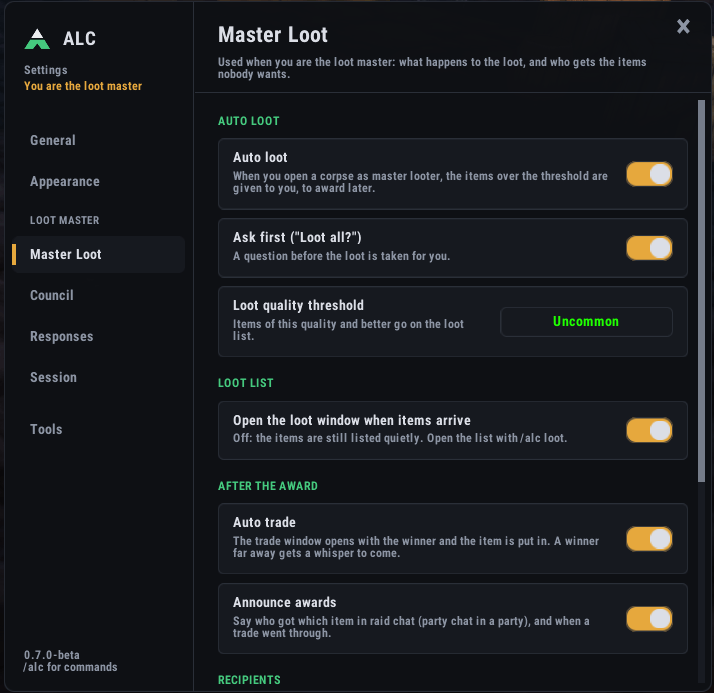
- Loot is detected. When the loot master opens a corpse, items at or above your quality threshold (epic by default) go into the Loot window. With auto loot on, ALC first asks "Loot all N item(s) for yourself?" so the items are in the loot master's bags before the session. You can also add an item by hand with
/alc add [item link]. - The loot master starts a session for one item, or with Start all for every item in the list in one session.
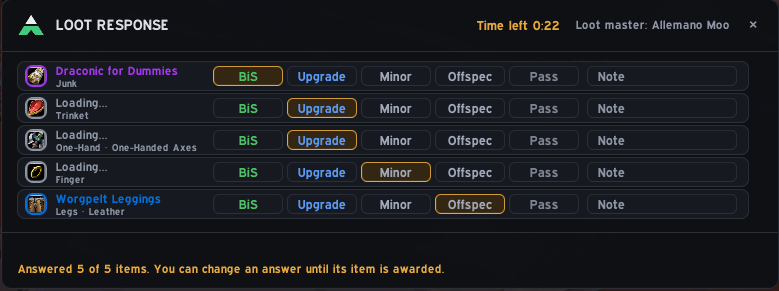
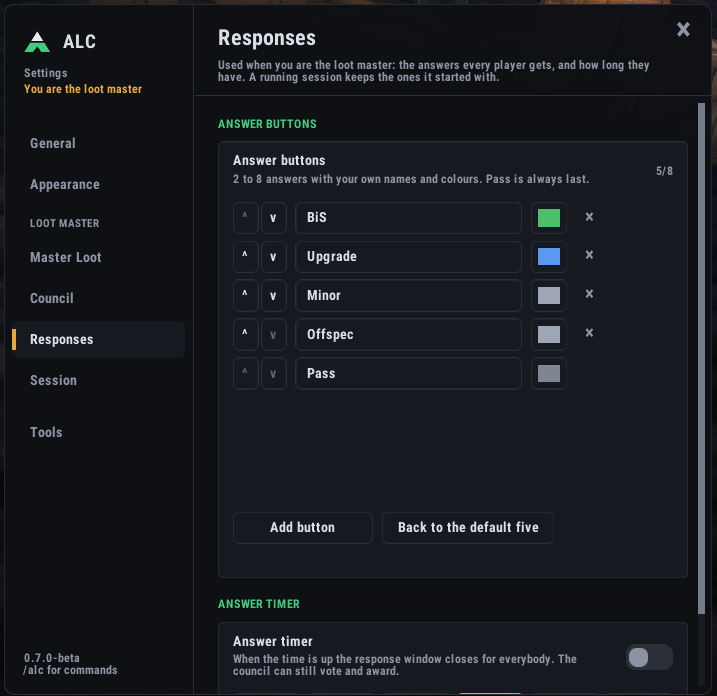
- Every raider answers in a small Loot Response window, one row per item: BiS, Upgrade, Minor, Offspec or Pass, with a short note if they want ("replaces my trinket"). A time bar shows how long is left to answer. You can change the buttons: 2 to 8 answers with your own names and colours.
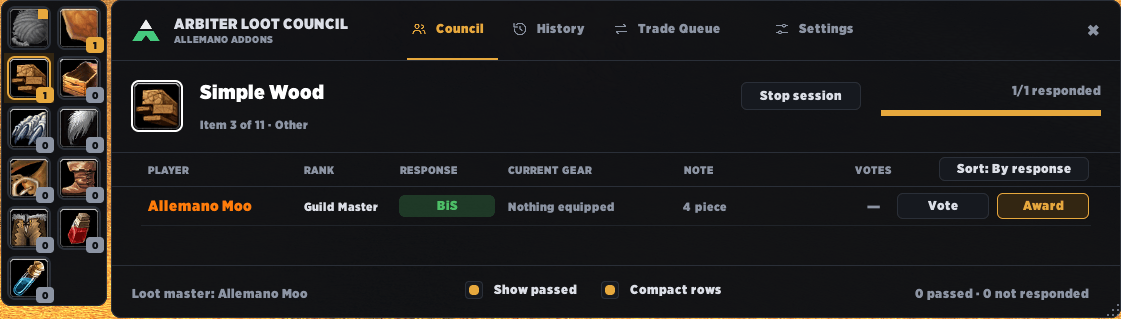
- The council votes. The council window shows every candidate with their answer, note, guild rank, what they already won lately, and the equipped items the new one would replace (sent with the answer, so the council can compare). Players who have not answered yet are listed last as "Waiting". Vote with one click; the votes are shared with the council as they come in.
- The loot master awards the item to the winner, to the disenchanter or to the guild bank. With auto trade on, the trade window opens with the winner and the item is put in for you. Items that still have to be handed over wait in the Trade Queue (
/alc trades), with the time left to trade a Bind-on-Pickup item. - Everything is logged. The History tab (
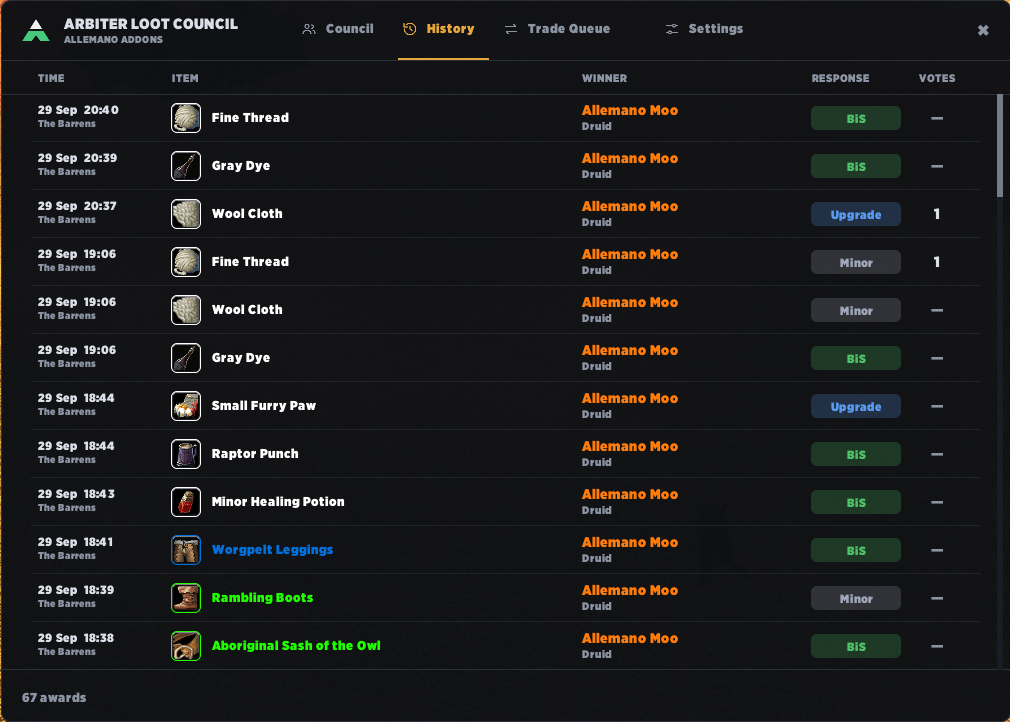
/alc history) keeps who got what, with which answer, and what became of it afterwards.
Example: a boss drops three items. You click Start all, the raid answers within a minute, the council goes through the item strip on the left of the window one item at a time, and you award each one. The session ends with the last award.
For the council
- Arbiter Context. Click a candidate and a box opens beside the window with everything about them in one place: the full note, what they wear in that slot and the item level difference, whether they have already won loot in the same slot (or this very item), and their loot history marked TONIGHT or this week.
- Arbiter Compare. Ctrl-click a second candidate and the box shows the two side by side: answer, roll, votes, what they wear, the upgrade, loot tonight and in 7 or 30 days. The better roll, more votes and the bigger upgrade are shown in green.
- Recent awards on every row: what each player has won in the last 7, 14, 30 or 90 days (hover for the list).
- Random rolls (optional): the loot master can add a roll to every answer, shown as its own column.
- Right-click menu on a candidate: vote, award, change answer, remove (counts as a pass). Show passed brings the passes back.
- Only the council sees the candidates, the votes and the history.
For the loot master
- Multi-item sessions with an item strip (item icons) on the left of the council window. Each item is awarded on its own.
- Undo award for 90 seconds after an award; the trade queue follows. Pause / Resume a session, and Stop session asks for a second click.
- Disenchant and Guild bank buttons next to the award: the item goes to the character you set, through the trade queue, and is logged as Disenchant or Guild bank.
- Auto trade: stackable items are split so only one goes into the trade, and a winner who is too far away gets a whisper to come.
- Items given back: when a winner trades an item back to you, the Loot window offers to put it in the list again.
- Answer timer (30 to 300 seconds) that closes the answer window by itself.
- Announce awards in raid or party chat (can be turned off).
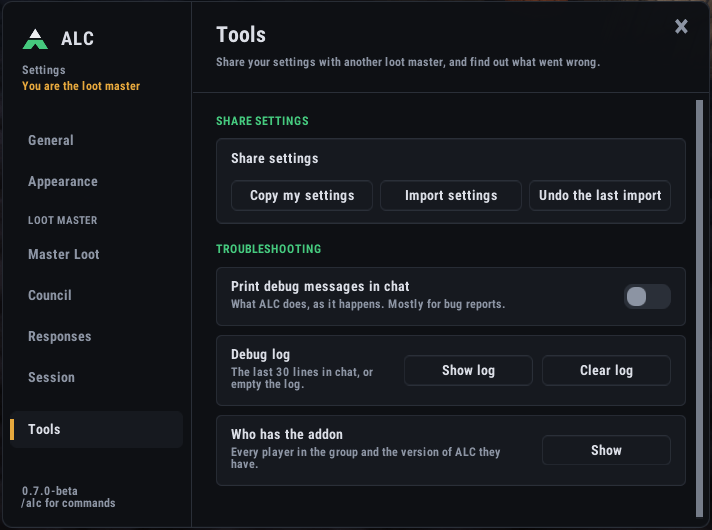
- Share your settings: another player takes over as loot master for a week? Settings > Session > Share settings > Copy my settings gives a line of text (council, threshold, answer buttons, timer, disenchanter, guild bank and more) to send on Discord. They paste it under Import settings, see exactly what would change, and apply it, with Undo if they change their mind. Windows, font and personal choices are not part of it.
- Recovery: if the loot master or a raider reloads the UI during a session, ALC gets the session back from the loot master.
For every raider
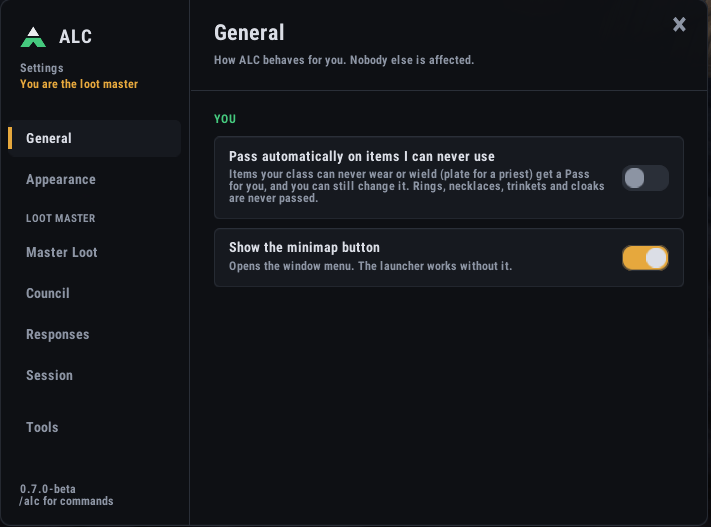
- Auto-pass (optional, off by default): Settings > Everyone, "Pass automatically on items I can never use". Plate for a priest or a two-handed sword for a rogue gets a Pass for you, marked "Auto-passed", and you can still change it. Rings, necklaces, trinkets and cloaks are never passed.
- Answered rows stand out with a bar and a tint in the colour of your answer, so with many items you see at a glance what is left.
- Item tooltips say who won it: for a week, an awarded item's tooltip (bags, chat links, the loot window) says "ALC: awarded to X (BiS)" and what became of it.
History that follows the item
The History tab says what happened to every award: Awaiting trade, Delivered, Returned (the winner gave it back, so it no longer counts in Recent awards) or Traded to X (the winner traded it on; the council's winner stays the winner). Search by date, filter by 7 to 90 days, export to CSV text, and clear a date with a backup you can restore. The loot master can Sync to council with one button, and a council member who joins a session fetches the latest awards by itself, so there are no gaps.
Soft reserve too
Install Arbiter Soft Reserve (it needs ALC) and every item in the Loot window gets two buttons: Start LC (green, a loot council session) and Start SR (purple, a soft reserve session with rolls). Without it, ALC looks and works as described above.
Try it alone
/alc test starts a session with made-up players (/alc test [items] [players]), so you can practise the whole flow before raid night.
Settings
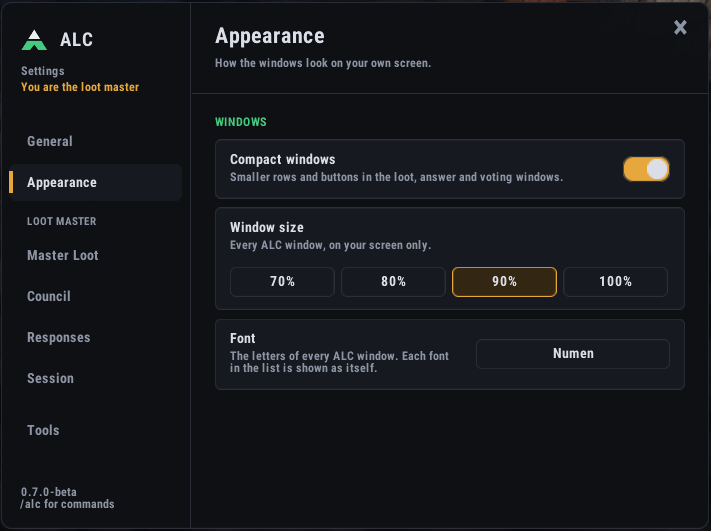
/alc settings, the minimap button or the launcher. Five tabs: Everyone (window size, font, auto-pass), Council, Loot (council list, loot threshold, auto loot and trade, disenchanter, guild bank), Session (rolls, answer timer, recent awards, the award log, share settings) and Buttons (your own answers).
Commands
/alclists every command,/alc menuopens the window menu/alc settingsopens the settings/alc council add <First Last>adds a council member/alc add [item link]adds an item to the loot list,/alc lootopens the Loot window/alc voteopens the council window,/alc pausepauses or resumes the session/alc deand/alc bankaward to the disenchanter or the guild bank/alc historyshows the awards,/alc tradesthe items still to be traded,/alc resultsthe rolls/alc profilecopies, imports or undoes shared settings/alc versionsshows who in the group has the addon and which version/alc debug logfor troubleshooting
Installing manually (WoW Forever)
ALC is made for WoW Forever (interface 16001). If the CurseForge app does not install it into the right folder, download the file from the Files tab and unzip it so that the folder is World of Warcraft\_classic_beta_\Interface\AddOns\ArbiterLootCouncil. Restart the game completely (a /reload does not find a new addon). Everybody in the raid who should answer needs the addon.
Something wrong?
Tell us on Discord (https://discord.gg/BvFrTKUAst) what you did, with the lines from /alc debug log, any error text, and a screenshot if something looks wrong. With Allemano Hub installed, its Errors page makes a report you can copy in one go. Guides for loot masters, raiders and the council are at https://allemano.org/guides/alc.
Part of Allemano Addons. Uses the Ace3 libraries, ChatThrottleLib and LibStub (embedded), which have their own licenses.
Arbiter Loot Council Team