WoW Forever Japanese (日本語化)
- By
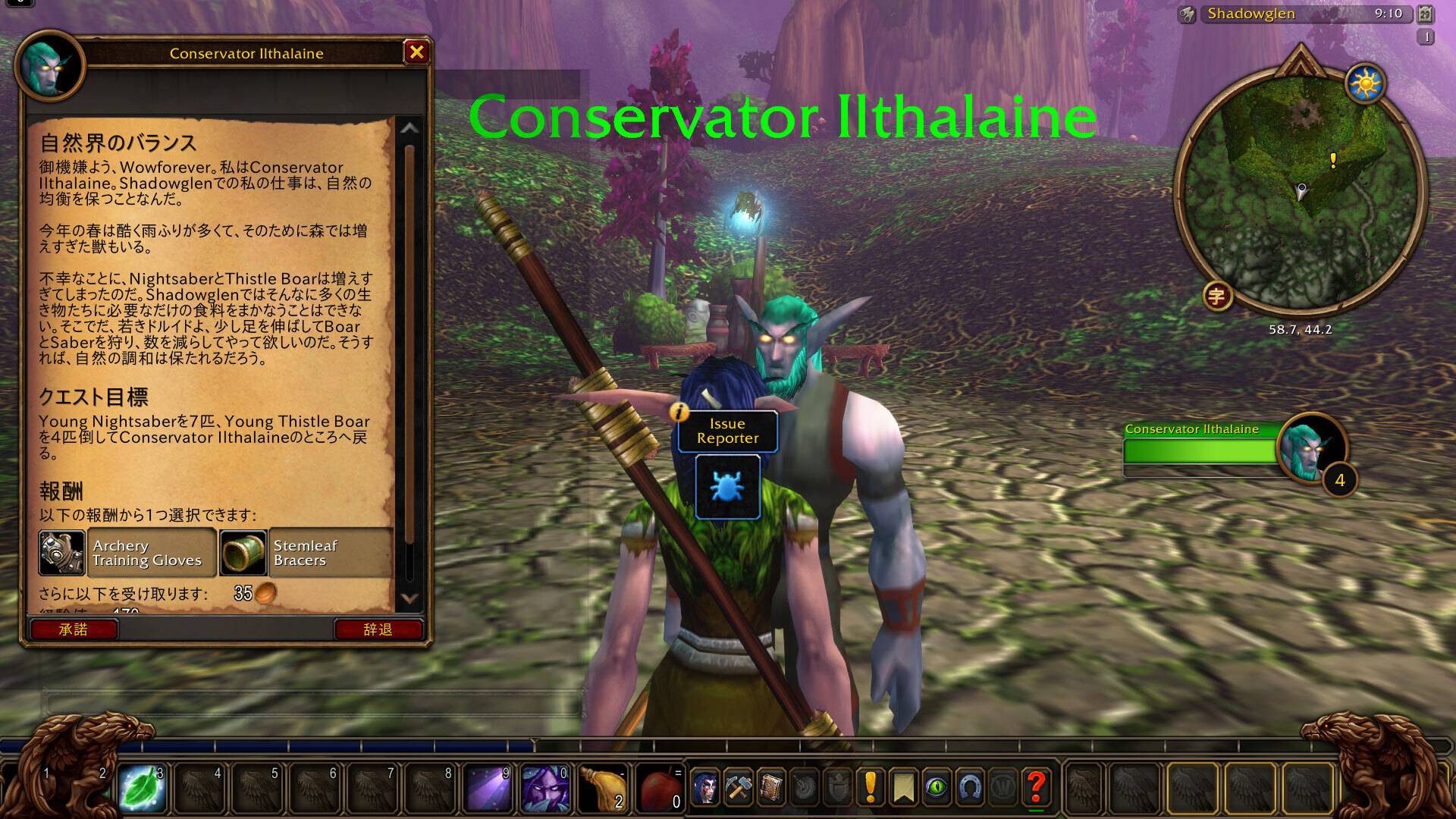
Play WoW Forever in Japanese: quests, NPC dialogue, tooltips and menus, with the English one key away.
01-quest-window-japanese.jpg
02-hold-alt-for-english.jpg
03-popup-dictionary.jpg
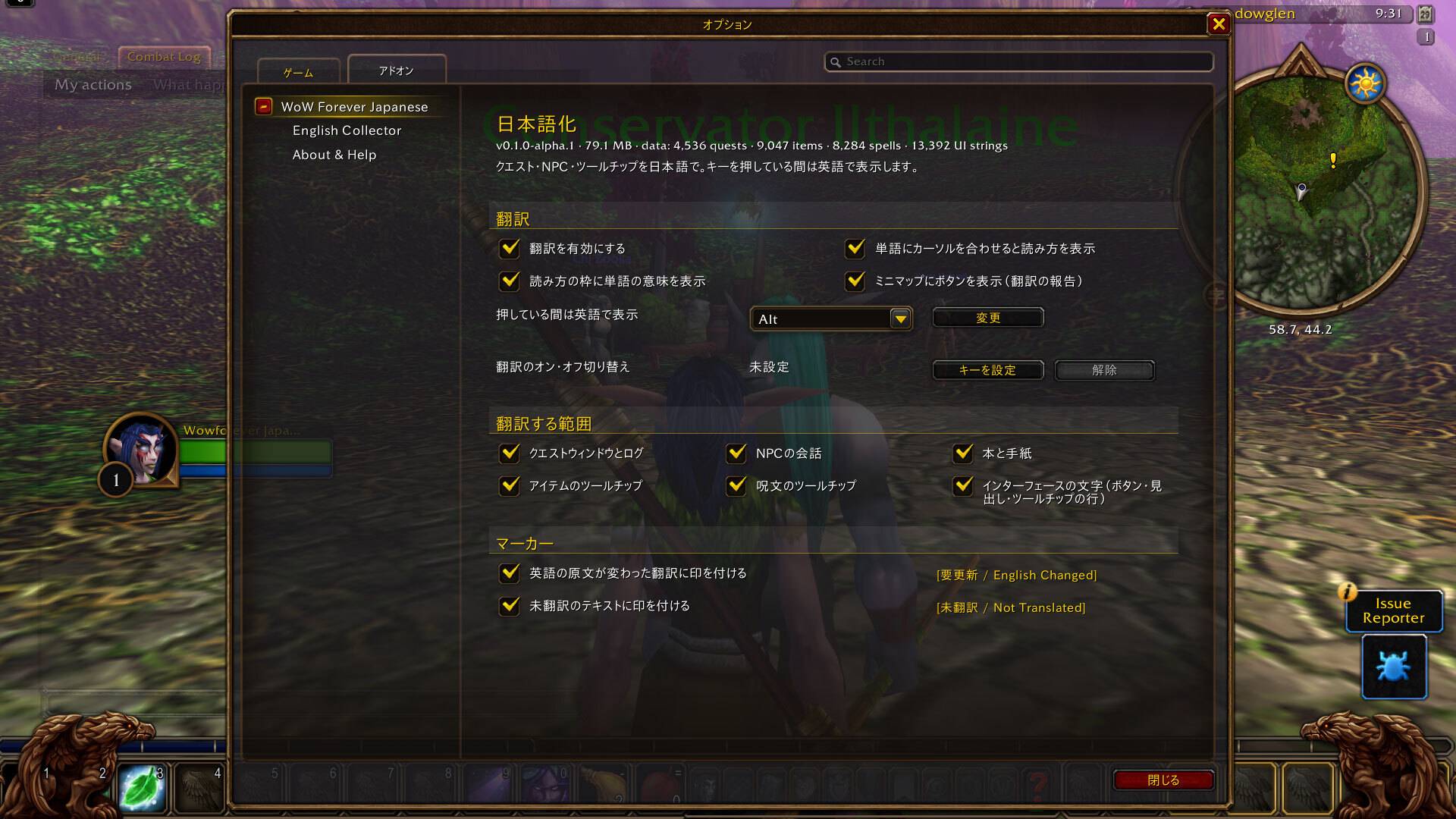
04-settings.jpg
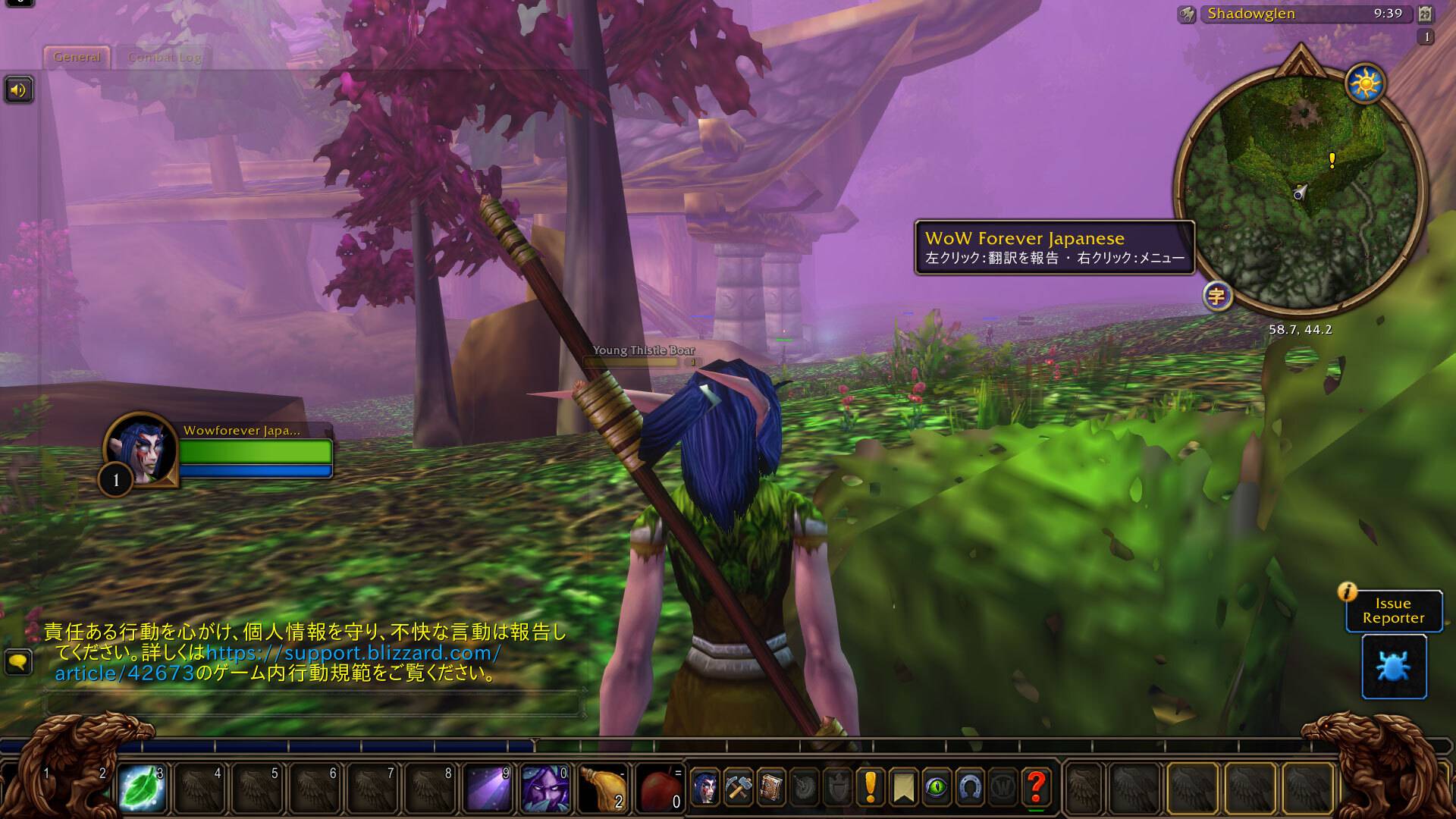
06-minimap-button-and-world.jpg
Description
日本語の説明は下にあります。
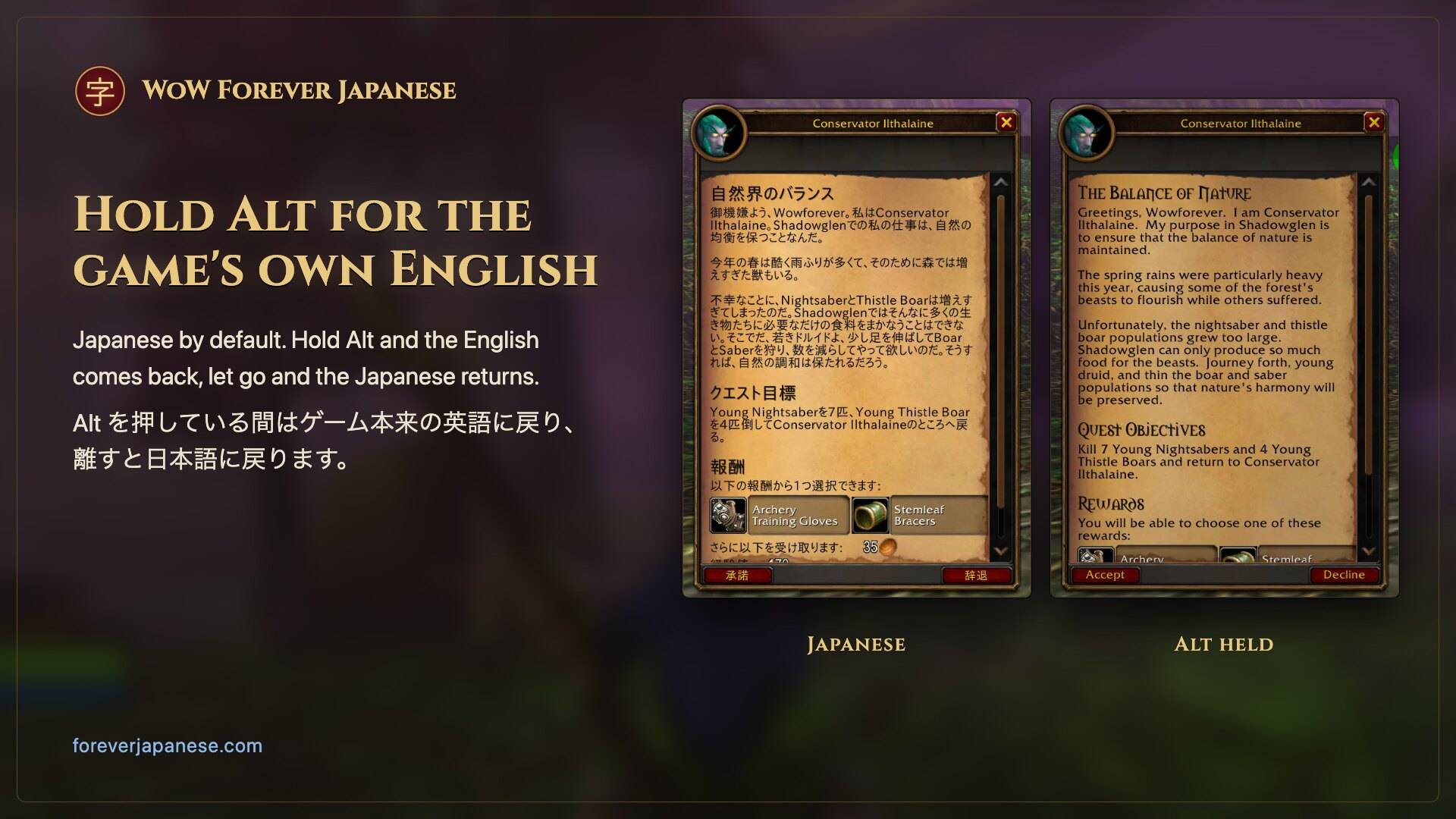
WoW Forever Japanese shows World of Warcraft: Forever in Japanese. The game's own English is always one key away: hold Alt and it comes back, let go and the Japanese returns. It is for players who read Japanese, and for learners who want to play in it.
Website: https://foreverjapanese.com (screenshots and a short guide to how it works).
What it translates
- Quests: the quest window, the quest log and the objective lines in the tracker.
- NPC dialogue: the talk window, speech bubbles, NPC lines in chat and boss emotes.
- Books, letters and plaques.
- Item and spell tooltips, and buff and debuff text, with the game's live numbers filled in.
- The interface: windows, labels, menus, popups and messages.
In numbers: 4,637 quests, 10,933 NPC dialogue lines, 923 book pages, 209 letter pages, 9,124 item tooltips, 19,977 spell tooltips, 15,843 UI.
Names of people, places, creatures, items and spells stay in English everywhere, so you can still talk with other players, read guides and search by name.
Popup dictionary
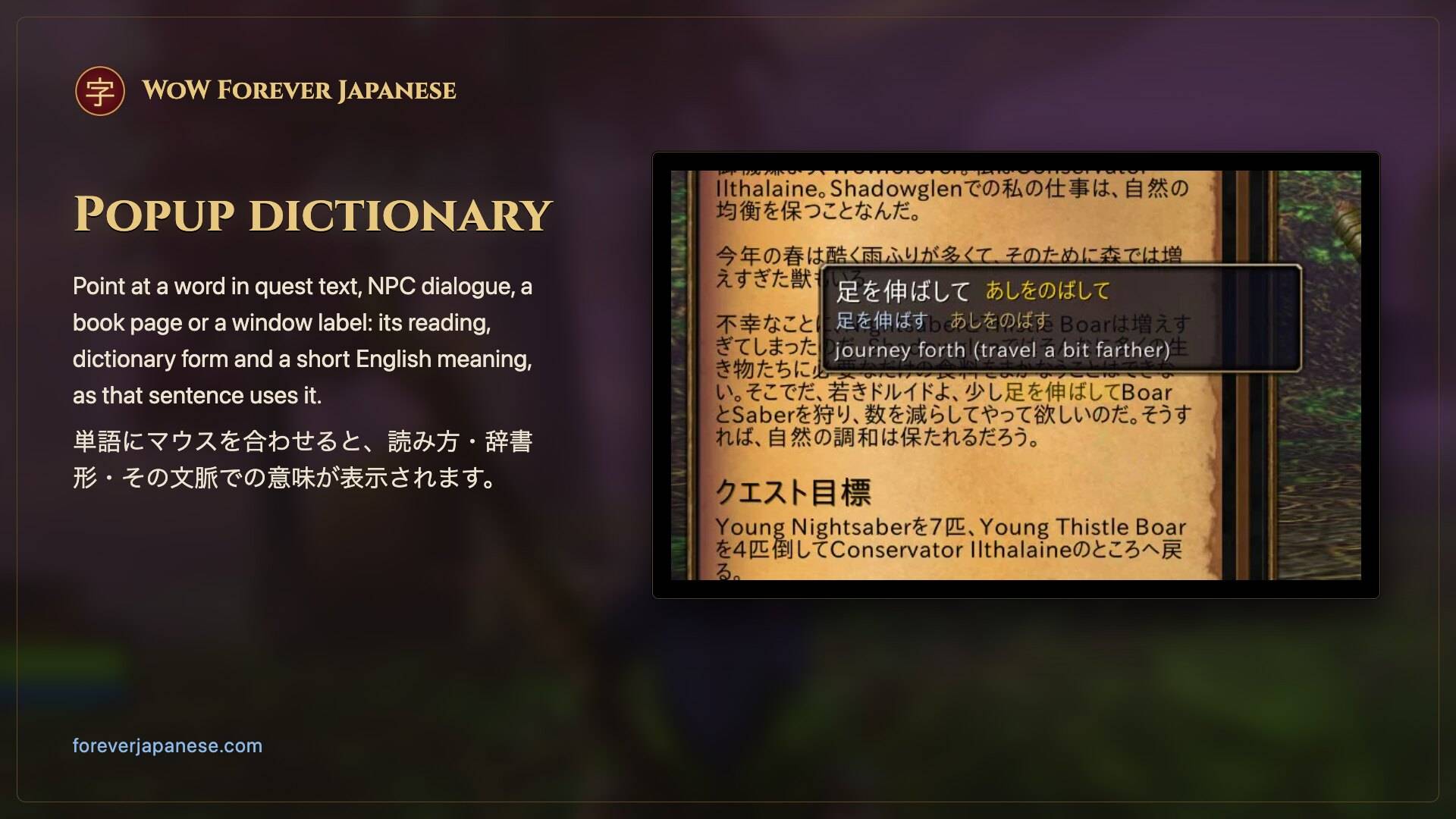
Point at a Japanese word in quest text, NPC dialogue, a book page or a window label, and a small popup shows its reading, its dictionary form and a short English meaning of the word as that sentence uses it. Nothing is drawn until the pointer is on a word.
Settings
Esc > Options > AddOns, or type /wfj config. Turn translation on or off, for everything or per area; change the key you hold for English; set a key that switches translation on and off; turn the markers ([未翻訳 / Not Translated], [要更新 / English Changed]), the popup dictionary and the minimap button on or off.
What the addon records
When the game shows English the addon has no translation for, the addon notes that English in its saved settings file, so it can be translated later. It saves your class and race, because some game lines change depending on them. It never saves your character's name, account, realm or location. Nothing is sent anywhere unless you send it yourself. You can turn it off under English Collector in the settings.
To send what it noted, click Send English on that page (or type /wfj collector send). Copy the link the window shows, open it in your web browser and submit the GitHub issue form it opens, already filled in; then click I sent it in the game. If the window shows a second box, paste that text into the form too. When the window says the text is too long even to paste, it asks you to zip the saved file and drag it into the same form (type /reload first if you played since logging in).
Install
Install it with the CurseForge app (make sure your Forever install is selected), or unzip the download into your Forever client's Interface/AddOns folder. World of Warcraft: Forever only; no other addons or libraries needed.
Report a translation problem
Click the 字 minimap button (or type /wfj fix), pick the line you just read, choose what is wrong, and paste the report into the form on GitHub: https://github.com/zyaga/wow-forever-japanese/issues
FAQ
Why is a buff's tooltip sometimes in English? There are two cases.
- In combat. The game hides from addons which buff an icon under the minimap is, so its tooltip stays in the game's English until the fight ends. Then it is Japanese again.
- On the target frame. Buffs and debuffs there always stay English: the game draws their tooltip in a window no addon is allowed to touch.
Your own buffs under the minimap and those on party frames are Japanese out of combat. Spell tooltips on your action bar stay Japanese in combat, the cooldown countdown too.
Why are names still in English? On purpose, so what you read matches what other players say and what guides call things.
What do the markers mean? [未翻訳 / Not Translated] means the line has no translation yet and is shown in the game's English. [要更新 / English Changed] means the English changed after the line was translated.
Both can be turned off in the settings.
Which game does it work with? World of Warcraft: Forever only.
Credits
The hand-written translations are the work of the Japanese translators of WoWJapanizer, QuestJapanizer and CraftJapanizer_Quest, listed by name in ATTRIBUTION.md, which ships inside the addon. Lines those projects did not cover are machine-drafted and marked as such in the project's data.
License
GPL-2.0-or-later. Website: https://foreverjapanese.com. Source and translation data: https://github.com/zyaga/wow-forever-japanese. The bundled font is IPA UI Gothic, under the IPA Font License v1.0.
This addon is made by fans. It is not affiliated with or endorsed by Blizzard Entertainment. Game screenshots: ©2004 Blizzard Entertainment, Inc. All rights reserved. World of Warcraft, Warcraft and Blizzard Entertainment are trademarks or registered trademarks of Blizzard Entertainment, Inc. in the U.S. and/or other countries.
日本語
WoW Forever Japanese は、World of Warcraft: Forever を日本語で遊べるようにするアドオンです。Alt キーを押している間だけゲーム本来の英語が表示され、離すと日本語に戻ります。日本語で遊びたい方にも、日本語を勉強中の方にもおすすめです。
ウェブサイト: https://foreverjapanese.com (スクリーンショットと使い方の紹介)
翻訳される内容
- クエスト: クエストウィンドウ、クエストログ、トラッカーの目標
- NPC の会話: 会話ウィンドウ、吹き出し、チャットに流れる NPC のセリフ、ボスのエモート
- 本・手紙・銘板
- アイテムと呪文のツールチップ、バフ・デバフの説明(数値はゲームの実際の値が入ります)
- インターフェース: ウィンドウ、ラベル、メニュー、ポップアップ、メッセージ
数で見ると: クエスト 4,637、NPC の会話 10,933 行、本 923 ページ、手紙 209 ページ、アイテムのツールチップ 9,124、呪文のツールチップ 19,977、UI 15,843。
人物・地名・モンスター・アイテム・呪文の名前はすべて英語のままです。ほかのプレイヤーとの会話や、攻略情報の検索にそのまま使えます。
ポップアップ辞書
クエスト本文、NPC の会話、本のページ、ウィンドウのラベルで日本語の単語にマウスを合わせると、読み方・辞書形・その文脈での短い英語の意味が小さなポップアップに表示されます。マウスを合わせるまでは何も表示されません。
設定
Esc > オプション > AddOns、または /wfj config で開きます。翻訳のオン・オフ(全体または項目ごと)、英語を表示するキーの変更、翻訳を切り替えるキーの設定、マーカー([未翻訳 / Not Translated]、[要更新 / English Changed])・ポップアップ辞書・ミニマップボタンの表示を切り替えられます。
アドオンが記録するもの
ゲームに表示された英語のうち、アドオンに日本語訳がないものは、あとで翻訳できるようにアドオンの設定ファイルに記録されます。クラスと種族は保存されます。ゲームの文章の一部がそれによって変わるためです。キャラクター名、アカウント、レルム、位置は保存されません。自分で送らない限り、どこにも送信されません。設定の 英語テキスト収集 でオフにできます。
記録した英語を送るには、そのページの 英語を送る をクリックします(/wfj collector send でも同じです)。ウィンドウに表示されたリンクをコピーしてブラウザで開き、入力済みで開く GitHub の Issue フォームを送信してから、ゲーム内で 送信しました をクリックします。ウィンドウに 2 つ目の欄があるときは、その文字列もフォームに貼り付けてください。貼り付けられないほど長いとウィンドウに表示されたときは、保存ファイルを zip にして同じフォームにドラッグするよう案内されます(ログイン後に遊んだ場合は先に /reload してください)。
インストール
CurseForge アプリでインストールしてください(Forever のインストール先が選ばれていることを確認)。手動の場合は、ダウンロードした zip を Forever クライアントの Interface/AddOns フォルダに展開します。World of Warcraft: Forever 専用です。ほかのアドオンやライブラリは不要です。
翻訳の問題を報告する
ミニマップの 字 ボタン(または /wfj fix)を押し、直前に読んだ行を選んで何が問題かを選び、表示された報告文を GitHub のフォームに貼り付けてください: https://github.com/zyaga/wow-forever-japanese/issues
よくある質問
バフのツールチップが英語になることがあるのはなぜ? 理由は二つあります。
- 戦闘中。 ゲームはミニマップの下のアイコンがどのバフなのかをアドオンに隠すため、そのツールチップは戦闘が終わるまでゲームの英語のままです。戦闘が終わると日本語に戻ります。
- ターゲットフレーム。 ここに表示されるバフとデバフは常に英語です。ゲームがそのツールチップを、アドオンが触れることのできないウィンドウに表示するためです。
ミニマップの下の自分のバフとパーティーフレームのバフは、戦闘外なら日本語で表示されます。アクションバーの呪文のツールチップは戦闘中も日本語で、クールダウンの残り時間も表示されます。
名前が英語のままなのはなぜ? 意図した仕様です。ほかのプレイヤーの会話や攻略情報と同じ名前のまま読めます。
マーカーは何を表している? [未翻訳 / Not Translated] はまだ翻訳がなく、ゲームの英語のまま表示されている行です。[要更新 / English Changed] は翻訳のあとで英語の原文が変わった行です。
どちらも設定で非表示にできます。
どのゲームで使える? World of Warcraft: Forever 専用です。
クレジット
手書きの翻訳は、WoWJapanizer、QuestJapanizer、CraftJapanizer_Quest の翻訳者の皆さんによるものです。翻訳者の名前はアドオンに同梱の ATTRIBUTION.md に記載しています。これらのプロジェクトが扱っていない行は機械で下訳したもので、データ上でその旨を記録しています。
ライセンス
GPL-2.0-or-later。ウェブサイト: https://foreverjapanese.com 。ソースコードと翻訳データ: https://github.com/zyaga/wow-forever-japanese 。同梱のフォントは IPA UI ゴシック(IPA フォントライセンス v1.0)です。
このアドオンはファンが制作したものです。Blizzard Entertainment とは関係がなく、承認も受けていません。ゲーム画面: ©2004 Blizzard Entertainment, Inc. All rights reserved. World of Warcraft、Warcraft、Blizzard Entertainment は、米国およびその他の国における Blizzard Entertainment, Inc. の商標または登録商標です。
WoW Forever Japanese (日本語化) Team