


HexReforger Save Editor
- By
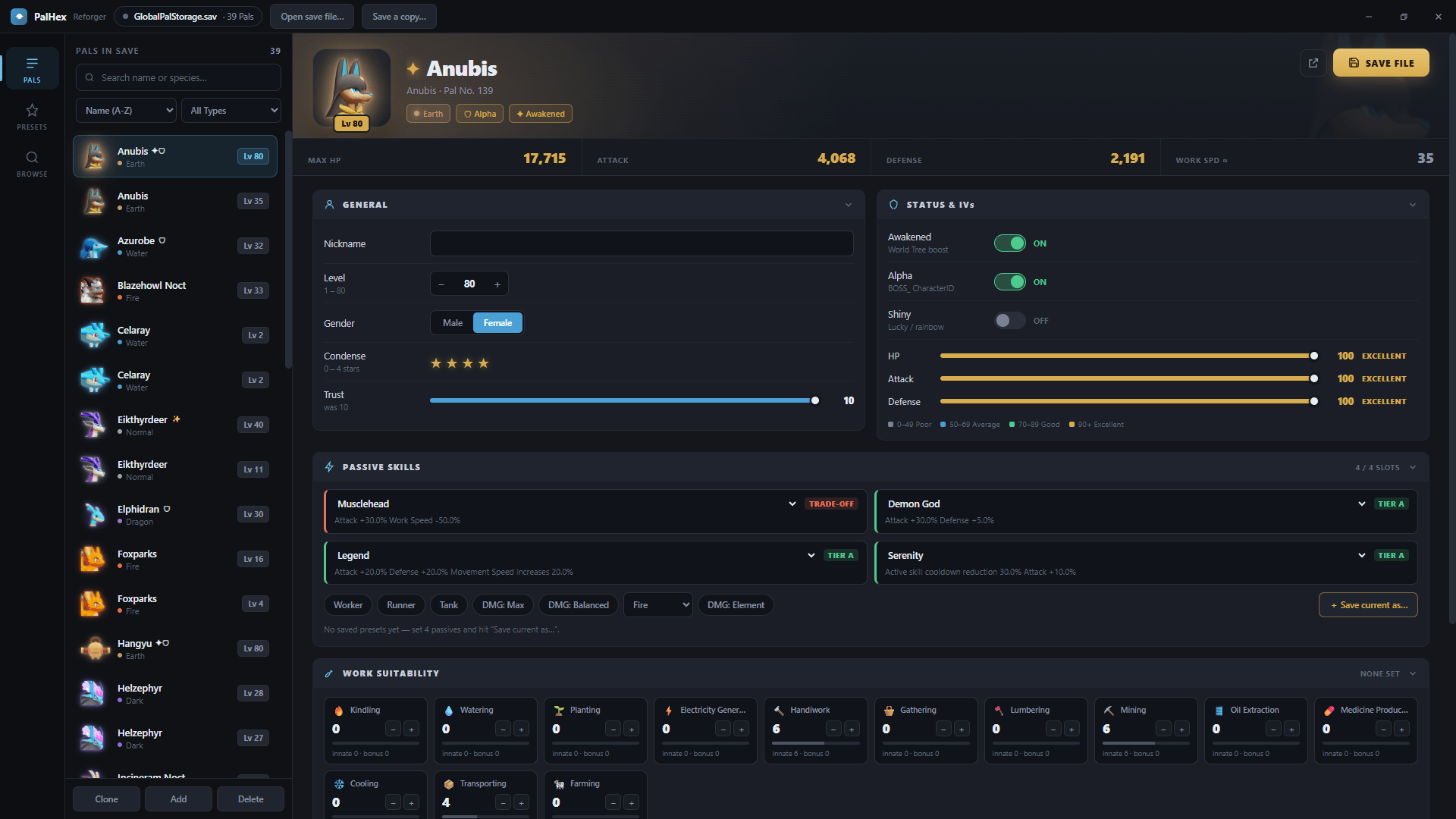
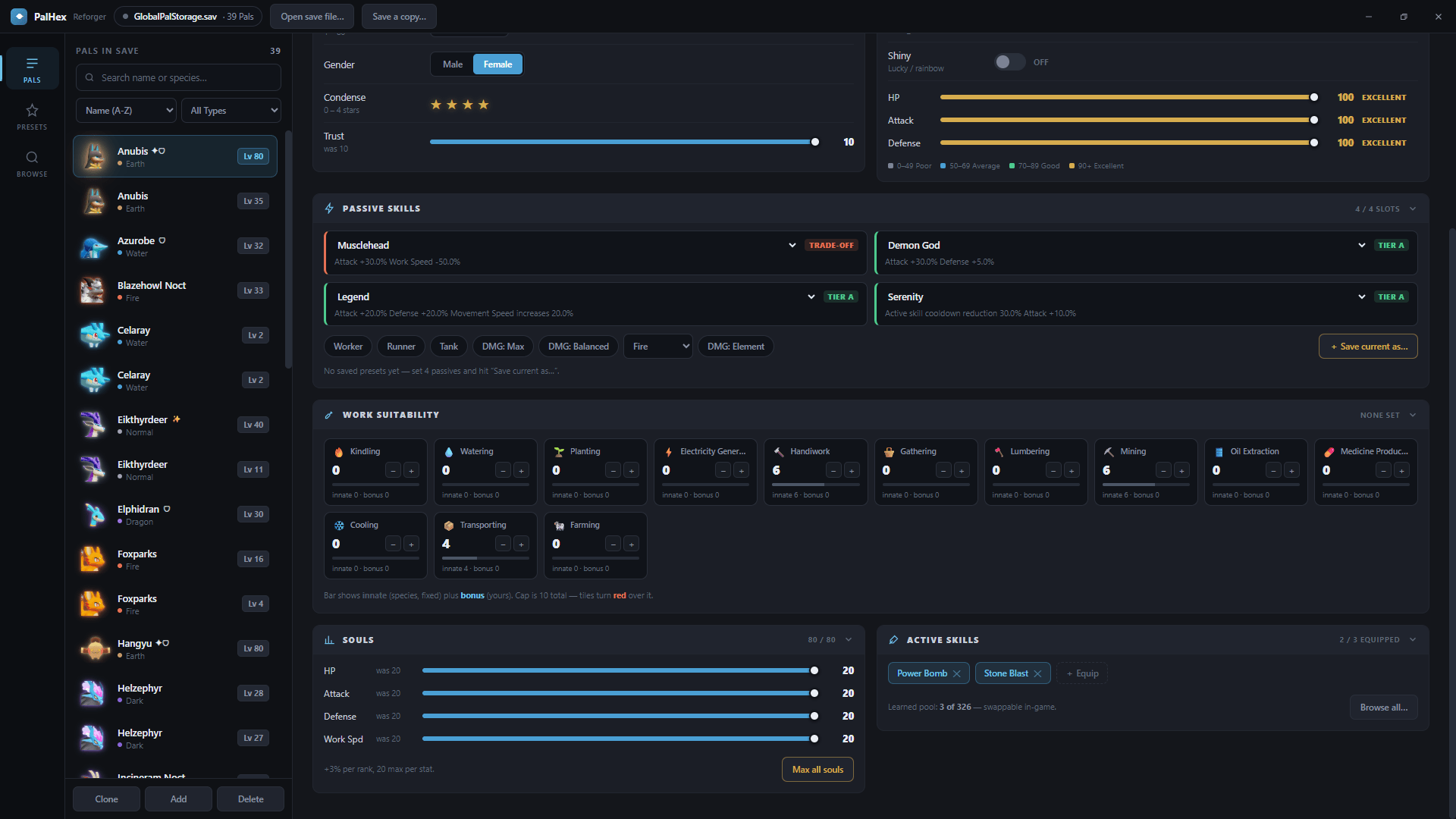
Screenshot 2026-10-06 160424.png
Description
HexReforger Save Editor
An external save editor Palworld. It is not an in-game mod. It runs on its own, with Palworld closed, and edits your .sav files directly. Don't put it in your game or mods folder.
What it does
PalHexReforger is a modern take on the classic PalEdit idea. Open your save, pick a Pal, change what you want, and save. It only touches your save files, never the game, and it makes a .bak backup automatically before the first write.
Features
Pal editing
- Nickname, level (1-80), gender, and IVs
- Condense stars (0-4) and Trust (0-10)
- Awakening toggle
- Alpha and Shiny toggles, mutually exclusive as in-game
- Souls for HP, Attack, Defense, and Work Speed (0-20 each), plus a quick Soul Injector popup
Skills
- 4 passive slots with the current passive list (421), each showing what it does
- Equipped and learned attacks from the current list (326), filterable by element
- Searchable "Browse All" lists for passives and attacks, so you can plan a build first
Builds and presets
- One-click passive presets: Worker, Runner, Tank, DMG: Max, DMG: Balanced, and per-element damage
- Save your own passive combos and reuse them on any Pal
Work Suitability
- Edit bonus ranks for all 13 work types
- A "loaded as" vs "now" comparison, and a warning when a change would exceed the game's cap of 10 per work type
Live stat preview
Max HP, Attack, and Defense update as you change level, IVs, Condense, Souls, Awakening, or passives, so you can see the effect before you save. The Work Speed figure is an estimate.
Pal management
- Clone any Pal
- Add a new Pal of any of the 408 species
- Multi-select delete
- Sort by name, Pal No., level, or Awakened / Alpha / Shiny first
- Filter by element type
- Real in-game Pal names instead of internal IDs
Save file support
Level.savGlobalPalStorage.sav*_dps.sav- The newer Oodle-compressed (PlM) saves that older editors can't open
- Edits are always written back in the older zlib format, which the game loads fine
Experimental: Add Merchant
You can add merchant NPCs (Wandering Merchant, Black Marketeer, Pal Merchant, Weapons Dealer, and others) to your storage. They show up in the box, but the game currently rejects withdrawing them as invalid. Treat this as a work in progress, and don't expect a working shop yet.
How to use
- Close Palworld completely.
- Back up your save folder. The editor makes a
.baktoo, but keep your own. - Open PalHexReforger and choose your save file.
- Select a Pal, edit it, then click Save.
- Launch Palworld and check your Pals.
Where saves live (Steam): %LOCALAPPDATA%\Pal\Saved\SaveGames\<SteamID>\<WorldID>\
If edits seem to disappear, temporarily turn off Steam Cloud sync for Palworld while you edit.
Requirements
- Windows
- Palworld save files (Steam or dedicated server)
Known limitations
- Work Speed in the stat preview is an estimate and doesn't include Work Speed Souls.
- Partner Skill isn't shown.
- Merchants can't be withdrawn in-game yet (see above).
- Always keep your own backups. Editing saves carries risk, and you use this tool at your own risk.
Credits
- palworld-save-tools for parsing and writing the save format
- ooz for decompressing Oodle-compressed saves (GPLv3)
- palworld-save-pal as the reference for the stat formula and GlobalPalStorage slot handling (GPLv3)
- The original PalEdit, for the inspiration
Palworld is a trademark of Pocketpair, Inc. This project is unofficial and not affiliated with or endorsed by Pocketpair.
By Astro & Jaxtoochill
ENJOY!
HexReforger Save Editor Team
