Mod settings, just a click away.
0.2.0 Beta · By xIlusionz
Standard UE4SS or UE4SS Experimental for Palworld
LUA · JSON · INI · .modconfig.json
No more folder surfing. Find your mods, adjust their supported settings, and review everything you changed in one menu that feels at home in Palworld.
Find it. Tweak it. Review it. Save & Restart.
Changes are saved to your configs. Restart Palworld to apply them.
🔹 YOUR SETTINGS, WITH ROOM TO EXPLORE
- Find your favourites. Search mods and settings, then pin the mods you use most to the top.
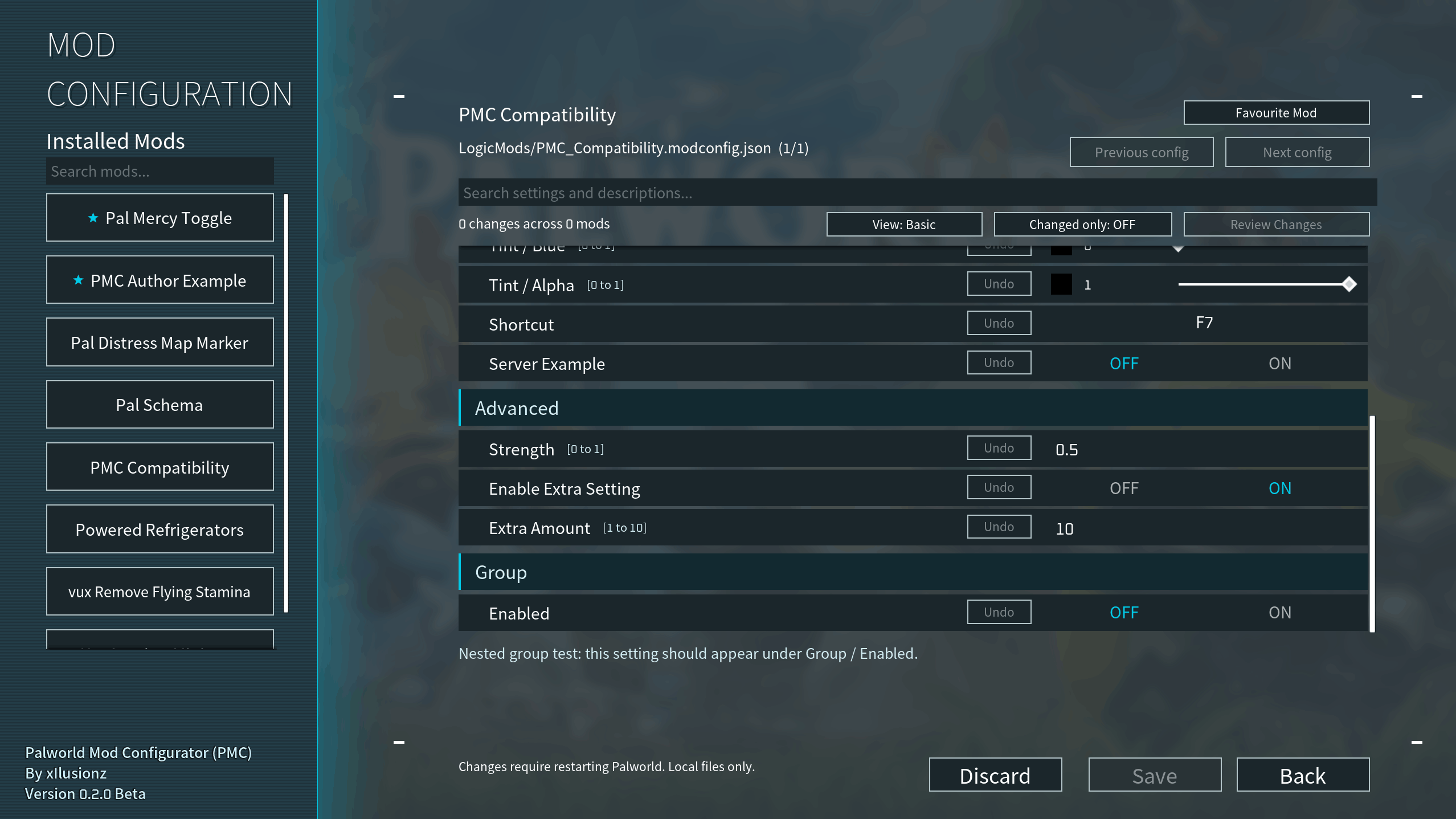
- Browse with less clutter. Categories and Basic / All Settings views organise configs where authors provide the information.
- Get the value right. Use toggles, numbers, text, dropdowns, colour controls and keybind capture. Supported step buttons and exact colour entry make fine adjustments easier.
- Know what an option does. Read available descriptions, comments, units and limits as you browse.
🔹 SEE EVERY CHANGE BEFORE YOU SAVE
A clearer view of what you are about to change.
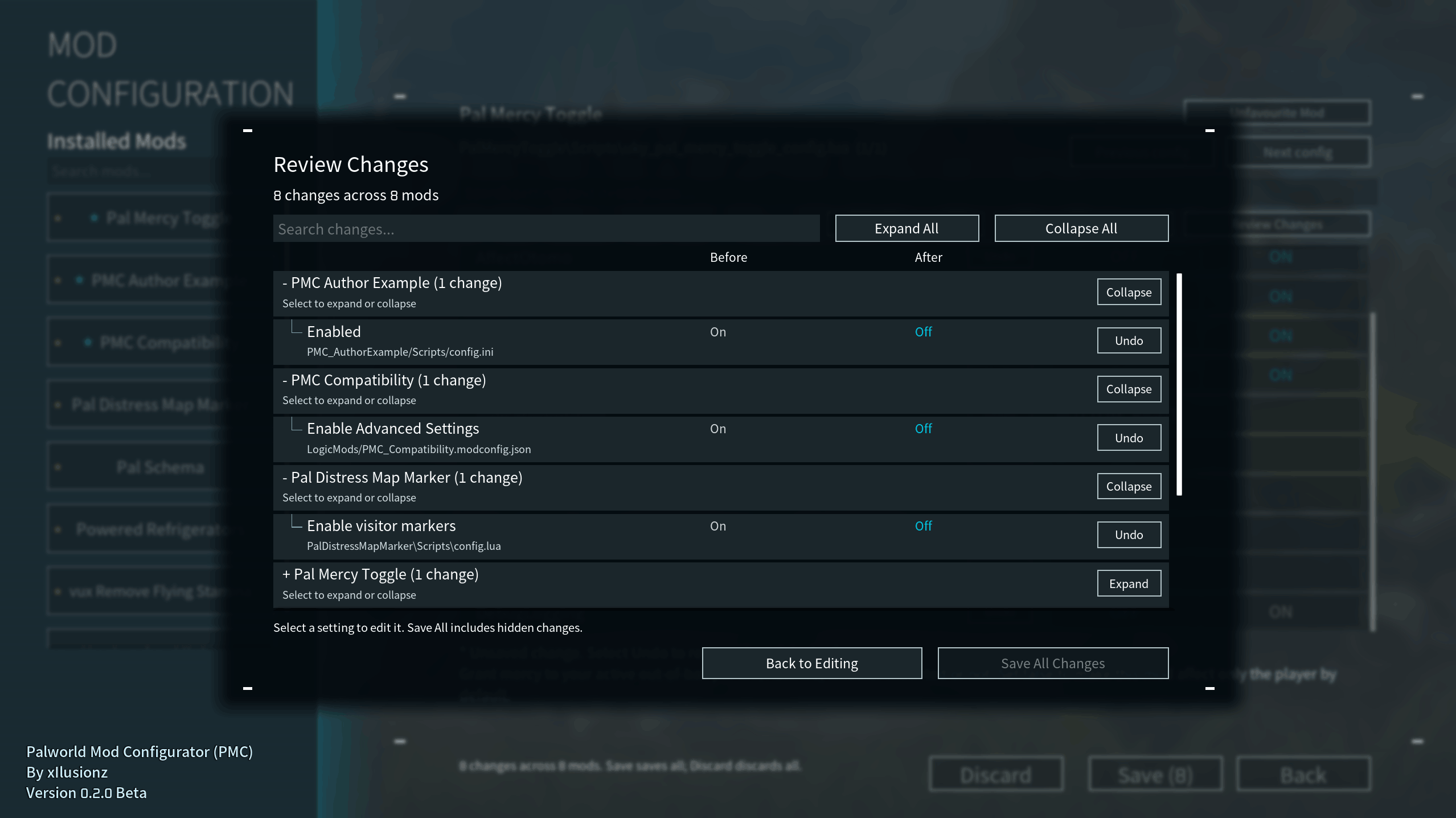
Review Changes groups edits by mod with Before / After values. Search the list, collapse groups, undo individual edits, or filter the editor to changed settings.
- Before / After comparison. See the saved value beside your proposed value, with changes grouped beneath their mod names.
- Search and collapse. Find a particular edit, collapse one mod, or expand/collapse all groups when the list gets long.
- Undo one setting. Restore its saved value without throwing away your other edits. Undo is not a reset to the mod author's defaults.
- Changed-only view. Show pending settings in the editor. Switching views or searching keeps your other edits intact.
- Save across mods. Move between configs, then save your pending changes together. The count shows how many settings and mods are affected.
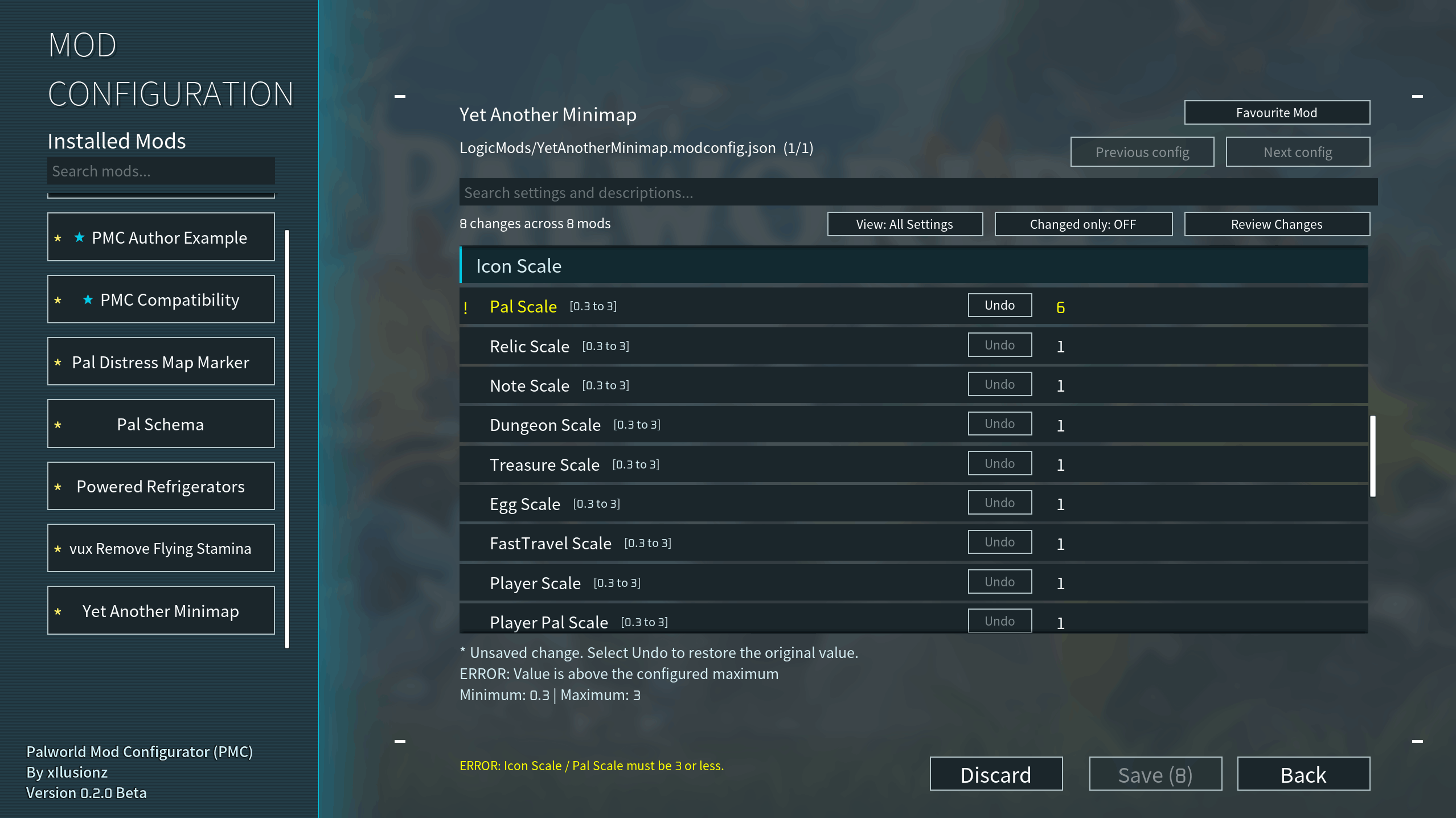
- Clear validation. Yellow errors identify invalid values, and save-time error navigation takes you to the affected setting. Values must satisfy the limits supplied by the config or author metadata.
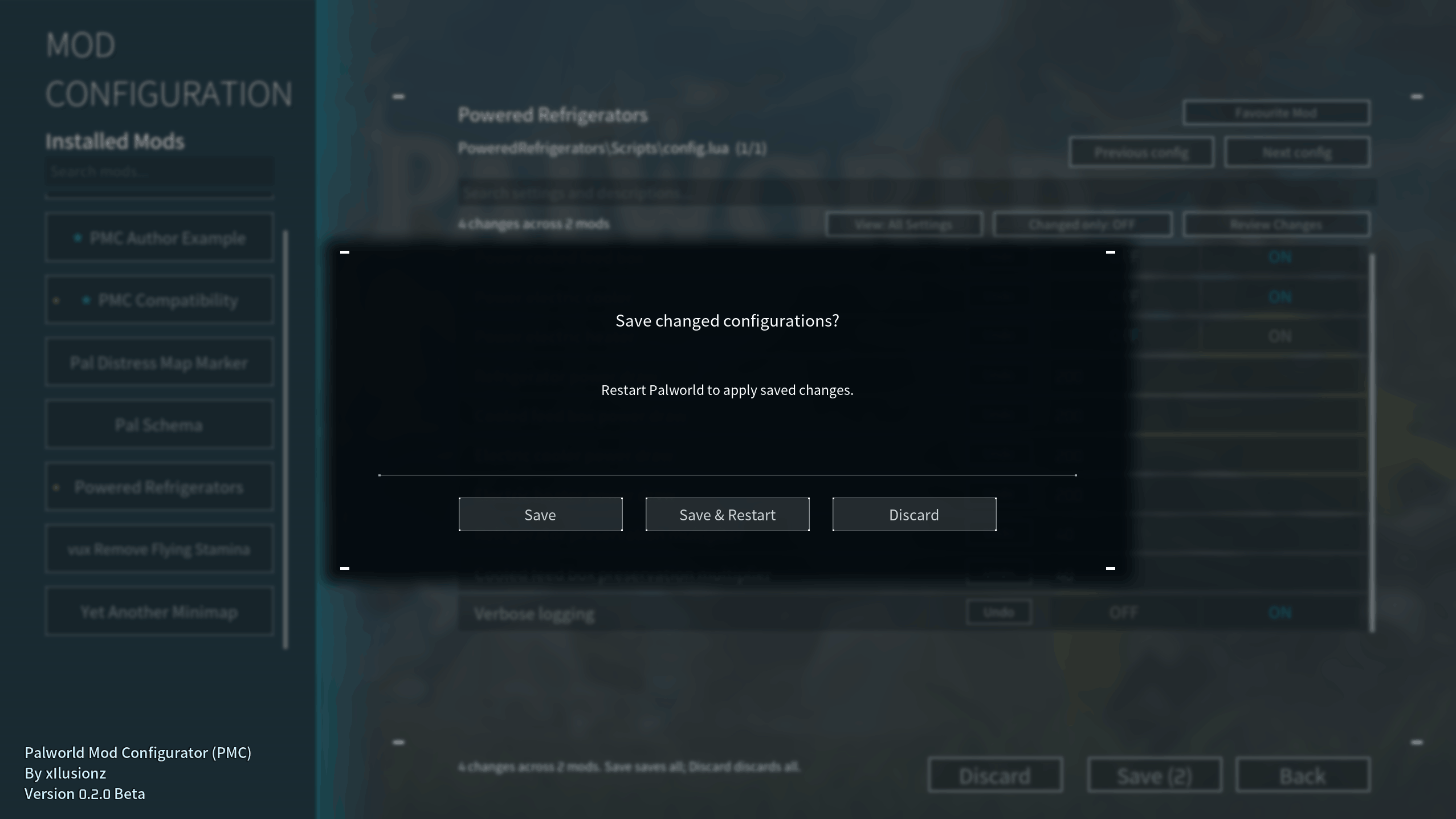
- A choice when leaving. With unsaved edits, choose Save, Save & Restart, or Discard. Escape from the popup returns to editing.
After saving, a restart reminder stays visible for the current session. Save & Restart saves first and requests a Steam relaunch; it does not restart after a reported save failure.
🔹 SMALL DETAILS THAT MAKE EDITING EASIER
Favourites that stay put: marked mods move to the top and stay favourited after restarting. A cyan star marks favourites; a separate yellow asterisk marks unsaved changes.
Fine control: use author-defined plus/minus steps for supported numbers. Drag RGBA sliders for a visual adjustment or type an exact component value; matching colour previews update as you edit.
Less guesswork: descriptions appear as you browse, with supported units and limits beside settings. Dropdowns present allowed choices, while keybind capture supports keys and modifiers.
Useful organisation: category headings separate sections, and matching category prefixes are removed from child labels. Basic view hides only settings explicitly marked advanced. All Settings remains available, and hidden pending edits still appear in Review Changes.
A familiar finish: Palworld-style fonts, cyan highlights, smooth menu transitions and in-place updates for Undo, toggles and Discard. No full row rebuild is needed for ordinary edits.
🔹 FOUR CONFIG TYPES. ONE PLACE TO EDIT.
- Lua (.lua) — Supported settings tables, read without executing the config as code.
- JSON (.json) — Supported structured settings.
- INI (.ini) — Supported sections and values.
- .modconfig.json — Compatible configs designed for MCM, including files in LogicMods. Supported controls include colours, dropdowns, keybinds and boolean dependencies.
Controls depend on the config. PMC preserves unrelated content and supported comments when saving. It supports many common layouts, not every file or mod. Compatibility with MCM-designed configs does not mean PMC is MCM or requires it.
🔹 OPEN PMC IN A FEW STEPS
Windows Palworld requires one supported loader: Standard UE4SS or UE4SS Experimental for Palworld. No PMC-specific UE4SS settings changes are required.
- Close Palworld and download the PMC file matching your loader.
- Extract its Pal folder into your Palworld installation folder, where Palworld.exe is located.
- Start the game and select Mod Configuration on the main menu.
The manual packages use these common locations:
Standard:     Pal/Binaries/Win64/Mods/PalworldModConfigurator
Experimental: Pal/Binaries/Win64/ue4ss/Mods/PalworldModConfigurator
UI package:   Pal/Content/Paks/LogicMods/PalworldModConfigurator.pak
Use the Mods folder your loader actually uses. Install one PMC version, once.
Updating? Close the game, back up the old PMC folder and replace it with the matching new folder and PAK. Keep your existing Scripts/pmc-ui-state.json if you want to retain favourites. Leave your other mods and their configs alone.
🔹 YOUR CONFIGS STAY YOURS
PMC keeps one original backup per config, rather than another backup on every save. It checks for external file changes and flags save failures. Files save individually: if one fails, earlier successful saves remain saved and failed edits stay pending.
PMC edits local files; it does not change a remote server or automatically apply another mod's settings live. Avoid editing the same config elsewhere while using PMC. Uninstalling PMC leaves your saved settings in place.
🔹 FOR MOD CREATORS
Many supported configs work automatically. The optional PMC Author Kit provides examples and a validator for friendly labels, descriptions, limits and a declared list of editable settings. Your mod continues loading its own config and can work without PMC.
Get the optional Author Kit on Nexus. Players do not need the kit or example mods.
🔹 SOMETHING MISSING? LET ME KNOW.
A missing option may use an unsupported layout, filename or location, or depend on another setting. Internal metadata is deliberately hidden. Report compatibility requests with the config layout; for bugs, include your PMC, Palworld and UE4SS versions, reproduction steps and relevant log lines. Remove private information first.
🔹 CREDITS & THANKS
- UE4SS contributors — The framework that makes PMC possible.
- Okaetsu — UE4SS Experimental for Palworld.
- Dekita — Mod Config Menu (MCM) and the config format supported through PMC's compatibility work.
🔹 MORE MODS BY xIlusionz
Powered Appliances / Powered Refrigerators
Put base electricity to work for refrigeration, heating and cooling.
Stuck Pal Scanner (SPS)
Find stuck Pals and keep your base running smoothly.