Mr. Green’s Storage Manager
- By
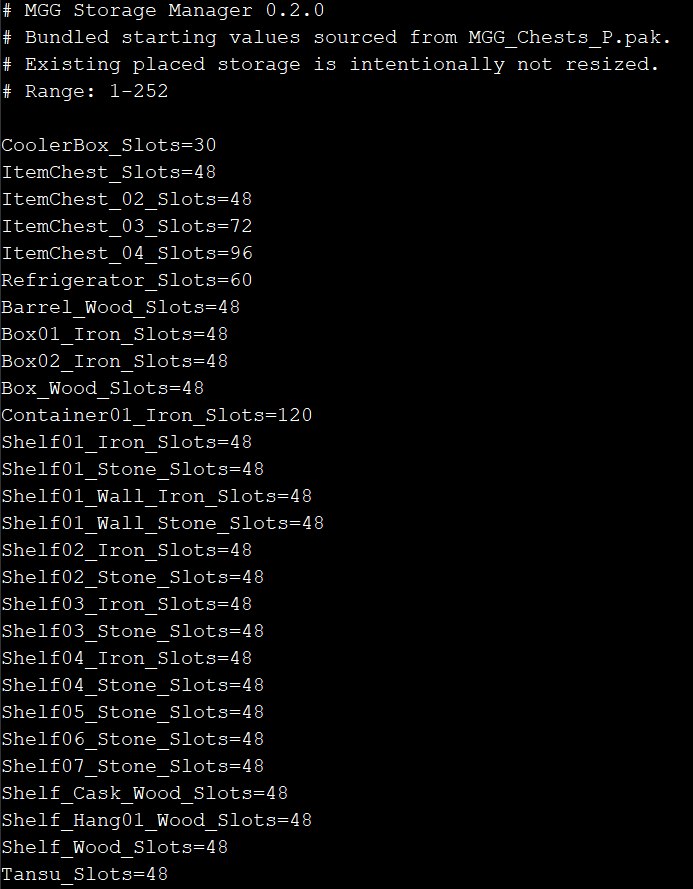
Storage Manager Config Preview.png
Description
Storage Manager is a lightweight Palworld mod that uses a UE4SS Lua configuration system to control the default inventory size of supported storage containers.
Instead of replacing Palworld storage assets with a .pak, Storage Manager lets you configure supported chests, cabinets, shelves, containers, Cooler Boxes, and Refrigerators through a simple editable configuration file.
By default, the mod keeps the same balanced progression style as the original Bigger Chest & Fridge mod. Most everyday storage is standardized around 48 slots, while stronger late-game containers receive larger capacities.
Features
- Configurable storage sizes for 28 supported containers.
- Simple editable storage.cfg configuration file.
- Most standard and decorative storage defaults to 48 slots.
- Refined Metal Chest defaults to 72 slots.
- Advanced Chest defaults to 96 slots.
- Large Container defaults to 120 slots.
- Cooler Box defaults to 30 slots.
- Refrigerator defaults to 60 slots.
- Pure UE4SS Lua implementation.
- No PalSchema required.
- No replacement .pak files.
- No GUI or unnecessary commands.
- Works with newly constructed storage.
- Existing placed storage is left untouched for safety.
- Suitable for single-player, hosted worlds, and server-side use.
Configuration
Storage sizes are controlled through:
Pal\Binaries\Win64\Mods\MGGStorageManager\Scripts\storage.cfg
Example:
ItemChest_Slots=48
ItemChest_02_Slots=48
ItemChest_03_Slots=72
ItemChest_04_Slots=96
Change the values you want, save the file, and fully restart Palworld.
Important — New Storage Only
Storage capacity is assigned when a container is constructed.
Existing placed storage will not automatically change size.
To apply a new storage capacity, build or rebuild the container after changing the configuration.
Installation
UE4SS is required.
Extract the mod so the files are located at:
Pal\Binaries\Win64\Mods\MGGStorageManager\
Inside that folder you should have:
enabled.txt
Scripts\main.lua
Scripts\storage.cfg
Once installed, fully restart Palworld.
Compatibility
Storage Manager changes the storage-size templates used when supported containers are created.
Mods that also modify storage inventory capacities may conflict with Storage Manager.
Enjoying this mod? Follow MrGreenGames and leave feedback in the comments! 💚
🟢 Feel free to use this mod in your modpacks and videos!
If you feature the mod in a video or showcase, linking back to the original mod page in your description is greatly appreciated, but not required.
🔴 Please do not redistribute or repurpose the mod.
You may not reupload the mod to other websites, launchers, or platforms, nor reuse its code, data, or other assets in separate projects.
Do not place the mod behind ad-based or redirect services such as AdFly, and do not sell the mod or include it in any paid modpack.
💚 This mod is intended to remain free and accessible to everyone.
The Mr. Green’s Storage Manager Team