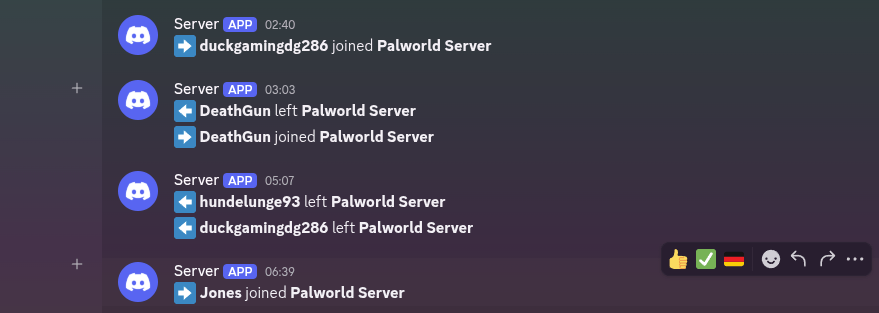
Bildschirmfoto vom 2026-07-21 07-15-27.png
Description
# PalChatBridge
**Forward in-game Palworld chat messages to Discord via webhook.**
PalChatBridge is a C++ UE4SS mod for Linux Palworld servers. It captures chat messages, join/leave events, broadcasts, and server status changes from the game log or stdout, then forwards them to a Discord channel via a webhook URL.
## Requirements
- **Palworld dedicated server** running on Linux
- **UE4SS for Linux** — This mod requires [ue4ss-linux](https://rl-dev.de/palworld/ue4ss-linux) to be installed and working on your server. Without UE4SS, the mod will not load.
- **curl** installed on the server (used for Discord webhook HTTPS requests)
## Architecture
| Component | Technology | Description |
|---|---|---|
| **C++ Mod** (`.so`) | CppUserModBase subclass | Discord HTTP POST, rate limiting, log/stdout watcher, event detection |
| **Lua Mod** (`main.lua`) | UE4SS Lua script | Config loading, fallback curl sender, chat hook registration |
The C++ mod runs a background thread that watches the server log file (or intercepts stdout on Linux) for chat lines, join/leave events, broadcasts, and save events. Detected events are queued and sent to Discord at a configurable rate. The Lua mod loads the config and provides a fallback curl-based sender if the `.so` is not loaded.
## Directory Structure
On the server, the mod lives inside the UE4SS `Mods/` directory and the config lives in the game's `Binaries/Linux/` directory (next to the server executable):
```
<PalServer>/
├── Binaries/Linux/
│ ├── PalServer-Linux-Shipping # Server executable
│ └── PalChatBridge.json # Config (must be here!)
└── Saved/Logs/
└── UE4SS.log
<UE4SS>/Mods/
├── mods.txt # Add "PalChatBridge : 1" here
└── PalChatBridge/
├── enabled.txt
├── mod.txt
├── libs/
│ └── main.so
└── scripts/
└── main.lua
```
## Installation
1. Copy the entire `ue4ss_mods/PalChatBridge/` folder into your UE4SS `Mods/` directory on the server.
2. Add `PalChatBridge : 1` to the main `Mods/mods.txt` file to activate the mod.
3. Copy `config/PalChatBridge.json` to the game's `Binaries/Linux/` directory (next to the server executable `PalServer-Linux-Shipping`). This is where the mod loads the config from.
4. Edit `PalChatBridge.json` and set your `webhook_url`.
5. Restart the server.
## Configuration
All settings are in `PalChatBridge.json`:
```json
{
"enabled": true,
"debug_mode": false,
"server_name": "Palworld Server",
"avatar_url": "",
"message_format": "**[{server}] {player}:** {message}",
"send_system_messages": false,
"max_message_length": 1900,
"rate_limit_ms": 1000,
"server_log_file": "",
"ignore_prefixes": ["!", "/"],
"send_online_message": true,
"online_message": ":green_circle: **{server}** is back online!",
"send_join_events": true,
"join_message": ":arrow_right: **{player}** joined **{server}**",
"send_leave_events": true,
"leave_message": ":arrow_left: **{player}** left **{server}**",
"send_broadcast_events": true,
"broadcast_message": ":loudspeaker: **[{server}] Broadcast:** {message}",
"send_save_events": false,
"save_message": ":floppy_disk: **{server}** auto-saved the world"
}
```
### Options
| Option | Type | Default | Description |
|---|---|---|---|
| `enabled` | bool | `true` | Master switch for the mod |
| `debug_mode` | bool | `false` | Enable verbose logging to stderr/stdout |
| `webhook_url` | string | `""` | Discord webhook URL (required) |
| `server_name` | string | `"Palworld Server"` | Server name shown in Discord messages |
| `avatar_url` | string | `""` | Optional Discord bot avatar image URL |
| `message_format` | string | `"**[{server}] {player}:** {message}"` | Chat message template. Placeholders: `{server}`, `{player}`, `{message}` |
| `send_system_messages` | bool | `false` | Forward messages without a player name |
| `max_message_length` | int | `1900` | Maximum message length before truncation |
| `rate_limit_ms` | int | `1000` | Minimum delay between Discord webhook calls |
| `server_log_file` | string | `""` | Manual log file path. Leave empty for auto-detection |
| `ignore_prefixes` | string[] | `["!", "/"]` | Messages starting with these prefixes are not forwarded |
| `send_online_message` | bool | `true` | Send a message when the server starts |
| `online_message` | string | `":green_circle: **{server}** is back online!"` | Server online message template. Placeholder: `{server}` |
| `send_join_events` | bool | `true` | Forward player join events to Discord |
| `join_message` | string | `":arrow_right: **{player}** joined **{server}**"` | Join message template. Placeholders: `{player}`, `{server}` |
| `send_leave_events` | bool | `true` | Forward player leave events to Discord |
| `leave_message` | string | `":arrow_left: **{player}** left **{server}**"` | Leave message template. Placeholders: `{player}`, `{server}` |
| `send_broadcast_events` | bool | `true` | Forward server broadcast messages to Discord |
| `broadcast_message` | string | `":loudspeaker: **[{server}] Broadcast:** {message}"` | Broadcast message template. Placeholders: `{server}`, `{message}` |
| `send_save_events` | bool | `false` | Forward auto-save events to Discord |
| `save_message` | string | `":floppy_disk: **{server}** auto-saved the world"` | Save event message template. Placeholder: `{server}` |
## Event Detection
The mod detects events from the server log file or by intercepting stdout (Linux only). It supports multiple log formats:
- **Chat**: `[CHAT]`, `LogChat`, `[Chat]`, JSON chat events
- **Join**: `joined the server`, `has joined`, `Join succeeded`, `Player X joined`
- **Leave**: `left the server`, `has left`, `disconnected`, `Connection closed`
- **Broadcast**: `Broadcast:`, `RCON broadcast`, `Server broadcast`
- **Save**: `Auto-saved`, `Saving world`, `Save complete`
Log file auto-detection searches common locations relative to the UE4SS working directory. If auto-detection fails, set `server_log_file` in the config to the full path.
## Linux Limitations
On Linux in "limited mode", the following CppUserModBase callbacks are **not available**:
- `on_program_start()` — skipped
- `on_unreal_init()` — skipped
- `on_ui_init()` — skipped (no GUI)
**Available:**
- `on_update()` — event loop
- `on_lua_start()` / `on_lua_stop()` — Lua mod lifecycle
- `on_cpp_mods_loaded()`
The C++ mod handles all Discord HTTP POST requests (including background thread + rate limiting), while the Lua mod loads the config and provides a fallback sender.
## Troubleshooting
| Problem | Solution |
|---|---|
| `PalChatBridge_Send not available` | `.so` not loaded. Check `libs/main.so` exists and UE4SS is running |
| No messages in Discord | Verify `webhook_url` is correct. Enable `debug_mode` and check logs |
| Join/leave events not working | Enable `debug_mode` to see detected log lines. Check `send_join_events`/`send_leave_events` are `true` |
| Log file not found | Set `server_log_file` in config to the full path of your server log |
| `curl: command not found` | Install curl: `apt install curl` (Debian/Ubuntu) or `dnf install curl` (Fedora) |
| Mod not loading at all | Ensure [ue4ss-linux](https://rl-dev.de/palworld/ue4ss-linux) is properly installed and working |
## Support
If you find this mod useful, consider supporting development:
PalChatBridge Discord Linux Team

Owner