## X-Ray Vision Pack — Enhanced
spot every ore from a mile away, and never waste another pickaxe swing on empty rock. This pack makes terrain blocks translucent and gives every ore a hand-crafted, glowing, sparkling texture that's impossible to miss — no mods, no shaders, just a resource pack.
## What it does
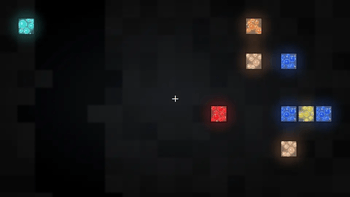
Terrain becomes see-through — Stone, cobblestone, deepslate, dirt, sand, gravel, sandstone, netherrack, end stone, tuff, calcite, andesite, diorite, granite, blackstone, basalt, mud, terracotta, soul sand/soil, mycelium, podzol, and crimson/warped nylium are all rendered mostly transparent.
Every ore, reimagined — Coal, Iron, Copper, Gold, Redstone, Lapis, Diamond, and Emerald (both stone and deepslate variants), plus Nether Gold Ore, Nether Quartz Ore, and Ancient Debris all get:
A textured rock background instead of a flat color
Multiple shaded mineral clusters with highlight/shadow for a faceted, gem-like look
A soft two-layer glow (bloom) behind each cluster
Scattered sparkle flecks for extra shimmer
A crisp dark border so they pop against the transparent stone
2x resolution (32x32) textures for crisper detail than vanilla's 16x16.
Bedrock and obsidian are left solid on purpose — so you don't accidentally see straight through to the void or bottom of the world.
## Intended use
This pack is built for singleplayer and creative-mode use — testing builds, finding your own resources faster, or just enjoying a different way to explore caves. Most multiplayer servers prohibit X-ray resource packs, so please don't use this to gain an unfair advantage on someone else's server — check server rules first.
## A quick note on how this works
This is a pure texture-based effect — no gamma hacks, no mods. Because of that, two honest limitations:
You'll see ore clearly once it's near an exposed face (a wall, tunnel, or cave), but ore buried many blocks deep inside solid stone may still be hidden — that's a rendering optimization built into Minecraft itself, not something a texture pack can fully override.
This pack doesn't change screen brightness. For the best visibility in unlit caves, pair it with your Video Settings → Brightness slider set to max, or a shader pack with a brightness option.
The Optifine And Iris Shaders Are Recommended For Better Ores Rendering