X-Ray By PeakMC6725
The most complete X-Ray resource pack for Minecraft Java Edition: a separate, ready-to-use file for every single version from 1.8 to 26.3, with fullbright, silverfish markers, archaeology markers and 190 block overrides on modern versions.
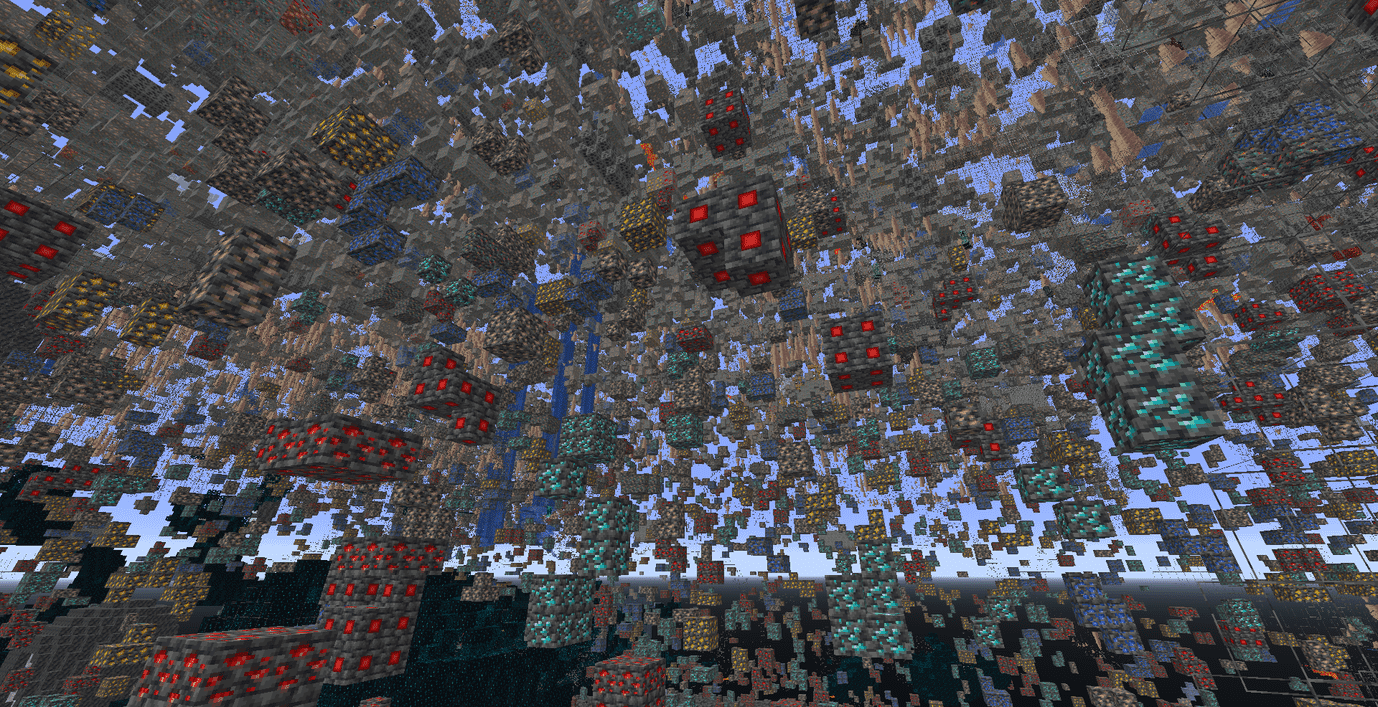
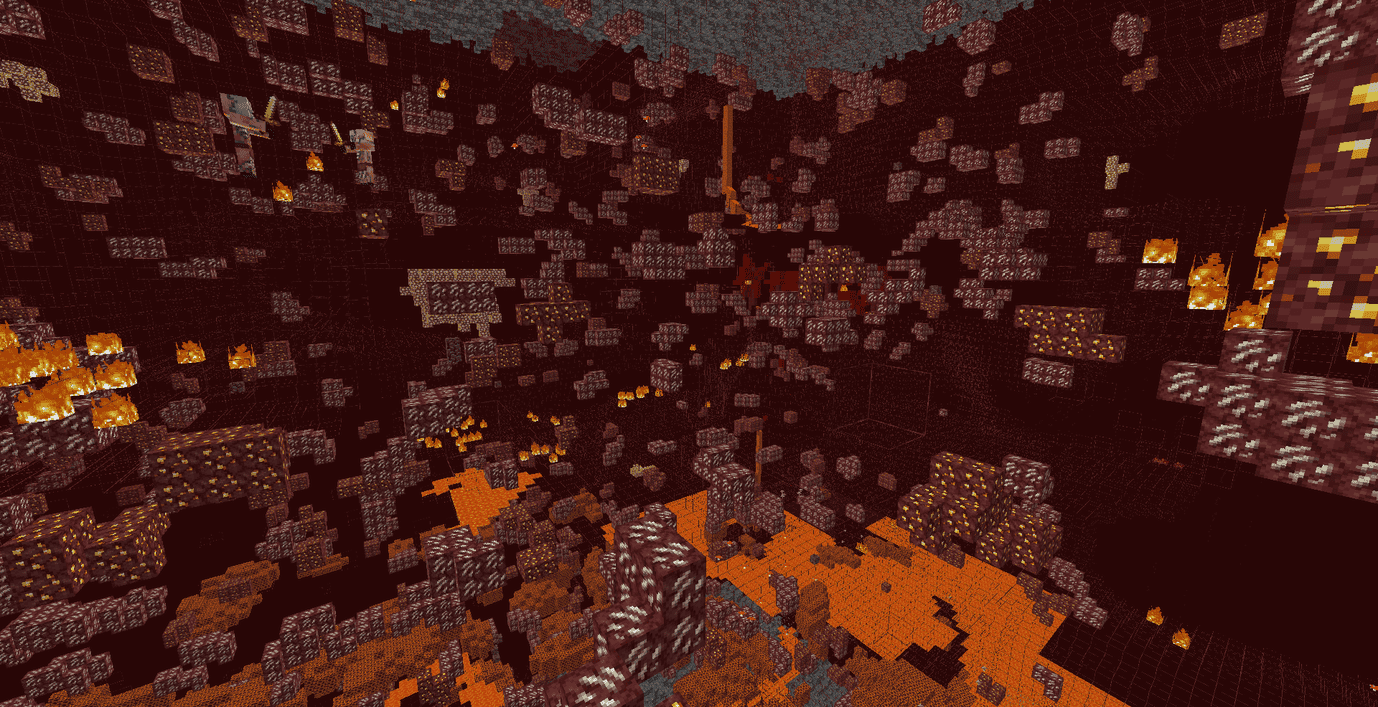
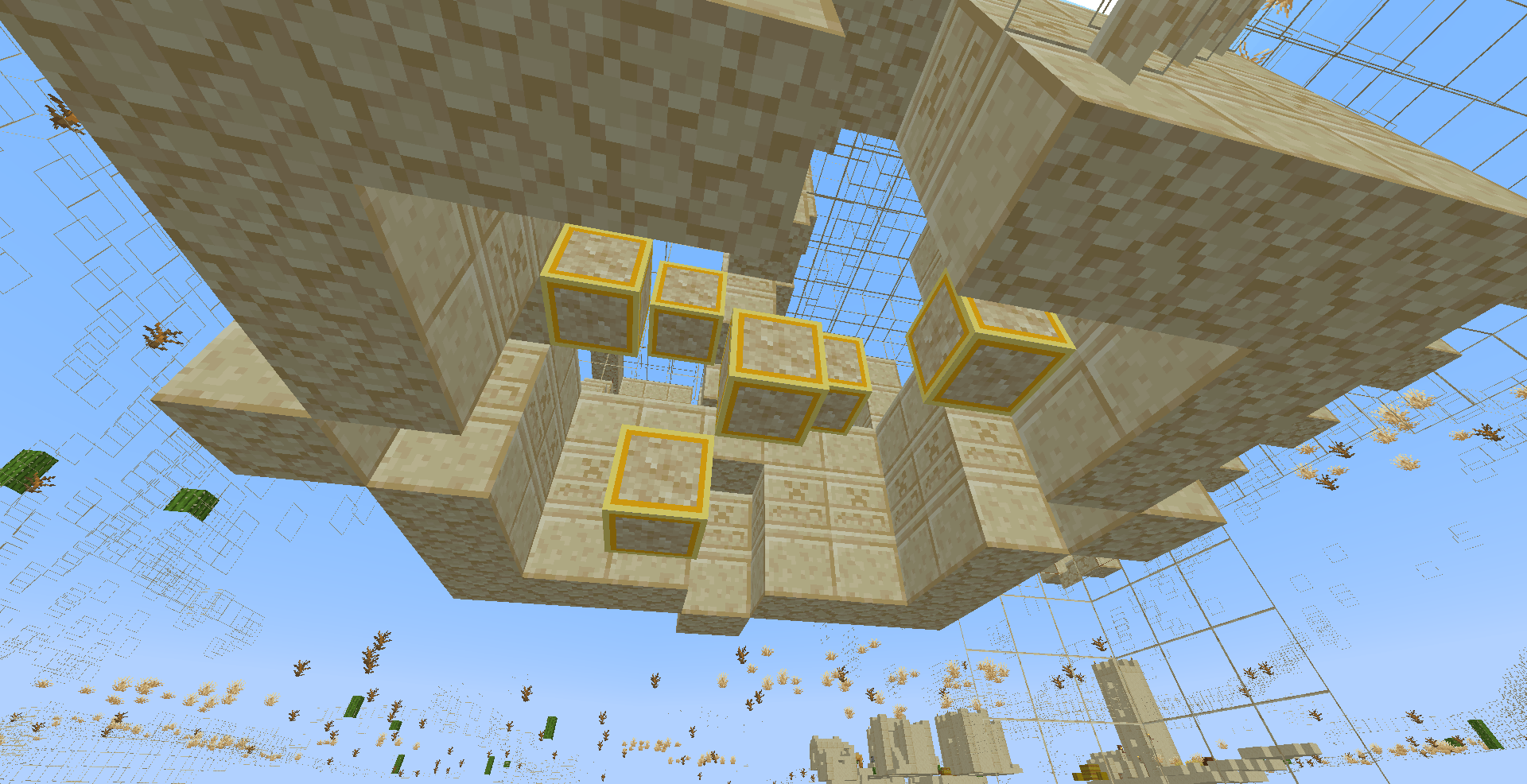
Stone, dirt, gravel, sand, deepslate, tuff, terracotta, netherrack and other filler blocks turn into thin see-through frames. Ores, spawners, structure blocks, copper, sculk, amethyst and other valuables stay solid. You see exactly what is hiding underground, and caves are never dark.
Quick start: download the file that matches your exact Minecraft version, put it in .minecraft/resourcepacks/, enable it at the top of your pack list, and go underground. Fullbright on 1.8 - 1.16.5 needs OptiFine. Fullbright is ignored by Sodium, Embeddium and Iris. Details below.
Table of contents
- What the pack does
- Which file do I download? (all 75 versions)
- Installation, step by step
- Fullbright, version by version
- Every block that changes
- What does NOT change
- Compatibility (mods, launchers, other packs)
- Performance
- Troubleshooting
- FAQ
- Servers and fair play
- Permissions
- Credits and support
1. What the pack does
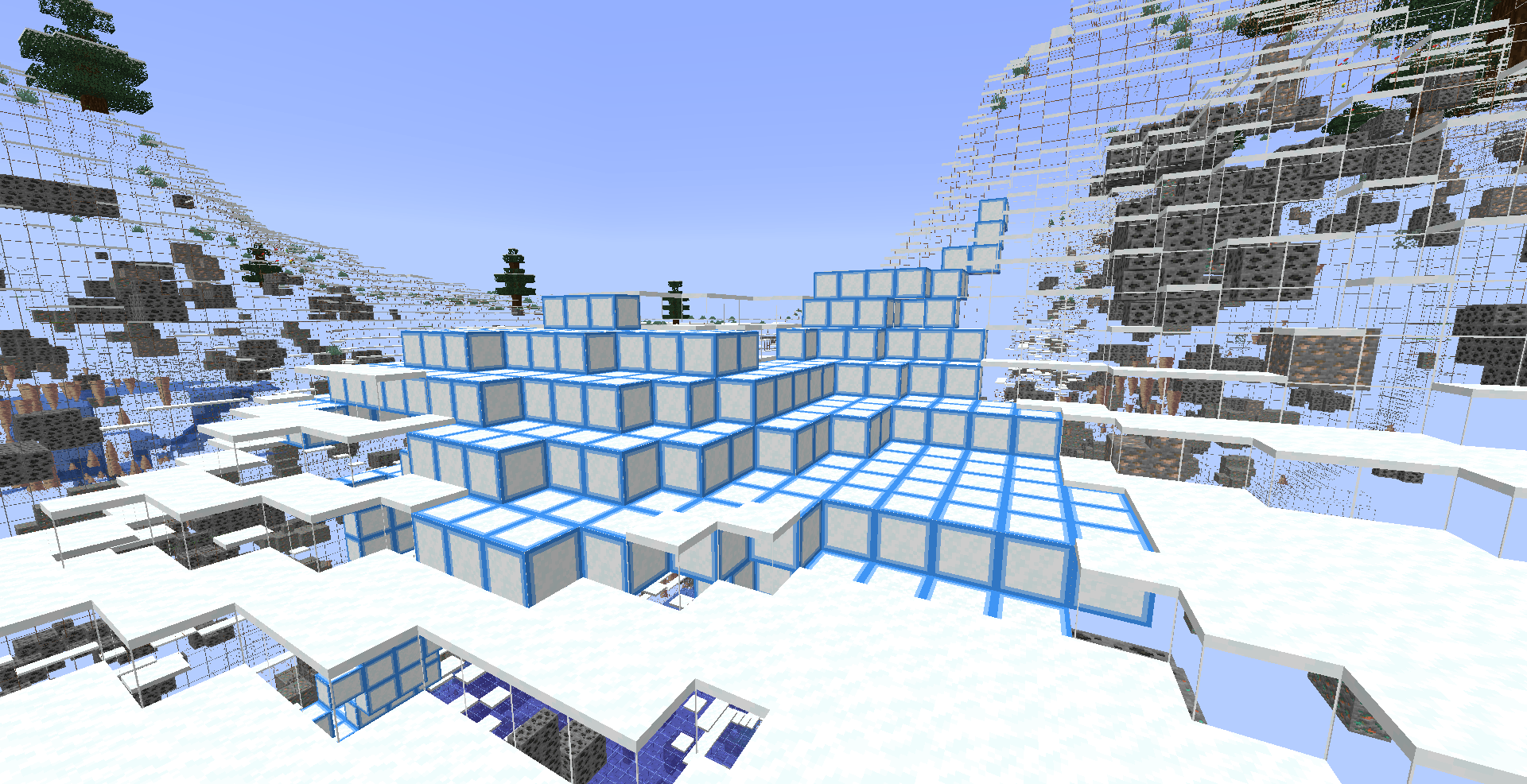
- See-through terrain. Common filler blocks are drawn as thin wireframes (only the edges and a faint pattern remain), so you see the shape of the ground without a solid wall in front of you.
- Solid valuables. Ores, mineral blocks, spawners, structure bricks and other important blocks stay as full cubes with their normal textures, so they stand out against the frames.
- Silverfish markers. Infested blocks look like the normal block with a dot on it, so you can spot silverfish traps in strongholds.
- Powder snow marker. Powder snow gets a blue ring pattern, so you do not fall into it by accident.
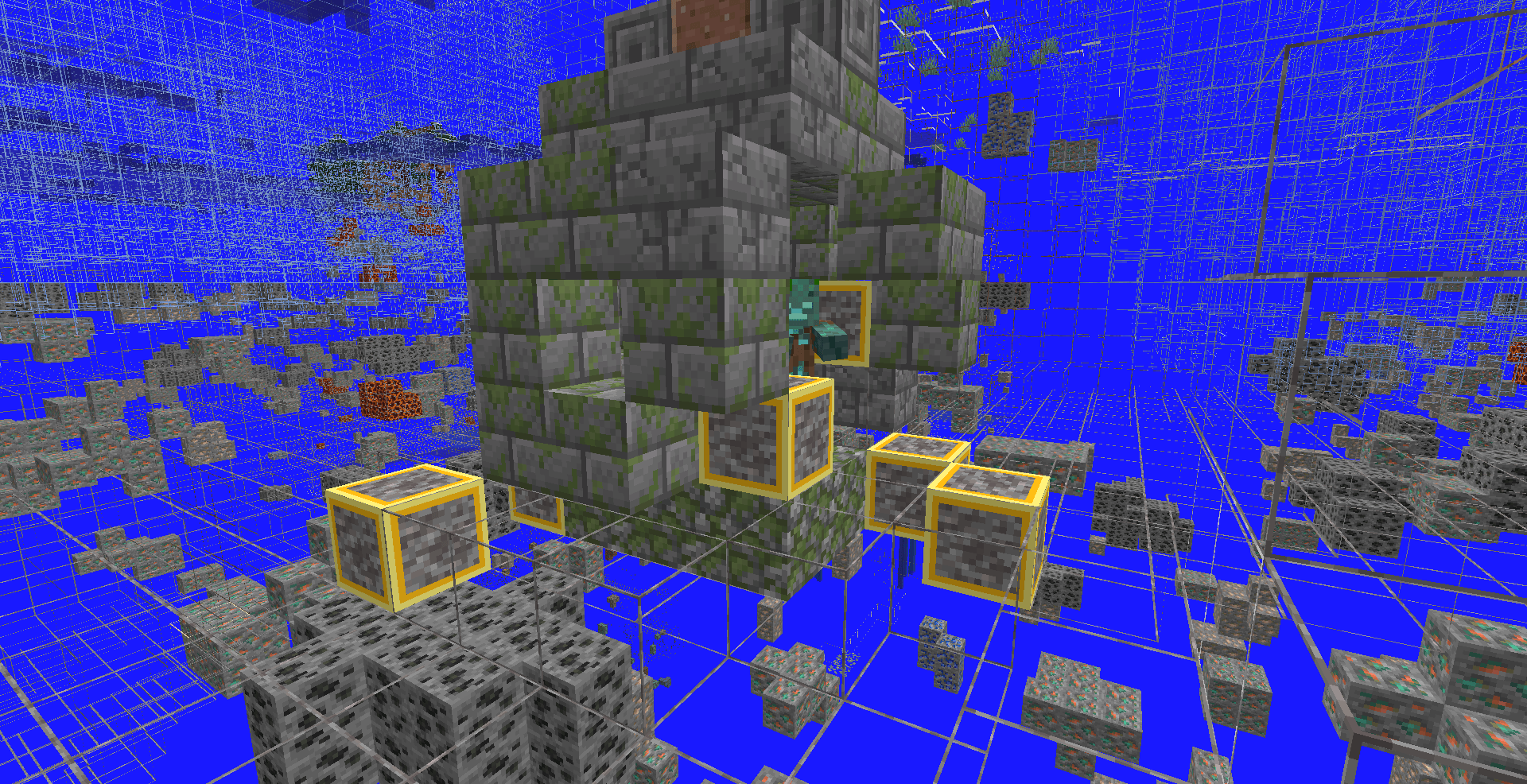
- Suspicious sand and gravel markers. Archaeology blocks get gold ring patterns, so trail ruins and ocean ruins are easy to find.
- Fullbright. No dark caves, no torches needed. How this works depends on your version (section 4).
- Pure resource pack. No mods needed for x-ray. It only changes how blocks look on your screen. It does not change the world, the server or your game files.
- One file per version. Every file is made for its exact Minecraft version, so you do not get a wrong pack format warning.
2. Which file do I download? (all 75 versions)
Download the file named for your exact Minecraft version, for example x-ray-v1.0.0-1.8.9.zip for 1.8.9.
| Group |
Minecraft versions |
Fullbright |
| A |
1.8, 1.8.1, 1.8.2, 1.8.3, 1.8.4, 1.8.5, 1.8.6, 1.8.7, 1.8.8, 1.8.9, 1.9, 1.9.1, 1.9.2, 1.9.3, 1.9.4, 1.10, 1.10.1, 1.10.2, 1.11, 1.11.1, 1.11.2, 1.12, 1.12.1, 1.12.2 |
OptiFine needed |
| B |
1.13, 1.13.1, 1.13.2, 1.14, 1.14.1, 1.14.2, 1.14.3, 1.14.4, 1.15, 1.15.1, 1.15.2, 1.16, 1.16.1, 1.16.2, 1.16.3, 1.16.4, 1.16.5 |
OptiFine needed |
| C |
1.17, 1.17.1, 1.18, 1.18.1, 1.18.2 |
Built in (vanilla) |
| D |
1.19, 1.19.1, 1.19.2, 1.19.3, 1.19.4 |
Built in (vanilla) |
| E |
1.20, 1.20.1, 1.20.2, 1.20.3, 1.20.4, 1.20.5, 1.20.6, 1.21, 1.21.1 |
Built in (vanilla) |
| F |
1.21.2, 1.21.3, 1.21.4, 1.21.5, 1.21.6, 1.21.7, 1.21.8, 1.21.9, 1.21.10, 1.21.11, 26.1, 26.1.1, 26.1.2, 26.2, 26.3 |
Built in (vanilla) |
Notes
- Files in one group have the same contents. Only the version in the pack information is different.
- Snapshots, pre-releases and release candidates are not officially supported. They may work if the release version of that line works.
- Java Edition only. Bedrock, Pocket and Education editions are not supported.
- Loaders (Forge, Fabric, NeoForge, Quilt) do not matter. The pack is a normal resource pack.
3. Installation, step by step
- Download the file for your exact version (section 2). Do not unzip it.
- Open Minecraft, go to Options > Resource Packs > Open Pack Folder.
- Move the
.zip into the folder (or drag it into the game window).
- Move the pack from the left list to the right list.
- Put it at the top of the right list so no other pack overrides it.
- Click Done. The game reloads. This can take a few seconds.
- On 1.8 - 1.16.5 only, for fullbright: install OptiFine and make sure Video Settings > Quality > Custom Colors is on (it is on by default).
- Go into a cave and check that stone is a frame and ores are solid.
To remove it, move the pack back to the left list or delete the file.
4. Fullbright, version by version
| Versions |
How fullbright works |
Needs |
| 1.8 - 1.12.2 |
All-white OptiFine custom lightmap |
OptiFine |
| 1.13 - 1.16.5 |
All-white OptiFine custom lightmap |
OptiFine |
| 1.17 - 1.18.2 |
Modified terrain shaders skip the lightmap |
Vanilla (no OptiFine needed) |
| 1.19 - 1.19.4 |
light.glsl shader override |
Vanilla |
| 1.20 - 1.21.1 |
light.glsl shader override |
Vanilla |
| 1.21.2 - 26.2 |
Lightmap shader (all-white lightmap) |
Vanilla |
| 26.3 |
Lightmap shader rewritten for 26.3's new shader compiler |
Vanilla |
Why OptiFine on old versions? Vanilla Minecraft only lets resource packs change shaders from 1.17 onward. Before that, lighting cannot be changed by a pack, so those files include a white lightmap that OptiFine reads.
Does not work with: Sodium, Embeddium, Iris and similar mods. They replace terrain rendering and ignore the shader files. X-ray still works with them. For fullbright with those mods, use the Night Vision effect or a mod that gives fullbright.
Other things to know
- Fullbright mainly lights up terrain (blocks). On versions 1.17 - 1.21.1, some entities and particles may still look darker.
- Fog is not removed. Distant terrain still fades into the fog colour.
- Shader packs (Iris/OptiFine shaders) have their own lighting and will override this.
5. Every block that changes
5.1 Modern versions (1.13 and newer)
Blocks that do not exist yet in your version are simply ignored.
Thin frames (see-through filler)
- Frame, same on all faces: stone, granite, diorite, andesite, dirt, coarse dirt, rooted dirt, gravel, sand, red sand, clay, mud, moss block, tuff, dripstone block, cobbled deepslate, netherrack, soul sand, soul soil, end stone, ice, packed ice, blue ice, snow block, terracotta and all 16 coloured terracotta.
- Frame with top and side patterns: deepslate, basalt, polished basalt, blackstone, crimson nylium, warped nylium, mycelium, podzol, sandstone, red sandstone.
- Frame with tinted grass top: grass block.
Solid cubes (ores and valuables)
- Ores: coal, iron, copper, gold, redstone, lapis, diamond, emerald (including all deepslate versions), nether gold ore, nether quartz ore, ancient debris.
- Mineral blocks: coal, iron, gold, diamond, emerald, lapis, redstone, netherite, raw iron, raw copper, raw gold, amethyst block, budding amethyst, calcite.
- Copper family: copper block, cut, chiseled, grate and bulb versions in every oxidation stage (exposed, weathered, oxidized) and all waxed versions.
- Structure blocks: stone bricks (plain, mossy, cracked, chiseled), cobblestone, mossy cobblestone, deepslate bricks and tiles (plain, cracked, chiseled), polished deepslate, polished blackstone (plain, bricks, cracked bricks, chiseled), gilded blackstone, tuff bricks, polished tuff, chiseled tuff and chiseled tuff bricks, mud bricks, packed mud, prismarine (plain, bricks, dark), nether bricks (plain, red, cracked, chiseled), smooth sandstone, smooth red sandstone, cut and chiseled sandstone and red sandstone, smooth basalt, reinforced deepslate, oak planks.
- Special blocks: spawner, sculk, bedrock, obsidian, crying obsidian, glowstone, shroomlight, sea lantern, magma block, nether wart block, warped wart block, purpur block, bone block, TNT, sponge, wet sponge.
Markers
- Silverfish dot (infested blocks): infested stone, cobblestone, stone bricks, mossy stone bricks, cracked stone bricks, chiseled stone bricks, deepslate.
- Blue ring: powder snow.
- Gold ring: suspicious sand and suspicious gravel.
5.2 Old versions (1.8 - 1.12.2)
These versions use the old block system, so the pack covers the core blocks:
- Frames: stone, granite, diorite, andesite, dirt, coarse dirt, podzol, grass, mycelium, sand, red sand, gravel, clay, hardened clay and all 16 stained clays, netherrack, soul sand, end stone, ice, packed ice, snow block, sandstone, red sandstone.
- Solid: coal, iron, gold, diamond, emerald, lapis, redstone (lit and unlit) and nether quartz ore, all mineral blocks, glowstone, obsidian, bedrock, mob spawner, sea lantern, cobblestone, mossy cobblestone, the four stone brick types, oak planks, sponge and wet sponge, the three prismarine types, nether brick, red nether brick, nether wart block, magma, purpur block, bone block, chiseled and smooth sandstone.
- Silverfish dot: all six silverfish block types.
- Not changed on old versions: TNT, other plank types and smooth stone variants (they keep their normal look). Blocks added after 1.12 do not exist in those versions.
6. What does NOT change
- Items, tools, armor, the inventory and the hotbar keep their normal look.
- Water and lava are not changed. Lava is still easy to see from far away.
- Logs, leaves, glass, plants, crops, rails, torches, chests, doors and other normal blocks keep their normal look.
- Mobs, players, particles and the sky are not changed.
- Block shapes and hitboxes are not changed. A frame block is still solid: you cannot walk through it, and you break it the normal way.
- Block drops, mining speed and game rules are not changed.
- Sounds, music, menus and fonts are not changed.
7. Compatibility
| Setup |
X-Ray |
Fullbright |
| Vanilla launcher |
Works |
1.17+ works, older needs OptiFine |
| OptiFine |
Works |
Works (OptiFine lightmap on old versions) |
| Sodium / Embeddium |
Works |
Does not work |
| Iris + shader pack |
Works |
Does not work (shader pack controls light) |
| Forge / Fabric / NeoForge / Quilt |
Works |
Same as above |
| Other resource packs |
Works if X-Ray is on top |
Same as above |
- Pack order matters. Put X-Ray above any pack that changes block models, ore textures or shaders. Packs that change the same blocks (ore outline packs, block model packs, custom stone packs) can conflict.
- Combining with ore packs. Texture-only ore packs are fine if you place them below X-Ray, because X-Ray reuses the vanilla textures of your lower packs for ores.
- Dark packs and brightness settings. Brightness in Options does not matter once fullbright is working.
8. Performance
Frame blocks are drawn with extra small boxes, so the game has more geometry to draw than with vanilla stone. On most computers this is fine. If your FPS drops:
- Lower Render Distance (try 10 - 12 chunks).
- Lower Simulation Distance.
- On 1.8 - 1.16.5, use OptiFine for better performance.
- Close other heavy programs.
9. Troubleshooting
The pack shows a red or yellow "incompatible" label. You downloaded the wrong version. Download the file named for your exact Minecraft version. A yellow warning can often be ignored, but the pack is only guaranteed on the version it was made for.
The pack turns itself off after loading. A shader failed to load, or another pack conflicts. Try the pack alone. If it still turns off, post your Minecraft version and the line from .minecraft/logs/latest.log that mentions the shader.
Fullbright does not work on 1.8 - 1.16.5. Install OptiFine and check that Custom Colors is on. Vanilla cannot do fullbright on these versions.
Fullbright does not work on 1.17 or newer. You are probably using Sodium, Embeddium or Iris. Remove them, or use Night Vision. Also check that X-Ray is at the top of your pack list and that you downloaded the file for your exact version.
Everything is bright but stone is not see-through (or the opposite). Another pack is above X-Ray. Move X-Ray to the top.
Purple and black checkerboard blocks (old versions). This is a missing texture. Tell me the block name and your version in the comments and I will fix it.
The background is blue. This is Minecraft's own sky and fog colour showing where blocks used to be. With OptiFine you can turn Sky and Fog off in Video Settings. A resource pack cannot change it.
Water blocks my view. Water is not changed. You can add a fully transparent water_still.png and water_flow.png to the pack yourself.
I cannot find ores far away. Minecraft only draws terrain within your render distance. Increase it, or fly toward the area.
FPS is low. See section 8.
Black screen or crashing right after enabling the pack. Disable the pack from options.txt (resourcePacks:[]) and report your version, launcher, mods and latest.log.
10. FAQ
Is this a mod? No. It is a resource pack. You do not need Fabric or Forge.
Is it safe? It only contains models, textures and shader files. It has no programs, scripts or mods inside. The only code is small graphics shader files that Minecraft itself loads.
Does it work in singleplayer and multiplayer? It works anywhere, because it only changes how your own game draws blocks. Server rules still apply (section 11).
Does it work on Realms? It is client-side, so it changes only your view. Follow the rules of the realm you play on.
Does it work in the Nether and the End? Yes. Netherrack, blackstone, basalt, soul sand and end stone are frames. Ancient debris, nether gold, nether quartz and structure blocks stay solid.
Does it work in Bastions, Fortresses, Strongholds, Mineshafts, Trial Chambers and Ancient Cities? Their important blocks (bricks, spawners, sculk, deepslate bricks) stay solid, so the structures are easy to spot.
Why one file per version? So the game never complains about the pack format, and so each version only contains what it needs.
Why is 1.8 - 1.12.2 smaller? Those versions use the old block system and have far fewer blocks. The pack covers the core blocks.
Can I use it with other x-ray packs? Use only one x-ray pack at a time.
Will you update it for new versions? Yes. Tell me which version you play in the comments.
11. Servers and fair play
X-Ray is banned on many servers and minigames. Check the rules before you use it online. Use it in singleplayer, or only where it is allowed. You are responsible for how you use the pack.
12. Permissions
- You may include the pack in a modpack if you credit the project.
- Please do not re-upload the files to other sites without permission.
- Videos and reviews are welcome. A link back is appreciated.
13. Credits and support
Made by PeakMC6725. The fullbright shader on 1.21.2 - 26.3 is based on "Vanilla Fullbright" by sniffercraft34 (MIT License). On 26.3 it is adapted for the new shader compiler. The fullbright method on 1.17 - 1.21.1 uses small changes to Minecraft's own shader code.
Found a problem? Leave a comment with:
- Your exact Minecraft version
- Your launcher and any mods (OptiFine, Sodium, Iris, etc.)
- A screenshot
- The
latest.log if the pack turns off
If you like the pack, please leave a rating and tell me which version you play.