❄️ Winter Panorama
A peaceful winter night, right in your Minecraft menus.
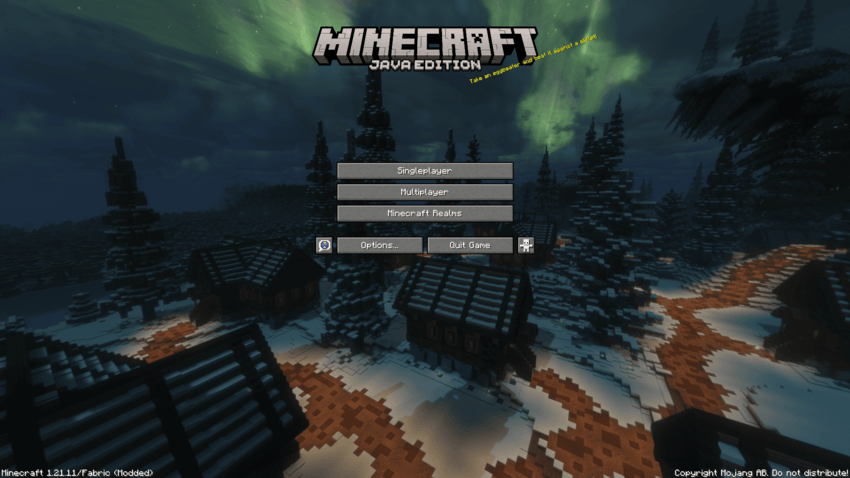
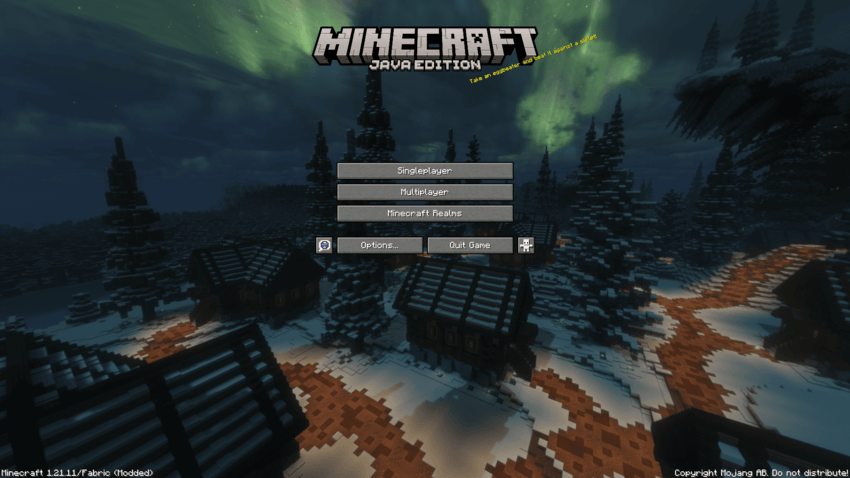
Winter Panorama is a Minecraft resource pack that replaces the default menu panorama with a breathtaking winter landscape, featuring snow-covered villages, towering mountains, a magnificent castle, and glowing northern lights.
Bring the calm and magical atmosphere of a winter night to your Minecraft menus.
✨ Features
🌌 Beautiful Northern Lights
Enjoy a star-filled night sky illuminated by vibrant green auroras stretching above the snowy landscape.
❄️ Immersive Winter Scenery
Explore a frozen world filled with snow-covered mountains, dense pine forests, and peaceful winter villages.
🏰 Majestic Winter Castle
A beautifully illuminated castle overlooks the landscape, adding a touch of fantasy to the winter atmosphere.
🏡 Warm & Cozy Lighting
Golden lights from village houses and winding pathways create a beautiful contrast against the cold blue winter night.
🖥️ Custom Menu Panorama
Replaces Minecraft's default panorama with six custom textures, creating a seamless 360° winter environment.
📸 A New Look for Your Menus
Forget the familiar vanilla menu background.
Winter Panorama brings together cinematic lighting, glowing auroras, snowy architecture, and peaceful nighttime scenery to create an atmospheric menu experience.
Designed for players who love winter aesthetics, cozy environments, and beautiful Minecraft landscapes.
📦 Installation
-
Download Winter Panorama.
-
Launch Minecraft and open Options → Resource Packs.
-
Click Open Pack Folder.
-
Move the downloaded .zip file into the resourcepacks folder.
-
Enable Winter Panorama from the resource pack menu.
Your new winter-themed menu is ready!
🌙 Winter Panorama
❄️ A colder world, a warmer welcome.