promotional bannermobile promotional banner

SpacedX Crosshairs

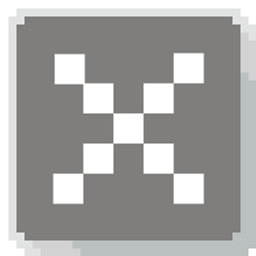
Replaces the standard crosshair with a detached, spaced-dot reticle featuring a center aim point surrounded by four isolated guide pixels.

SpacedX Crosshairs

Prefer a lightweight reticle that keeps your line of sight completely open? SpacedX Crosshairs replaces the solid vanilla crosshair with a detached, pixel-spaced reticle: a dedicated center dot framed by four isolated outer guide points.

An image of the crosshair


Features

  • Detached Pixel Layout: Leaves an open gap between the center point and the outer marks, giving you an unobstructed view right around your target.
  • 100% Vanilla Compatible: Pure client-side resource pack—no Forge, Fabric, or OptiFine required.
  • Zero Performance Overhead: Simple, optimized texture replacement with zero impact on framerates.

Installation

  1. Download the .zip pack file.
  2. Open Minecraft and go to Options > Resource Packs.
  3. Click Open Pack Folder.
  4. Drag and drop the .zip file into the folder.
  5. Move SpacedX Crosshairs to the Selected list on the right and click Done.

Compatibility

  • Format: Standard Minecraft Resource Pack (Java Edition)
  • Multiplayer: Fully allowed on all public servers and competitive networks (Hypixel, SMPs, practice servers).
  • Overlay Friendly: Works smoothly alongside custom GUI packs, PvP textures, and standard shaders.

SpacedX Crosshairs Team

profile avatar
Owner
Forgeborn tier icon
  • 4
    Followers
  • 32
    Projects
  • 114.3K
    Downloads

I make mods n stuff...

More from qlttqbView all