THIS IS ONLY THE RESOURCEPACK - you need the datapack in your world for anything to work!
Quinn's Better Noteblocks
A vanilla friendly datapack/resourcepack that adds better functionality to noteblocks in Vanilla minecraft, such as noteblock editing tools, more octaves, etc.
If you've ever tried to make a jingle or a song using noteblocks but gave up because Minecraft's noteblocks can't pitch high or low enough, this project is for you! While vanilla Minecraft only supports 2 octaves, Quinn's Better Noteblocks adds support for 9 octaves, which is more than enough to create any song! This pack is fully vanilla-friendly and only requires the installation of a resourcepack and a datapack.
Demo
Features
Change the octave of noteblocks
Custom texture
Custom tuning wrench item
Shift + Right Clicking on non-note block changes mode
Shift + Right Clicking on note block upgrades noteblock
Tuning Mode
Left Click decreases note
Right Click increases note
Shift + Left Click decreases octave
Shift + Right Click increases octave
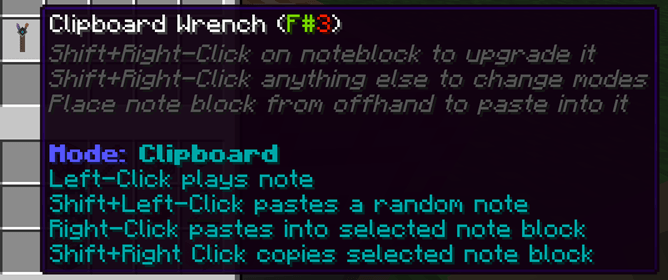
Clipboard Mode
Left Click plays note
Shift + Left Click pastes a random note
Right Click pastes into note block
Shift + Right Click copies note block
Placing noteblock from offhand pastes into it
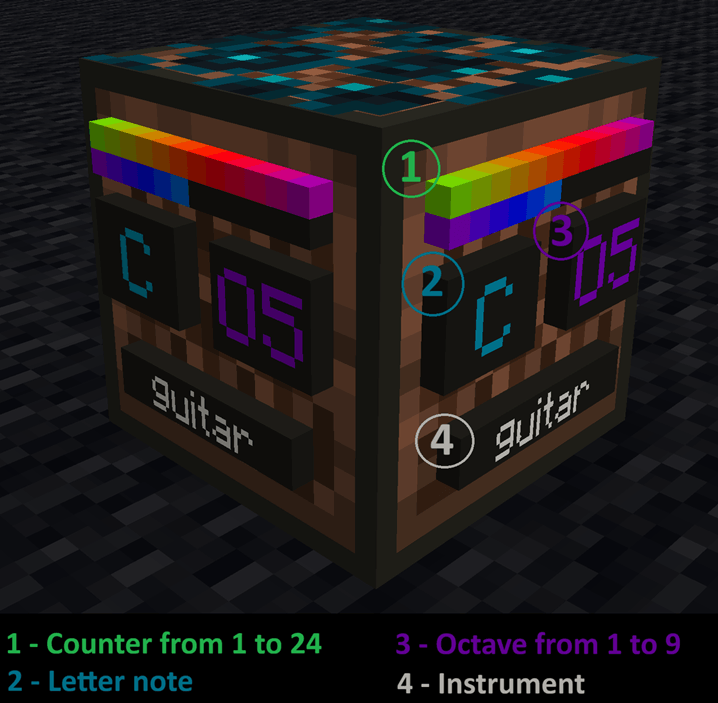
Better Note Block
This is an upgraded noteblock! It has an octave associated with it and plenty of useful information.
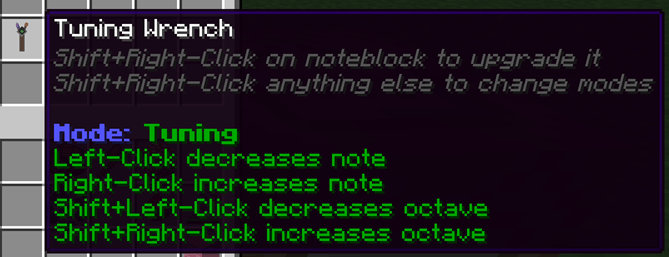
Note Block Wrench
Use this to unlock the potential of Better Noteblocks! Shift + Right Click converts any regular note block into an upgraded one.
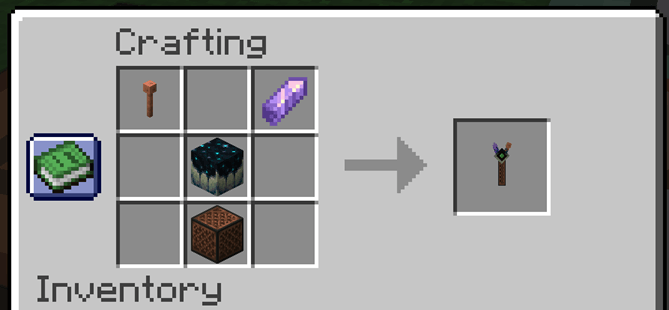
Recipe
Tuning Mode
Shift+Right Click the ground to change modes!
Clipboard Mode
Shift+Right Click the ground to change modes!
Planned Features
'Advanced Settings' for wrench for things like tuning key, pasting a series of notes, etc
Custom paintings that provide informational note block posters (like chords, notes, etc)
New instruments
Songmaker mode
Installation
Singleplayer
Download the latest release from Releases or your platform of choice
Drop QuinnsBetterNoteblocks_resourcepack into the resourcepacks folder
Open saves
Open the world you want to add it to
Drop QuinnsbetterNoteblocks_datapack into the datapacks folder
Make sure you equip the resourcepack
Multiplayer
Use these instructions if you are a server owner and would like to add QuinnsBetterNoteblocks to your server so any player can use it.
Download the latest release from Releases or your platform of choice
In your server, open the world folder
Move QuinnsbetterNoteblocks_datapack into the datapacks folder
Upload QuinnsBetterNoteblocks_resourcepack to a resource pack hosting website like https://mc-packs.net
Open your server.properties file and fill in the resource-pack= field with the download link and the resource-pack-sha1= field with the SHA-1 Hash. (if you use https://mc-packs.net these fields are auto-generated for you)
FAQ
Q: Why both a datapack and a resourcepack?
A: The resourcepack holds the sound files and the datapack handles the logic, both are needed.
Q: Will this cause performance issues?
A: Any noteblock that is upgraded will spawn in 1 entity. There are also commands running every tick to check this entity. You can expect at least some extra impact on performance per note block. The performance impact of this has yet to be stress tested, but it seems like the overall impact is low unless you are making a very large note block contraption. That being said, it seems to have no impact on my frames or TPS in my testing world. I am also trying my best to keep this as optimized as possible while still providing the best features.
Q: Why is there a sculk vein above my note block?
A: When you upgrade a noteblock using the wrench, the vanilla note block noises need to be disabled to allow for the new BetterNoteblocks noises to play. The only way to achieve this is putting a block on top- the sculk vein.
Q: Will this work in multiplayer?
A: Yes! Just make sure other players have the resourcepack too.
Disclaimers
This pack works by spawning entities at upgraded noteblocks that hold extra information. If a command is run that kills all entities, the noteblocks will cease to function.
Since every note block is an entity, it could possibly have an impact on performance.
The resourcepack is necessary to hear the notes. If a player on the server doesn't have the resourcepack, they won't be able to hear the note blocks
Sculk veins have been modified to not drop anything if they are broken with a note block between them. This is so you can't 'cheat in' sculk veins by upgrading note blocks.
Setblock commands are used in some parts of the code. They should be harmless- but I haven't stress tested trying to break or abuse this yet. It's possible players could abuse this.
Since holding a wrench causes an interaction entity to surround the note block, the noteblocks can't be broken while a wrench is held near them. This could be abused by players to trap or grief.
Known Bugs
Better Noteblocks have an extra 1 tick delay
As far as I know, there is no way around this due to how the datapack commands execute
Sometimes pasting from offhand using the clipboard wrench doesn't work (likely a latency issue)
Item display entity for the better noteblock has a set brightness (will appear to 'glow' in dark areas)
Some instruments may be tuned an octave or two off from where their default -should- be
The Quinn's Better Noteblocks (required resourcepack) Team