NoMod Shaders
- By
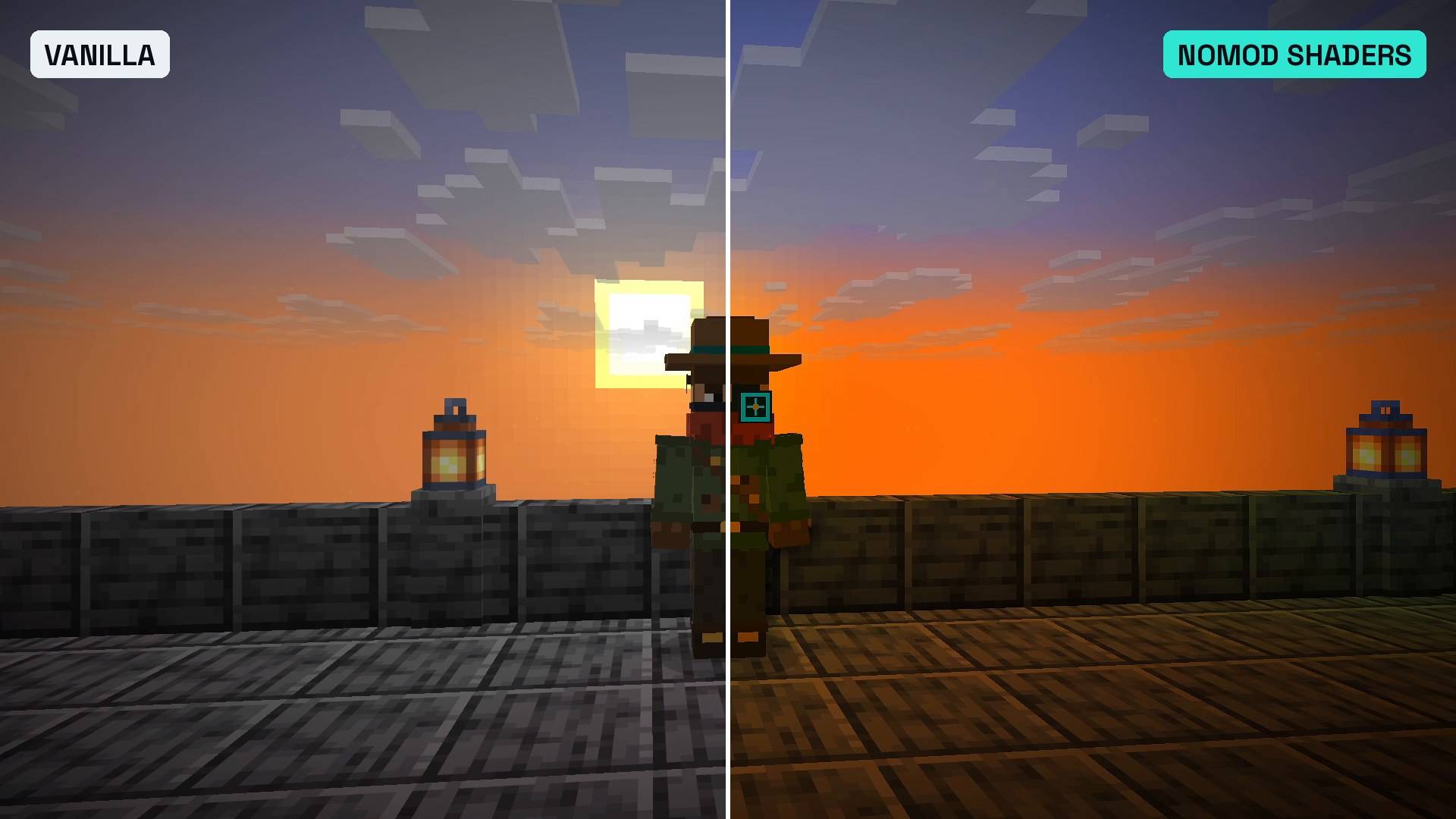
Real in-game screenshot, same spot and same moment. Left vanilla, right NoMod Shaders: golden light on the planks, warm lanterns, deeper sky.
Description
NoMod Shaders
by The Mod Hunter
Shaders for Minecraft Java 26.3. No Iris. No OptiFine. No mod loader.
Minecraft 26.3 can change its own shaders through a resource pack, so I built a shader look that needs nothing else: leaves and grass wave in the wind, sunsets turn the whole landscape golden, nights get a cosy blue moonlight, torches glow warm, and bright light blooms. Drop in a resource pack and a small data pack, and you're done.
What it is
NoMod Shaders is a vanilla shader pack: a normal resource pack that replaces a few of the game's own core shaders and adds screen effects, plus a small data pack that lets every player switch between three looks. It is not a mod. It runs on plain Minecraft Java Edition 26.3, in singleplayer and on servers.
Vanilla vs NoMod Shaders
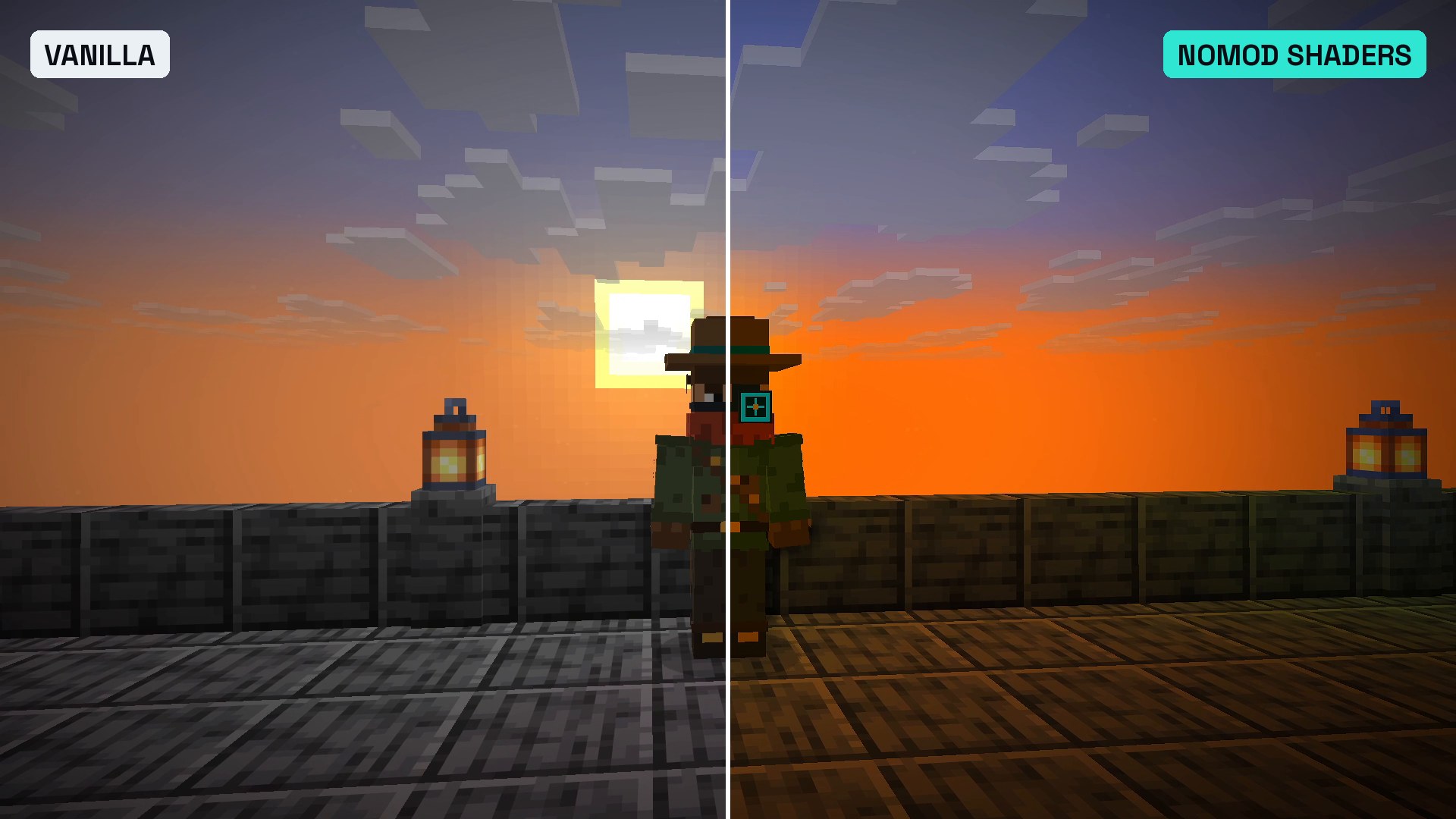
All pictures are real in-game screenshots from my world on Minecraft 26.3, Default look.
Night: vanilla on the left, NoMod Shaders on the right. 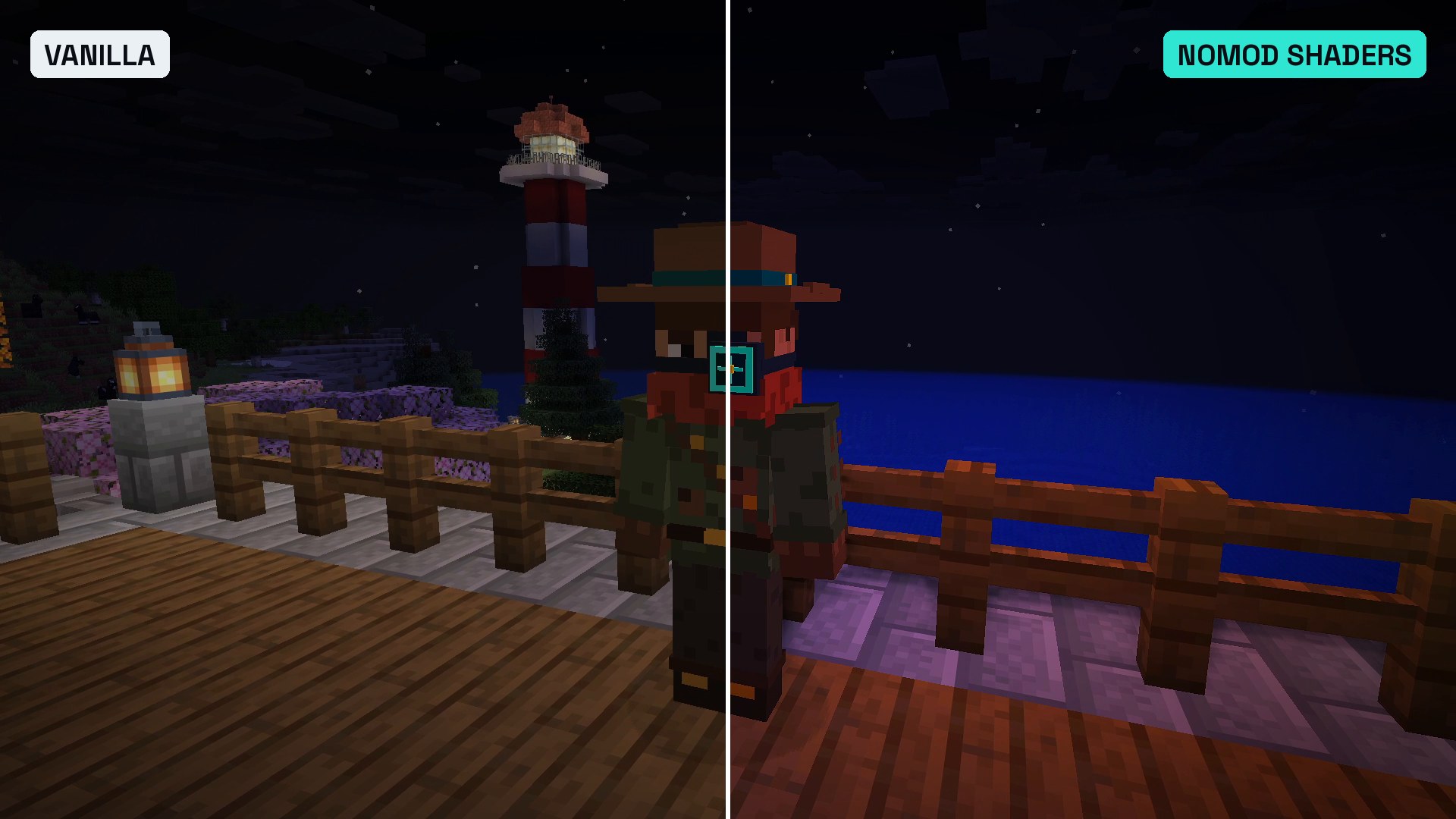
Block light: vanilla on the left, NoMod Shaders on the right. 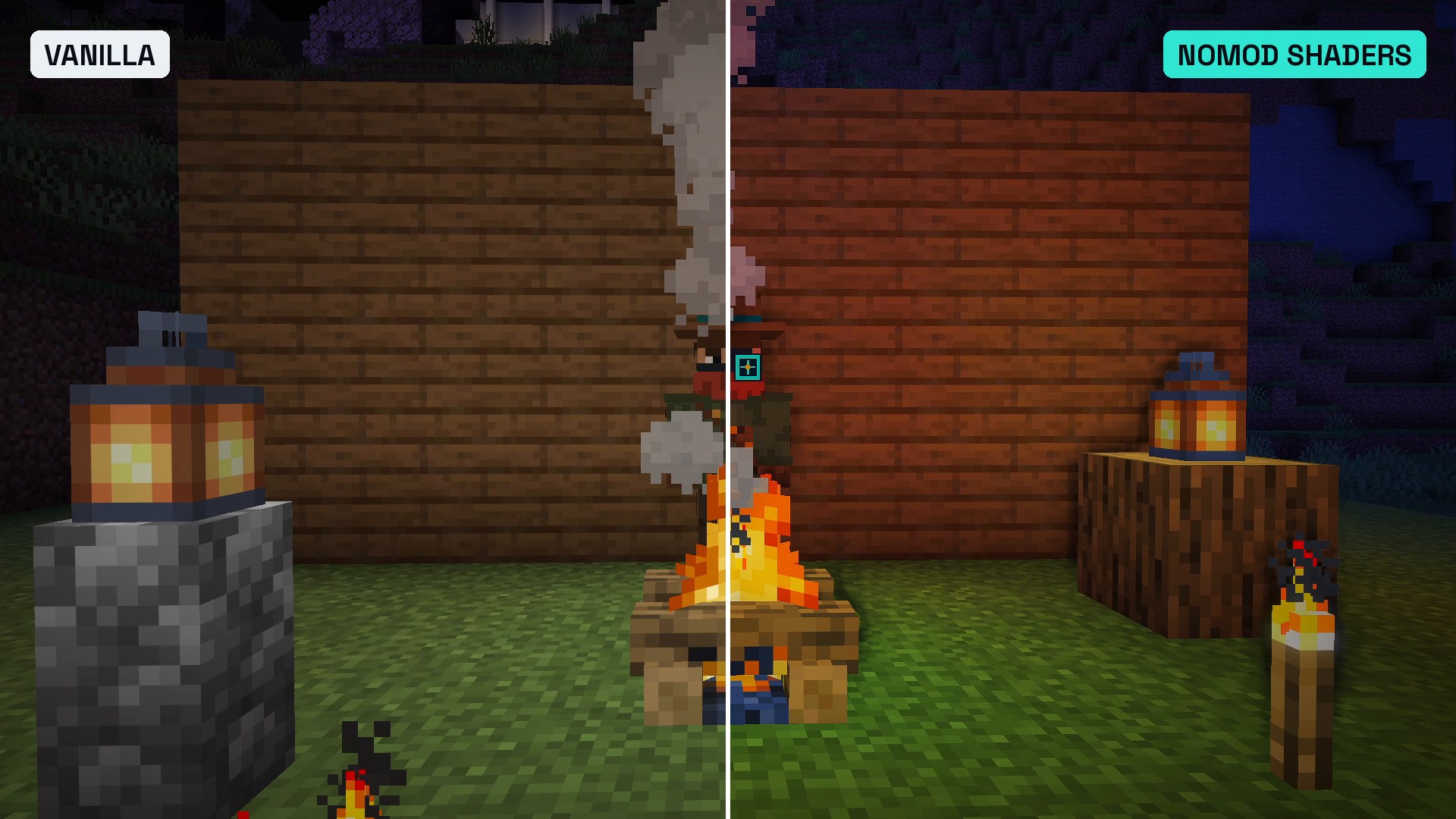
Sunset over the sea: NoMod Shaders on the left, vanilla on the right. 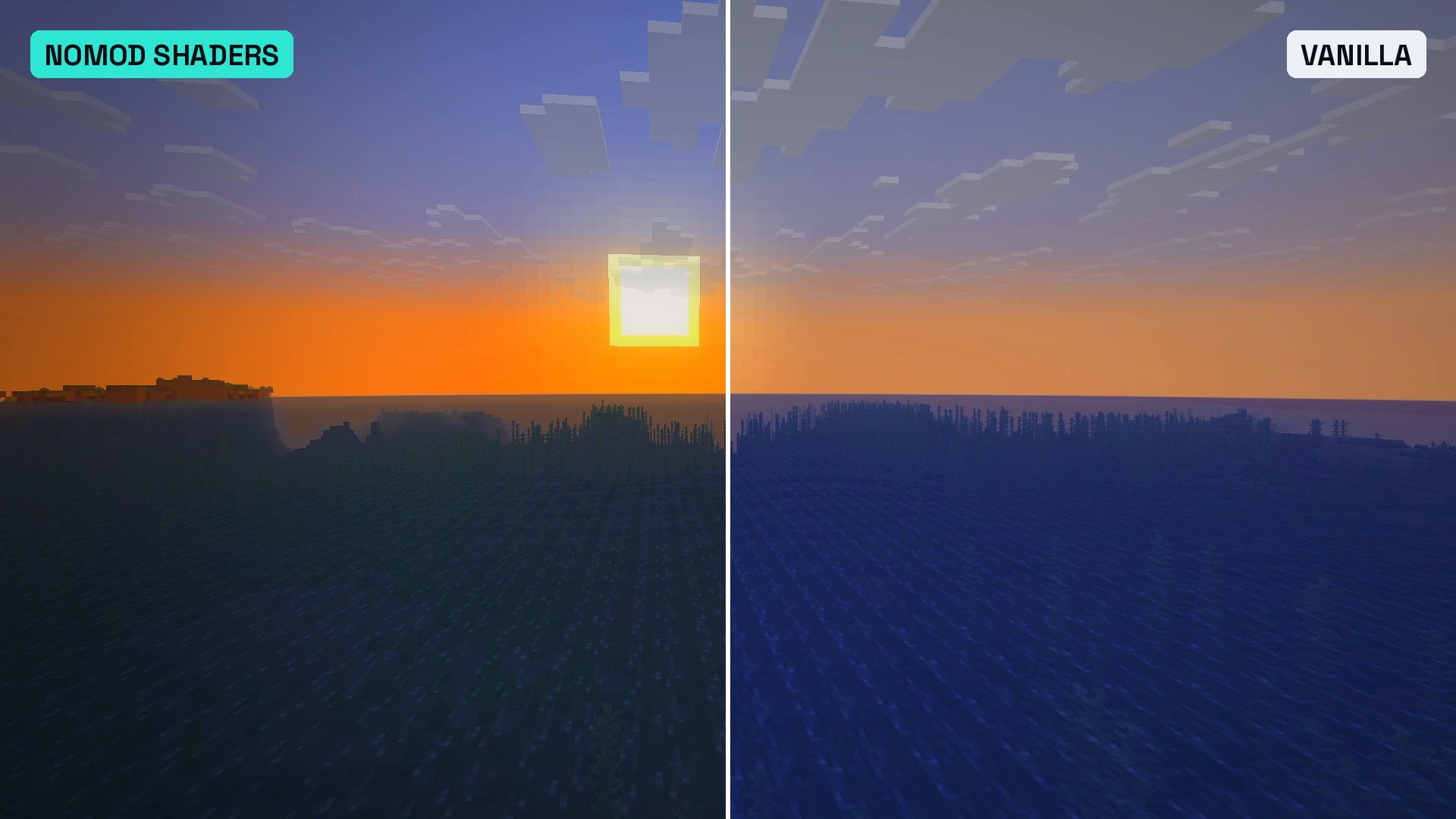
Wind: 
Features
- Waving leaves and grass: grass, ferns and other crossed plants bend in the wind from the root, oak-type leaves and vines rustle, slow gusts roll across the land.
- Light distance haze: the near range stays crisp, the middle distance gets a light haze. At the edge of your render distance it is exactly vanilla, so far hills and coastlines stay readable.
- Golden hour and moonlight: the landscape turns golden while the sun goes down and comes up. Nights get a bright, cool-blue moonlight instead of dark grey.
- Warm block light: torches, lanterns, campfires and candles light their surroundings in amber.
- Glow (bloom): soft glow on the sun, the bright sky and light sources.
- Contact shadows: soft shading in corners, under ledges and where blocks meet the ground.
- Colour grade: richer colours, cool shadows, warm highlights, a soft vignette.
- Depth of field in the Cinematic look: whatever is in the middle of the screen stays sharp, the rest blurs like a camera lens.
Three looks, switched in-game
| Look | What you get | Command (no operator rights needed) |
|---|---|---|
| Lite | wind, haze, warm light, light glow, close to vanilla, fastest | /trigger shaders_lite |
| Default | adds contact shadows, cool shadows and a stronger glow | /trigger shaders_default |
| Cinematic | film look with strong contrast plus depth of field | /trigger shaders_cinematic |
| Off | screen effects off (wind, haze and warm light stay while the pack is on) | /trigger shaders_off |
Default is on when you join. Extra files in every version:
- No wind:
NoModShaders-0.6.0_resourcepack_still.zip, same look, leaves and grass stay still. Use it instead of the normal resource pack. - Always on:
NoModShaders-0.6.0_resourcepack_always.zip, Default look without the data pack (no switching). Never use it together with the data pack.
Performance (my own test)
Measured by me on November 1, 2026, in my world on Minecraft Java 26.3: the same 8-second slow camera move high over a valley at noon, FPS read from the F3 screen once it settled.
| Look | FPS in my test |
|---|---|
| Vanilla (no packs) | about 440 |
| Lite | about 430 to 445 |
| Default | about 340 to 380 |
| Cinematic | about 265 to 335 (average about 295) |
Test system: NVIDIA GeForce RTX 4070 Ti SUPER, driver 617.14, 1920 x 1080, render distance 12, recording software running. Your numbers will differ with other hardware and settings.
Install in 3 steps
- Resource pack: put
NoModShaders-0.6.0_resourcepack.zipinto.minecraft/resourcepacksand turn it on under Options > Resource Packs. - Data pack: new world: Create World > Data Packs, drag
NoModShaders-0.6.0_datapack.zipin. Existing world: put it intosaves/<your world>/datapacksand type/reload. - Play: the Default look turns on by itself. Switch with the
/triggercommands above.
Servers: the data pack goes into the server world, every player needs the resource pack (a server resource pack works too).
Compatibility
- Minecraft: Java Edition 26.3 only. Not for Bedrock or Pocket Edition (on Bedrock, Vibrant Visuals is the built-in option).
- Mod loaders and mods: none needed. Sodium and Iris: not tested yet.
- Other resource packs: texture packs work alongside. Packs that replace
fog.glsl,lightmap.fshorterrain.vshconflict, the one higher in the list wins. - Graphics setting: no "Fabulous" graphics needed.
Known limits
This is what vanilla Minecraft allows, not a replacement for an Iris shader pack.
- No real sun shadows, no reflections, no volumetric light rays, no water waves.
- Vanilla shaders don't know which block they draw, so the pack finds plants by their biome colour and shape. Cherry, azalea and pale oak leaves have no biome colour and stay still, and so do spruce and birch leaves and flowers. Tall two-block plants and sugar cane bend per block.
- In biomes with a very strong grass colour, grass block tops could move slightly. Use the "no wind" pack if you see that.
- Contact shadows and depth of field only know what is on screen.
- Mojang says post effects and core shaders can change with any update, so a new Minecraft version can break the pack until I update it.
License
MIT. Learn from it and build on it, keep the copyright notice.
Made by The Mod Hunter: new mods, packs and tests for the current Minecraft version every week.
- Project page with install guide and test results: themodhunter.com/mods/nomod-shaders
- Website: themodhunter.com
- YouTube: youtube.com/@themodhuntergg
- Imprint (Impressum): themodhunter.com/imprint
Not an official Minecraft product. Not approved by or associated with Mojang or Microsoft.
NoMod Shaders Team