Bundles have been enhanced! They can now carry up to 27 stacks of mixed items, making them the ultimate storage solution!


This presentation concerns about the latest release.
For older ones, check the "Older Versions" section, at the bottom of the page.
📥How to Install
- 1) Download the Datapack
- 2) Chose the world you want to install the Data Pack in and navigate to its "datapacks" folder
- 3) Copy the downloaded Data Pack file (Better Bundle) into this folder
- 4) Join the world and run
/reload command
📖Features
The bundles have been improved and they can now carry up to 27 stacks of items including stackable, non-stackable and even shulker boxes!

Use the bundle expanded capacity
- Fill a bundle: Put the items you want to transfer into a chest, then hold an empty bundle in your main-hand, and right-click on the chest to transfer its content into the bundle.
- Empty a bundle: To take items out of a bundle, you can:
- Use the vanilla scroll functionality: Use the mouse wheel to scroll through the items and take out the one you want.
- Quickly deposit items into an empty chest: Hold a filled bundle (
with this pack) in your off-hand, keep your main-hand empty, and right-click on an empty chest to transfer all the bundle's contents into that chest.
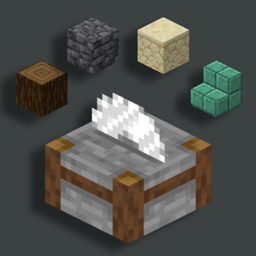
- Bundle Crafting Recipe

❗Note❗ Both the normal and trapped chest can be used in the crafting recipe.
- Youtube Showcase
📤How to Uninstall
To uninstall the Data Pack you can just run /function bundle:uninstall command. When the uninstallation process is completed a confirmation message will be sent in the chat.
Older Versions
- Version 1.4 and below (for Minecraft 1.19-1.21.1)
A new and enhanced bundle that can carry more items over the vanilla one, making it the perfect storage solution!

📥How to Install
- 1) Download the Datapack
- 2) Chose the world you want to install the Data Pack in and navigate to its "datapacks" folder
- 3) Copy the downloaded Data Pack file (Better Bundle) into this folder
- 4) Join the world and run
/reload command
📖Features
The bundle has been improved and it can now carry 27 item slots including stackable and non-stackable items and even shulker boxes.
To put items inside a bundle, hold an empty bundle in your main hand and right click on a chest to transfer its content into the bundle.
To empty a bundle, hold it in your off hand, don't hold anything in your main hand and right click on an empty chest to transfer all the bundle content into the chest.
- Youtube Showcase
- Bundle Crafting Recipes
Here are the crafting recipe and its variants to craft a bundle.
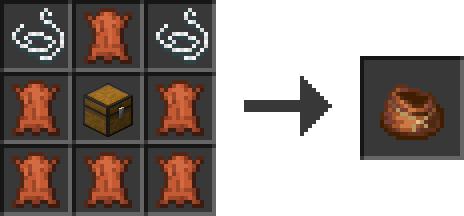
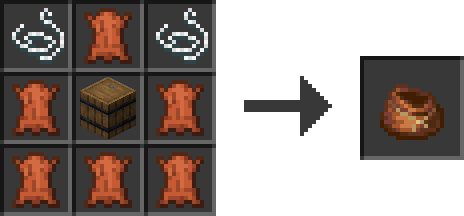
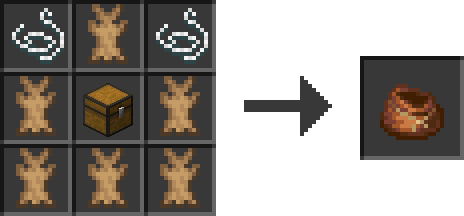
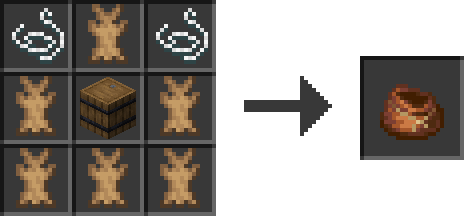
❗Note❗ both the normal and trapped chest can be used in the crafting recipe.
📤How to Uninstall
To uninstall the Data Pack you can just run /function bundle:uninstall command. When the uninstallation process is completed a confirmation message will be sent in the chat.


![Better Bundle [Data Pack] logo](https://media.forgecdn.net/avatars/thumbnails/1132/816/64/64/638692796721560306.png)