PrimeCinematic
- By
A cinematic Iris shaderpack written from scratch for Minecraft 26.2 — soft coloured shadows, volumetric light shafts and a properly calibrated filmic grade, with four presets from Performance to Ultra.
Screenshot 2026-08-11 124421.png
Description
# PrimeCinematic
Written from scratch for Minecraft 26.2 — not a fork, not a re-skin of an existing base. It aims at one thing: **footage that looks good without looking like a different game.** Vanilla's colours stay recognisable. What changes is the light.
## What it does
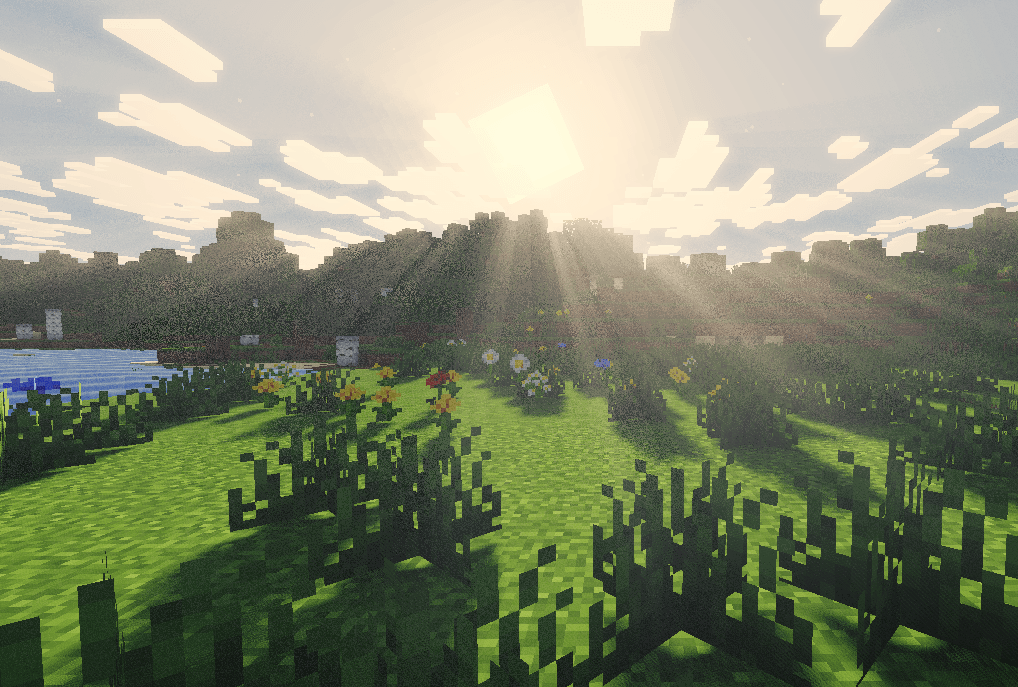
**Soft, coloured shadows.** Sun and moon shadow mapping, filtered with a rotated Vogel disk so the penumbra reads as a smooth gradient instead of a repeating ring pattern at low sample counts. Stained glass and water tint the light that passes through them, so a window throws colour on the floor.
**Volumetric light shafts.** Real rays through gaps in geometry, strongest at low sun angles and damped in rain.
**Screen-space ambient occlusion.** Contact shadow in corners, under overhangs, and everywhere in caves.
**Water that reads as water.** Fresnel-weighted sky reflection, depth-tinted body colour, and a vertex-stage swell that picks up during a storm.
**Waving foliage.** Grass, crops, flowers, leaves, vines, kelp and seagrass, each keyed by block id, all stronger in rain.
**A filmic grade.** ACES tone mapping, calibrated so mid-grey lands where film puts it. The standard ACES fit maps 18% grey about nine points too bright — that is the milky, washed-out look you see on a lot of packs. This one corrects for it. Neutral and high-contrast curves are included if you want a different look.
## Four presets
| Preset | What it is |
|---|---|
| **Performance** | Shadows only. No ambient occlusion, no bloom. |
| **Balanced** | Everything on, 176-block shadows. The default. |
| **Cinematic** | Softer shadow edges, longer light shafts. |
| **Ultra** | 2048 shadow map, 224-block shadows, 24-step shafts. |
Every value behind them is also a slider, grouped into Shadows / Lighting / Atmosphere / Post Processing, each with a plain-English tooltip that says what it actually does.
## Performance
Rendering the shadow map is roughly **60% of this pack's GPU cost** — the world gets drawn a second time from the sun's point of view. So if you need frames:
> **Shadow Resolution is the lever, not Shadow Distance.**
> Dropping 2048 to 1024 typically buys **15–40%**, and the shadow distortion keeps texels dense near the camera, so the near field barely changes. Cutting distance instead makes far terrain go flat-lit, which looks much worse for what it saves.
Measured on an RTX 5070 Ti Laptop at 2.5K, render distance 16: around **200–250 FPS on Balanced**, against ~700 with shaders off. Expect to land near a third of your vanilla framerate on Balanced, and better than that on Performance.
## Requirements
- Minecraft Java **26.2**
- **Iris 1.11.2** or newer
- **Sodium 0.9.1** or newer (Iris requires it)
- A GPU supporting OpenGL 4.3
## Install
1. Download the `.zip`. **Do not unzip it.**
2. Put it in `.minecraft/shaderpacks/`
3. In game: **Options → Video Settings → Shader Packs → PrimeCinematic → Apply**
## Known limits — please read before reporting these
Being straight about what this pack does not do:
- **No screen-space reflections.** Water reflects the sky, not the world. Blocks and mobs do not appear in it.
- **No PBR.** No labPBR or normal/specular map support — resource packs shipping those will render as though they had not.
- **No TAA, no motion blur, no depth of field.**
- **No coloured block light.** A redstone torch lights its surroundings warmly, but it does not throw red.
- **Shadows fade out past Shadow Distance.** Raise it if you shoot wide landscape footage.
- **Dense foliage at range can show faint sampling noise** in the shadow filter. Raising Shadow Samples reduces it; it does not disappear entirely.
## Filming notes
Tone Mapping on **Filmic** with Film Grain around **0.006** survives YouTube compression better than the clean defaults — a little sensor noise gives the encoder something to hold onto, so flat sky areas band less.
Sun Path Angle is worth a look too. The default −25° gives longer, more directional shadows than vanilla's overhead sun, which is most of what makes a landscape shot read as cinematic.
## Who made it
PrimeCinematic was written from scratch — every pass, nothing forked — for a video series on the **OnePatchLater** YouTube channel. If you want to see how it was built, or what gets made next, that is where it happens.
## License
Use it anywhere — single-player, servers, screenshots, videos, streams, monetised or not. Modify it for your own use. **Just say where it came from:** naming the pack is enough, and that is the whole requirement.
If there is room for a link, pointing people at this page or at the channel is genuinely appreciated — that is what keeps the pack getting updates.
The one thing to please not do is re-upload it somewhere else; link here instead. Modpacks are welcome on the same terms. Full text in `LICENSE.txt` inside the zip.
PrimeCinematic Team