Humid Shaders
- By
A performance-focused, customizable shaderpack currently locked to a "Realistic" preset style.
97388d1326310a3038fbdc063841d0c791192cb0_350.webp
bb083452f1b5ad9af576a07a6c512c76ea9ed010_350.webp
40912a181e8c5c5e36a2347cab4206ffd641cec4_350.webp
Description
About
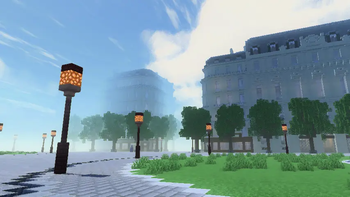
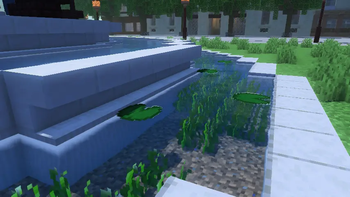
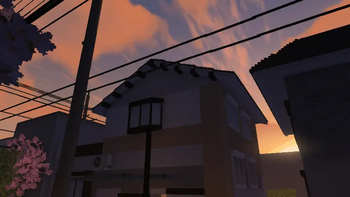
A performance-focused, customizable shaderpack currently locked to a Realistic preset style (physically-based daytime sky, neutral color grading) at Balanced quality. Renders soft volumetric clouds with realistic sky lighting, and water with depth tinting, reflections, and shoreline detail.
Features
- Volumetric clouds, aurora, godrays, ground fog, atmospheric haze, and weather effects
- Water: depth tint, shore foam, sun glint, screen-space reflections/refraction
- Post-processing: shadow filtering, bloom, tone mapping, color grading, depth of field, motion blur, film grain, vignette, lens flare
- PBR material support via LabPBR
- Extensive in-game config screen (e.g. "Cool Features" panel with toggles/sliders for lens flare, cinematic bars, cirrus clouds, Milky Way, shooting stars, chromatic aberration, and film grain each adjustable in strength)
License
Licensed under LGPL-3.0-or-later.
Credits & Derivative Status
This shaderpack is a derivative work of MakeUp UltraFast, itself distributed under LGPL-3.0-or-later. Humid Shaders inherits and must comply with the copyleft terms of the original source availability, same/compatible license for modifications, and attribution retained. The full license text is in the LICENSE file; credits explicitly acknowledge MakeUp UltraFast as the base.
Configuration
Options live in shaders/lib/config.glsl. Any #define NAME value // [v1 v2 ...] line becomes a user option in the shader settings screen; removing the value list locks the value while keeping the macro available to the code.
Screens and sliders are laid out in shaders/shaders.properties, and option labels/tooltips in shaders/lang/en_US.lang.
The look is fixed by HUMID_COLOR_STYLE 2 (Realistic) and the weight by HUMID_QUALITY 1 (Balanced). Change those two values and re-add a value list to bring the options back.
Development
- ForDevelopers.EN.md — annotated overview of the MakeUp architecture this pack is built on.
- ParaDesarrolladores.ES.md — the same document in Spanish.
- helpful.txt — commands useful for testing lighting and time of day.
The Humid Shaders Team