Description
CineFrame
Cinematic letterbox bars for Minecraft
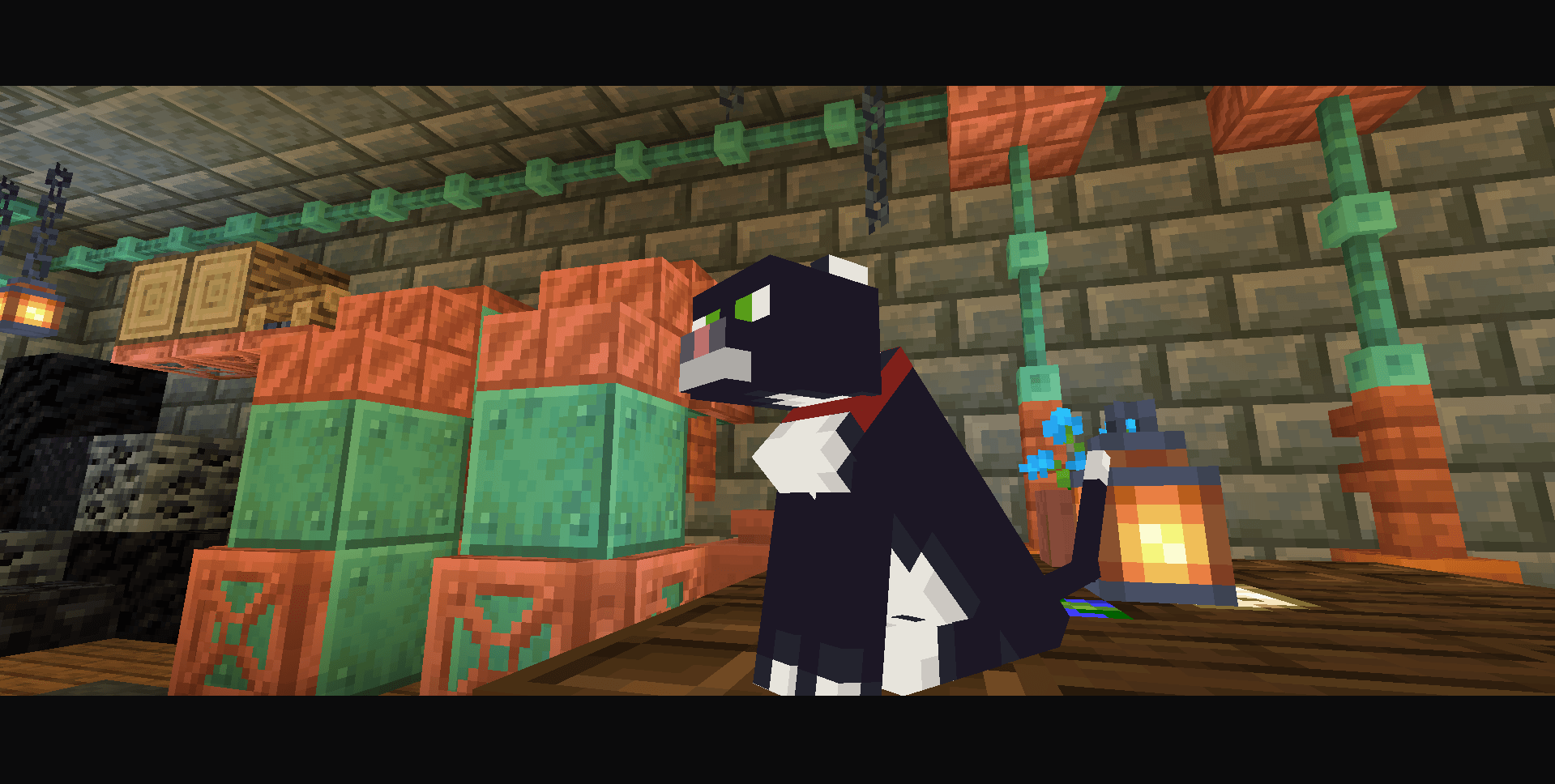
Black bars at the top and bottom, like a movie. Pick a film ratio, move the bars around, soften the edges and let them pick up a little color from the scene. The rest of the picture stays vanilla. Nothing extra on screen, just the frame.
Features
- Film ratios: 1.37:1, 1.66:1, 1.85:1, 2.00:1, 2.16:1, 2.35:1, 2.39:1 and 2.76:1, or set the bar size by hand
- Three layouts: top and bottom, left and right, or a full frame
- Ready-made profiles: Classic, Cinema, Wide, Vertical, Frame, Soft, Off
- Smart color: the bars blend in the colors of the scene behind them
- Fine tuning: opacity, bar color, soft edge, shift up/down and sideways
- Hide on F1: bars can disappear when the HUD is hidden
Compatibility
Minecraft Java 1.16.5 - 26.3
- Fabric + Sodium + Iris - ✅ recommended
- OptiFine HD U - ✅ supported
Warning: don't run OptiFine and Iris together, pick one. This pack doesn't work alongside other shader packs.
Installation
- Install Fabric + Sodium + Iris (or OptiFine, without Fabric) for your Minecraft version
- Copy the pack's
.zip(do not unpack it) into yourshaderpacksfolder - In-game:
Options > Video Settings > Shaderpacks > CineFrame
Important: delete all old versions of this pack from
shaderpacksbefore installing, otherwise the game may load a stale file.
In-game settings
Open the shader pack's settings: a profile picker, the on/off switch and 3 sections.
- Shape: bar layout, film ratio, bar size
- Position: shift the bars sideways or up and down
- Look: opacity, color, smart color, soft edge
- Hide on F1: hides the bars together with the HUD
Troubleshooting
- No bars -> check that this pack is selected, shaders are enabled, and the profile isn't "Off"
- Bars too thick or too thin -> change "Film ratio" or "Bar size" in the Shape menu
- Bars disappear on F1 -> turn off "Hide on F1"
- Menu buttons missing -> delete old pack versions from
shaderpacksand reload shaders
Contact
faspadio (hoziain_murki)
- GitHub: github.com/Hacer599
- Twitch: twitch.tv/faspadio_if_tve
- YouTube: @hoziain_murki
CineFrame
Кинополосы для Minecraft
Чёрные полосы сверху и снизу, как в кино. Выбери киноформат, двигай полосы по экрану, смягчай края и пусть они подмешивают немного цвета из кадра. Остальная картинка остаётся ванильной. Ничего лишнего на экране, только рамка кадра.
Особенности
- Киноформаты: 1.37:1, 1.66:1, 1.85:1, 2.00:1, 2.16:1, 2.35:1, 2.39:1 и 2.76:1, либо ручная толщина полос
- Три расположения: сверху и снизу, слева и справа или рамка
- Готовые наборы: Классика, Кино, Широкий, Вертикальный, Рамка, Мягкий, Выкл
- Умный цвет: полосы подмешивают цвета кадра позади себя
- Тонкая настройка: прозрачность, цвет полос, мягкий край, сдвиг вверх/вниз и вбок
- Скрытие по F1: полосы могут пропадать вместе с интерфейсом
Совместимость
Minecraft Java 1.16.5 - 26.3
- Fabric + Sodium + Iris - ✅ рекомендуется
- OptiFine HD U - ✅ поддерживается
Внимание: OptiFine и Iris одновременно не надо, выбери что-то одно. С другими шейдерпаками этот пак не работает.
Как установить
- Установи Fabric + Sodium + Iris (или OptiFine, без Fabric) для своей версии Minecraft
- Скопируй
.zipпака (не распаковывая) в папкуshaderpacks - В игре:
Настройки > Графика > Шейдеры > CineFrame
Важно: перед установкой удали из
shaderpacksвсе старые версии этого пака, иначе игра может подхватить старый файл.
Настройки в игре
Открой настройки пакета шейдеров: выбор набора, переключатель и 3 раздела.
- Форма: расположение полос, киноформат, толщина
- Положение: сдвиг полос вбок и вверх/вниз
- Вид: прозрачность, цвет, умный цвет, мягкий край
- Скрывать по F1: прячет полосы вместе с интерфейсом
Если что-то не так
- Полос нет -> проверь, что выбран этот пак, шейдеры включены и набор не «Выкл»
- Полосы слишком толстые или тонкие -> поменяй «Киноформат» или «Толщина» в разделе «Форма»
- Полосы пропадают по F1 -> выключи «Скрывать по F1»
- Пропали кнопки меню -> удали старые версии пака из
shaderpacksи перезагрузи шейдеры
Контакты
faspadio (hoziain_murki)
- GitHub: github.com/Hacer599
- Twitch: twitch.tv/faspadio_if_tve
- YouTube: @hoziain_murki
CineFrame Team