Afterglow
- By
A moody, rain-soaked, neon-tinted realism shader for Minecraft, with natural skies, glowing lights, reflective puddles, and drops you can actually see land.
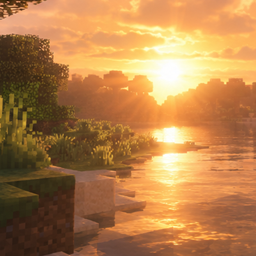
Afterglow is an Iris shader pack for Minecraft that pushes the game toward cinematic, atmospheric realism, with a subtle cyberpunk edge. Daytime stays natural and recognizable, while night, rain, and light sources get the dramatic treatment.
Sky and atmosphere
- Natural Minecraft sky colors, with only a faint blue city-glow at night
- Animated clouds that grow denser and darker in rain
- Halos around the sun and moon
- Fog that starts far away, with no purple haze
Light
- Light sources keep their true color (end rods stay white, torches stay warm)
- Soft two-pass bloom around glowing blocks
- Dynamic light: a held torch lights up your surroundings
- Ore glow limited to the ore pixels, with a slight pulse
- Bright surfaces such as end stone and snow no longer flash white under torchlight
Rain, the main feature
- Irregular puddles that reflect lights and the sky
- Wet ground, including sand
- Visible raindrops synchronized with ripples: each ring is born exactly where a drop lands, on the ground and on water
- Droplets on your screen that refract the image, slide, and evaporate
- Distant rain curtains, thicker rain fog, darker clouds
- Dark raindrops at night that don't trigger bloom
Water and fire
- Waves that really deform the surface, plus reflections
- Darker water with depth, and blue fog underwater
- Wake rings when you walk or swim, and dive splash rings
- Procedural flames with a blackbody-style gradient (white-yellow to orange to red; blue for soul fire), plus a subtle flicker on warm light
- Dense orange fog inside lava, and white-blue fog in powder snow
Vegetation
- Leaves, grass, flowers, and tall plants sway in the wind, harder in storms
Final look
- Subtle cyberpunk grading (teal shadows, slightly magenta highlights), light chromatic aberration, vignette, and film grain
Options (in the Iris menu): reflections on/off and strength, wave strength, wind strength, bloom strength, color grading strength, dry-weather puddles, realistic fire on/off, screen raindrops, and distant rain curtains.
Afterglow Team