Przyjaciel ModPack / Friend ModPack
- By
Paczka modów stworzona z myślą o fanach serii YouTubera Przyjaciel! ModPack made beacuse of the fans of channel Przyjaciel!
https://ibb.co/5kBX8GB
Description
PRZYJACIEL MODPACK 1.16.5
English:
Hello!
My name is Tomek, on YouTube Przyjaciel - mój channel: https://www.youtube.com/channel/UCr9cziTQVJ8Hdk1f4A6Q53Q
I made my modpack named Przyjaciel ModPack beacuse of my youtube viewers, who asked for this many times :)
All the mods are from curseforge app. I made this modpack with it :)
ABOUT THIS MODPACK:
This modpack contains a lot of adventure mods that include new dimensions, dungeons and mobs! This is a lot of fun!
There will be no shortage of new armors, weapons and artifacts.
Sometimes it can be hard to survive a blood moon or mobs attack, but after you gather some stuff it can be much easier.
There are also some mods intended for the "end game". OPChanter is one of this mods, that allows us to powerup our tools (power XX, protection XX and more!)
If you want rest from adventures and dungeons you can craft for yourself an cloud pet from Inventory Pets mod and use it to fly. Its much easier to build a lot of beatiful buildings!
It only depends on your imagination :)
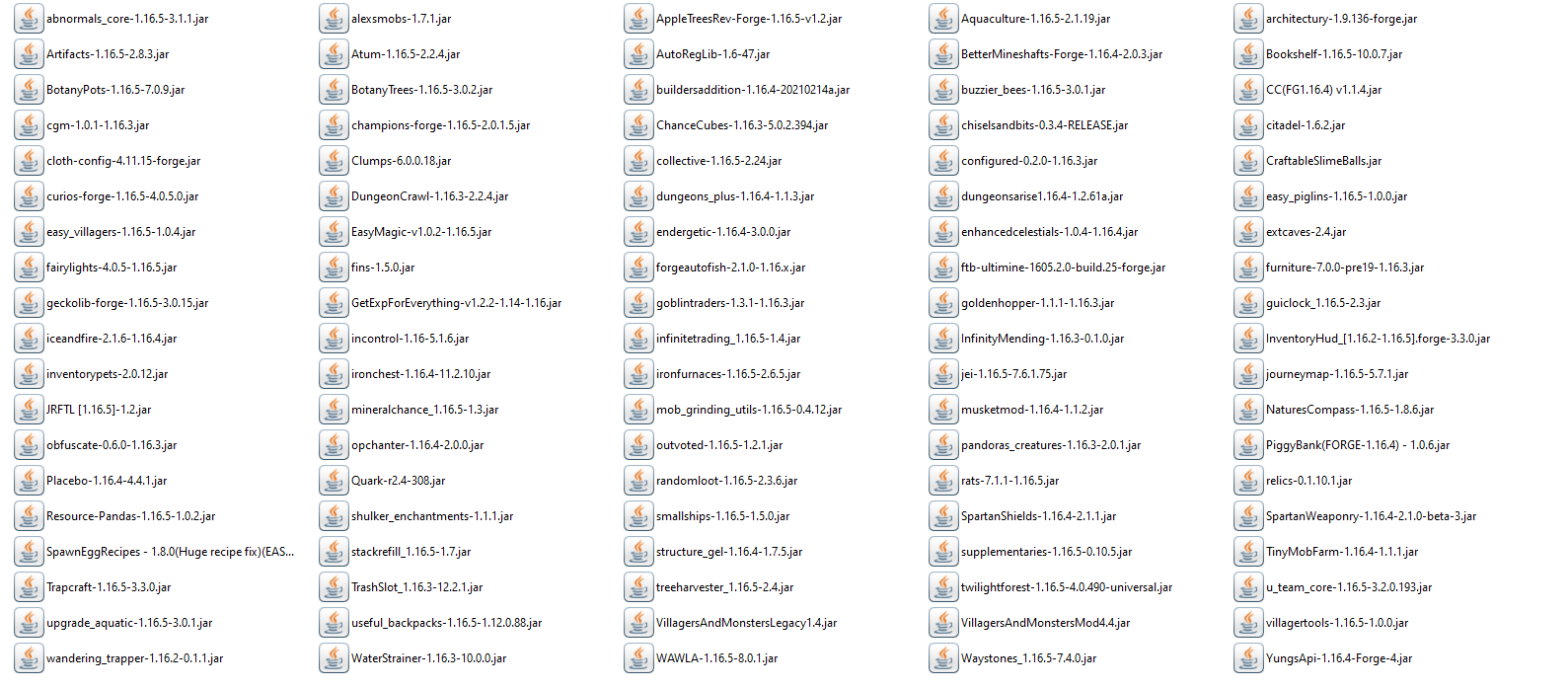
Mod List:
SETUP & INSTALLATION:
Download the .zip folder which is an export profile from my curseforge account.
It has mods folder and config folder in it.
Install 1.16.5 version of Minecraft. Then install 1.16.5 forge. Launch your forge profile and then after closing minecraft just unpack .zip and place mods and config folders in .minecraft
If any problems have appears please write some comments :)
Polski/Polish:
Witam! Nazywam się Tomek, a na YouTube Przyjaciel - mój kanał YouTube: https://www.youtube.com/channel/UCr9cziTQVJ8Hdk1f4A6Q53Q
Paczkę Przyjaciel ModPack stworzyłem z myślą o fanach mojej serii "X Dni w Minecraft na Modach 1.16.5", którzy bardzo często proszą o zrobienie dla nich tejże paczki, a raczej jej udostępnienie. Mody są wszystkie z curseforge'a. Paczkę robiłem przy pomocy samej aplikacji curseforge'owej. Wszystkie mody poznałem dzięki filmikom oraz własnemu reaserchowi i korzystałem z nich już długo, dlatego wiedziałem co dodawać.
LISTA MODÓW: https://ibb.co/qm24WSt
INSTALACJA: Pobierz Minecraft na wersji 1.16.5. Ściągnij forge'a z wersji 1.16.5 (najlepiej installer, bo automatycznie się instaluje). Po instalacji forge'a odpal w Minecraft'cie instalacje z forgem i poczekaj aż się załaduje do końca. W menu powinien się pojawić nowy przycisk "MODS". Wyłącz Minecraft'a, a następnie ściągniety tutaj .zip rozpakuj. Powinieneś mieć teraz folder mods oraz config, które musisz przenieść do folderu .minecraft (wpisując %appdata% możesz się do niego dostać). Po wklejeniu tych dwóch folderów powinno wszystko śmigać W razie problemów proszę pisać:) Pozdrawiam!
Przyjaciel ModPack / Friend ModPack Team