Neomized
- By
A lightweight, pre-optimized NeoForge performance base and blank-slate template for modpack devs and players.
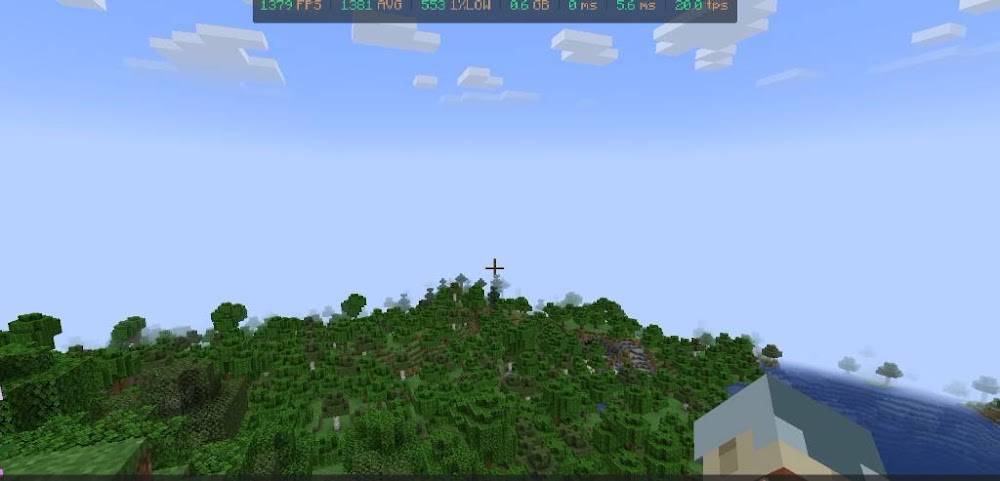
base performance stats
Hungryman567 | Neomized
Create a server, get 25% off your first month

Description
Neomized — Clean NeoForge Performance Base
Neomized is a lightweight, pre-optimized NeoForge blank-slate template designed for modpack creators, server owners, and players who want maximum FPS and fast load times with zero gameplay bloat.
Drop your own content mods straight on top, or play a butter-smooth vanilla+ experience right out of the box. Looking for Minecraft 1.20.1 Forge? Check out Neomised's sister project, Pureforge—built with the exact same zero-bloat philosophy for forge 1.20.1!
Verified Benchmark Performance
Tested on an Intel Core i5-14400F & NVIDIA RTX 5060 (12 render/simulation distance):
Tested on an Intel Core i5-14400F & NVIDIA RTX 5060 (12 render/simulation distance):
• Average FPS: ~1,380 FPS (1,600+ Max FPS)
• 1% Low FPS: 550+ FPS (zero micro-stuttering)
• RAM Footprint: ~0.6 GB in-world
• Server Tick: Rock-solid 20.0 TPS (5.6 ms tick time)
• Startup Time: Under 30 seconds from launcher to in-game
• 1% Low FPS: 550+ FPS (zero micro-stuttering)
• RAM Footprint: ~0.6 GB in-world
• Server Tick: Rock-solid 20.0 TPS (5.6 ms tick time)
• Startup Time: Under 30 seconds from launcher to in-game
Included Optimization Stack
• Sodium & Iris: Massive rendering speedups plus full shader support out of the box.
• Lithium: Server-side tick, mob AI, and physics optimizations.
• ModernFix & FerriteCore: Drastically reduces RAM usage and speeds up game boot times.
• ImmediatelyFast & BadOptimizations: Optimizes UI, entity rendering, and background client ticks.
• LetMeDespawn, Clumps & FastSuite: Prevents entity lag, merges XP orbs, and speeds up recipe lookups.
• CrashExploitFixer: Extra stability and security protection.
• Sodium & Iris: Massive rendering speedups plus full shader support out of the box.
• Lithium: Server-side tick, mob AI, and physics optimizations.
• ModernFix & FerriteCore: Drastically reduces RAM usage and speeds up game boot times.
• ImmediatelyFast & BadOptimizations: Optimizes UI, entity rendering, and background client ticks.
• LetMeDespawn, Clumps & FastSuite: Prevents entity lag, merges XP orbs, and speeds up recipe lookups.
• CrashExploitFixer: Extra stability and security protection.
Creator & Quality-of-Life Essentials
Built-in utilities to make building and testing your own modpack effortless:
• Built-In Performance & TPS HUD: Monitor live FPS, 1% Lows, RAM usage, and Server TPS right at the top of your screen without cluttering F3.
• JEI + JEIOptimizer: Fast item and recipe browsing with parallel search indexing.
• Jade & AppleSkin: Clean block/entity tooltips and saturation info.
• Mouse Tweaks & Controlling: Smooth inventory management and searchable keybinds.
Built-in utilities to make building and testing your own modpack effortless:
• Built-In Performance & TPS HUD: Monitor live FPS, 1% Lows, RAM usage, and Server TPS right at the top of your screen without cluttering F3.
• JEI + JEIOptimizer: Fast item and recipe browsing with parallel search indexing.
• Jade & AppleSkin: Clean block/entity tooltips and saturation info.
• Mouse Tweaks & Controlling: Smooth inventory management and searchable keybinds.
How to Use as a Modpack Template
- Install Neomized in the CurseForge App.
- Click the three dots -> Profile Options -> enable Allow content management for this profile.
- Click Add More Content and drop in your favorite mods, shaders, and resource packs—the performance configs are already tuned and ready to go!
Contact me for any inquiries at hungryman.dev (at) gmail
Neomized Team