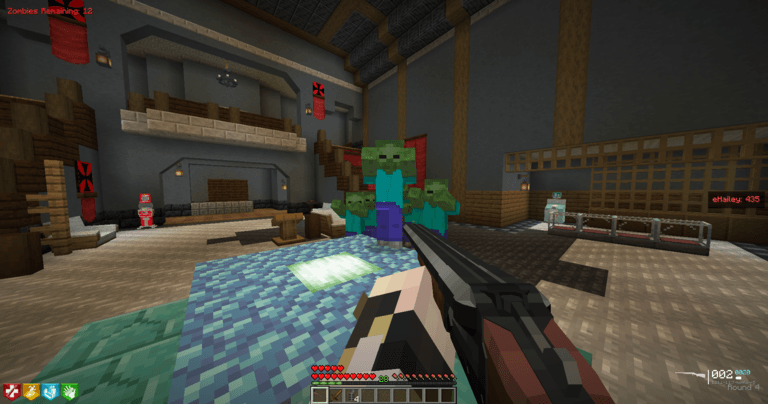
Although the weapons are not required, most of the mod was built around Tacz, and some features may not be compatible with vanilla! Most of the gameplay was tested in our handmade Kino Der Toten reconstruction.
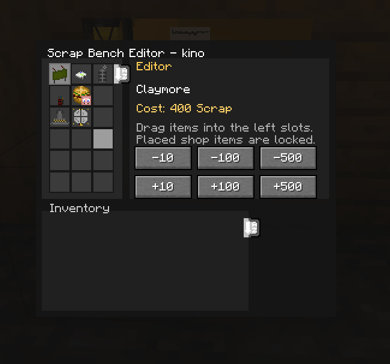
When outside of a game, you are able to fully configure the Scrap Bench, unique to each map.
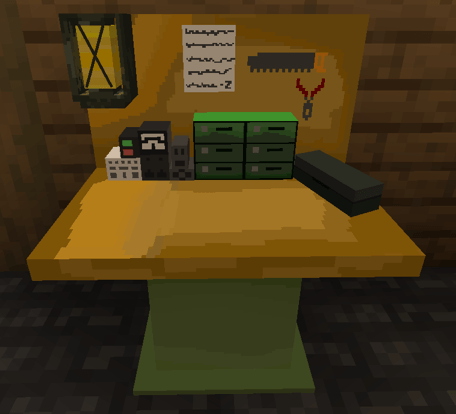
Configurable to purchase items with salvage.
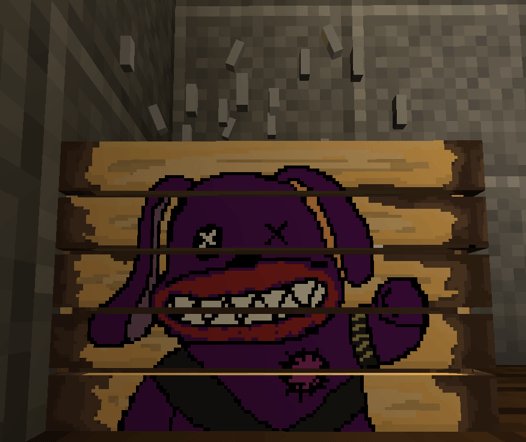
Custom Ammo Crate texture created by Bleachy (Inspired by Black Ops 7)
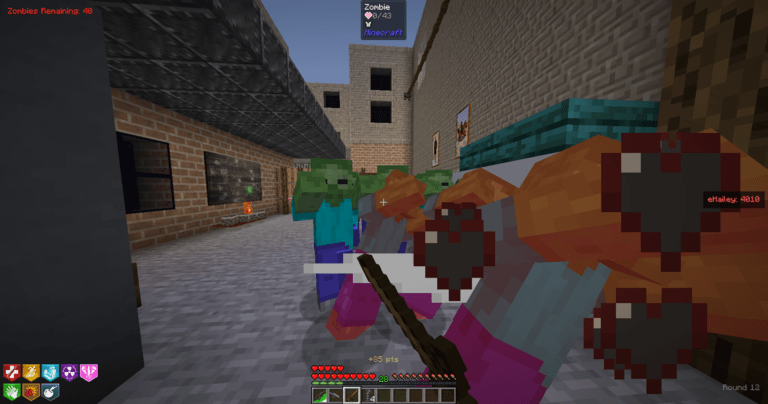
Vanilla Swords are fully compatible with perks such as Melee Macchiato
Description
Zombies Survival
-=- Mod Overview -=-
The Zombies Survival mod allows you to create your own 'Zombies Survival' maps, in which you survive endless waves of Zombies. These zombies grow stronger every round, so you'll need to set up different weapons and abilities you obtain to help combat the undead.
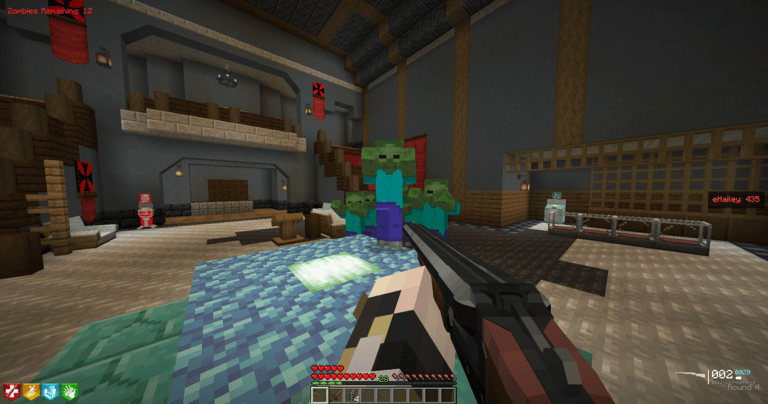
* Important note: This mod was designed to be used alongside TACZ. It is functional without TACZ, but some features may not be fully functional/optimized, however it is entirely playable on vanilla. We just strongly recommend TACZ.
-=- How Does It work? -=-
This mod gives you everything you need to create & play your own Zombies Survival maps. But how does it work?
Firstly, how playing a game works: The game starts on round one, with a simple premise: survive as long as you can. Zombies will start spawning, and killing them all only causes the next round to start, which more zombies that are stronger, faster, and have more health will spawn. Killing these zombies awards you with points, which you can use to buy weapons & other upgrades to make yourself stronger. The game ends when all players go die, but players can be revived when they go down, to save them from dying and losing their gear (They still respawn the next round.). Your goal when playing is to survive as long as you can!
Then, how do you set up a map to BE played? Maps can be as simple or as complex as you'd like. You can make a small building, an entire city, whatever you'd like to survive waves of the undead on. The following categories will go over what the mod provides & how you can use them to create the best maps you can, so please read through all of it!
-=- Features -=-
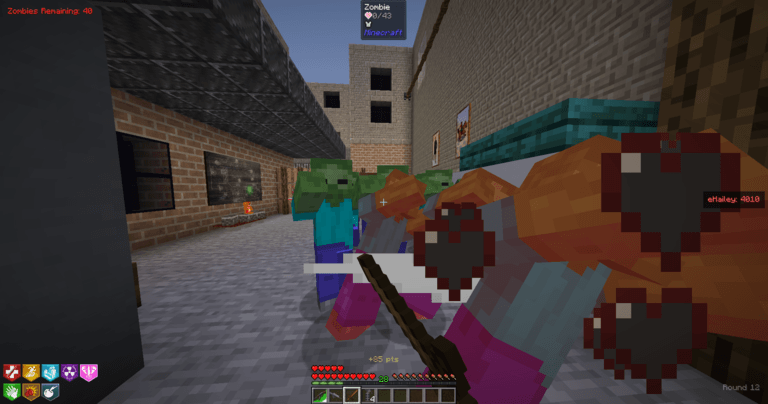
This mod comes equipped with an incredibly in-depth config accessible completely in game with a command, no need to restart to apply any changes. It features a round-based endless onslaught of zombies, a points sytem upon killing zombies, weapons/perks to buy with those points, a Pack-a-Punch system to power your weapons up for the increasing waves of Zombies, an inventory system allowing the player to hold two guns + a melee, and much more!
Wallbuys: Configurable invisible item frames placed on walls. You're able to put any weapon you'd like in these, designate the amount of points buying this weapon should cost, and with our full TACZ integration, you're able to set costs for buying ammo for the gun!
Doors: Configure walls to be doors, bought with points, that you can use to set progression throughout a map, with configurable zombie spawns that activate as you open doors, being able to create different paths throughout your map!
Powerups: Randomly spawning abilities that give you some sort of temporary boost to help you!
Perks: Purchasable upgrades and abilities placed onto your character. Each has a unique effect to benefit you, and with 10 perks on launch, you have plenty of customization at your fingertips.
Mystery Box: Configure a box, that when purchased, spins a roulette to grant the player a random weapon configurated from the list of weapons you put in it, with the ability to set chances of each weapon, and set your own 'Wonder Weapons'!
Pack-a-Punch: A machine that allows you to boost the damage of the weapon you're holding permanently for a set amount of points.
Buildables: Craftable items to aid you, which you may set possible spawn locations for around your maps. Players will have to seek out these parts wherever you make them spawn to collect them, then craft the buildables at benches!
Gobblegum: Obtained from the 'Gobblegum Machine', these activatable gumballs will give you helpful abilities to survive. Whether its spawning Powerups, Pack-a-Punching your guns, making Zombies stop targeting you for a short amount of time, and tens of more powerful and unique effects based on rarities, these will help you gain the upper hand on the endless waves of Zombies.
Salvage: Scrap that falls onto the ground from killed zombies, shown when holding tab in the bottom left. Spend this currency at Scrap Benches, where you can configure equipment to be sold for scrap, such as Monkey Bombs, Gersh Devices, Grenades, Claymores, Bouncing Bettys, etc!
Alternate Ammo Types: Special abilities you can put on your weapon, which all have different effects! Obtained through crouch-right clicking on Pack-a-Punch, and works on any weapon besides Wonder Weapons, including meelees! These AATs include:
Turned: Turns an enemy into a friendly servant, that will assist you in killing zombies!
Fireworks: Causes fireworks to shoot out, killing zombies around it!
Light Mend: Causes balls of light to shoot out, seeking out and healing you and your teammates!
Cryo Freeze: Covers an area with snow, freezing all zombies that enter!
Dead Wire: Spreads lightning across zombies, stunning and damaging them!
Blast Furnace: Spreads burn across zombies, which spreads further by killing burning zombies!
Ammo Boxes: Boxes where you spend points to buy ammo for your weapons. To ensure wallbuys aren't made pointless due to being able to buy ammo for any weapon, guns that are wallbuys have a discounted ammo cost! This feature, as well as the discounted amount, and even ammo boxes themselves are all editable/able to be disabled in config!
Power: Set a power switch on your map, which disabled machines until power is turned on, activating them all! Pack-a-Punch and Perk machines are affected by power, as well as having the ability to make doors opened by turning on power.
-=- Commands, Config, and How to Setup! -=-
Here, the entire process of creating a map with be explained, so please make sure you read through this to fully understand what the mod is capable of, and how to set up your maps to be the best they can be. You can make them as simple or complex as you'd like, using as little or as many features as you wish!
To begin with, stand where you'd like to create the spawn point for your zombies map, and type:
/zombies map create {Name}
Now, when you execute commands to setup your map, you'll need to have the map select to have all changes affect that map. This is important if you have multiple maps, you'll want the right map to be selected to make changes to the correct map. So, run:
/zombies map select {Name}
From here on out, you have lots of freedom to setup as you'd wish. Below has guides of how to setup all features.
Door Buys:
Look at a wall that you'd like to act as a door. It will register all connected blocks that are the same type, which will disappear when purchased in game. These doors will automatically close when the game ends. Then run:
/zombies door create {Door #} {Cost of Door}
/zombies door power {Number} - Creates a door that opens when power activates.
/zombies door cost {Number of door} {Cost of Door} - This command will edit the cost without having to remake the door if you wish to change it.
/zombies door open {Number} & /zombies door close {Number} - These commands will open and close doors. This is useful for getting around the map while still creating it.
/zombies door openall & /zombies door closeall - Same as above, but opens/closes ALL doors.
/zombies door remove {Number} - removes a door.
/zombies door list - lists all doors numbers & cords.
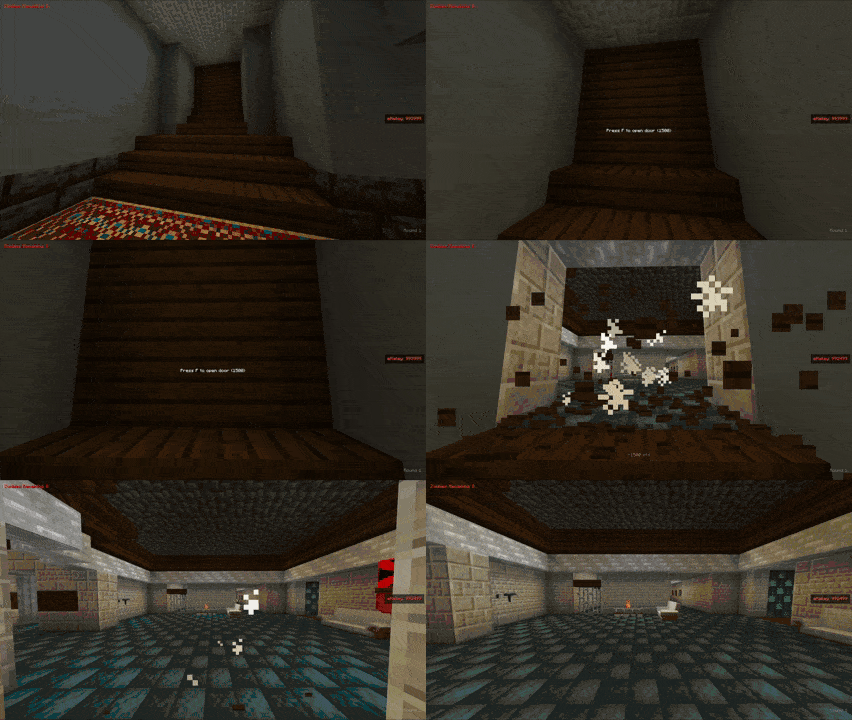
An example of purchasing a door in-game.
Zombie Spawns:
Stand where you'd like for zombies to spawn, and run:
/zombies spawns {door number} {door number}
For example, if you were to put 0 for the door number, it would be a spawn that is always active. (i.e. the spawn room.) If you put:
/zombies spawns 1 - This would cause this spawn to only start working when door number 1 is open. Additionally, if you were to run:
/zombies spawns 1 2 - This would cause the spawn to only become functional when door 1 OR 2 is open. This enables you to create multiple paths throughout the map, with the door to either side of a room causing the spawns in the room to activate.
/zombies spawns menu - This feature allows you to change what mobs are spawning during the rounds. Feel free to add cow rounds, or any other modded mob as well!
(Previously "/zombies zombiespawn")
Wall Buys:
Look at a block, and run:
/zombies wallbuy create - This will create a wallbuy. Now run:
/zombies wallbuy open - This will open an inventory. Place the weapon you wish to have buyable here.
/zombies wallbuy cost {weapon/ammo} {cost of weapon/ammo} - here you can set the costs for the weapon, and if it requires ammo (Guns, Bows) you can set the cost of buying ammo for it as well.
/zombies wallbuy remove - This will remove the wallbuy you are looking at.
Mystery Box:
Place down mystery boxes with the block in creative, where you'd like them to spawn. It functions with its own formula for the teddy bear being rolled, as well as a weight system to configure the rarity of certain weapons. (If you are unaware, a weight system is a way to generate rarities. For example, three items with 10 weight, which is the default for our mod, will pull a random number from 1-30, with each item having 10 numbers each, so each item has a 33.3% chance of being pulled. A higher weight means more likely, lower weight means less likely.)
/zombies mysterybox add {slot number} - This will put the help weapon in your hand to whatever slot number you choose.
/zombies mysterybox remove {slot number} - This will remove a weapon from a certain slot in the mysterybox.
/zombies mysterybox list - Displays all weapons in the box, what slot number they are in, and their weight/odds of being obtained when rolling.
/zombies mysterybox odds {slot number} {weight} - Sets the weight for a specific slot
/zombies mysterybox {cost} - Sets the cost of the mystery box.
/zombies mysterybox spotlist - Displays where box locations are configured to.
Wonder Weapons:
If you plan to add Wonder Weapons (Rare, strong weapons unique to the map, ex. the "Ray Gun" from Zombies, or map specific ones like the Staffs from Origins, etc) you'll need to add them to the list of Wonder Weapons in the map you have selected. Run:
/zombies wonderweapon open - This will open the inventory. Drag the Wonder Weapons here. This is important for certain mechanics, such as the "Wunderbar" Gobblegum which will make your next box spin a guaranteed Wonder Weapon, as well as future mechanics revolving around this command.
Loadouts:
/zombies starterkit - This will open an inventory. Whatever you place in here will be the starting loadout for the selected map.
Wunderfizz:
Place a chest (currently working on a model) and look at it. Then, run:
/zombies wunderfizz set - This will designate the chest as a Wunderfizz machine. This will spawn in at round 15 (The round number is editable in config.) and have all perks available to buy. (Each perks availability is also able to enabled/disabled if you'd rather not have some perks there.)
/zombies wunderfizz remove - Removes the wunderfizz you are looking at.
Music Easter Eggs:
You'll be able to upload music to your server/game and create interactable objects, that when are all activated, will play that song for everyone in a map! (Jukebox/Note Blocks in sound options) The mod includes the meteorite from Kino der Toten, and a Teddy Bear model for examples of what to use but feel free to use items from other mods as well.
/zombies musicparts set - Use this while looking at an object to set it as a music part.
/zombies musicparts list - Shows all music parts locations.
/zombies musicparts remove - Removes a music part.
Non-Command Setup (Perks, Gobblegum, More):
The rest of the mechanics to creating a map are not based around commands, but rather placing physical items. You are free to add as many as you'd like, or as little as you'd like. These features include:
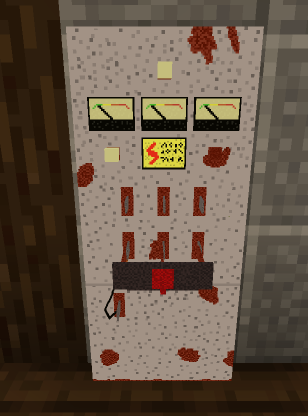
Power:
Placing down the power switch will cause Pack-a-Punch and Perk machines to be unsuable until power is turned on by interacting with the switch, adding a sense of progression.
Perks:
Placing down perk machines will allow the player to buy them for a certain amount of points. You're able to enable/disable a 4 perk limit, as well as enable/disable the modern pricing system of increasing price per perk, or use a configurable flat amount for each perk. Every perk has in-depth config for customization as well! Some perks do not have a finished model yet and can only be obtained if you configure a wunderfizz machine/get a free perk powerup/use a gobblegum.
Jugg - Increases health.
Staminup - Increases speed.
Speed Cola - Increases TACZ guns reload speed + bow shooting speed
Deadshot - Increases headshot damage.
Quick Revive - In multiplayer, Quick Revive will increase your revive speed. In singleplayer, it will self-revive the player when downed, with 3 total uses per game.
Vulture Aid - Causes zombies to drop small ammo pouches, point pouches, green mist that hides the player, and doubles the drop rate of salvage.
Elemental Pop - Random Alternate Ammo Types will now proc at random. This is combined with the AAT on your gun as well.
Blood Wolf Bite - Summons a dog named Luna to kill zombies for you after getting a certain amount of kills.
PHD Flopper - Removes self-damage from explosions, causes an explosion to occur when falling a few blocks.
Melee Macchiato (Currently does not have a model) - Increases melee damage, adds AoE, and reduces melee cooldown.
Electric Cherry (Currently does not have a model) - Causes a stun around you when reloading, increasing the duration for how empty your gun's clip is.
Double Tap - Increases gun shot speed + body damage from projectiles.
Widow's Wine - Turns grenades obtained (2 per round by default) to Widow's Wine grenades, which explode in a large radius and stun zombies when hit. Melee hits also have a chances to stun zombies as well. Killing zombies that are stunned by Widow's Wine has a chance to drop a powerup which grants another charge of Widow's Wine.
Mule Kick - Enables you to purchase a third weapon if the inventory system is enabled (Which it is by default.) If Mule Kick is lost, repurchasing it will grant the weapon you lost.
Wisp Tea (Currently does not have a model) - Summons a Wisp to float on your shoulder and attack your targets after getting a certain number of kills.
Pack-a-Punch & AATs:
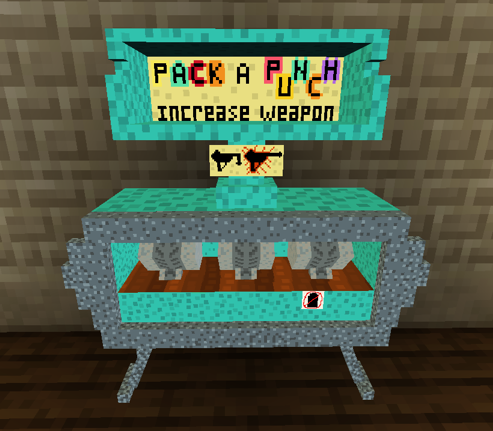
The Pack-a-Punch machine, when placed, allows the player to interact with it to boost their weapon's damage. By default, you can pack a punch a weapon three times, with increasing cost and damage boost each time. You can configure the damage boost on each level of Pack-a-Punch, the costs, or even limit to only one Pack-a-Punch. Shift-right clicking on the PaP will allow you to put a random AAT on your weapon, each with their own effects. The cost and each AATs stats are all configurable as well.
Gobblegum:
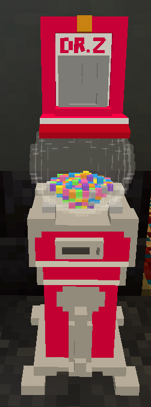
Placing a Gobblegum Machine will allow players to roll it up to three times per round, with increasing price. There's 4 rarities of gobblegum, with the rarities chances, effects of the gums, and cost per use of the machine all configurable in the options, as well as completely disabling certain Gobblegums.
(We made sure that if certain features weren't present in a map, gobblegums correlating to them would be disabled, ex. 'Shields Up', a Gobblegum that buffs the Zombie Shield for a period of time, will not spawn unless the Shield is capable to be crafted and HAS been crafted on a map!)
Buildables:
Placing down the parts for a buildable, as well as a buildables bench, will allow the players to collect the parts and the build its associated item. Currently, there are two available to craft. Parts are shared across all players, and missing/obtained parts are visible in the top right when holding tab. Placing a part in multiple locations will have it choose one of the locations to be in randomly when the game starts, allowing for a different experience each game! Hide them as much as you'd like for players to have to search for them. You can have one part spawn in one of 5 locations, another one in 2 locations, another one in 10 locations, it's up to you!
The Zombie Shield - Collecting all 3 parts of the Zombie Shield will allow the player to craft it at the buildables bench. This will shield the players from hits from behind, but will eventually break, and have to buy a replacement.
The Trample Steam - Collecting all 3 parts of the tramplesteam will allow the player to craft the trample steam, a placable device that will launch the player in the direction it is facing. Only one can be held, and it disappears upon death, meaning the player will have to pick it up again.
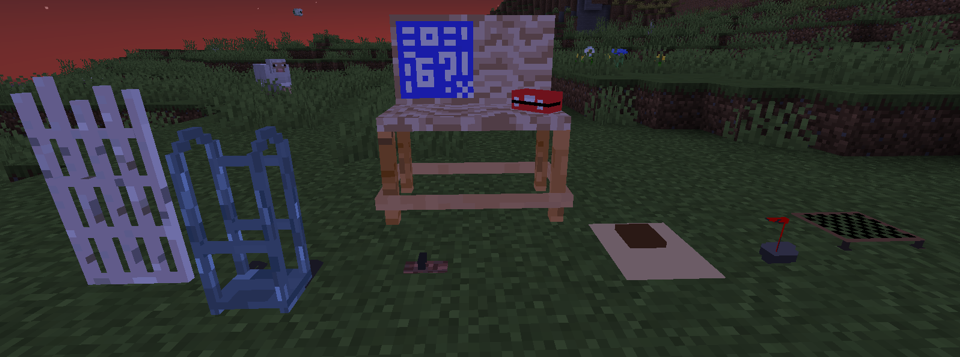
Ammo Crates:
Placing these down will allow players to buy ammo for the weapon they are holding. The cost varies from Non Pack-a-Punched to each level of Pack-a-Punch, and if a weapon is configured to be a Wonder Weapon. This prevents weapon from feeling useless if you're unlucky with max ammos. If a weapon is a wallbuy on the map somewhere, the cost is reduced on the wallbuy itself and ammo box, as to not leave wallbuys pointless with this feature, instead promoting them even more. Every single cost here is configurable.
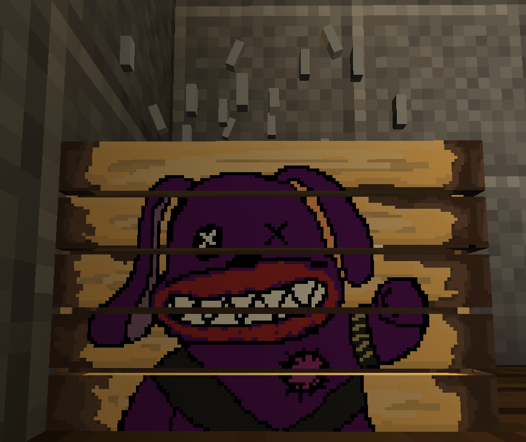
Salvage & Scrap Bench:
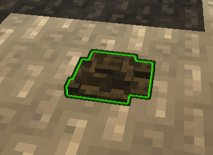
Salvage will automatically drop, with the ability to disable this in config. However, you may instead place a Scrap Bench, allowing players to buy equipment with the scrap.
(Scrap will be placed onto the ground, highlighted by green.)
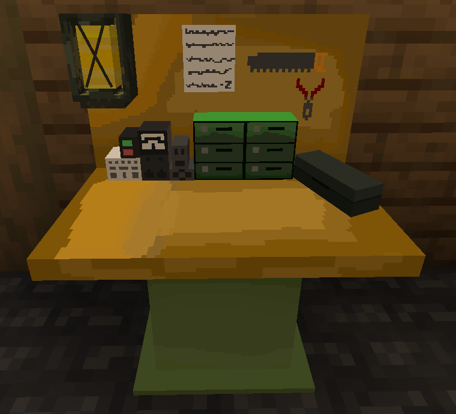
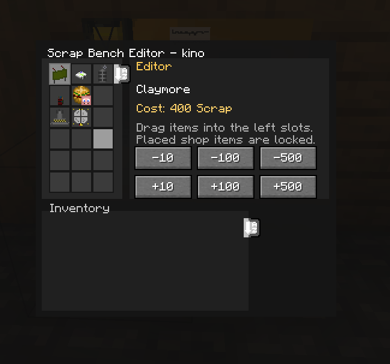
The menu above will show when right-clicking the bench outside of the game. Place equipment from your inventory into the top left, then right click an item you wish to edit the cost of, and use the buttons to set the cost in scrap.
Currently. we have the following equipment:
Claymore - Placeable explosive device that trigger when zombies walk in front of their sensors.
Bouncing Betty - Placeable explosive device that triggers when zombies on top of them.
Gersh Devices - An infinite damage device that sucks zombies into a black hole.
Monkey Bombs - A monkey toy rigged with explosives that distracts zombies before exploding.
Self Revive Kits - These will allow you to revive yourself when downed! By default, you can only craft 3 per game.
Grenades - A throwable explosive that does a large amount of damage. You also gain 2 per round passively.
Stim - Use this equipment to restore missing health.
Semtex - Similar to the grenade, it will stick to zombies before exploding.
Flashbang - A throwable stun that blinds zombies for a short while.
Decoy - A cheaper and more common alternative to the monkey bomb without the explosion at the end.
Damage, carrying capacity, throw speed & more is all changable in config! Remember not to blow yourself up either, unless you have PHD Flopper!
Starting/Stopping a game:
when your map is ready to be played, you may begin by running:
/zombies start {map} - This will start a lobby with a default of a 60 second timer, where the game will then start.
/zombies join - Joins the current lobby of zombies. This does not let you join an in progress game.
/zombies forcestart - Skips the lobby waiting time and instantly starts the game.
/zombies stop - Ends the currently running zombies game.
/zombies leave & /zombies rejoin - leave/rejoin a zombies game you were in.
The Config:
Maybe the most important part of setting a map, mess with the config if you're unhappy with the base settings! We hope that the base config that it comes with is enjoyable, but we can't stress enough how much freedom we wished to give with this options menu. If you're too lazy, just use the base settings. We got you. (Our base config was set with all features included, just as a FYI. Gobblegum, Ammo Crates, Salvage, all of it.)
/zombies options
Most config options are self-explanatory, but here's a basic rundown.
Rounds:
This very likely will need little tweaks, and should be self-explanatory. You can change the spawning function of the zombies here.
Zombies:
Also self-explanatory. Here you can set the multipliers on our Zombie scaling formulas, raising them to make them scale faster, lowering to scale slower, and configure points gained from hitting zombies, killing zombies, headshots/melee kills.
Perks:
There's plenty of config, so feel free to change around what you'd like here, all fairly self-explanatory. Set a perk limit like how some games have, or no perk limit with the increasing price like modern games, whatever you'd like.
Hellhounds:
This changes options for the Hellhound rounds, which spawn Hellhounds that attempt to kill you, granting a max ammo when the round finishes.
Gobblegums:
Set the rarity of each tier of gobblegum, as well as configure each individual one.
AATs:
Config for the AATs. Plenty of config here to mess with as well if you're unhappy with our AATs.
Other:
Set the Pack-a-Punch level cap, the damage increase per level, if players retain weapons when respawning, and more.
Powerups:
Configure the drop weights of each powerup, similar to the mystery box system, as well as the drop rates, and how each drop functions.
Equipment:
You can change the config of all the equipment, as well as enable/disable getting grenades every round. By default you gain 2 per round, with a max of 4. (If you plan on changing this, remember it will affect widow's wine, which converts grenades to Widow's Wine grenades)
Weapons:
Enable or Disable the inventory system (2 weapons and 1 melee limit), set how long the mystery box weapons last before disappearing, and set costs of Ammo Boxes/discounts for Wall Buys.
Enable/Disable:
Enable or Disable specific Powerups, Perks, and Gobblegums.
Sound Options:
You always have the ability to upload sound files into the config folder of the mod, within the soundpacks subfolder. When these names are the same as the sound names, they'll be used as sound effects for that sound cue. For example:
A file named "doublepoints.ogg" in the folder will result in that audio file being played when you pick up a double points. The mod comes with a txt file that also explains this. A recently implemented feature allows client side sounds to play if server side isn't playing any sounds, so feel free to configure your client as well!
/zombies sounds - This lists all sounds and if they have a sound effect file for it currently, of it it doesn't have one.
/zombies sounds refresh - This refreshes the sound files, so you won't have to restart your game/server for changes to take affect.
-=- Important Notes & What's Next -=-
With version 1.0 released, this is only the beginning of what we have planned. We plan on consistently releasing updates with a substantial amount of new features, QoL changes, and content to keep letting you make your perfect zombies map; whether they're custom-made, recreations of iconic maps, we want this mod to be as enjoyable as possible for you. Upcoming features for the next version include, but are not limited to:
- Textures for missing perk models & Wunderfizz.
- Re-doing textures to ensure everything looks the best we can make it. (We're all new to making models, so we're improving as we go!)
- A new perk.
- Multiple new gobblegum.
- Multiple new equipment.
- New buildables.
- Per-map Configs & the ability to copy configs to another map.
- Pack-a-Punch camos for TACZ guns.
- Further down the line, we'd love to also include gamemodes, such as Grief, Turned, Dead Ops Arcade, and possibly more!
- We also plan on eventually creating a TACZ Add-On for our own custom Wonder Weapons!
We also highly recommend joining our Discord server for help with any issues you may encounter, updates for our mods, and access to our zombies server where you may play our maps we've recreated for our own world!
Zombies Game Maker Team