Zero Fighter
- By
※下の方に日本語の説明があります
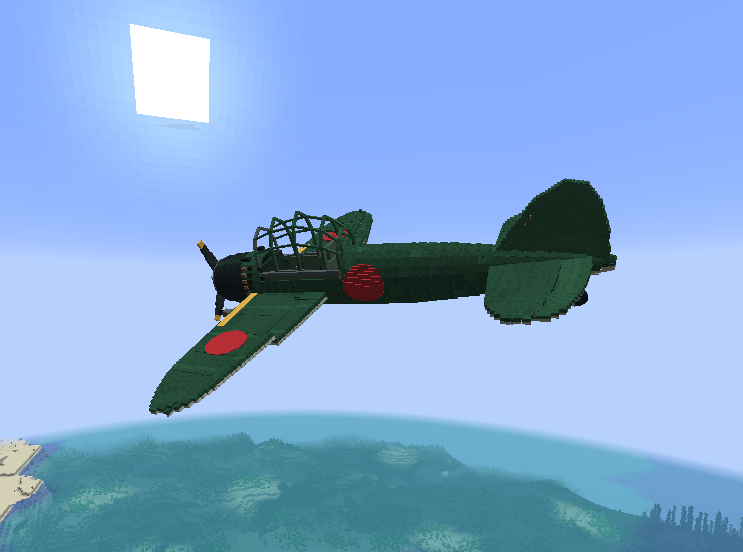
Zero Fighter adds a flyable aircraft inspired by the A6M5 Zero to Minecraft. Experience aerial combat with machine guns and bombs, perform takeoffs and landings, and challenge AI-controlled enemy fighters in single-player worlds.
・Features
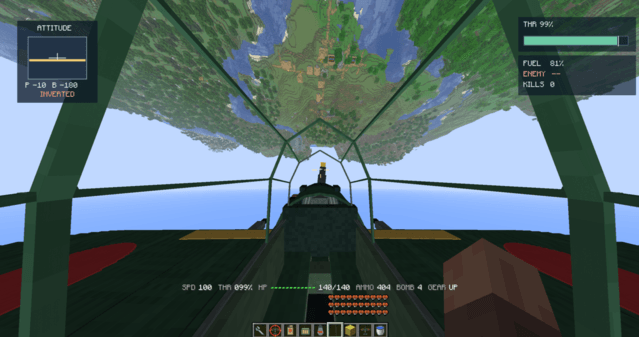
Aerobatic Flight- Use pitch and roll controls to perform loops, barrel rolls, and inverted flight. When you release the controls after a maneuver, the wings gradually level out.
- Detailed 3D Aircraft — A voxel-style A6M5 Zero with an animated propeller, retractable landing gear, automatic flaps, and moving ailerons.
- Aircraft Controls — Fly using your mouse and keyboard, with sharper turns using the A/D keys.
- Aerial Combat — Fire machine guns, drop aerial bombs, and engage in dogfights.
- Enemy Fighters — Practice solo aerial combat against enemy aircraft with the same flight performance as your own.
- Aircraft Damage — Aircraft have HP, damage effects, reduced performance when heavily damaged, and crash explosions.
- Fuel and Ammunition — Refuel, reload, repair, and recover aircraft using dedicated items.
- Water Landings — Safely landed aircraft float on the water and can be recovered.
・Controls
| Action | Default control |
|---|---|
| Adjust throttle (0–110%) | Mouse wheel |
| Fine flight adjustments | Move the mouse |
| Turn left / right | A / D |
| Pitch up / Lift off | W or Space |
| Pitch down | S |
| Roll left / right | Q / E |
| Extend / retract landing gear | G |
| Look around without steering with the mouse | Hold C and move the mouse |
| Zoom | Hold right mouse button |
| Fire machine guns | Left mouse button |
| Drop a bomb | B |
| Exit the aircraft | Shift |
Engine Overheating
Keeping the throttle above 100% causes the engine to heat up. The higher the setting, the faster it heats up. If the engine overheats, engine power drops and the throttle automatically eases down toward 95%. Reduce the throttle to 100% or below to let the engine cool.
Takeoff
Keep the landing gear extended and scroll up to increase throttle. Once you’ve gained enough speed and covered at least 28 blocks on the runway, press W or Space to lift off. After takeoff, press G to retract the landing gear.
・Installation
Requirements:
- Minecraft Java Edition 26.2
- Fabric Loader 0.19.3 or newer
- Fabric API
- GeckoLib (Fabric) 5.5.5 or newer
Install Fabric API and GeckoLib, then place the compiled Zero Fighter JAR file in your Minecraft `mods` folder.
・AI Dogfights
Use the enemy aircraft spawner to summon an AI-controlled fighter for solo combat practice.
The spawner is available in Creative Mode
Enemy aircraft use the same model and flight capabilities as the player's aircraft. Their aiming includes tracking delays and imperfect accuracy.
・Development Status
This mod is currently in early alpha development. Bugs and balancing issues may still exist. Back up important worlds before testing.
・Credits and AI Disclosure
This project was developed with extensive assistance from generative AI, including code, assets, and documentation.
The project icon is not an actual in-game screenshot. Minor visual differences may exist.
Because this mod includes aerial bombs and crash explosions, players should back up important worlds before testing or using the mod in survival.
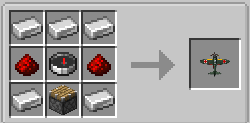
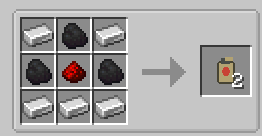
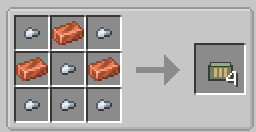
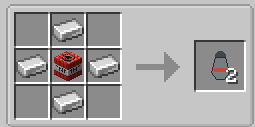
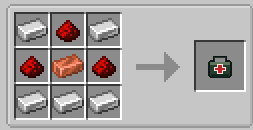
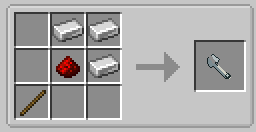
・Crafting Recipes
・日本語の説明
「Zero Fighter」は、零式艦上戦闘機52型をモチーフにした操縦可能な航空機をMinecraftに追加するMODです。機銃や爆弾を駆使した空中戦を体験したり、離着陸を行ったり、シングルプレイヤーワールドでAIが操縦する敵機と戦ったりすることができます。
・主な特徴
- アクロバット飛行 — 機首の上下とロールを組み合わせて、宙返りやバレルロール、背面飛行ができます。操作を離すと、主翼は徐々に水平へ戻ります。
- 精巧な3D航空機 — ボクセルスタイルで再現されたA6M5型零戦。プロペラの回転、格納可能な着陸装置(脚)、自動フラップ、可動式の補助翼がアニメーションで表現されています。
- 操縦システム — マウスとキーボードで操作します。AキーおよびDキーを使用することで、より鋭い旋回が可能です。
- 空中戦 — 機銃掃射や爆弾投下を行い、ドッグファイトを繰り広げることができます。
- 敵機 — プレイヤー機と同等の飛行性能を持つAI操縦の敵機を相手に、ソロでの空中戦の練習が可能です。
- ダメージシステム — 機体にはHPが設定されており、ダメージを受けるとエフェクトが発生します。大きな損傷を負うと飛行性能が低下し、墜落時には爆発が発生します。
- 燃料と弾薬 — 専用のアイテムを使用して、燃料の補給、弾薬の再装填、機体の修理・回収を行うことができます。
- 水上着陸 — 水面に安全に着陸させると機体は水上に浮き、回収することが可能です。
・操作方法
| 操作 | 初期設定 |
|---|---|
| エンジン出力の調整(0〜110%) | マウスホイール |
| 機体の向きを微調整 | マウスを動かす |
| 左右に旋回 | A / D |
| 機首を上げる/離陸 | W または Space |
| 機首を下げる | S |
| 左右にロール | Q / E |
| 着陸脚の出し入れ | G |
| マウスで視点だけを動かす | C を押しながらマウスを動かす |
| ズーム | 右クリック長押し |
| 機銃を撃つ | 左クリック |
| 爆弾を投下 | B |
| 機体から降りる | Shift |
エンジンのオーバーヒート
スロットルを100%より上げたまま飛ぶと、エンジンの温度が上がります。出力が高いほど温度の上昇は早くなります。オーバーヒートするとエンジンの出力が低下し、スロットルが自動で95%に向けて徐々に下がります。温度が上がってきたら、スロットルを100%以下に戻すと冷却できます。
離陸
着陸脚を出した状態で、マウスホイールを上に回して出力を上げます。滑走路を28ブロック以上走り、十分に加速したら W または Space で機首を上げて離陸します。離陸後は G で着陸脚を格納できます。
・導入方法
動作環境:
- Minecraft Java Edition 26.2
- Fabric Loader 0.19.3 以降
- Fabric API
- GeckoLib (Fabric) 5.5.5 以降
Fabric APIおよびGeckoLibを導入した上で、ダウンロードした「Zero Fighter」のJARファイルをMinecraftの「mods」フォルダに配置してください。
・AIとの空中戦
敵機スポナーを使用することで、AIが操縦する戦闘機を出現させ、ソロでの空中戦の練習を行うことができます。スポナーはクリエイティブモードで使用可能です。
敵機は、プレイヤーの機体と同じモデルおよび飛行性能を備えています。敵の照準には追従の遅延や精度の不完全さが含まれています。
・開発状況
本MODは現在、アルファ開発の初期段階にあります。バグやバランス調整上の問題が残っている可能性があります。テストを行う前に、重要なワールドのバックアップを取っておいてください。
・クレジットおよびAIの利用について
本プロジェクトは、コード、アセット、ドキュメントの作成を含め、生成AIの多大な支援を受けて開発されました。
プロジェクトアイコンは、実際のゲーム画面とは細部が異なる場合があります。
このMODには爆弾と墜落爆発があるため、サバイバルや大切なワールドで使う前にバックアップを推奨します。
Zero Fighter Team