


ZAP-Hosting Affiliate System
- By
Welcome to the mod page for the official ZAP-Hosting Affiliate Mod which is tailored for our Official Affiliate Program and Official ZAP-Hosting Partners!
The purpose of this mod is to provide an easy method for modpack creators to integrate their affiliate contributions directly in-game, without the hassle of developing own mods or editing menus to accomplish this. Through this drag-and-drop mod, it makes it easier than ever for our affiliates to earn commissions from their modpacks to directly support them and their community!
What does the mod do?
Our mod implements client-side affiliate features into the in-game menus which is currently composed of:
- Multiplayer Screen - Affiliate Banner at the top of the server list.
- Title Screen - Replacing unused "Realms" button with an Affiliate Button.
- Title Screen - Small Affiliate Banner in one of the corners of the screen.
All of these features can be toggled individually, with various configuration options available ensuring that the final implementation is always up to the creator!
Note for Players: Please keep in mind that the main use for this mod is for our affiliates to bundle it with their modpacks to allow them to easily earn commissions and gain support from players. Therefore, if you stumble upon this mod in a modpack, consider this the choice of the mod creator and not spam. As a player, you are more than welcome to remove the mod manually from a modpack if you wish, since this mod doesn't influence functionality at all and only adjusts built-in client-side menus.
Want to participate in our Affiliate Program or become an Official Partner?
We love and are always excited to work with any new or existing creator and therefore encourage you to participate in our Official Affilite Program or apply as an Official ZAP-Hosting Partner!
Our Affiliate Program is available to everyone, meaning anyone (yes anyone!) can get started quickly by generating links on their ZAP-Hosting Affiliate Dashboard and sharing it with their community. Learn more on our guide here.
Aiming for something bigger? We encourage you to apply to our Official ZAP-Hosting Partner Program which comes with various benefits to support you and your community, including a custom affiliate discount code, higher commissions for sales and a potentially freebies! You can apply on our ZAP-Hosting Partner Page and you can learn more about the program on our guide here.
Installation & Setup
Are you ready to work with us? Awesome! Great news is that the installation and setup for this mod is very simple and only takes a few minutes of your time as a modpack creator. Follow the steps in the graphic and list below to ensure that you prepare the mod for use in your modpack.
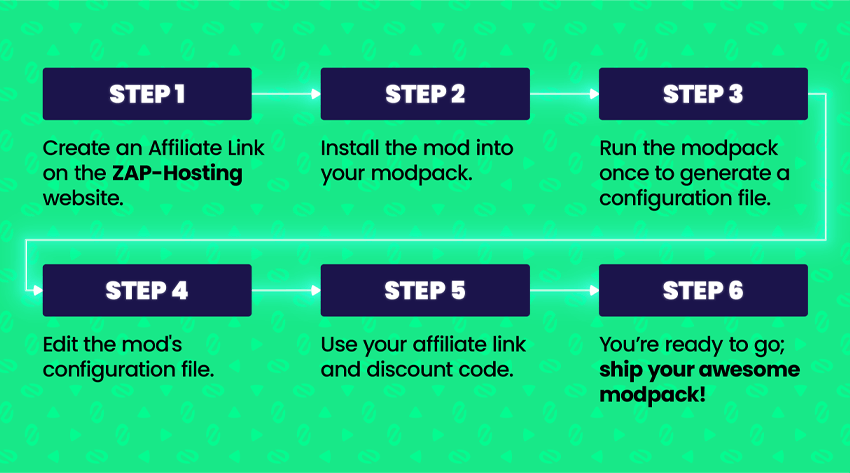
Step 1: Create an Affiliate Link through the ZAP-Hosting Affiliate Dashboard.
Step 2: Install the mod into your modpack. Either drag and drop the .jar directly or add it to your mod manifest.
Step 3: Run your modpack once to generate the configuration file.
Step 4: Access and open the "zapaffiliatemod-common.toml" config file.
Step 5: Configure the mod, adjusting the features and most importantly setting your affiliate link and discount code.
Step 6: Save and you are ready to ship your awesome modpack!
Need assistance? Or have any questions related to the mod or our affiliate/partner programs?
Please don't hesitate to contact us by either creating a ticket on our website or by emailing marketing@zap-hosting.com with your concern. Don't forget to add as much details as possible. We aim to get back to you as soon as possible!
The ZAP-Hosting Affiliate System Team
