Zenith From Terraria
Features
Zenith
Adds Terraria's legendary Zenith sword to Minecraft, bringing its iconic power and style into the world of Minecraft.
Villager
Introduces a custom villager dedicated to the Zenith, giving players another way to interact with the mod's content.
Crafting Station
Adds a custom crafting station designed specifically for crafting the Zenith.
Crafting Animation
Features a custom crafting animation that brings the creation of the Zenith to life.
Achievements
Includes 5 custom achievements that reward players for discovering, crafting, and mastering the Zenith and its abilities.
Enchantments
Adds 4 unique enchantments that enhance the Zenith with special abilities:
- Overgrowth
- Tempo
- Reach
- Starseek
Wiki
Enchantments
Starseek
Adds Summoner Mode to the Zenith, allowing you to control its summoning ability.
Found in: End Cities
Overgrowth
Increases the maximum level of the Zenith's swords. Max Level: II
Found in: Ancient Cities
Reach
Increases the travel distance of the Zenith's swords. Max Level: III
Found in: Trial Chambers
Tempo
Increases the deployment speed of the Zenith's swords.
Found in: Bastions
About the Relic
Crafting Netherite Relic: 4 netherite block, any carpet, 2 any candle
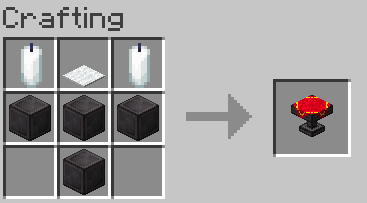
Place all 6 swords into the Relic and use its crafting interface to forge the legendary Zenith.
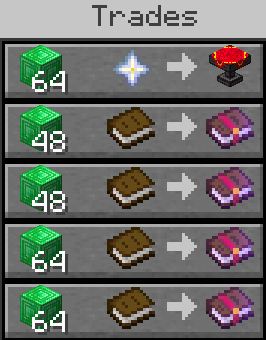
It can also be used as a villager job site block, allowing villagers to take on a profession associated with the Relic.
Trades:
Relic Usage
Placing and Removing Swords
You can place swords into the Relic by Shift + Right-Clicking or Shift + Left-Clicking. You can also remove swords using the same controls, or simply click on a sword to retrieve it.
Crafting the Zenith
To craft the Zenith, click the Relic icon in the center of the crafting interface.
Enchants
Enchanted swords work similarly to the vanilla Minecraft anvil system.
The enchantments available for your Zenith are displayed on the center button. The required XP level is shown at the top of the interface.