


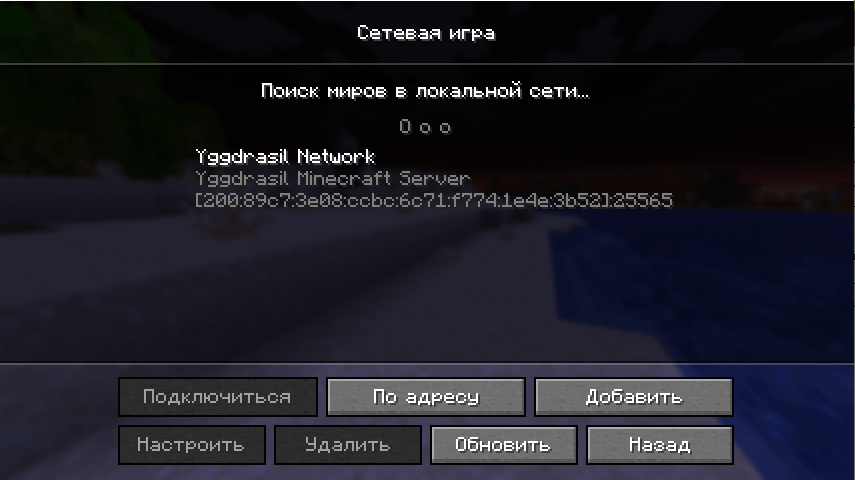
Screenshot_1.png
Description
🌉 Yggdrasil Bridge
Complete integration of Minecraft with the Yggdrasil Network and a fix for IPv6 addresses in local networks.
📜 Description
Yggdrasil Bridge is a client-side mod for Minecraft Fabric that solves two key tasks:
- Fixes incorrect IPv6 address formatting in the game's LAN discovery system, eliminating server duplication and connection errors.
- Provides full integration with the decentralized Yggdrasil Network, allowing you to discover and display game servers running on this network directly in the Minecraft interface.
⚠️ Important: The mod works in tandem with a server-side announcer. For a Yggdrasil server to appear in the list, it must be announced by a dedicated program.
✨ Features
🔧 IPv6 Fix (Works automatically)
- Correct Format: Automatically converts addresses like
fe80::1:25565to the proper[fe80::1]:25565. - Eliminates Duplicates: Prevents the same servers from appearing multiple times in the list due to different address parsing.
🌐 Yggdrasil Network Integration
- Automatic Search: When opening the multiplayer screen, the mod sends queries to known Yggdrasil announcers.
- Custom Names: Replaces the standard "LAN World" label with a customizable network name (e.g., "Yggdrasil Network") for servers in the
200::/3range. - Flexible Configuration: All query and display parameters are configured via a configuration file.
📥 Installation and Usage
1. Prerequisites

Your computer must have:

-Minecraft 1.21.11

-Fabric Loader for this version.

-Fabric API for this version. *(The mod depends on it for stable operation)*

-Yggdrasil Client and a configured Yggdrasil network.


2. Installing the Mod

1.  Download the latest version of yggdrasil-bridge-<version>.jar.

2.  Place the file in your Minecraft client's mods folder (usually %appdata%/.minecraft/mods).

3.  Launch the game.


3. Configuration (Optional)

On the first launch, a file named yggdrasil-servers.json will be created in the .minecraft/config/ folder.


No configuration is needed for basic operation. To change the list of announcers or the network name, edit this file:
{
"announcementServers": [
"200:89c7:3e08:ccbc:6c71:f774:1e4e:3b52"
],
"enabled": true,
"queryIntervalMs": 5000,
"showYggdrasilLabel": true,
"customNetworkName": "Yggdrasil Network"
}
⚙️ For Server Administrators (How to Make a Server Visible)
For your Minecraft server to appear in the Yggdrasil network through this mod, you need to:
1. Install and configure Yggdrasil on the machine running the Minecraft server.
2. Launch an announcer, for example, yggdrasil-announcer-minecraft.
3. Provide the announcer's IPv6 address to players. They will need to add this address to the announcementServers array in their client configuration.
Interaction Architecture:
1. Install and configure Yggdrasil on the machine running the Minecraft server.
2. Launch an announcer, for example, yggdrasil-announcer-minecraft.
3. Provide the announcer's IPv6 address to players. They will need to add this address to the announcementServers array in their client configuration.
Interaction Architecture:
[Yggdrasil Bridge Client] → (sends discovery query) → [Yggdrasil Network / Announcement Server] → (sends back server list) → [Yggdrasil Bridge Client] → (displays) → [Player's Minecraft Server List]Yggdrasil Bridge is a client-only tool and cannot announce servers.
❓ Frequently Asked Questions
Q: My server is not visible on the network. What should I check?
A: Ensure three things:
1. Client: Players have the mod installed, the Yggdrasil client is running, and your announcer's address is added to their yggdrasil-servers.json.
2. Server: The Yggdrasil announcer is launched, configured, and running on the server machine.
3. Network: There are no routing issues in the Yggdrasil network between the client and the announcer.
Q: Is Fabric API definitely required?
A: Yes. The mod uses Fabric API's capabilities for stable work with the network stack and mixins. Without it, the mod may not start.
Q: Will the mod work on the server?
A: No, this is a client-side mod. Its task is to correct the display and request information on the client. A separate announcer is required for the server part.
Q: Are IPv6 addresses in the local network (LAN) also fixed?
A: Yes, the mod corrects the format of any IPv6 addresses discovered through the game's LAN search, regardless of the Yggdrasil network.
A: Ensure three things:
1. Client: Players have the mod installed, the Yggdrasil client is running, and your announcer's address is added to their yggdrasil-servers.json.
2. Server: The Yggdrasil announcer is launched, configured, and running on the server machine.
3. Network: There are no routing issues in the Yggdrasil network between the client and the announcer.
Q: Is Fabric API definitely required?
A: Yes. The mod uses Fabric API's capabilities for stable work with the network stack and mixins. Without it, the mod may not start.
Q: Will the mod work on the server?
A: No, this is a client-side mod. Its task is to correct the display and request information on the client. A separate announcer is required for the server part.
Q: Are IPv6 addresses in the local network (LAN) also fixed?
A: Yes, the mod corrects the format of any IPv6 addresses discovered through the game's LAN search, regardless of the Yggdrasil network.
🔨 Technical Details
Minecraft Version: 1.21.11
Modloader: Fabric
Dependencies: Fabric API
Language: Java 21+
Configuration: .minecraft/config/yggdrasil-servers.json
License: MIT
Modloader: Fabric
Dependencies: Fabric API
Language: Java 21+
Configuration: .minecraft/config/yggdrasil-servers.json
License: MIT
📂 Project Structure and Contribution
The mod's source code, bug reports, and contribution opportunities are available on GitHub: https://github.com/tribetmen/yggdrasil-bridge
Yggdrasil Bridge Team
