


Yardsite
- By
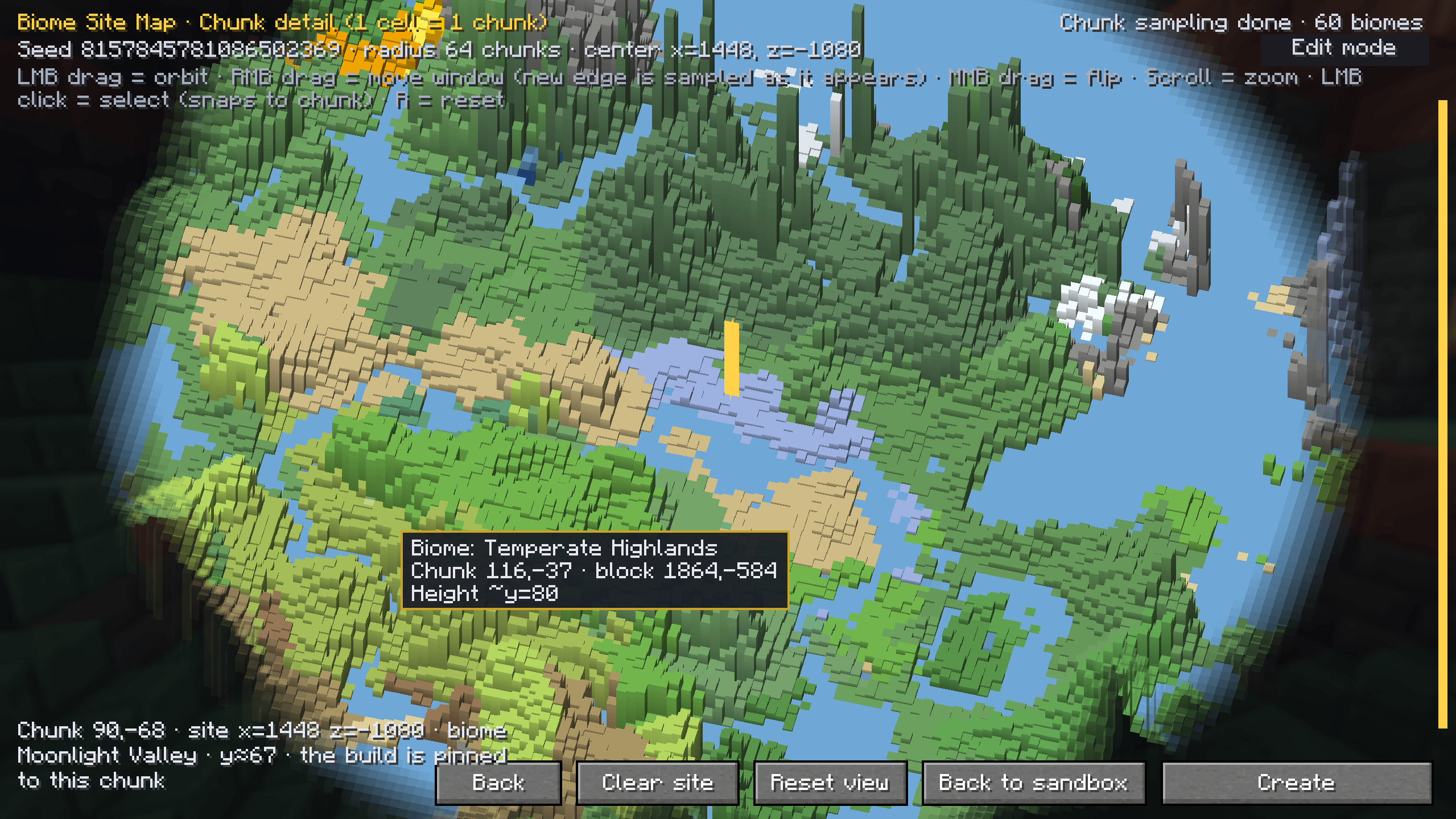
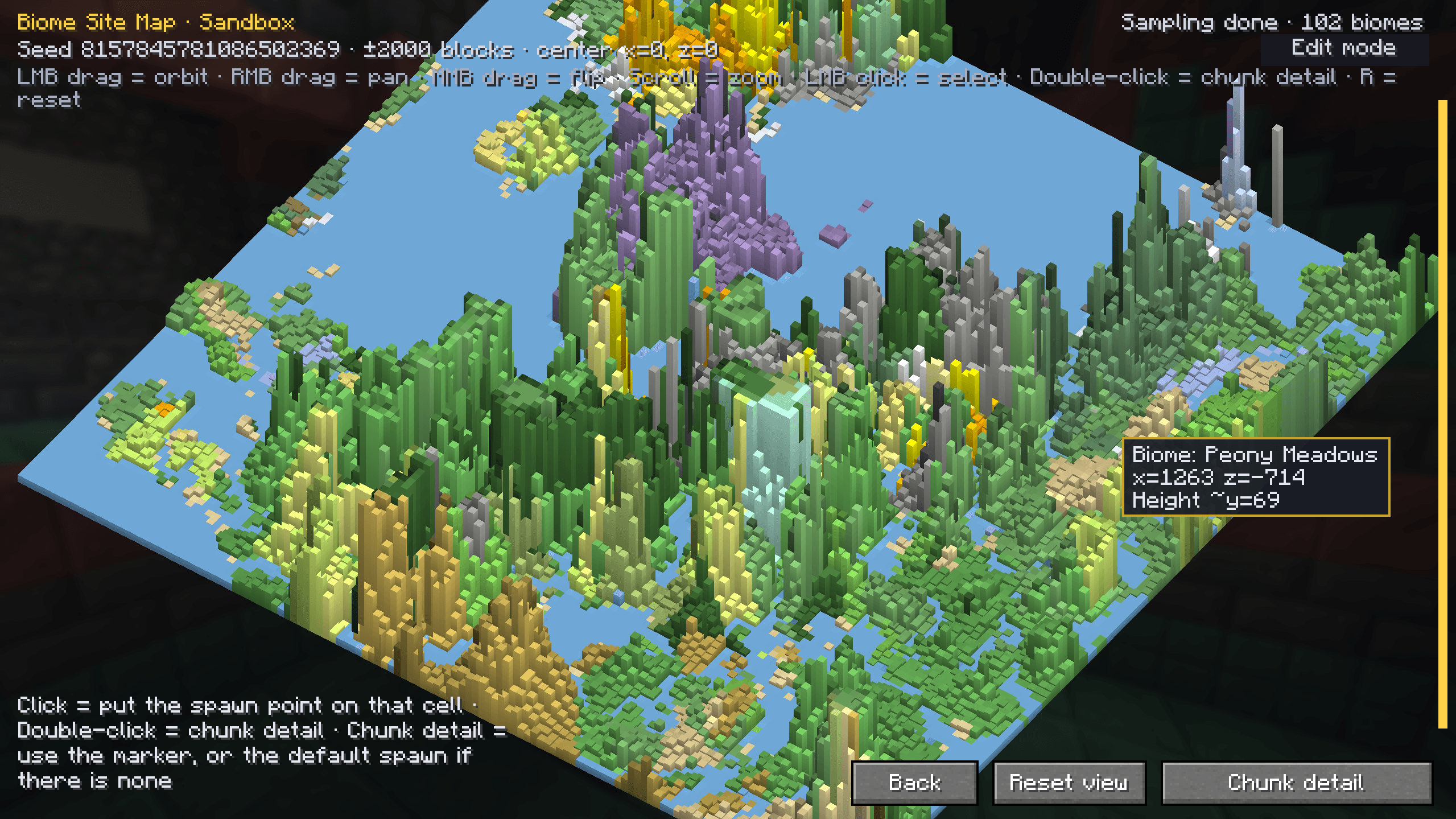
Before the world is created, pick your spawn point on a 3D biome map within a radius of a few hundred chunks.
QQ20261104-234258.png
QQ20261104-234237.png
Description
Yard Site
Yard Site adds a map to the Create New World screen. You pick a spot on it, and the world is generated around that spot instead of wherever the game would have put you.
The map is drawn from the world generator itself: terrain height and biome colours, sampled on the client without loading chunks. You start with the whole region, then zoom in to one cell per chunk and click the cell you want. Pressing Create World plays a short camera move instead of the usual loading bar: the map tilts away, circles the area while the nearby chunks arrive, then dissolves as the camera drops to your spawn point.
Using it
- Go to Create New World as usual. The map opens before the world does.
- Click a cell to place the marker, or double-click to open chunk view first. In chunk view one cell is one whole chunk, and that chunk is what actually decides the spawn.
- Press Confirm and Create.
Changing the seed redraws the map. Going back without picking anything creates the world the normal way.
With and without the Yard mods
On its own, the picked cell becomes your spawn point. Once the spawn chunks are generated, the Y value is checked against the real heightmap, so a tree or a snow layer at that spot will not leave you standing inside it.
With a Yard-series mod installed (yardcore and the rest), the same cell becomes a yard plot. The
Yard mod plans the building origin around it and puts the spawn inside the yard, and the camera move
draws the building as a wireframe on the way down.
Neither side requires the other. Install one, the other, or both.
Biome mods
Biomes are read from the same biome source the world uses, and TerraBlender is handled explicitly. Mods that register their biomes through TerraBlender, such as Terralith, show up on the map correctly. Other biome mods have not been tested one by one; most should work for the same reason. A mod that adds biomes after world generation has run may still show the base biome on the map.
Requirements
- Minecraft 1.21.1, NeoForge 21.1.x, Java 21
- No required dependencies
- Sodium is optional. With it, real terrain stays hidden until each chunk column is actually being drawn, so it cannot show through the map. Without it everything still works, the hand-off is just a little rougher.
- A Yard-series mod is optional and only adds the plot mode
Config
config/yardsite-common.toml:
| Key | Default | What it does |
|---|---|---|
site.spawnSiteSelect |
true |
show the map at all; false keeps vanilla spawn behaviour |
site.selectRadius |
2000 |
map size, ±N blocks around the spawn area |
site.sampleThreads |
0 |
sampling threads; 0 means half the CPU cores |
site.spawnChunkRadius |
3 |
spawn chunk radius kept loaded after you enter |
site.earlyEntry |
false |
log in early and keep generating chunks afterwards |
site.revealAnim |
true |
the camera move; false keeps the vanilla loading screen |
Biome colours changed in the in-game editor are saved to config/yardsite/site_biome_colors.json.
Worth knowing
- Only for single-player and LAN world creation. Dedicated servers do not have this screen.
- While the camera move plays, this mod takes over the world-creation loading screen. If another mod
does the same, the two may get in each other's way; set
site.revealAnim = falseto compare. - The map uses the mod's own renderer. No assets from the base game or from other mods are included.
Building
./gradlew build                  # jar in build/libs/yardsite-<version>.jar
./gradlew runClient              # dev client
Sodium is only needed at compile time for the optional culling hooks. Drop
sodium-neoforge-0.8.13+mc1.21.1-mod.jar into libs/ before building to include them; without it
the build skips those classes and the mod still runs.
Credits
Design, decisions and testing: CYun_CYER. Part of the code was written with AI assistants (DeepSeek, Qwen) and then reviewed, tested and edited by hand; the mod's behaviour is not generated at runtime.
License
MIT, see LICENSE. Use it, change it, ship it, sell it, as long as the copyright notice stays.
Author: CYun_CYER (Modrinth: CYun2024)
Yardsite Team


