Xaero Map Regions
- By
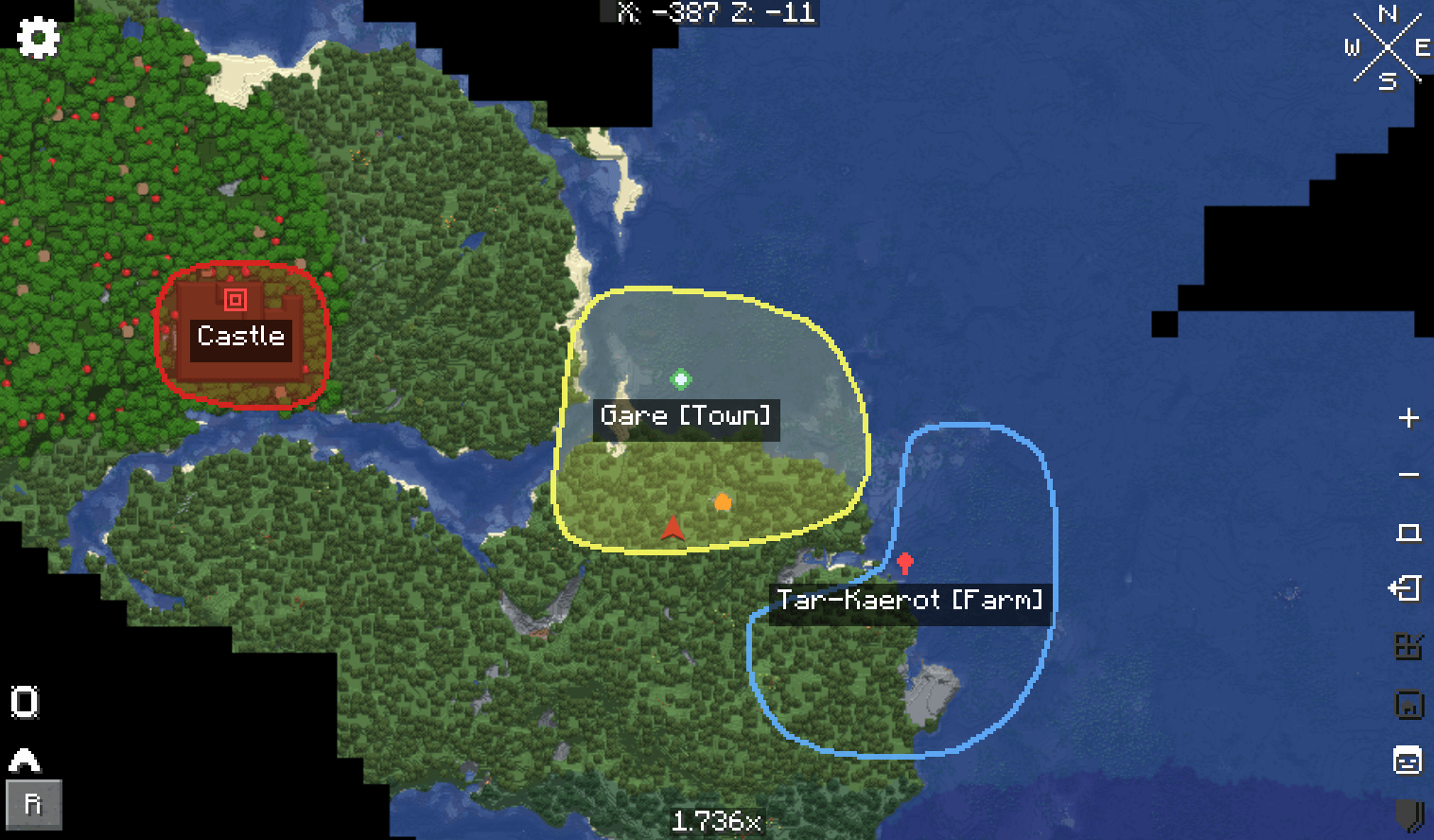
If you've been missing the ability to create regions - complete with names, boundaries, and icons - in your builds or servers, this mod is just what you need
изобÑажение_2026-05-17_115140233.png
Description
✦ Usage
Install Xaero Regions and Kotlin for Forge on the dedicated server and on every client that should
see or manage regions. Xaero's World Map is required on clients. Players without the client mod do
not see the map overlay.
see or manage regions. Xaero's World Map is required on clients. Players without the client mod do
not see the map overlay.
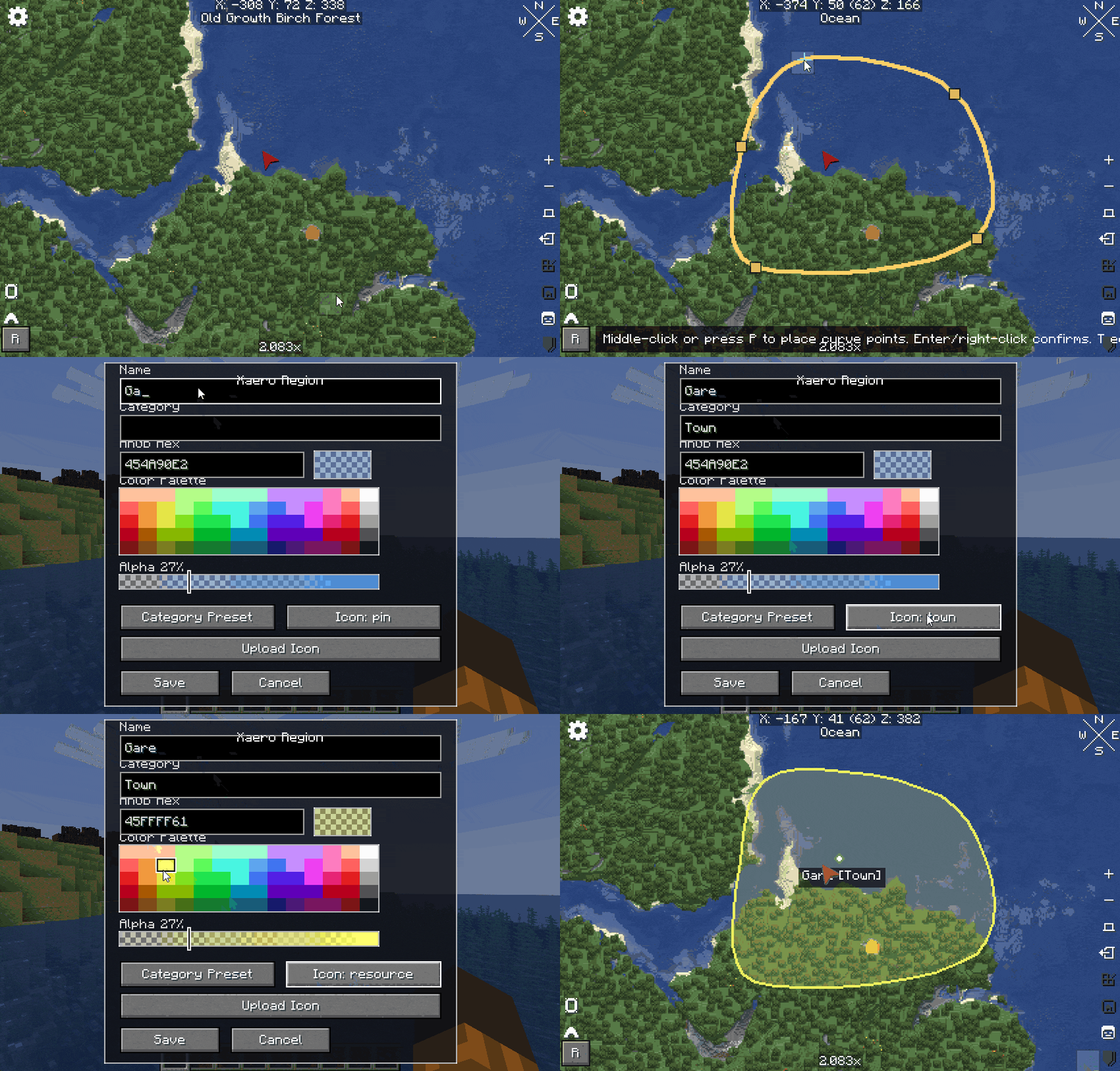
Open Xaero's World Map and use the region controls:
- R opens the region drawing workflow on Xaero's map screen when the player is an operator in creative mode.
- P or middle mouse click adds a polygon point.
- Right mouse click or Enter finishes the polygon and opens the region editor.
- Backspace or Delete removes the last point while drawing.
- E edits the manageable region under the cursor.
- T edits the manageable region under the cursor, or opens the region manager when no region is
under the cursor. - Shift + R opens the region manager directly.
Display preferences are stored locally in `config/xaeroregions-client.properties`. Available
options include region names, icons, overlap decluttering, minimum on-screen marker size, and the
maximum render distance. The default render distance is 8192 blocks; use `0` for unlimited.
✦ Server permissions
Server permissions are configured in `config/xaeroregions-server.properties`:
operatorPermissionLevel=2allowNonOperatorRegionCreation=false
With the default value (false), only operators can create, edit, delete regions, or upload custom
icons. Operators may do this in Survival or Creative mode.
When allowNonOperatorRegionCreation=true, every player may create regions and upload new icons.
Non-operators may edit or delete only regions they created; operators may manage every region. The
server assigns and preserves the owner UUID, so ownership cannot be forged by a modified client.
Administrative /region commands remain operator-only regardless of this setting. Creative mode
is not required.
Hide a region for one player
/region hide <player> <region>
Show a hidden region again
/region visible <player> <region>
Create a point marker
/region createpoint <player> <mode> <iconname> <label> <x> <y> <z>
Arguments:
- <player>: target player who will see the marker.
- <mode>: marker lifetime mode.
- <iconname>: predefined pixel icon. The command suggests available icon names while typing.
- <label>: text shown under the marker. Use quotes for labels with spaces.
- <x> <y> <z>: block coordinates for the marker.
Modes:
- waitenter: the marker disappears for the target player when they enter the marker's chunk.
- waitcommand: the marker stays until it is removed with `/region delpoint`.
Delete a point marker
/region delpoint <player> <x> <y> <z>
✦ What It Does
- Draws freeform polygon regions directly on Xaero's World Map.
- Supports names, ARGB colors, opacity, categories, predefined pixel icons, and custom PNG icons.
- Stores regions on the server with `SavedData` and synchronizes them to connected clients.
- Enforces creation and ownership permissions again on the server for every mutation packet.
- Respects each player's Xaero explored-map data and fades newly revealed portions in over about
1.5 seconds. - Renders fixed-size labels that no longer grow with map zoom, automatically suppresses tiny or
overlapping labels, and provides a per-player name toggle. - Keeps colored fills and visible outlines when labels are hidden.
- Optimizes large maps with visible-window culling, configurable render distance, zoom-dependent
fog-of-war LOD, cached Xaero reflection lookups, cached polygon triangulation, scanline chunk
coverage, merged visible chunk rectangles, and batched GPU fills. - Shows a title when the player enters a region. Traveler's Titles is supported only through
reflection; when absent, the built-in title overlay is used.
✦ Dependencies
Use these dependencies when publishing and when building a server pack.
NeoForge | 21.1.220 or newer.
Kotlin for Forge | Tested ver: 5.12.0 - required on server and client.
Xaero's World Map | 1.44.2 or newer - required on clients.
XaeroLib | Tested ver: 1.1.15
Traveler's Titles | Optional -> Tested by reflection only | If absent, Xaero Regions uses its built-in title overlay.
Do not redistribute `xaeroworldmap-neoforge-1.21.1-1.44.2.jar` inside the Xaero Regions jar or the
repository release artifact. Xaero's World Map is an external dependency with its own license.
repository release artifact. Xaero's World Map is an external dependency with its own license.
Xaero Map Regions Team